How to make a 50/30/20 budget template.

The 50/30/20 budget rule is a handy framework for managing your money. Find out how it can help you build better money habits and grow your savings with a customisable 50/30/20 budget template from Adobe Acrobat.
What you’ll learn:
- What is a 50/30/20 budget?
- How to make and use a 50/30/20 budget spreadsheet
- 50/30/20 budget template example
- Frequently asked questions
- Other budgeting resources.
What is a 50/30/20 budget?
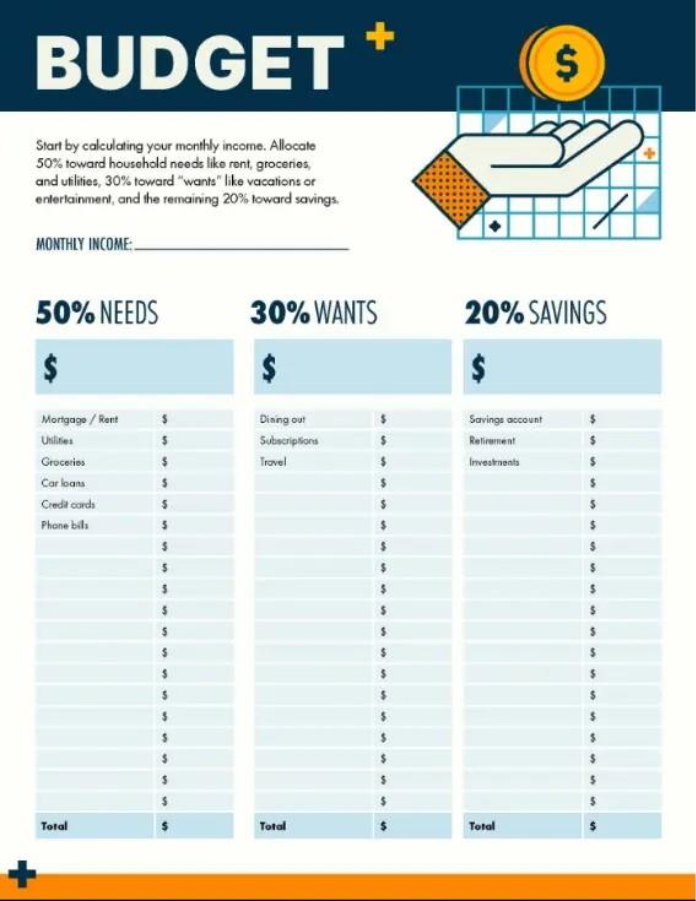
A 50/30/20 budget is a handy budgeting rule that splits your monthly income into three separate pots – needs, wants and savings. Each one is tied to a percentage to help you allocate your money.
Needs: 50%
Half of your budget should cover the essentials. This includes things like your mortgage, rent payments, food, utilities, transportation, and other non-negotiable expenses that keep your household running.
Wants: 30%
About 30% of your income should go towards any non-essential expenses that make life all the more enjoyable. Think hobbies, dining out, travel, shopping and entertainment, for example. These are classed as your wants.
Savings: 20%
The final category in the 50/30/20 budget rule is savings, which makes up 20% of your total income. This portion is essential for building long-term financial stability.
You can use this money to build up your rainy-day or emergency fund, helping you stay prepared for unexpected expenses. You could also pay down outstanding debts to reduce financial pressure or invest in opportunities that strengthen your portfolio and secure your financial future.
How to make and use a 50/30/20 budget.
The best way to build a sustainable household budget is to start with a structured plan. That’s where your 50/30/20 budget template comes in. Follow these five simple steps to make your own:
Step 1: Choose your budget template.
You can start with a free downloadable PDF budget template that comes with pre-labelled sections.
If you prefer extra flexibility, you can create your own 50/30/20 budget spreadsheet in Excel or Google Sheets, so that you can customise categories to match your household priorities. Once you’re happy with the sheet set-up, you can always convert to a printable PDF at a later date.
Step 2: Outline the three categories.
Set up and fill out the three main columns in your template: Needs (50%), Wants (30%), and Savings (20%). Add your typical expenses under each category, including rent, food, utilities, entertainment, and other additional expenses and saving pots.
Step 3: Track your spending regularly.
You should try to update your budget at least weekly with actual expenses. Compare them to your budgeted amounts to determine if you’re on track. You can also flag any overspending and adjust your budget quickly.
Step 4: Review and adjust monthly.
At the end of each month, check how closely you stuck to the 50/30/20 rule. If one category consistently goes over, you might want to rebalance your template.
Keep refining until your budget matches your lifestyle and financial goals.
Step 5: Stay accountable.
If you’re using a budgeting PDF, you can convert it to Excel for editing.
Better yet, share your budget with your family to get everyone on board. You can also teach your kids how to manage money with a simple 50/30/20 budget template – a valuable skill for the future.
50/30/20 budget template example.
Looking for inspiration to set up your own 50/30/20 budget template? Below are practical examples that show you how to divide income into needs, wants, and savings.
You can use these templates as a guide to build a system that can help you budget with confidence.
Frequently asked questions.
What is one disadvantage of 50/30/20 budgeting?
One potential limitation of the 50/30/20 budgeting method is that its fixed allocations (50% needs, 30% wants, and 20% savings) may not fit every financial situation. For example, those with higher housing or childcare costs, or individuals aiming for larger savings targets, might find the template less practical for their unique circumstances.
In this instance, you might want to try a different budgeting template.
How do you create a 50/30/20 budget in Excel?
To create a 50/30/20 budget in Excel, set up a sheet with categories for income, needs, wants, and savings in separate columns or rows. Then use formulas to calculate 50% for needs, 30% for wants, and 20% for savings from your total income.
Is a 50/30/20 split good?
That depends on your budget. If your needs take up more than 50% of your income, or your wants exceed 30%, it could be a signal to cut back on spending. You could redirect the extra funds towards essentials like building an emergency fund or saving for retirement.
But it all comes down to your personal preferences and individual finances.
Other budgeting resources.
Budgeting isn’t always a walk in the park, but it’s definitely essential for a healthy financial future. Discover more resources to help you stay abreast of your finances.
- Compare different types of budgeting templates.
- Get tips for home renovation budgets.
- Set your saving goals with a SMART goals template.
No matter what type of budget you choose to use, discover how Adobe Acrobat can help you create, manage, and organise your PDF documents online.
Keep exploring
Content as a Service v2 - acrobat-hub - Tuesday, October 24, 2023 at 10:18