ACROBAT
How to budget with free monthly budget planning templates.
Simplify your monthly budget planning with our helpful guide and free budgeting planner template.
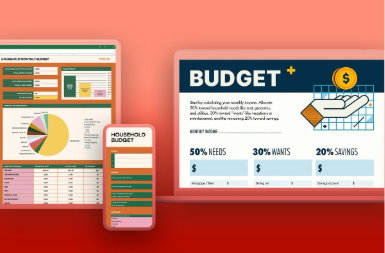
Want to take control of your finances? Creating a monthly budget can help—and it’s easier than you might think.
This guide breaks down the essentials and shares tips on how to build a budget that works for you. Plus, you’ll find free budget planning templates to get you started. We’ll cover different budget types and how to tailor them to your household.
Ready? Let’s start with the basics.
What is a budgeting planning template?
A budgeting planning template is a ready-made framework designed to help you organise and manage your finances systematically. It provides a clear structure with categories to track your income, expenses, savings, and investments. Think of it as a roadmap that guides your financial planning.
But it’s more than just a simple spreadsheet, a well-designed monthly budget planner offers several features such as:
- Income tracking: Tracks income (for example, salary) and outgoing costs (for example, bills).
- Expense categorisation: Organises your spending into clear groups, like mortgage/rent, or transport, for example.
- Savings and Investments: Sets targets for savings and investments, tracking your progress to achieving goals related to them, for example.
- Automation: Automates calculations, so you don’t have to do it manually. This reduces the risk of mistakes.
- Visualisation: Graphs and charts give you a visual representation of data, allowing you to draw conclusions easier.
Why do you need a budget template?
A budgeting template can help give you control of your finances. Get peace of mind with some of the benefits that come with using a budgeting planner:
- Simplified budgeting. One of the biggest benefits of using a budget template is that it makes budgeting much easier—especially if you find the process overwhelming or time-consuming. A free template saves you from building a system from the ground up. Instead, you can start with a ready-made structure and tailor it to fit your individual needs.
- Organised income tracking. A template helps you track all your income sources—whether it’s a salary, freelance projects, or passive income like side hustles—and sort your expenses into categories such as housing, transport, groceries, and entertainment. By laying out your income and spending clearly, you get a better understanding of your financial habits and can make smarter choices about how to manage your money.
- Prioritized financial responsibility. A budget template promotes financial discipline and accountability. It keeps your goals—like saving for a house deposit, paying off debt, or preparing for retirement—front of mind. With a clear, structured system in place, you can prioritise your spending, make necessary adjustments, and ensure your money is being used to support your long-term objectives.
What are the three types of personal budget templates?
There are a few types of monthly budget planning templates available to help you streamline your financial management process for your household or business. In this section, we’ll explore three key types of templates:
- The 50/30/20 budget template,
- A monthly family household budget
- A simple budget template.
Each template is designed to suit different needs and preferences, offering a clear framework for tracking and managing your income and expenses. Whether you're aiming for a balanced spending plan, handling household finances, or looking for a straightforward budgeting method, these templates provide a flexible starting point you can easily tailor to your lifestyle.
1) 50/30/20 budget template.
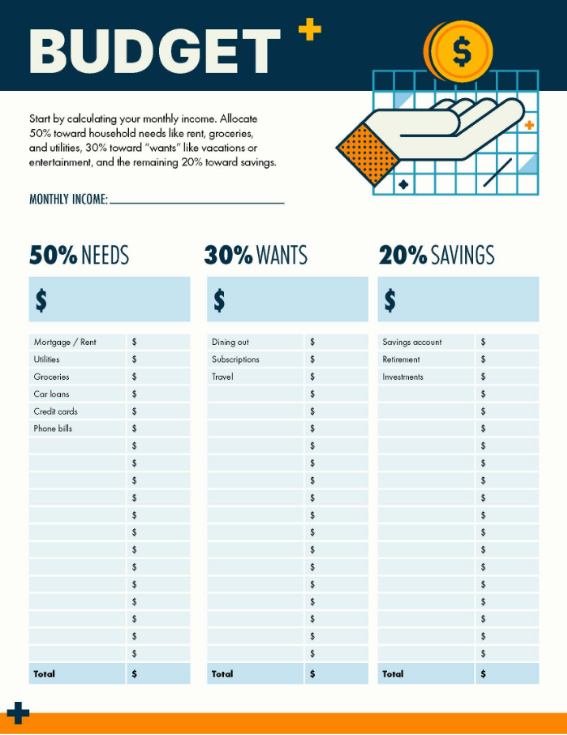
This popular method allocates your income budgeting sheet into three distinct categories:
- 50% needs: Covers essential expenses such as mortgage or rent, bills, food shopping, transportation, crucial expenses.
- 30% wants: Discretionary spending, for example, eating out or hobbies.
- 20% savings: Investment into your financial future, such as savings accounts and stocks and shares ISA.
Overall, it provides a clear direction for balancing immediate needs, optional spending, and building a strong financial foundation.
Want to know how you can start your own? Here’s a free, fully customisable budget for the 50/30/20 style:
2) Monthly family budget template.
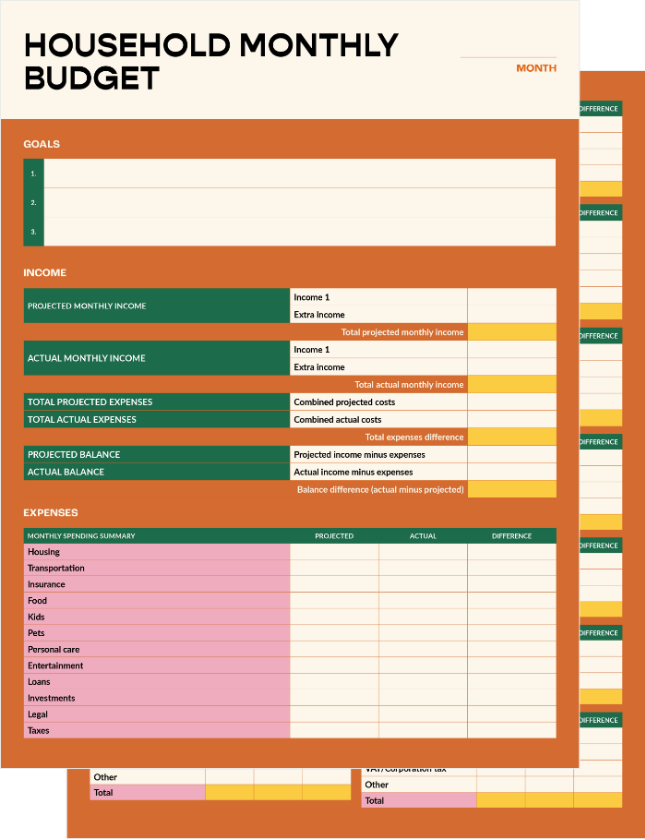
A monthly family budgeting template simplifies complex family finances by tracking household expenses and multiple income sources. This ensures everyone's needs are met. Some key considerations are:
- Childcare
- Education
- Healthcare
- Extracurricular activities
- Household maintenance
Benefits :
- Allocates funds for each family member's needs
- Tracks shared expenses
- Plans for family goals (holidays, saving for the children’s future university costs)
- Provides a comprehensive overview of family financial health
- Enables effective communication and collaboration.
Want to set your monthly household budget in order? Download the monthly budget template PDF below and tailor it to your personal needs.
3) Free simple budget template.
If you prefer a minimalist approach or are just beginning with budgeting, a simple template is a great starting point. It covers the core elements of budgeting, offering a clear and easy-to-follow layout to track income and expenses. Common sections include income sources, fixed expenses (like rent or utility bills), variable expenses (such as groceries or transport), savings, and debt repayments.
A basic monthly budget template helps you build a strong budgeting foundation without overwhelming you with too many details. It gives a clear view of your cash flow, helping you spot areas for improvement and adjust accordingly. For more detailed tracking, consider breaking your budget down into weekly intervals.
Here is a free budget template that's simple and easy to follow:
How to create a monthly budget planner
You can personalise a budget template to your exact monetary needs. Tailor the template so it matches your income, expenses, and savings. Follow these steps when customising your free budget template:
- Choose a budget template that matches your needs.
Select a budget template that matches your budgeting objectives and the level of detail you need. Prioritise compatible templates with common formats like Excel or PDF.
Consider exploring budgeting software or mobile apps that can automatically synchronise with your bank accounts and credit cards for easy expense tracking. Then, categorising transactions and getting insights is simple.
- Review and modify income sources.
Identify all sources of income and modify your template to include these sources, such as:
- Salaries
- Freelance earnings
- Side hustles
- Investments
- Rental income.
Make smooth adjustments with PDF editor or PDF converter tools from Adobe Acrobat online services.
- Customise expense categories.
Assess your spending habits by determining the expense categories, then identify the most relevant ones. Examples include:
- Housing
- Bills
- Transportation
- Food shopping
- Entertainment
- Debt payments
- Savings.
Add, remove, or modify categories within the budgeting planner template to accurately reflect your specific expenses.
- Set realistic budget limits.
Consider your income, financial aspirations, and spending patterns when setting budget limits for each category. Ensure that your budget is both realistic and aligned with your overall financial circumstances. - Track and monitor your expenses.
Utilise the template to track your monthly expenses. Consistently input your expenditures into the correct categories and define your financial goals – both short and long-term, such as:
- A holiday
- Paying off debt
- Emergency fund
Integrate these goals into your budget by allocating specific amounts toward each objective.
- Analyse and adjust as needed.
Continuously review your spending patterns to:
- Identify areas where you can reduce spending or reallocate funds.
- Prioritise savings.
- Allocate a portion of your income toward savings before allocating funds to other expense categories.
This helps you build a financial safety net and progress toward your long-term financial goals.
- Use built-in formulas or calculations.
Many free budget templates include built-in formulas or calculations that automatically summarise your income and expenses, as well as calculate savings. You can also access visual representations of your budget and gain valuable insights into your financial health.
Following these steps down to a tee and using Acrobat online service, you can make your budgeting calculator your own. And it’s fuss-free and easy to do – no previous experience necessary. Adobe tools make it easy for everyone to edit, convert, and arrange a budgeting planner.
Frequently asked questions.
How do you create a monthly budget?
What are the three things that should be included in a monthly budget?
How do you write a simple budget?
How do I make my own budget planner?
Does Google have a budget template?