#1E1E1E

How to Email a Cover Letter and CV.

When applying for a job, sending your CV and a cover letter by email is a good way to make a great first impression. It’s one of the most efficient ways to apply for a vacancy, showcasing why you’re an ideal candidate for the role.

Learn more about how to email a cover letter and CV and get your dream job with our guide below.
Why You Should Email a CV and Cover Letter.

A cover letter is an important document used to show prospective employers that you’re a great fit for the role. They detail your relevant experience and demonstrate that you have the right mindset for the company.

Once recruiters and HR teams receive your CV and cover letter, they’ll often make a quick decision on whether to take your application further. A good cover letter should be tailored to each job you apply for. Hiring managers can usually tell when they’re reading a generic cover letter, so make sure to format and personalise each one to the role and the company in question. Your application should include your transferrable skills and achievements while letting your personality shine through.

How to Send a CV and Cover Letter by Email.

When sending your application, you’ll have a few options. That said:

  • Most hiring managers prefer PDF documents as they are accessible on any device with consistent formatting.
  • If you have completed your application in other format, such as Word or Google Docs, you can convert it to PDF using the Adobe Acrobat conversion tool.
  • Once you convert and save your file, you can go ahead and attach it to your email.
  • Before you write anything in the body of the email, we advise attaching everything you need first, so you don’t forget.
  • You can also password protect your cover letter file before sending to make sure your personal details are secure.

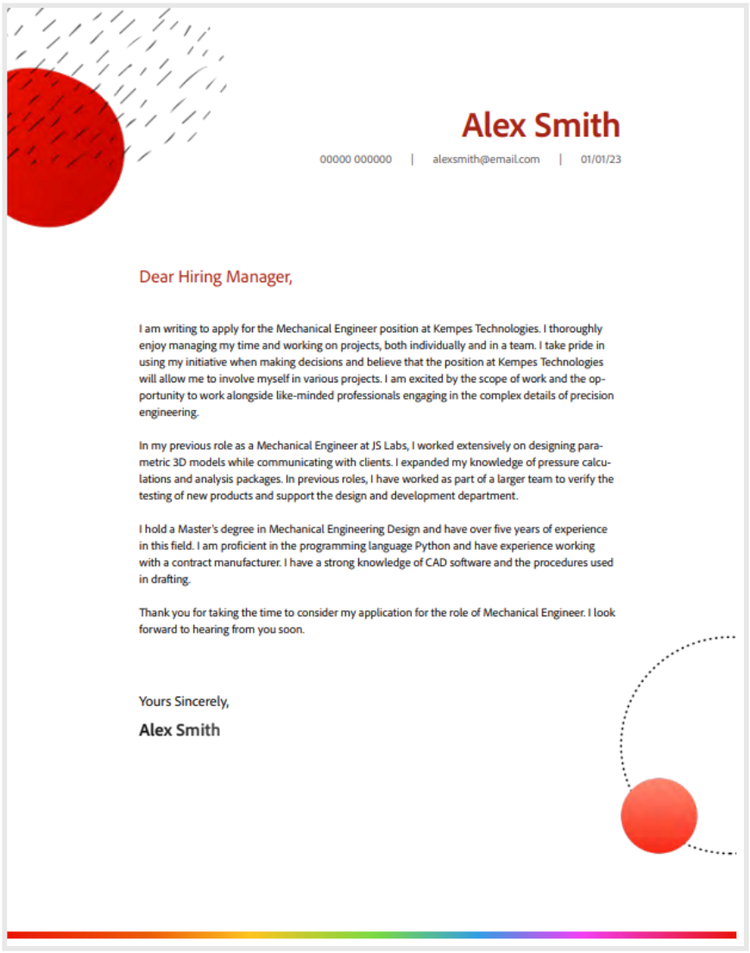
Download our Cover Lettter template above

Then use Adobe tools to edit in details specific to your job.

Edit PDF Online for Free

Benefits of Emailing a CV and Cover Letter

  • It looks professional. Sending your CV and cover letter via email is one of the first steps to making a good impression. Ideally, you’ll attach them to the email in separate files and in PDF format. That way, it’s easy for the recipient to read them on any device, make comments or send them to others.
  • Sets you apart from the competition. Some candidates may send CVs and cover letters in the post or hand them to reception. By emailing them, you’re in someone's inbox and more likely to get noticed. A hand-delivered or posted CV can easily get lost on a desk or in the wrong department.
  • Puts you in contact with the hiring manager. Sending your cover letter and CV via email puts you in direct contact with the hiring manager, making it easier for them to respond if your application is successful. Likewise, if your application isn’t quite what they’re looking for, this can put you in a good position to thank them for their consideration and request any constructive feedback.

FAQs.

What should I write in the email when sending my CV and cover letter?

In the subject line, include the reason you are sending your CV. Make sure to address the recipient by name, telling them who you are and why you’re contacting them with a friendly and professional tone. At the end, include that you’re looking forward to hearing from them regarding the position. Finally, proofread your email with spell check and confirm you’ve attached all the right documents.

Should I merge my CV and cover letter?

We wouldn’t recommend merging your CV and cover letter in your email application. For best practice, attach them as two separate documents so the recipient can view and forward them as they wish without having to separate them.

What is the best greeting for a cover letter?

If the job application doesn’t provide a name to address your cover letter and CV email to, try and research who will receive your application. If you know the name of your recipient, it’s always best to lead with ‘Dear [Name]’. If you don’t know the name of your recipient, you can safely use ‘Dear Hiring Manager’. This option reads much better than ‘To Whom It May Concern’.

Looking for more expert guides on how to get the most from Adobe Acrobat? Check out these other handy pages:

Sign up to Adobe Acrobat online services and produce high-quality PDFs and access professional editing tools for your next job application.