ACROBAT | 6-MINUTE READ
What is ASCII?
ASCII is the first major computer code to represent English text.
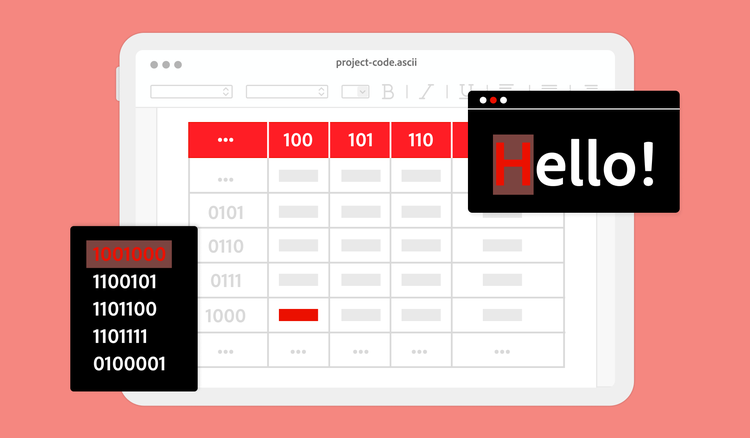

ASCII code is the first major computer coding system. Computer codes represent different characters and text, allowing computers to exchange information and data seamlessly across devices. It also bridges the communication gap between technology and humans so we can understand and speak with one another.
Many consider ASCII code to be the universal language of all computer systems. Its adoption as the first standard encoding system ensured that data could be exchanged seamlessly across different devices.
What is ASCII?
ASCII originated in the early 1960s with telegraph and Morse codes. It quickly became the first major character encoding standard for interchanging information and the universal language of sharing data across technology. The standardisation allowed two different computer systems to understand one another since they adhered to the same code.
So, what is ASCII code, exactly? ASCII code is how a computer interprets and displays letters, numbers and symbols. Computers cannot understand human languages, like English or Spanish, but can comprehend numbers, like 0 and 1. Since data is stored as a number in a computer, ASCII assigns human text and symbols a numerical value so computers can understand human commands.
ASCII code assigns a unique numerical value to different characters, using seven bits to represent 128 characters. A bit, short for binary digit, is the smallest unit of data in a computer.
Since text is represented as numbers, computers can easily store, search and manipulate data. So, if you convert a PDF document, the text is stored as ASCII codes. Knowing ASCII code is handy in case you need to troubleshoot with text encoding while converting a PDF to text.
As technology advanced, so did the development of additional characters and diverse languages and alphabets. Even though ASCII laid the foundation for a standard communication system, more diverse encodings became necessary. So, the Unicode standard was developed to represent a wider range of characters. However, ASCII code is still widely used and referenced in data communication.
Most modern computer systems consider Unicode the universal standard, even though it still contains the original ASCII encodings. The first 128 characters of Unicode are the same as those of ASCII text. Since ASCII is the blueprint, developers can still work with older technologies that rely on the code.
ASCII provides foundational knowledge of how text is represented in digital systems, optimising technology across diverse operating systems.
How does ASCII work?
Since computers communicate with numbers, ASCII code was developed to break the language barrier between humans and computers. ASCII code consists of 128 numerical values representing 128 symbols, letters and formatting commands.
Essentially, ASCII code covers the following:
- Uppercase and lowercase letters A through Z
- Numbers 0 through 9
- Basic punctuation like periods, question marks and exclamation marks
- Basic formatting like line feed, tab and carriage return (enter)
Here are some common basic values found on the ASCII table chart:
- An exclamation mark is number 33.
- A period is number 46.
- The question mark is number 63.
- The number 1 is represented by code 49.
Remember, different values represent upper and lowercase letters. For instance, lowercase a is the number 97, while uppercase A is the number 65. Lowercase b is 98, uppercase B is 66, lowercase c is 99 and uppercase C is 67.
If you’d like to communicate “hi” in ASCII code, you would type 104 105. Lowercase h is represented by the ASCII code 104 and lowercase i is represented by the number 105.
At first, learning all of the ASCII code characters may seem overwhelming. However, with a finite 128 characters, it’s a basic computer code for beginner programmers.
What are the advantages and disadvantages of using ASCII code?
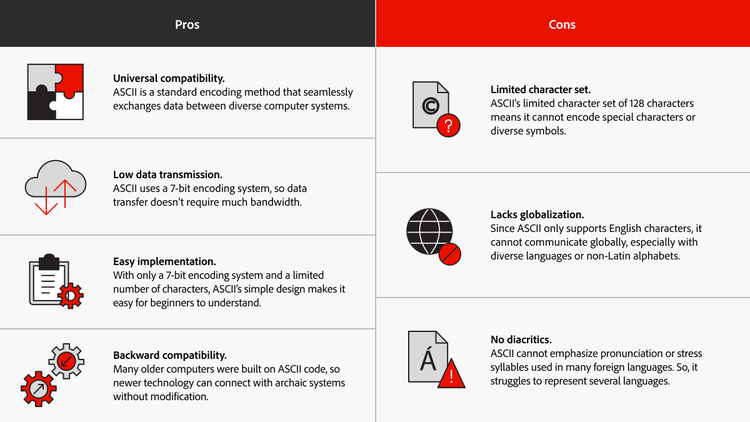
As the first basic standard for computer code, ASCII has many advantages that make it popular across the diverse technological world. However, ASCII code’s early development can put the computer language at a disadvantage in our modern world.
How to convert ASCII to text.
You can convert ASCII to text in several ways, whether through manual conversion or programming languages with built-in ASCII code functions.
To convert ASCII to text, look up your desired character with the corresponding ASCII numerical code. Each code in the table corresponds to a specific computer character to convert standard text to ASCII.
For example, if you want to write the word “Hello,” look up the corresponding numerical value for each letter and combine the characters. “Hello” in ASCII is written as 72 101 108 108 111. Consult an ASCII table through a reliable site like https://www.ascii-code.com and assemble the characters to create readable text.
Programmers can also convert ASCII code to text using popular programming languages containing built-in converting functions. Python uses the “chr()” function to convert ASCII code to text, while JavaScript uses the “String.fromCharCode()” function. Some programmers also build automatic functions within Excel to write simple code.
Also, anyone can convert ASCII code to text by using online tools. You can search for “ASCII code to text” in your search engine and find a site that instantly converts the code to text or vice versa.
Frequently asked questions.
ASCII has multiple purposes, but it is mainly used to:
- Transfer data between computer systems and store simple text files
- Encode and decode text to ensure your message arrives in the same format you sent it in
- Help communicate with outdated systems initially built around ASCII code.