Learning How to Convert Kindle to PDF
Converting a Kindle book or document to PDF is now a popular way of sharing proof copies or review books between people. It also helps if you have a document on your Kindle that you want to send to someone else.
There are plenty of things you can do when you convert a Kindle page to PDF and this guide will help you through the process.
What you’ll learn.
This guide is here to help you to convert your Kindle documents into a PDF so you can share, save them for yourself and easily use them as resources across multiple devices.
Quick list: How to Use a Kindle to PDF Converter.
Follow these steps to ensure that you are converting your Kindle pages correctly and can save them where you want to.
- Where to start. Use a Kindle to PDF converter like Adobe Acrobat to begin.
- What to press. Find the file you want to convert and select it.
- Wrapping up. Pick where you want to put your new PDF file.
In detail: Converting Kindle to PDF Step-by-Step on Your PC.
Let’s look at how to convert in more detail. This full step-by-step guide will take you through the process from start to finish.
- You’ll need to make sure the file you’re converting is on your computer. You can do this by plugging your Kindle into your laptop or computer. Click documents to open up all the files you have on your Kindle.
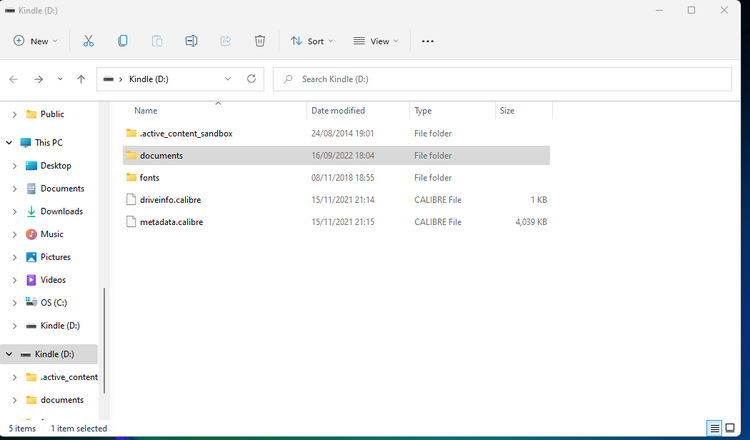
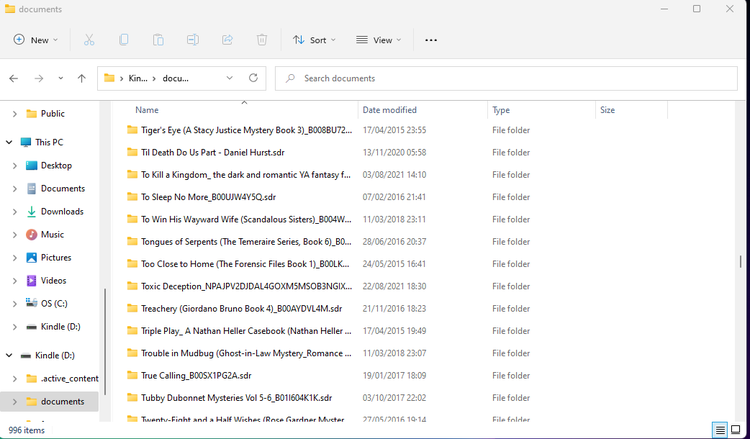
2. Once you’ve opened your documents, you’ll see all your kindle books and documents ready for you
to select. Next, open Adobe Acrobat online tool. Go to the Convert section and select the PDF
converter tool.
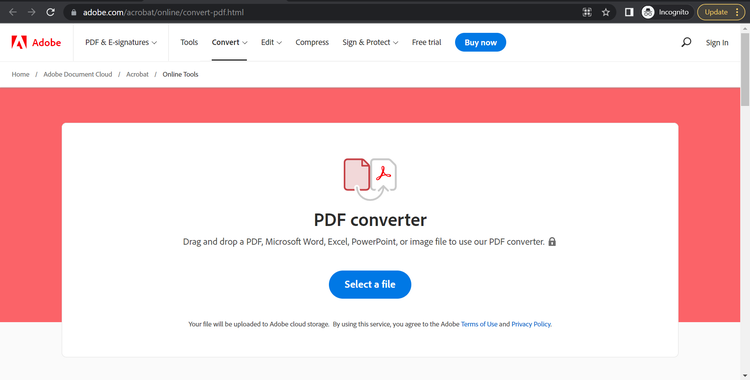
3. After clicking the Select a File button, find the document you want to convert and double-click
on it.
4. Your file will begin converting and before long your PDF will be ready.
Benefits of Converting a Kindle Page to a PDF.
- Sharing - Converting a Kindle document to PDF can help with sharing certain documents with friends, family or colleagues. The recipients can read it on many devices, including their Kindle.
- Presentations - Providing your sources during a presentation or showing a PDF version of an excerpt from a Kindle book or document is sure to impress
- Personal collection - A personal collection also helps save time in finding the bit you want later and keeps everything neatly organised in your files.
FAQs.
Can I export books from my Kindle?
Are Kindle docs Epub?
Can I Convert Kindle to PDF on a Mac?
What tools can I use to convert Kindle files to PDF?
Is it legal to convert Kindle books to PDF?
How do I convert DRM-protected Kindle books to PDF?
Can I convert Kindle books to PDF for free?
Can I convert Kindle books to other formats, like EPUB or Word?
What are the limitations of converting Kindle files to PDF?
How do I ensure the formatting of the Kindle book is preserved in the PDF?
What are the best alternatives to converting Kindle books to PDF?
Related Acrobat content.
Need more expert guides on getting the most from Adobe Acrobat? Check out these other handy pages: