Join thousands of users who have successfully cropped PDFs using Acrobat.
What does it mean to crop a PDF?
To crop a PDF file means to adjust the dimensions of a document to remove unwanted content, margins and white space. Cropping a PDF makes the remaining content appear larger or cleaner and can help focus a reader's attention on the right area of the page.
You can crop PDFs that include text, tables, images, and converted Word documents or any other file type. Ultimately, when you crop a PDF, you’re essentially retaining the most important parts of the page and removing what you don’t need.
How to crop PDF pages online
You can crop a PDF easily with Adobe. Just follow these simple steps to learn how to shape the perfect page and crop unwanted elements out of sight. All you need to do to crop a PDF file online is:
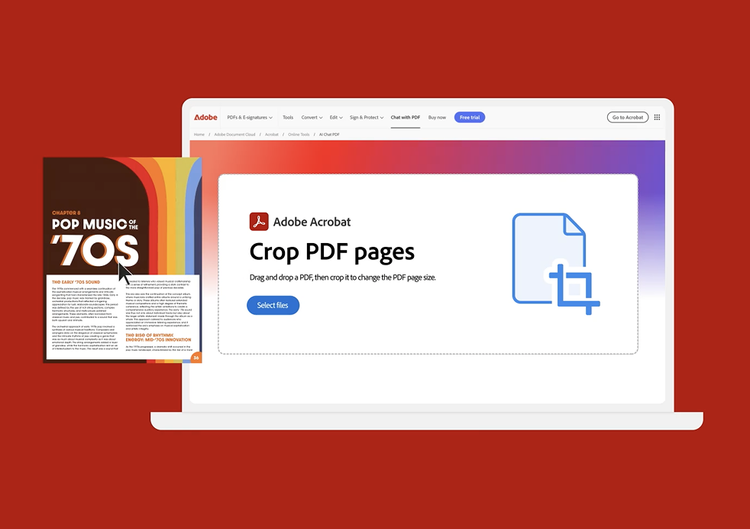
- Click the Select a file button or drag and drop your files into the drop box.
- Select the PDF file you want to crop.
- Once your PDF is uploaded, sign in to crop your file.
- Acrobat automatically outlines the first PDF page with a rectangular cropping border. Drag the border handles to resize the page as desired.
- Select Crop to save your changes.
- Apply your crop settings to additional pages by setting the page range, or click All under Page Range.
- Click OK and save your file.
Explore our free PDF cropping tool
Using our PDF cropping tool, you can do more than simply crop. You can transform your page, reducing and removing unnecessary elements. Below, we explore what our free PDF cropping tool is capable of.

Crop white margins from a PDF
Trim PDF pages to remove white margins. This can improve readability, enhance aesthetics and presentation and help keep your pages neat and uniform. Cropping blank white space can also help to remove unnecessary distractions and direct the reader's focus.

Crop PDF pages to the right size
Need to crop a PDF to a certain size? Using Adobe Acrobat, you can get the ideal size every time. This is useful when printing the PDF pages, as you can match it to the exact paper size. You can also use your PDFs to fit unique sizes like Instagram posts.

Apply cropping to other pages
Have multiple PDF pages to crop? All you need to do is:
- Click Crop Pages
- Choose the area you want to crop
- In the Set Page Boxes dialog, set the page range to All, or define a specific range.
Following these steps will ensure all of the PDF pages you need cropped are done so quickly and to a consistent size.

Crop and markup PDF pages
Once you’ve cropped the pages to the size you want, you can also markup your PDF. Use the comment tool to make notes or annotate pages. You can use tools like highlight, sticky note, draw, and text box to add markups.

Crop and share PDFs
Once you’ve cropped your PDF, you can then share it. You can either choose to download the file and send it to who you want, or you can send it via a generated link.

Crop and compress PDFs
You can also compress your PDF file. This will reduce the file size, making it easier to send, helping you avoid email file size limits. Different compression levels affect the page, so select Medium or Low compression to retain a high file quality.
What is the best PDF crop tool online?
The best PDF crop tool will depend on your needs and resources. Free PDF croppers, like Adobe Acrobat, can get the job done to a high standard and allow you to crop your files quickly and consistently. However, you can also pay to unlock more features and access a wealth of tools that can make editing and customising PDFs simple.
Consider a PDF crop tool that:
- Offers precise control
- Is versatile with other tools
- Allows for batch processing
- Has non-destructive cropping (hides the content instead of deleting it)
- Is compatible with different operating systems.
Questions? We have answers.
After uploading the PDF file you want to crop and signing in for free, the Acrobat Crop PDF tool automatically outlines the first page of your PDF document with a rectangular cropping border. You can resize the crop area by dragging the border handles as desired. Select Crop when you’re ready to save your cropped PDF file.
You can use the Acrobat cropping tool in any web browser, such as Microsoft Edge or Google Chrome. As a result, you can use the tool on almost any operating system, such as Mac, Windows or Linux.
After cropping a PDF file, you can organise the pages when you sign up for a seven-day free trial of Adobe Acrobat Pro. The Acrobat Pro free trial for Mac or Windows lets you delete, extract, insert, rotate or rearrange PDF pages. You can also use our PDF editor to edit PDFs, edit scanned PDFs with OCR, merge files, annotate files, and reduce PDF file size. You can also insert headers, page numbers, bookmarks or watermarks.
In addition, Adobe PDF converter tools let you convert files to and from PDF, including HTML pages, image formats like PNGs and TIFFs, Microsoft Word documents, Excel spreadsheets and PowerPoint presentations.
You can use the Adobe Acrobat app to easily crop PDF files on your phone. Simply download the app from your device’s app store.
- Open the Adobe Acrobat app on your mobile phone
- Locate the PDF you want to edit
- Tap Edit PDF
- Choose the crop tool
- Adjust the crop handles to find the area you want to crop
- Apply the crop
- Save your changes.
Use Acrobat tools for free
- Sign in to try 25+ tools, like convert or compress
- Add comments, fill in forms and sign PDFs for free
- Store your files online to access from any device
Create a free account | Create free account Adobe Acrobat Sign in


