ACROBAT
Free downloadable recipe card templates.
Get things just right every time, with sharable, custom recipe cards from Adobe. Learn how to quickly convert your recipe card templates to PDFs with Adobe Acrobat for easy editing, storing and sharing.
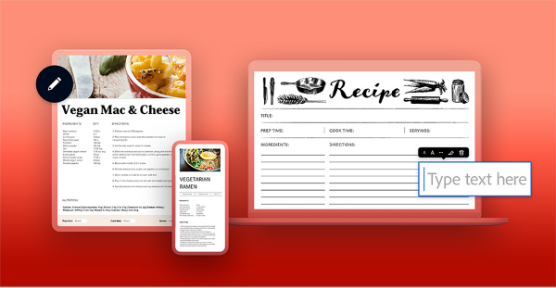
Cooking up the perfect dish needs the right blend of ingredients, technique, and skill (and a little bit of focus). Choosing the right recipe cards can guide you step-by-step with everything you need to make a meal perfect. Designing your own recipes and converting them to a digital format might sound like a long process, but it couldn’t be simpler with the right tools.
Ready to embrace your inner chef? Design your own recipe cards using a downloadable template with this Adobe guide. Start small with a single recipe, then replicate the template for all your favourite meals – you’ll have enough for your own recipe book in no time.
If you’ve got a treasured family recipe you want to digitise for your recipe card templates, you can use Adobe Scan to scan hand-written notes into digital PDFs — making it easier to share, edit, and organise your recipes.
Recipe template cards make kitchen life easier for home hooks and professional chefs alike. They not only provide an organised way to record and catalogue your favourite dishes but also add a pinch of personality to your growing recipe collection.
Here are three free, editable template recipe cards to help you get started.
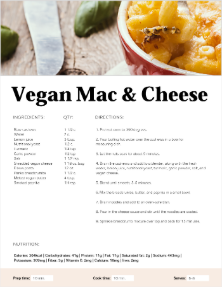
1. Full-page recipe card template.
If you love detail, then full-page template recipe cards will give you all the information you need for the perfect dish. This template gives you enough space to add an extensive description for every step, ensuring your instructions are clear.
One standout feature of this recipe card design is the nutritional information section – ideal if you’re trying to be more health-conscious or need to take note of those macros for future gains.
With this recipe card template, you can also add personalised images, making the recipe card more appealing and providing visual nods so you can ensure things look just right.
Try out this recipe card template to create a more informative experience and help whoever reads it recreate your dish perfectly (even if that someone is you).
2. Half-page recipe card template.
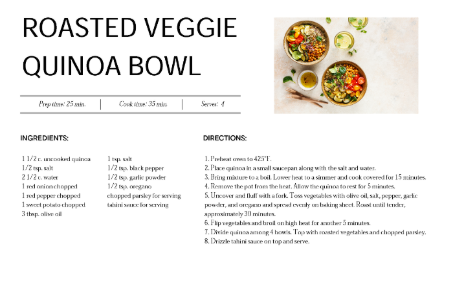
The half-page recipe card template is a perfect choice for those who want their recipe cards to toe the line between being detailed and concise.
While this template is smaller than the full-page recipe card, it still offers sections for ingredients, instructions, and other must-know notes.
Because of its compactness, the half-page recipe card is easy to store and flick through – leaving room for more scrumptious recipes. Half-page recipe cards are ideal if you’re following a less-complex recipe or want to save storage space.
Check out the half-page recipe card template below.
3. Basic black-and-white recipe card template.
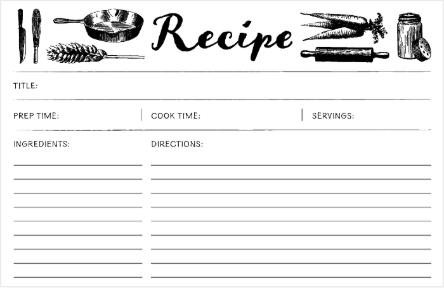
This basic black-and-white editable recipe card template lets you outline your recipe essentials – including prep time, servings, ingredients and steps.
It offers a clean and aesthetically pleasing design for your favourite dishes, while remaining cost-effective. After all, it costs a lot less to print in black and white.
The blank recipe card template is ideal if you only need basic directions and want something that stores away neatly.
Give the basic black-and-white recipe card template a try for your cooking needs.
What to include in your recipe cards.
Cooking up your own editable recipe cards is fun and easy, but there’s a few things worth including, depending on your chosen recipe card template:
- Start with a brief overview and description of the dish and have your prep time right up front.
- It’s best if you can list the ingredient amounts required in the order they’ll be used.
- Present a step-by-step list of all the processes, such as mixing, changing heat, chopping, or when to add ingredients.
- Mention the expected cooking times as well any other steps, such as basting, turning, stirring or searing.
- Some dishes are enhanced by the right pairing, why not suggest some side dishes as well as drink or dessert options.
- If there are alternative ingredients to change the nutritional value of a dish, give them a mention and what they might impact.
You can use your recipe card templates again and again for all your dishes. Alternatively, you could make different recipe cards for each food category — one for baked goods, one for fried foods, and of course you’ll want to save space for some desserts too. You can merge each PDF too, making your own digital booklet.
Writing in your recipe cards couldn’t be easier either, you can fill in your PDF with Adobe and include the ingredients for the relevant dish. Once you’re done, simply print. If you want to stop your secret recipe from becoming not-so-secret, you can password protect your PDF too.
How to make recipe cards.
To design recipe cards, you’ll want to ensure that the information is correct, easy to follow, and visually appealing without hurting clarity.
Here are some key steps to help you make recipe cards with as much care as you make your dishes:
1. Determine your recipe card layout and dimensions.
Don’t dive into designing right away. Just as with cooking, it’s important to get your method down first. Decide on the layout and dimensions of your recipe cards. If your cards are online only, you might want to focus more on resolutions than paper sizes. Or maybe storage is a concern, in which case you might opt for a 3x5 index card over an A4 page.
2. Organise your recipe card sections.
There’s nothing more stressful than flicking around a recipe for the next steps while your pot is boiling over or the pan is starting to smoke in your periphery. By dividing your recipe cards into distinct sections such as recipe title, ingredients, instructions, cooking times and so on, you can get the information you need immediately.
Use bold text for section headers and different font sizes for separate elements to create a clear visual hierarchy.
3. Play with visual elements.
Why not add some visual elements to your recipe card template? This can add an aesthetic charm to your recipe cards with illustrated icons of different ingredients, or a space for images of the dish itself. It may also help give a budding chef some visual cues.
4. Include editable fields.
To ensure your recipe cards are functional, you could add editable fields for users to fill in their own ingredients, measurements, or notes, allowing them to customise the recipe to their dietary wants or needs. Adobe Acrobat or Adobe Acrobat online toolscan help you add editable fields online if you want to share your recipe digitally.
Test and finalise your recipe cards.
Once you’ve put together the initial design for your recipe cards, it’s time to try it out so you can ensure it contains all the essential information you need.
Here are some things to consider when you want to test your recipe cards:
1. Check readability and clarity.
Give your recipe card to a family member, friend, or colleague and get them to review it. Get them to follow your recipe card, using no other supporting information. If they get stuck at points, it could help you pinpoint any clarity issues that may need adjusting.
2. Verify the printing quality.
If you want to share your recipe cards with other, you might want to test the printing quality before you print off a batch. Pay close attention to the colours, fonts, and images, while checking for alignment issues or print discrepancies.
3. Ensure mobile compatibility.
People often look for recipes on their mobile phone or tablets, which means your recipe card template needs to work on a range of devices. It’s important to test your recipe card template on different screen sizes, resolutions, and devices to ensure it maintains readability.
4. Make necessary adjustments.
As you test your recipe cards, jot down the issues you’ve noticed alongside any feedback. Then, action those points as necessary. Once you’re done, it’s back to the start again to ensure no further changes are needed. Test, action and repeat until your recipe cards are ready and it’s time to eat.
Frequently asked questions.
What is a recipe card?
Recipe cards are a small card that function as a cooking guide. They’re convenient to store, easy to read and give you all the information you need to cook a meal. That includes ingredients, quantities, cooking times and step-by-step cooking instructions. They may contain nutritional information too.
What size are recipe cards?
While there’s no limit on the size of your recipe card, the average sizes are either 4x6 or 3x5 inches. Most recipe boxes and tins fit a 4x6 recipe card, so if you’ve got a storage solution you love you may want to consider what size card it’s made for.
Is there a recipe card template in Word?
Yes, Microsoft Word has a range of recipe card templates available for use. If you’ve got a recipe card template in Word but want to make it a PDF to make sharing, editing or printing easier, you can use our Word to PDF converter tool for free.
How can I make my own recipe cards?
Making your own custom recipe cards is easy:
- Start by getting any recipes you love that aren’t already digitised.
- Scan the recipes you want. You can also extract and search any text to make changes or look for a specific ingredient to add to your shopping list.
- After you’re finished scanning, add the information to a template you like or customise it depending on what you want your recipe card to look like.
Does Google Docs have a recipe template?
Similar to Adobe Acrobat and Microsoft Word, Google Docs do offer their own recipe card templates for multiple types of documents. You can then easily convert your Google Doc file to PDF:
- Click File > Download > PDF to save your Google Doc to PDF format.
- Once you’ve saved your PDF, click File > Email > Open to open the recipe card file.
- Choose PDF from the dropdown list at the bottom of the box.
- Now, you can share, print or edit your PDF with your laptop, PC or mobile device.
How do I copy and print recipe cards?
Copying and printing recipe cards is easy. Just follow these steps:
- Ensure you save the recipe card in a printable format, such as a PDF.
- Open your recipe card PDF file and adjust the print settings, such as the orientation or margins, to fit the desired size for your recipe card. Want to make changes to your recipe card? You can edit your PDF online with Adobe Acrobat.
- Finally, click Print and choose the number of copies you need.