Adobe
Продукти
Creative Suite
Фамилията Photoshop
Фамилията Acrobat
Платформа Flash
Digital Marketing Suite
Цифрова платформа за големи фирми
Digital Publishing Suite
Още продукти
Решения
Авторско съдържание
Образование
Финансови услуги
Правителствени организации
Решения за маркетинг в цифрова форма
Още решения
Обучение Помощ Изтегляния Компанията
Магазин
Магазин на Adobe за дома и домашния офис
Други начини за купуване
Търсене
 
Информация Влизане
Добре дошли, Моята кошница Моите пратки Моята поддръжка
Моят акаунт
Излизане
Защо трябва да влизам? Влезте, за да управлявате акаунта си и за да имате достъп до пробни версии за изтегляне, разширения за продукти, зони на общностите и други.
Adobe
Продукти Раздели   Търси  
Решения Компанията
Помощ Обучение
Влизане Добре дошли, Моите пратки Моята поддръжка
Qty:
Subtotal
Checkout
Adobe Creative Suite family /

Adobe Photoshop CS5

Overview Features Tech specs Reviews FAQ Showcase Extend
Buying guide

What's new in Photoshop?

The newest version of Adobe® Photoshop® CS5 software redefines digital imaging with breakthrough tools for photography, superior image selections, realistic painting, and more. And now, use it with creativity-boosting mobile apps1. Read customer reviews ›

Покажи ми:
All features
All features New Top
New since CS4 New since CS3
For photography For design


Automatic lens correction

Automatic lens correction

Save time with automatic correction of lens distortions, chromatic aberration, and vignetting. Photoshop CS5 uses an image file's EXIF data to make precise adjustments based on the type of camera and lens you used.

Lens Correction filter improvements

Lens Correction filter improvements

Work more intuitively with the Lens Correction filter. Grid display is off by default; chromatic aberration correction sliders allow decimal point adjustments; a third slider can correct common green/magenta aberrations; and more.

Straighten Image tool

Straighten Image tool

Quickly straighten any crooked image. Simply drag a straight line from the Ruler tool onto your image, and the image will snap to the line.

Gradient tool preset for neutral density

Gradient tool preset for neutral density

Use the Neutral Density preset to emulate a neutral density filter, clicking once to have the Gradient tool darken an overexposed patch of a photo while leaving the rest unaltered.

More ›
Complex selections made easy

Complex selections made easy

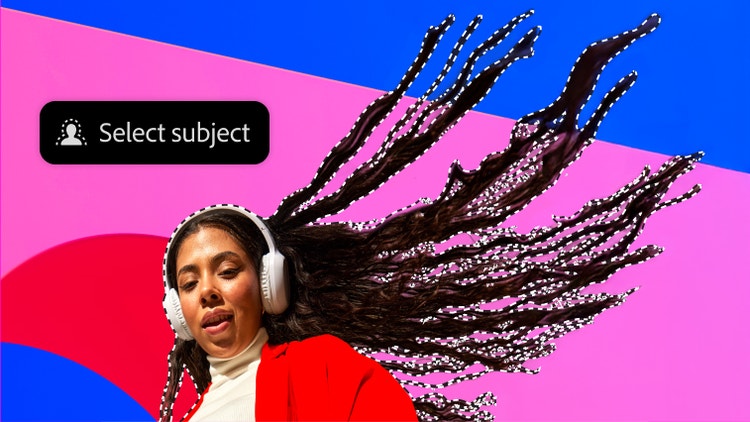
Select specific areas within an image in fewer clicks. Easily select intricate image elements, such as hair; eliminate background color around selection edges; and automatically vary selection edges and perfect masks using new refinement tools.

Content-Aware Fill

Content-Aware Fill

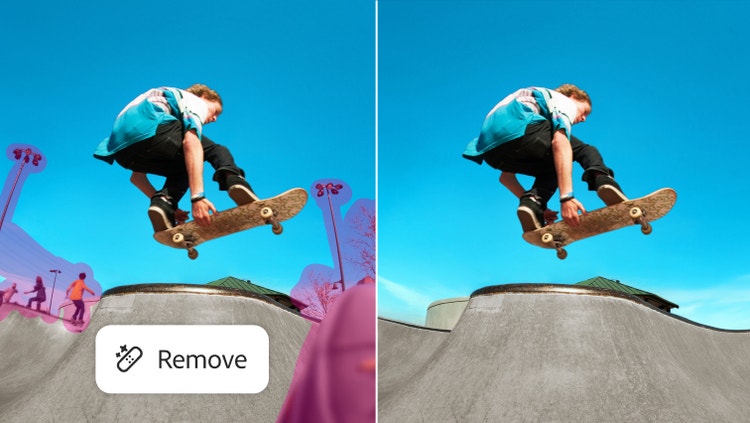
Remove any image detail or object and watch as Content-Aware Fill magically fills in the space left behind. This breakthrough technology matches lighting, tone, and noise so it looks as if the removed content never existed.

Superior HDR imaging  [Color]

Superior HDR imaging

Create photo-realistic or surreal HDR images with unprecedented speed and control. Get better-than-ever results thanks to automatic ghost removal and greater control with tone mapping and adjustments, and even give single-exposure photos the look of HDR.

Extraordinary painting effects

Extraordinary painting effects

Easily change a photograph into a painting or create unique artistic effects with the Mixer Brush, which offers on-canvas color blending, and Bristle Tips, which let you create lifelike, textured brush strokes.

More ›
Content-Aware Fill

Content-Aware Fill

Remove any image detail or object and watch as Content-Aware Fill magically fills in the space left behind. This breakthrough technology matches lighting, tone, and noise so it looks as if the removed content never existed.

Extraordinary creative tools

Extraordinary creative tools

Achieve realistic painting effects with the ability to mix colors on canvas and create natural brushstrokes. Merge multiple exposures into stunning high dynamic range (HDR) images. Move, remove, warp, or stretch any image element.

State-of-the-art photography

State-of-the-art photography

Easily merge multiple exposures to extend the dynamic range with more power, precision, and fidelity than ever before. Convert to black-and-white in new ways. And use Dodge, Burn, and Sponge tools that intelligently preserve color and tone details.

Easy access to core editing power

Easy access to core editing power

Get just the tools you need — exactly when you need them — as you perform common editing activities. Adjustments and Masks panels guide you in making precise adjustments and masks.

More ›
Complex selections made easy

Complex selections made easy

Select specific areas within an image in fewer clicks. Easily select intricate image elements, such as hair; eliminate background color around selection edges; and automatically vary selection edges and perfect masks using new refinement tools.

Content-Aware Fill

Content-Aware Fill

Remove any image detail or object and watch as Content-Aware Fill magically fills in the space left behind. This breakthrough technology matches lighting, tone, and noise so it looks as if the removed content never existed.

Superior HDR imaging  [Color]

Superior HDR imaging

Create photo-realistic or surreal HDR images with unprecedented speed and control. Get better-than-ever results thanks to automatic ghost removal and greater control with tone mapping and adjustments, and even give single-exposure photos the look of HDR.

Extraordinary painting effects

Extraordinary painting effects

Easily change a photograph into a painting or create unique artistic effects with the Mixer Brush, which offers on-canvas color blending, and Bristle Tips, which let you create lifelike, textured brush strokes.

More ›
Content-Aware Fill

Content-Aware Fill

Remove any image detail or object and watch as Content-Aware Fill magically fills in the space left behind. This breakthrough technology matches lighting, tone, and noise so it looks as if the removed content never existed.

Superior HDR imaging  [Color]

Superior HDR imaging

Create photo-realistic or surreal HDR images with unprecedented speed and control. Get better-than-ever results thanks to automatic ghost removal and greater control with tone mapping and adjustments, and even give single-exposure photos the look of HDR.

Extraordinary painting effects

Extraordinary painting effects

Easily change a photograph into a painting or create unique artistic effects with the Mixer Brush, which offers on-canvas color blending, and Bristle Tips, which let you create lifelike, textured brush strokes.

Mobile integration

Mobile integration

Use Photoshop CS5 directly with creativity- and productivity-boosting mobile apps as they become available for devices like the iPad.3  View all mobile apps ›

More ›
Complex selections made easy

Complex selections made easy

Select specific areas within an image in fewer clicks. Easily select intricate image elements, such as hair; eliminate background color around selection edges; and automatically vary selection edges and perfect masks using new refinement tools.

Content-Aware Fill

Content-Aware Fill

Remove any image detail or object and watch as Content-Aware Fill magically fills in the space left behind. This breakthrough technology matches lighting, tone, and noise so it looks as if the removed content never existed.

Superior HDR imaging  [Color]

Superior HDR imaging

Create photo-realistic or surreal HDR images with unprecedented speed and control. Get better-than-ever results thanks to automatic ghost removal and greater control with tone mapping and adjustments, and even give single-exposure photos the look of HDR.

Extraordinary painting effects

Extraordinary painting effects

Easily change a photograph into a painting or create unique artistic effects with the Mixer Brush, which offers on-canvas color blending, and Bristle Tips, which let you create lifelike, textured brush strokes.

More ›
Extraordinary painting effects

Extraordinary painting effects

Easily change a photograph into a painting or create unique artistic effects with the Mixer Brush, which offers on-canvas color blending, and Bristle Tips, which let you create lifelike, textured brush strokes.

Content-Aware Fill

Content-Aware Fill

Remove any image detail or object and watch as Content-Aware Fill magically fills in the space left behind. This breakthrough technology matches lighting, tone, and noise so it looks as if the removed content never existed.

Puppet Warp

Puppet Warp

Precisely reposition any image element to create a more visually appealing photo. For example, easily straighten an arm that's bent at an awkward angle.

Superior HDR imaging  [Color]

Superior HDR imaging

Create photo-realistic or surreal HDR images with unprecedented speed and control. Get better-than-ever results thanks to automatic ghost removal and greater control with tone mapping and adjustments, and even give single-exposure photos the look of HDR.

More ›

News

Photoshop companion apps for iPad

Tap into new connectivity between Photoshop CS5 and the iPad to mix colors, paint, activate Photoshop tools, and more.

12.0.4 update for Photoshop CS5

Download this free update to integrate Photoshop CS5 with new companion apps as they become available for devices like the iPad1.
Windows | Mac OS

Tips and techniques

Visit digital imaging evangelist Julieanne Kost's blog for Photoshop tutorials, techniques, shortcuts, and more.

Showcase

More
Tim Tadder Photography

Tim Tadder Photography

A modern master of commercial photography, Tim Tadder uses Photoshop to transform peak moments into dramatic images for some of the world's leading consumer brands.

Learning

More
  • Getting started
  • Tutorials on Adobe TV
  • Photoshop performance (PDF, 656k) /etc/pagetables/link_icon/pdf/jcr:content/image/file
  • Training and books
  • Training providers
  • Seminars and events
  • User groups
  • Max Online

Resources

  • Photoshop family
  • Photoshop.com
  • Compare Photoshop editions
  • Complete photography solution
  • Camera Raw support
  • DNG support
  • Photoshop Marketplace
  • Photoshop Exchange
  • Photoshop blog
  • For companies

Help

More
  • Help and support
  • Windows updates
  • Mac updates

Page Tools

Share on Facebook
Share on Twitter
Share on LinkedIn
Bookmark
Print

1 Photoshop CS5 (version 12.0.4 or later) and wireless Internet connection required. Mobile and tablet applications require a separate download and agreement to additional terms. Such applications may not be available in all countries or languages and may be subject to change or discontinuation without notice. Additional fees or subscription charges may apply.

Photoshop CS5

Create powerful images with the professional standard

Photoshop CS5
Buy Try
Do even more with...
CS5.5 Design Standard

Produce high-impact print designs and digital publications

CS5.5 Design Standard
Buy Try
Other ways to buy

Adobe Store

For home and home office

Education Store

Students, educators, and staff

Business Store

Small and medium businesses

Enterprise purchasing

Volume licensing options

Related products
Photoshop Extended
Photoshop Lightroom
Photoshop Elements
Photoshop.com
Photoshop family
Photoshop companion apps
Adobe Eazel
Adobe Nav
Adobe Color Lava
Adobe Photoshop Touch

Продукти

  • Creative Suite
  • Фамилия продукти Photoshop
  • Фамилията Acrobat
  • Flash Platform
  • Digital Marketing Suite
  • Digital Enterprise Suite
  • Digital Publishing Suite
  • Мобилни приложения

Решения

  • Управление на начина на работа на клиентите
  • Авторско съдържание
  • Маркетинг в цифрова форма

Индустрии

  • Образование
  • Финансови услуги
  • Правителствени организации

Помощ

  • Центрове за помощ за продукти
  • Поръчки и рекламации
  • Изтегляне и инсталиране
  • Моят Adobe

Обучение

  • Adobe Developer Connection
  • Adobe TV
  • Обучение и сертифициране
  • Форуми
  • Design Center

Начини за покупка

  • Магазин на Adobe
  • За големи организации

Файлове за изтегляне

  • Adobe Reader
  • Adobe Flash Player
  • Adobe AIR
  • Adobe Shockwave Player

Компанията

  • Отдел за новини
  • Партньорски програми
  • Фирмена социална отговорност
  • Възможности за кариера
  • Връзки с инвеститори
  • Събития
  • Правни услуги
  • Свържете се с Adobe
Изберете вашия регион България (промяна)
Изберете вашия регион Затвори

North America

Europe, Middle East and Africa

Asia Pacific

  • Canada - English
  • Canada - Français
  • Latinoamérica
  • México
  • United States

South America

  • Brasil
  • Africa - English
  • Belgium - English
  • Belgique - Français
  • België - Nederlands
  • България
  • Česká republika
  • Danmark
  • Eastern Europe - English
  • Eesti
  • España
  • France
  • Deutschland
  • Hrvatska
  • Ireland
  • Israel - English
  • Italia
  • Latvija
  • Lietuva
  • Luxembourg - Deutsch
  • Luxembourg - English
  • Luxembourg - Français
  • Magyarország
  • Middle East and North Africa - English
  • Moyen-Orient et Afrique du Nord - Français
  • Nederland
  • Norge
  • Österreich - Deutsch
  • Polska
  • Portugal
  • România
  • Россия
  • Schweiz - Deutsch
  • Suisse - Français
  • Svizzera - Italiano
  • Slovenija
  • Slovensko
  • Srbija
  • Suomi
  • Sverige
  • Türkiye
  • Україна
  • United Kingdom
  • Australia
  • 中国
  • 中國香港特別行政區
  • Hong Kong S.A.R. of China
  • India - English
  • 日本
  • 한국
  • New Zealand
  • Pacific - English
  • 台灣

Southeast Asia

  • Includes Indonesia, Malaysia, Philippines, Singapore, Thailand, and Vietnam - English

© 2012 Adobe Systems Incorporated. Всички права запазени.

С използването на този уеб сайт подписвате съгласието си с Правилата за използване и Правилата за онлайн поверителност (актуализирани на 14.07.2009 г.).