Share and track PDFs.
Share documents from your phone and get notified the moment they are opened, downloaded, or shared.


ADOBE ACROBAT READER MOBILE APP
Work on documents anywhere using the Acrobat Reader mobile app. This free app — trusted by hundreds of millions — is packed with all the latest tools you need to keep projects moving wherever you are. Download it for free.
Scan the QR code to get the app


Meet AI Assistant Plus for Acrobat. Ask your document questions. Get one-click summaries for fast insights and level up your productivity. Add AI Assistant Plus for Acrobat.
Liquid Mode powered by Sensei
Liquid Mode powered by Sensei lets you effortlessly read PDFs on phones, tablets, and Chromebooks — no pinching and zooming necessary. You can maximize your comfort with readability controls to adjust the default font size, character spacing, and line spacing.


Collaborate
Easily share PDFs and collect feedback. Keep reviewers engaged and stay informed of progress on the go.
Fill and sign forms anywhere
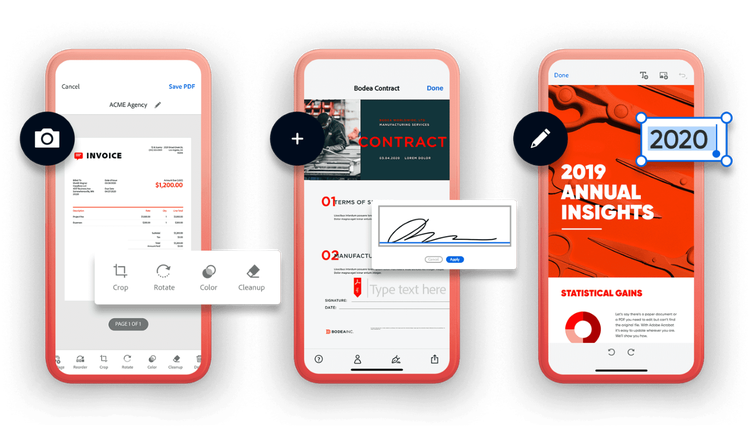
Quickly and easily fill and sign PDF forms electronically — even on a mobile device. Simply type text into the fillable fields and e-sign with your finger or stylus.

Share documents from your phone and get notified the moment they are opened, downloaded, or shared.

Your documents all in one place. Access and work on PDFs from OneDrive, Dropbox, or other cloud storages from your mobile phone or tablet.
For even more PDF power, subscribe to Acrobat Pro, Adobe PDF Pack, or Export PDF. And when you subscribe to Acrobat Pro, you can create, edit or convert PDFs to Word on your tablet and mobile phone. If you’re already a subscriber, sign in to use these premium mobile features.

Scan papers and whiteboards into high-quality PDFs, with automatic text recognition powered by Adobe
Learn more or scan the QR code below to get the app.