



Key findings:
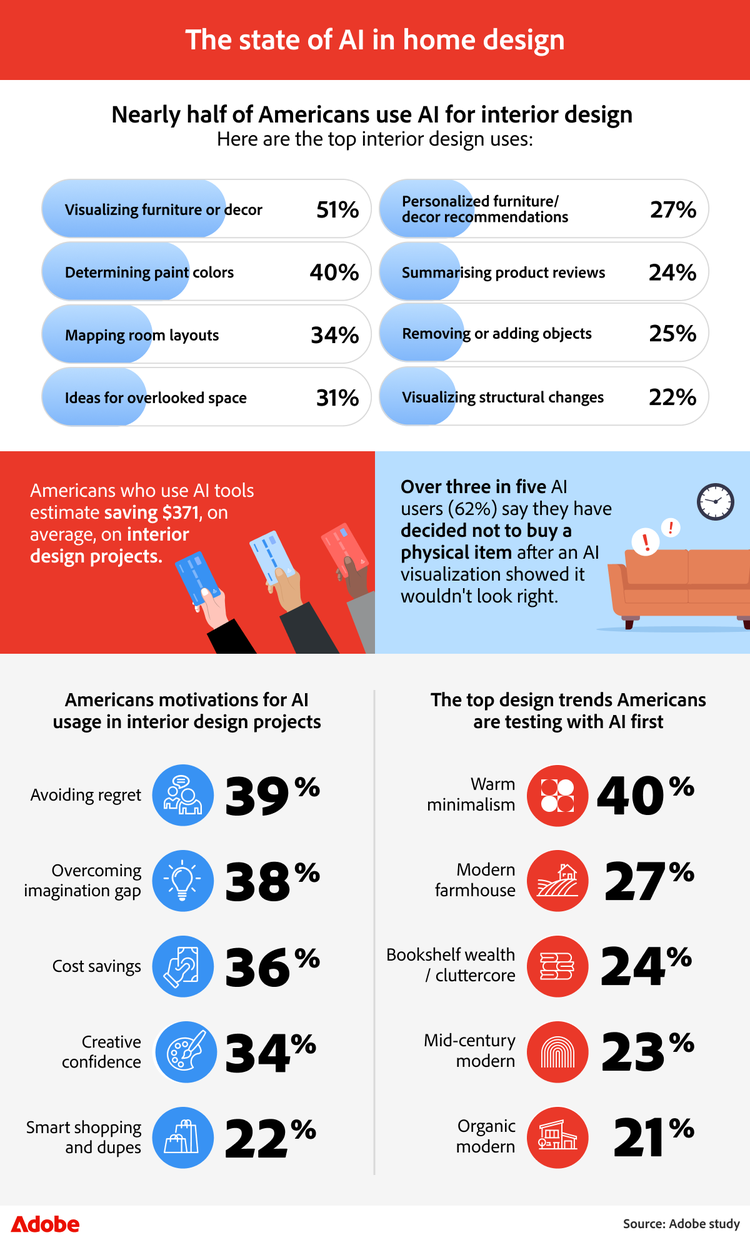
- Nearly half of Americans (49%) surveyed have already used AI for an interior design project.
- Respondents using AI tools estimate saving $371. Compared to the average homeowner’s annual home update budget of $1,752, AI visualization effectively saves users 21% on their yearly spend.
- Over three in five AI users (62%) studied have decided against a purchase after seeing an AI visualization, directly preventing renovation regret.
- The warm minimalism era: This is the #1 design trend respondents want to test (40%), significantly outpacing modern farmhouse (27%) and mid-century modern (23%).
- Top home vibes Americans are struggling to achieve include cozy (40%), organized (30%), and welcoming (26%).
How AI is changing home design
From testing layouts to planning budgets, AI is becoming a practical tool for making confident choices at every stage of a home project.
AI adoption in interior design is growing
There’s been a shift in how people plan and shop for their homes, with nearly half of Americans surveyed (49%) already using AI for an interior design project. Instead of relying on guesswork, many are using AI as a furniture financial advisor, with 51% of respondents testing furniture placement with AI before buying, helping them make more confident design choices upfront. That confidence is translating into real savings as Americans using AI tools save $371 on average on interior design projects.
Why owners and renters are turning to AI tools
Motivations for using AI vary by audience. Women surveyed are most driven by overcoming imagination gaps (41%), using AI to picture better ideas that are hard to visualize. Male respondents, on the other hand, are more focused on budgeting and planning (44%) and are 24% more likely than women to use AI primarily for cost savings.
The awareness gap in AI-powered design tools
Despite growing adoption, awareness of AI capabilities remains a major gap. Among non-AI users surveyed, 84% are unaware of style transfer tools, 73% don’t realize AI can support concepting and moodboarding, and 72% don’t know that AI can suggest furniture layouts. Even generative fill, which can be used to add a specific object into an existing image, is unfamiliar to 68% of non-users, and one in three have no awareness of any AI-powered design features at all.
How Adobe Firefly supports smarter home design
With Adobe Firefly's AI image generator, these capabilities come together in a single creative platform. From experimenting with layouts and bringing ideas to life with an AI image generator, Firefly helps turn inspiration into results. By making powerful creative tools more accessible, Firefly helps users to design smarter, visualize faster, and make better decisions before they buy.
How AI is shaping design trends and decisions
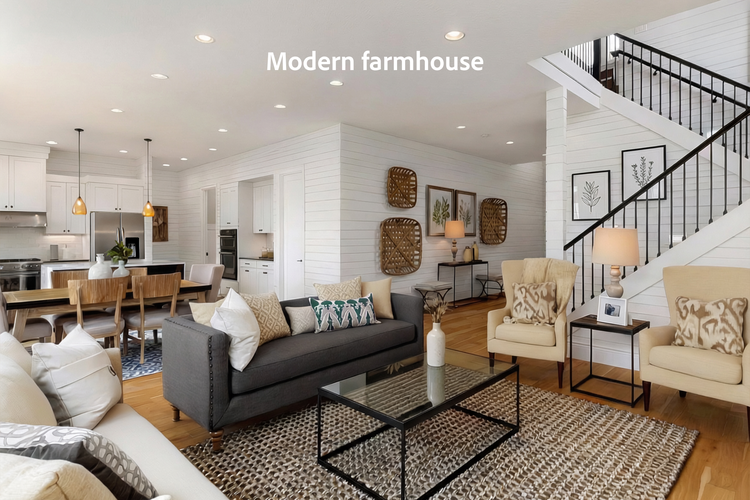
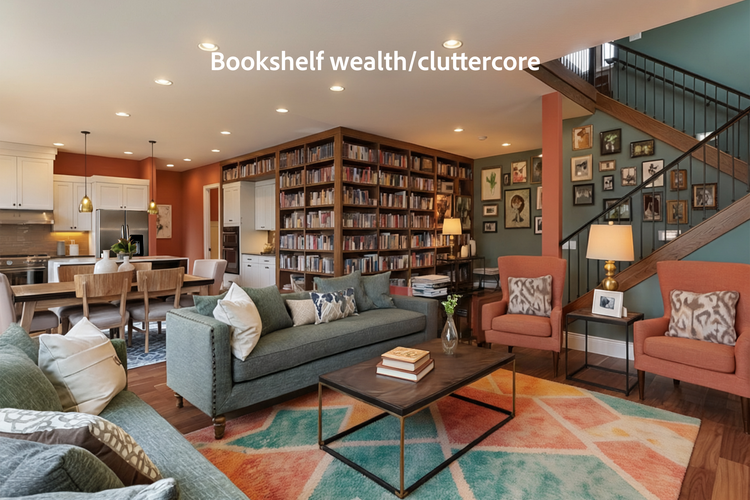
AI visualizations are changing how people explore interior design trends and how confidently they commit to them. Americans are increasingly using AI to preview how a single room could look across today’s most popular styles, from warm minimalism (40%) and modern farmhouse (27%) and bookshelf wealth/cluttercore (24%). These AI visualizations are doing more than inspire, too, with many directly influencing purchasing decisions. Over three in five AI users surveyed say they’ve decided not to buy a physical item after an AI visualization showed it wouldn’t look right, with Gen Z respondents leading the way at 70%.
Reimagining living room trends with Adobe Firefly
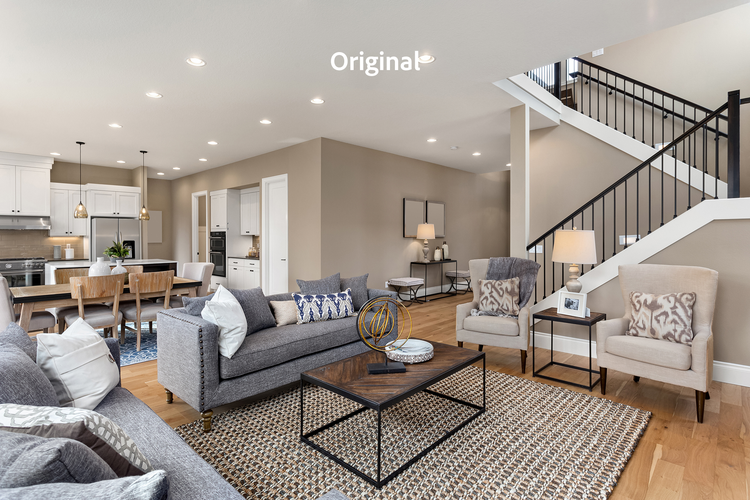
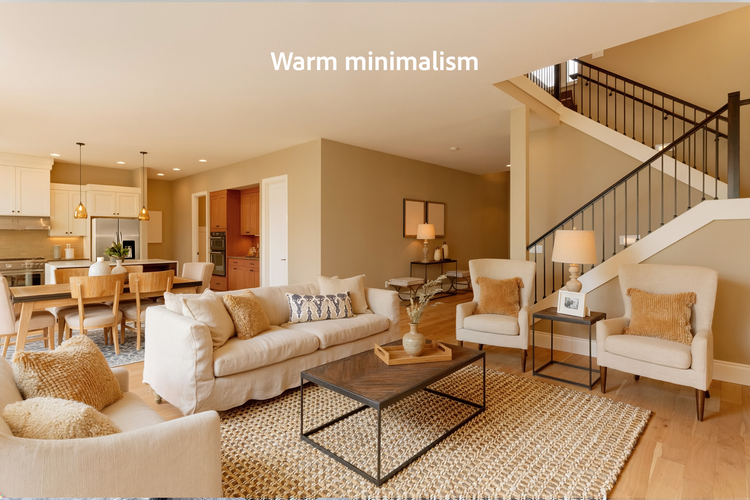
To see this in action, we used Adobe Firefly to reimagine a living room through the lens of today's top three trends. While we focused on the living area, you can easily apply these same techniques to other spaces in your home, such as a bedroom or bathroom. By starting with a single base photo, we created the Warm Minimalism image using this specific text-to-image prompt:
Warm minimalist living room makeover. Beiges, creams, and toasted almond tones. Textured fabrics like linen and wool. Decluttered, cozy, and organic. Soft natural light, matte finishes, and airy vibes. No harsh whites or cold metals.
The cost advantage of AI-powered design visualization
Cost is another major factor driving AI adoption. Nearly half of AI users surveyed (45%) agree that high-quality design visualization would be financially inaccessible without AI tools. Traditional virtual design services can range from $3,000 to $7,500+ for high-end, full-service renderings. Adobe Firefly, however, offers powerful creative capabilities such as concepting, layout exploration, and trend visualization, for a fraction of the cost. Whether someone is testing a single design trend or comparing multiple styles side by side, Firefly removes financial barriers to professional-quality visualization.
Faster experimentation and more confident purchases with Firefly
With Adobe Firefly, users can quickly generate before-and-after visuals, experiment with trending aesthetics, and refine ideas using an AI image generator or bring concepts to life with a free AI video generator. Firefly allows for faster experimentation, smarter decisions, and more confident purchases.
From vibes to visual clarity
AI is helping Americans move from vague feelings about their homes to clearer design choices, starting with the rooms they use every day.
The rooms Americans prioritize in home redesigns
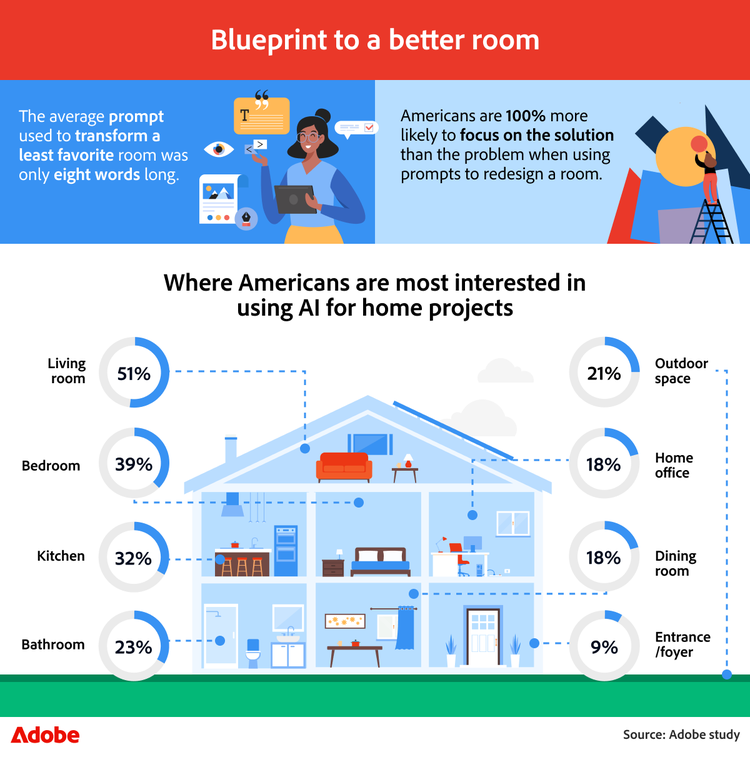
When surveyed, Americans turn to AI for home projects, and they prioritize the spaces that have the greatest impact on daily life. The living room tops the list (51%), followed by bedrooms (39%) and kitchens (32%). Despite the complexity of these home renovation projects, the average prompt used to transform a least-favorite room is just eight words long, and surveyed Americans are 100% more likely to focus on what they want to see rather than what they dislike when using AI to redesign a space.
Why achieving the right “vibe” is so difficult
Those prompts reveal a deeper challenge: many people know how they want their home to feel, but struggle to get there.
The most difficult vibes to achieve are:
- Cozy 40%
- Organized 30%
- Welcoming 26%
- Calm 25%
- Minimalist 19%
Gen Z respondents are 36% more likely than older generations to struggle to achieve a unique vibe, and one in 10 Gen Z respondents surveyed say they’re trying (and failing) to create a luxurious feel at home. That’s where an AI image generator becomes a practical problem-solver, allowing people to visualize the atmosphere, not just furniture, before committing to changes.
Turning short AI prompts into clear design inspiration
With Adobe Firefly, short, intuitive prompts can generate inspiration for any room. Whether users are experimenting with layouts using an AI image generator, testing ambiance through iterative visuals, or exploring concepts dynamically with a free AI video generator, Firefly helps translate vague ideas, like “cozy” or “calm”, into something concrete.
The stress behind home renovations
Budgets, paperwork, and scattered ideas often cause more stress than the design itself, but better planning can make all the difference.
The financial pressure of home updates
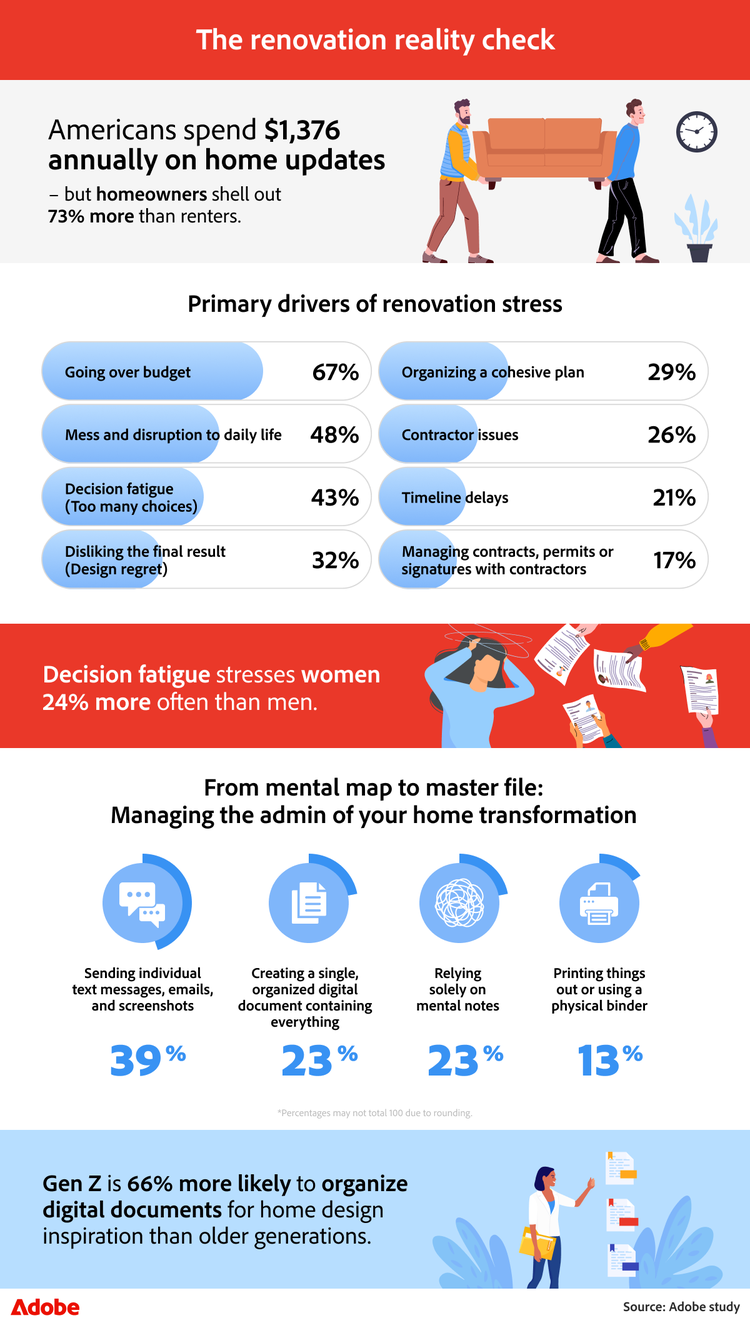
Home updates may be exciting, but they can also be a major source of stress, especially when budgets and paperwork start piling up. Respondents spend $1,376 annually on home updates, but homeowners surveyed spend 73% more than renters, an average of $1,752 annually, compared to renters $1,010.
Top renovation stressors: Budget, disruption, and decision fatigue
Going over budget is the leading cause of renovation stress (67%). Top stressors also include mess and disruption to daily life (48%), decision fatigue (43%), and design regret (32%). Women surveyed were 26% more likely to experience disruptions to their daily lives during these home improvement projects, whereas male respondents were 35% more likely to worry about contractor issues. Encouragingly, AI users are finding relief on both fronts, saving over 21% of their yearly home spend, an average of $371, by visualizing decisions upfront and avoiding costly missteps.
How disorganization increases renovation overwhelm
Beyond cost, organization—or the lack of it—plays a huge role in how overwhelming home projects feel. While many Americans rely on fragmented methods like scattered texts (39%) or mental notes (23%), this lack of a centralized plan often makes it harder to stay on budget and keep renovations moving smoothly.
Using Adobe Acrobat to streamline renovation planning
Tools like Adobe Acrobat help close this gap by making it easy to merge PDFs with a PDF merge tool to keep inspiration, quotes, and contracts in one place, and manage edits with an online PDF editor. With a free PDF editor, users can review plans, track changes, and sign PDFs online, reducing friction, preventing budget overruns, and bringing clarity to every stage of a home project.
Tips for turning ideas into decisions (without the stress)
Moving from a mental wish list to a finished space takes two things: clear prompts and a single place to keep everything organized. These tips show how to use Adobe Firefly to visualize ideas with confidence and Adobe Acrobat to keep the planning side under control.
1. Write prompts that actually get great results
The average prompt used to transform respondents' least favorite room is just eight words long, but the best visuals come from being a little more specific.
- Whether using an AI image generator or simply exploring new styles, a simple formula that works is: [Room] + [Style] + [Materials] + [Lighting] + [Mood]
- Be precise with language: Swap vague terms like “wood” or “metal” for specifics such as walnut, linen, or brushed brass. Small details make a big difference in realism.
- Firefly tip: Adobe Firefly responds best to positive direction. Instead of “no clutter,” try “clean, minimalist surfaces.” When using a free AI image generator, focus on what you want to see rather than what you’re trying to avoid.
2. Use Adobe Firefly as a creative sounding board
Firefly works best when you treat it like a collaborator, not a one-and-done tool.
- Close the imagination gap: Use generative fill to add a specific lamp, chair, or table to a photo of your real room. It’s a fast way to check scale, placement, and overall feel before buying.
- Refine in layers: Start with a base layout, then experiment using style reference to apply different aesthetics until something clicks. An AI video generator can even help you see how light moves through these new spaces.
- Build smarter mood boards: Generate a few wild-card visuals to explore ideas you wouldn’t normally consider, then save the strongest concepts for comparison.
3. Reduce admin stress with Adobe Acrobat
Design decisions are only half the challenge, as organization is what keeps projects moving.
- Create one source of truth: Instead of scattered texts and screenshots, use a PDF merger to combine Firefly visuals, receipts, and floor plans into a single master document.
- Simplify paperwork: Use Adobe Acrobat to sign PDF online to send, sign, and track contracts or permits, especially helpful when paperwork is a major stress point.
- Plan with numbers, not guesses: Use the measuring tool in Acrobat Pro to calculate dimensions for flooring, paint, or furniture spacing. Clear measurements help prevent budget overruns—the biggest renovation stressor of all.
Managing the stress behind home design
Home projects often come with more pressure than expected, as budgets, decisions, and paperwork quickly add up. With Adobe Acrobat keeping quotes and contracts organized and Adobe Firefly making it easier to visualize options, design uncertainty turns into clarity. Instead of relying on guesswork, people can explore possibilities with confidence and make design decisions that feel right long before any money is spent or permanent changes are made.
Methodology
To explore the utilization of AI for home improvement and design, we surveyed 1,026 Americans. The data has a 95 percent confidence level and a low three percent margin of error. Because this exploratory research relied on self-reported data, respondents may have biases, and discrepancies may exist between their answers and their actual experiences.
Keep exploring
title
Design with confidence: AI for home design with Adobe
cardImageAltText
New survey insights show how AI reduces risk and design regret. Discover how Americans use Adobe AI tools to plan home updates with confidence.
cardImage



