
Content as a Service v2 - b2b - Wednesday, September 25, 2024 at 15:13

Bullet points transform your resume from a wall of text into a scannable, organized document that respects the reader's time. They create visual hierarchy, guide the eye to key information, and make it easier for hiring managers to quickly identify your most relevant qualifications.
Here are the key benefits of using bullet points on your resume:
Poor bullet point usage can significantly hurt your application success. Resumes with lengthy paragraphs, inconsistent formatting, or too many bullet points often get passed over. Hiring managers may assume that candidates who cannot present their experience clearly on paper will struggle to communicate effectively on the job.
Understanding how to format a resume properly goes hand in hand with mastering bullet points. The best bullet points follow consistent formatting rules, use parallel structure, and maintain uniform punctuation throughout. When your bullet points are well-organized and visually balanced, they signal attention to detail and professionalism before the reader even absorbs the content.
Bullet points for resume entries also play a critical role in ATS optimization. These systems scan resumes for keywords and structured information. When your experience is organized into clear bullet points, the software can more easily identify relevant skills, accomplishments, and qualifications that match the job description.
The strategic use of bullet points on resume documents extends beyond just the work experience section. Understanding where to place them throughout your document ensures consistency and maximizes readability for both human reviewers and automated systems. When you master bullet point placement and content, you create a resume that works harder for you at every stage of the hiring process.
The question of how many bullet points per job on resume entries requires a nuanced answer. The general guideline is three to six bullet points per position, but the ideal number varies based on your experience level, the recency of the role, and its relevance to the job you are pursuing.
Here is a breakdown of recommended bullet points by experience level:
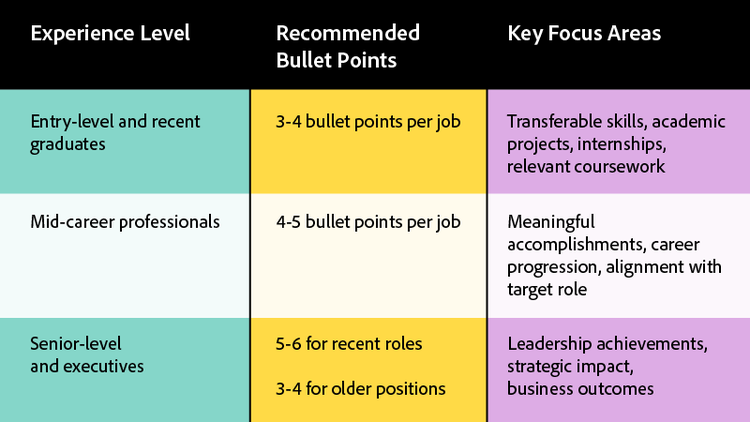
For entry-level candidates and recent graduates, quality matters more than quantity at this stage. If you are building a college student resume emphasize coursework, volunteer work, and extracurricular leadership that demonstrates your potential. Focus on transferable skills that show employers you can succeed even without extensive professional experience.
Mid-career professionals have enough experience to showcase meaningful accomplishments, but not so much that extensive trimming becomes necessary. Prioritize achievements that align with your target role and demonstrate clear career progression. This is the stage where your bullet points should really shine with quantifiable results and specific examples of impact.
Senior-level and executive candidates should give their most recent experience the most real estate because it best represents current capabilities. Earlier roles can be summarized more briefly, focusing only on the most impressive achievements. Leadership accomplishments, strategic initiatives, and business transformation stories deserve prominent placement.
The recency rule is essential for determining how many bullets per job on resume entries to include. Your most recent position should receive the most detailed treatment because it reflects your current skill level and responsibilities. As you move backward in your career history, gradually reduce the number of bullet points. A job from ten years ago might warrant only two to three bullets highlighting your most significant accomplishments.
Different job types also call for different approaches to bullet points for resume entries:
Understanding where to use bullet points throughout your resume helps maintain consistency and readability:
Equally important is knowing where not to use bullet points:
Artificial intelligence tools have transformed how job seekers approach resume writing. These technologies can help you determine the optimal number of bullet points for each position and ensure your content is both compelling and ATS-friendly. The Acrobat AI Assistant offers powerful capabilities for analyzing and refining your resume content, helping you identify areas for improvement and optimize your bullet points for maximum impact.
Modern resume AI tools can analyze job descriptions and suggest which of your experiences to emphasize. They identify keywords that should appear in your bullet points and flag content that might not resonate with applicant tracking systems. This technology takes the guesswork out of resume optimization and helps ensure your bullet points align with what employers are seeking.
One of the most valuable applications of AI for resume writing is condensing lengthy job descriptions into concise, impactful bullets. If you struggle to summarize your accomplishments, an AI summary generator can help you distill complex responsibilities into clear, scannable points. This is particularly useful when you need to reduce six or seven bullet points down to the recommended three to five while retaining the most important information.
AI tools can also help you identify weak bullet points that rely on job duties rather than accomplishments. They suggest stronger action verbs, recommend metrics to include, and ensure your bullet points maintain parallel structure throughout your resume. The Acrobat AI Assistant can review your entire document and provide suggestions for strengthening weak sections while maintaining your authentic voice and experience.
Beyond content creation, AI-powered tools help with formatting consistency. They can identify inconsistent punctuation, flag bullet points that are too long, and suggest ways to improve visual hierarchy. This attention to detail ensures your resume looks as polished as it reads, which matters significantly when recruiters are scanning documents quickly.
Knowing how many bullet points to include is only half the equation. The quality of your bullet points matters just as much as the quantity. A resume with four exceptional bullet points will outperform one with eight mediocre entries every time.
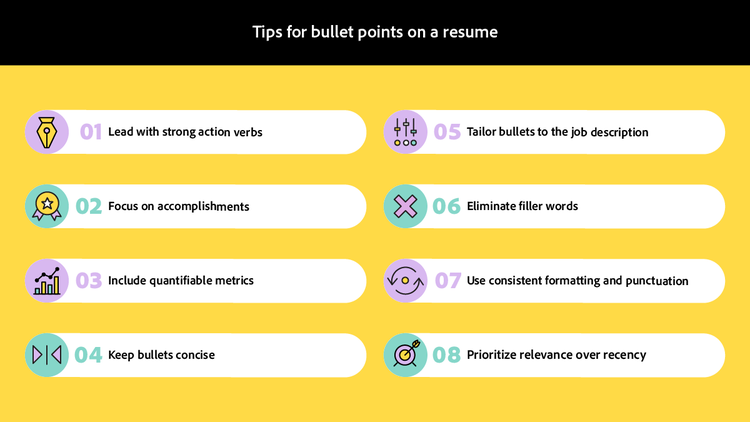
Follow these best practices for writing effective bullet points on resume entries:
The STAR method provides an excellent framework for structuring impactful bullet points. STAR stands for Situation, Task, Action, and Result. While you do not need to include all four elements in every bullet, this framework ensures you move beyond simple job descriptions to showcase meaningful accomplishments.
For example, instead of writing "Managed social media accounts," try "Increased Instagram engagement by 45% over six months by implementing a data-driven content strategy."
When you write a resume, avoid these common bullet point mistakes:
When space is limited, prioritize bullet points that demonstrate measurable impact, align closely with the target job description, and showcase skills mentioned in the posting. Cut bullet points that describe basic job functions, reference outdated technologies, or highlight responsibilities rather than achievements.
Consider the visual impact of your bullet points as well. Resumes with varying bullet point lengths look disorganized and difficult to scan. Aim for similar line lengths across your bullet points to create a clean, professional appearance. This attention to visual detail signals the same care you would bring to work products in your new role.
Testing your bullet points against the 7 second rule can help you evaluate their effectiveness. Print your resume and scan it quickly. Do your most impressive accomplishments jump out? Can you identify your key qualifications at a glance? If not, consider reorganizing or rewriting your bullet points for greater impact.
Your bullet points deserve professional presentation. Once you have crafted compelling content, ensure your formatting remains consistent across all devices and systems by saving your resume as a PDF. When you convert to PDF, you lock in your formatting so recruiters and ATS systems see exactly what you intended. This prevents font substitutions, spacing issues, and other formatting problems that can make even well-written bullet points difficult to read.

