How to generate a contract with AI
AI and automation are revolutionizing business document management, enabling faster creation, smarter analysis, and seamless collaboration for contracts and agreements across every industry.
What is an AI contract generator
An AI contract generator is a tool that uses artificial intelligence to create agreements based on user inputs and predefined templates. These systems analyze your requirements, reference established contract structures, and produce draft documents that include essential language and formatting.
The software tool works by processing prompts and structured data that you provide. When you specify the type of agreement you need and enter relevant details, the AI draws from its training on thousands of contract examples to generate appropriate clauses, terms, and conditions. The result is a coherent draft that follows standard conventions.
Understanding the fundamentals of writing a contract helps you evaluate and refine AI-generated output. Key contract elements include clearly identified parties, defined scope of work or obligations, payment terms, duration, termination provision, confidentiality requirements, and dispute resolution mechanisms.
AI contract generators streamline the initial drafting phase, but they serve as starting points rather than final products. The technology excels at producing structured documents quickly, giving you a foundation to customize and refine according to your specific needs. Whether you need a simple service agreement or a complex partnership arrangement, contract AI tools can help accelerate your workflow significantly.
How to use an AI contract generator
Creating a contract with AI follows a logical workflow: select your tool, define your needs, input details, generate the draft, export to a universal format, review thoroughly, and route for signatures. Each step builds toward a polished, professional agreement.
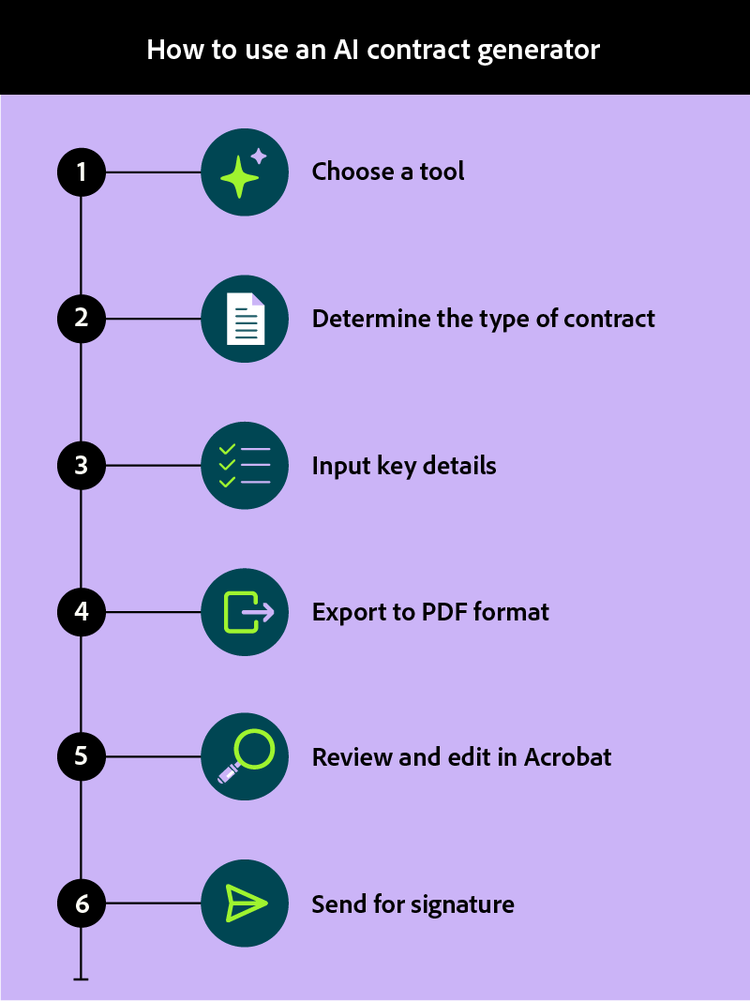
Select a tool
Choosing the right AI contract tool depends on your specific requirements. Consider factors like the types of contracts you frequently need, integration capabilities with your existing document workflows, and the level of customization available.
Evaluate whether the platform offers industry-specific templates, supports collaboration features, and provides secure storage options. For business users handling sensitive agreements, you may want to look for tools that prioritize data security and offer enterprise-grade compliance features. The best contract generator for your needs will balance functionality with ease of use.
Define the type of contract
Before generating content, identify exactly what kind of agreement you need. Common categories include employment contracts, non-disclosure agreements (NDAs), service agreements, independent contractor arrangements, and partnership documents.
Familiarizing yourself with different types of contracts helps you select the appropriate structure and ensures the AI generates relevant clauses. Each contract type has distinct requirements and standard provisions that the generator will incorporate based on your needs.
Input key details and requirements
Provide the AI with comprehensive information about your agreement. Essential inputs typically include the full legal names of all parties involved, their addresses and contact information, specific obligations each party must fulfill, payment amounts and schedules, effective dates and duration, and any special conditions or contingencies.
The more precise your inputs, the more accurate and useful your generated draft will be. Include industry-specific terminology and any unique provisions your agreement requires. An effective AI contract generator relies on quality inputs to produce quality outputs.
Once you submit your inputs, the AI processes your requirements and produces an initial contract draft. Depending on the complexity of your agreement, this typically takes anywhere from seconds to a few minutes.
Review the output structure to ensure it includes all necessary sections. The generated draft should contain an introduction identifying the parties, explanation of the purpose, defined terms, substantive clauses covering obligations and rights, and signature blocks.
Export to PDF format
Convert your generated contract to PDF format to ensure universal compatibility and preserve your document exactly as intended. PDF files maintain consistent formatting across all devices and operating systems, eliminating the risk of layout shifts or font substitutions that can occur with other file types.
Exploring generative AI tools for PDFs can give you additional capabilities for enhancing your documents. PDF format also provides security features like password protection and permission controls that help safeguard sensitive contract information.
Review and edit in Acrobat
After exporting to PDF, thorough review ensures accuracy and completeness. Adobe Acrobat provides AI-powered assistance that helps you analyze contract content efficiently. Using AI Assistant, you can chat with your PDF to ask questions about specific clauses, request definitions of key terms, or identify potential issues.
Beyond analysis, Acrobat makes it easy to act on those insights. Use the built‑in PDF editor to revise the document directly—adding missing provisions, correcting errors, using AI suggestions to refine language for clarity, or tailoring standard clauses to reflect your specific needs. When reviewing multiple documents, PDF Spaces lets you query a batch of files in a centralized AI workspace. Together, AI-assisted review and hands-on editing help transform a first draft into a polished, customized agreement, helping to ensure nothing important is overlooked.
Send for signature
With your contract reviewed and finalized, the last step is routing it for electronic signatures. Prepare the document by adding signature fields in the appropriate locations for each party.
Before sending, consider using the AI summary tool to generate a concise overview of key terms for stakeholders who need to approve the agreement. This helps decision-makers quickly understand the contract's essential points without reading the entire document.
Send the prepared contract to all parties through a secure e-signature platform like Acrobat Sign. Acrobat e-signature technology makes sure signers can’t change the agreement after they add signatures, protecting signed documents from tampering. In addition, you can track signature status and manage all requests — creating a valuable audit trail with timestamps. Once all signatures are collected, distribute final copies to all parties and store the executed agreement securely.
Benefits of using Adobe Acrobat for contracts
Adobe Acrobat offers distinct advantages for managing contracts throughout their lifecycle, from initial creation to final execution and storage.
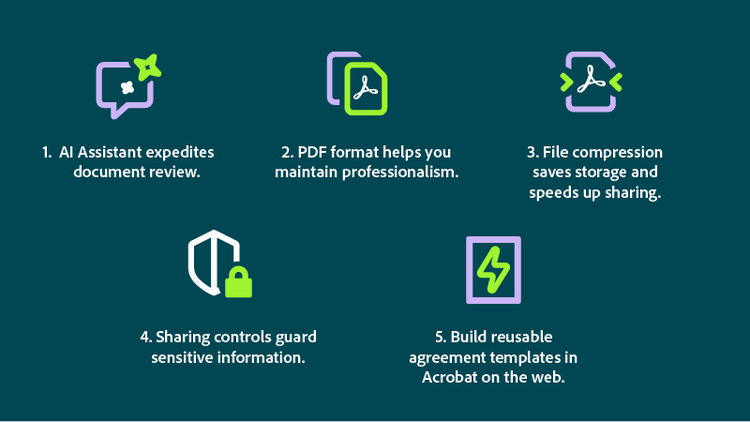
- AI Assistant accelerates document review. Ask questions about contract content, request clause explanations, or generate summaries that highlight key obligations and deadlines. This intelligent analysis helps you understand complex agreements quickly and identify areas requiring attention.
- PDF format keeps your presentation professional. PDF files maintain exact formatting regardless of how recipients view the document. Fonts, spacing, tables, and graphics appear identically on any device, preventing the misalignment issues common with word processing formats.
- File compression reduces storage requirements and speeds sharing. Acrobat compresses PDF files without sacrificing quality, making large contracts easier to email and store. This efficiency matters when managing high volumes of agreements.
- Sharing controls protect sensitive information. Set permissions to restrict printing, copying, or editing. Password protection adds another security layer, ensuring only authorized parties access confidential terms.
- You can quickly build reusable agreement templates in Acrobat on the web, helping you speed up your document process and keep key forms consistent. These templates work especially well for organizations that rely on uniform contracts and standardized agreements.
Limitations and key considerations using AI
While AI contract generators offer significant efficiency gains, understanding their limitations helps you use them responsibly and effectively.
Accuracy varies with complexity. AI performs well with standard agreements but may struggle with highly specialized or unusual contract requirements. Complex transactions involving multiple jurisdictions or novel business arrangements require careful human oversight.
Legal nuance also requires expertise. AI cannot fully replace legal judgment. Subtle implications of specific language, potential conflicts between clauses, and jurisdiction-specific requirements may call for professional review for high-stakes agreements.
Training data has boundaries. AI systems generate content based on patterns learned from existing contracts. They may not reflect the most recent legal developments or industry-specific best practices that emerged after their training period.
For these reasons, human review remains essential. Treat AI-generated contracts as first drafts requiring verification. Check all factual details, ensure terms accurately reflect your intentions, and confirm that protective provisions adequately address your risks.
Context matters significantly as well. AI lacks understanding of your specific business relationships, negotiation history, or strategic objectives. You must evaluate whether generated terms align with your broader goals and existing commitments.
Use extra caution with sensitive agreements such as those involving financial exposure or intellectual property. Consider professional legal review before execution.
When using any contract AI tool, consider data privacy. It is helpful to understand how your information is processed and stored. Choose platforms with clear privacy policies and appropriate data protection measures.
Frequently asked questions
Can AI generate a contract for me?
How can I use AI to review a contract?
What is the best AI tool for contracts?
Do I need technical skills to use an AI contract generator?
Can I customize AI-generated contracts?
How can I understand the key terms of a contract?
How do I send an AI-generated contract for signature?
You may also like