How to generate an invoice with AI
AI-powered invoice generators help businesses create professional invoices in minutes. Learn how to automate your invoicing process and streamline document management.
How to use an invoice generator
Artificial intelligence has fundamentally changed how business professionals approach document creation. Modern AI tools can analyze your business data, understand context, and generate professional documents that would previously require significant manual effort. Whether you're a freelancer billing your first client or a growing company processing hundreds of invoices monthly, understanding the basics of what an invoice is sets the foundation for effective billing.
Every invoice requires certain essential elements to be complete and professional. These include your business details such as name, address, and contact information, along with your client's corresponding information. You'll also need itemized services or products with clear descriptions, quantities, and rates. Payment terms specify how and when you expect payment, while the due date creates accountability. Understanding the various types of invoices helps you choose the right format for each situation, whether you need to invoice someone for a one-time project or establish recurring billing.
The process of using an online invoice generator follows a logical sequence that maximizes efficiency while ensuring accuracy. Here's how to approach each step.
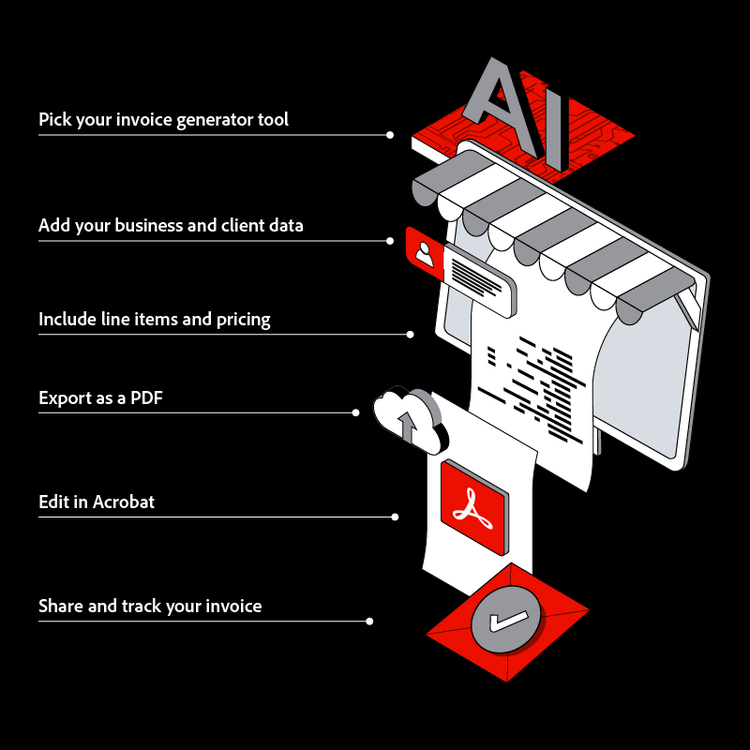
Choose your invoice generator tool
Using a free invoice template such as a template from Adobe Express is a smart place to begin. It gives you a solid foundation, and with a few thoughtful updates, you can easily tailor the content to reflect your specific branding, voice, and business needs. Small adjustments to language, structure, or examples can go a long way in making the material feel custom and relevant to your audience.
If you’re looking for more in-depth support, an AI assistant can be a valuable next step. These tools allow you to interact directly with your documents, often for free, making it easier to find information and get answers quickly. For example, you can upload your client and business documents into a PDF Space with Adobe Acrobat and then query that content in a conversational way. This makes it easier to extract insights, generate customized content, and streamline your workflow while maintaining accuracy and consistency.
Input your business and client data
Once you've chosen your tool, the next step involves entering your company details and client information. In Adobe Acrobat, you can save templates for future use, dramatically reducing data entry time for repeat clients.
Your business details should include your legal business name, address, phone number, email, and any relevant registration or tax identification numbers. Client information mirrors this structure. Advanced AI tools like Acrobat AI Assistant can auto-populate recurring fields based on previous invoices, recognizing patterns in your billing history, and suggesting appropriate entries for new documents.
Add line items and pricing
The core of any invoice lies in its line items—the products or services you're billing for. Enter clear descriptions that your client will easily understand, avoiding internal jargon or abbreviations. Include quantities, unit prices, and any applicable discounts. AI invoice generators often handle tax calculations automatically, applying the correct rates based on your location and the nature of the goods or services provided. When you aggregate past invoices, Acrobat can even suggest pricing based on your historical data or industry standards, helping ensure consistency across your invoicing.
Export to PDF
Before sending any invoice, a careful review ensures accuracy and professionalism. Confirm that all calculations are correct, client details are up to date, and the invoice number follows your sequential system. AI-generated invoices may occasionally need small refinements, especially for non-standard services or custom terms.
Once finalized, export your invoice to PDF format, the standard for secure, professional document sharing. Using Adobe Acrobat ensures consistent formatting across devices and preserves fonts, layouts, and branding exactly as intended. Acrobat also makes it easy to save your invoice as a reusable PDF template, allowing you to build a library of polished starting points that streamline future invoicing and maintain brand consistency over time.
Edit and finalize in Acrobat
After exporting, open your invoice in Adobe Acrobat to make final adjustments. Acrobat Pro editing tools allow you to update text, correct pricing, fine-tune spacing, or adjust logos and headers without needing to return to the original source file. This is especially useful when last-minute client changes arise.
You can also use Acrobat to add form fields for line items, totals, or payment details, making invoices clearer and easier for clients to review. For added professionalism, Acrobat enables you to insert digital signatures, apply password protection, or lock sections of the document to prevent accidental edits—ensuring the invoice you send is accurate and client-ready.
Send and track your invoice
Once finalized, Adobe Acrobat simplifies delivery and follow-up. You can send invoices directly from Acrobat via email, or generate a shareable link that clients can open without downloading large attachments. Acrobat for business has tracking features that let you receive notifications when an invoice has been opened and viewed, giving you clear insight into client engagement in order to time follow-up appropriately.
Acrobat also supports adding payment links and setting reminders, helping reduce delays and minimize manual effort. By centralizing sending, tracking, and follow-up within Acrobat, you maintain a systematic approach to invoice management while reinforcing a smooth, professional client experience.
AI invoice generator tools
The marketplace for free AI-powered invoicing solutions has expanded significantly, offering options for every business size and complexity level. Understanding the different categories helps you identify which approach best fits your operational needs and budget. Each tool type brings distinct advantages and potential limitations worth considering before committing to a platform.
The key is matching your choice to your actual workflow requirements rather than being swayed by features you may never use. A freelancer with five clients monthly has very different needs than a consulting firm processing hundreds of invoices. Here's a breakdown of the main tool categories you'll encounter.
Template-based generators
Adobe Acrobat AI-powered document assistant
From your Express template, Adobe Acrobat helps you finalize and manage the invoice as a PDF, whether you need to edit details, prepare it for sharing, or store it with other financial documents. Adobe Acrobat offers a professional approach to free, AI-powered invoicing by helping users work directly with the documents they already rely on, such as proposals, contracts, and past invoices. Instead of starting from scratch, professionals can quickly reference existing files to understand context and generate appropriate content.
Acrobat’s intelligent document capabilities can chat with documents, extracting relevant information and responding to your specific requests. You might ask the assistant to create the content for an invoice based on a project proposal or find billing details in an email correspondence. The conversational interface makes this tool intuitive once you understand its capabilities. Acrobat provides a robust and scalable solution, fitting seamlessly into established document workflows.
Accounting software integrations
Automation platforms
Benefits of using an online invoice generator
Choosing the right invoicing tool can have a direct impact on your business efficiency and cash flow. AI-powered invoice generators address the common pain points that make manual invoicing frustrating and time-consuming. Understanding how to write an invoice effectively becomes much easier when automated tools handle the technical details, allowing you to focus on running your business.
The advantages of modern invoicing tools extend beyond simple convenience. They represent a fundamental improvement in how businesses manage their billing relationships with clients. Here are the key benefits that make free online invoice generators valuable for businesses at every stage.
- Time savings and efficiency. Manual invoice creation involves repetitive data entry, formatting adjustments, and calculation verification that consumes valuable hours. AI invoice generators reduce this process from hours to minutes by automating routine tasks. Templates remember your preferences, and auto-fill features populate recurring information, while intelligent systems learn your patterns over time. This efficiency gain compounds with each invoice, freeing you to focus on revenue-generating activities rather than administrative paperwork.
- Reduced errors and improved accuracy. Human error in invoicing creates problems ranging from minor confusion to significant financial discrepancies. AI tools catch calculation mistakes before they reach your clients, ensuring totals, taxes, and discounts compute correctly every time. Formatting inconsistencies that might confuse clients or appear unprofessional get standardized automatically. Some systems even flag unusual entries that might indicate data entry errors, providing an additional verification layer.
- Professional appearance and branding. Your invoice represents your business in a tangible document that clients review carefully. Consistent, polished invoices reinforce your credibility and professionalism. Online invoice generators provide access to high-quality templates and leverage design best-practices. Maintaining brand consistency across all client communications becomes effortless when your invoicing tool applies your visual identity automatically.
- Faster payment cycles. Clear, accurate invoices lead to quicker client payments. When clients receive professional documents with unambiguous payment terms and easy-to-understand line items, they're more likely to process payment promptly. Using AI summary tools can help create concise invoice summaries for clients who need quick overviews. Confusion about charges or difficulty understanding invoice details creates payment delays that hurt your cash flow.
- Easy record keeping and organization. Modern invoice generators automatically store your documents in searchable archives, eliminating the need for manual filing systems. Finding a specific invoice from months ago takes seconds rather than minutes of searching through folders. This organization proves invaluable during tax preparation, financial audits, or client disputes. Digital records also provide backup protection against the physical document loss that can plague paper-based systems.
- Scalability for growing businesses. As your business expands, you may find that invoice volume increases proportionally. Manual processes that worked for ten invoices monthly become unsustainable at fifty or a hundred. AI invoice automation scales effortlessly, handling increased volume without requiring additional staff or proportionally more time. You can create a PDF invoice for each client with the same minimal effort regardless of whether you're billing one client or one hundred.
- Cost-effectiveness. The administrative overhead of manual invoicing includes not just time but also paper, printing, postage, and storage costs. Digital invoicing eliminates or reduces many of these expenses. Even paid invoice generator subscriptions typically yield savings, making them a sound investment for businesses of virtually any size.
Frequently asked questions
Can AI create an invoice for me?
How can I use AI to automate invoices?
Is there a free invoice generator?
What information should every invoice include?
Can I customize AI-generated invoices with my branding?
How do I send an invoice?
How do I password protect an invoice?
You may also like