


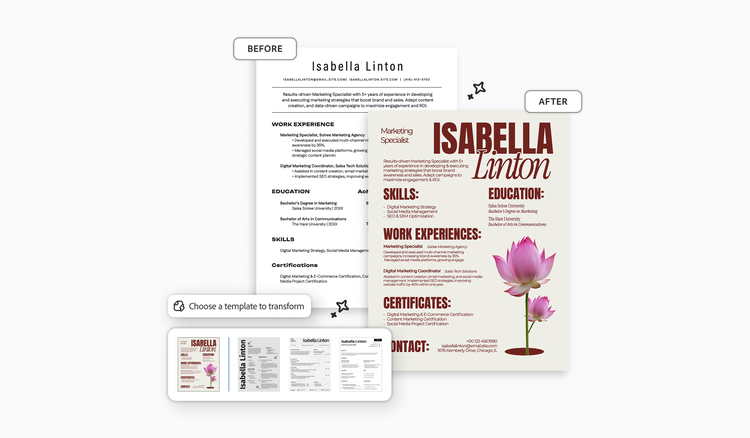
Modernizing an old resume doesn’t mean starting over. Most large employers screen resumes through an applicant tracking system (ATS), so the goal is a file that reads cleanly to software and to people. Convert your existing file, delete obsolete sections, quantify recent achievements, and choose an ATS-friendly layout template — your career history stays intact while the presentation gets current.
Why you need a modern resume template.
Adobe’s 2024 resume survey shows that 71% of Baby Boomer job seekers choose not to use resume templates, but clinging to outdated conventions and manual formatting can unintentionally hurt your document’s visibility in modern recruiting systems. If you are entering the job market for the first time or changing career paths, find the right resume template for starting from scratch.
To modernize an old resume without starting from zero, import your existing document into a templated resume builder. Strip away outdated formatting and obsolete sections, update your experience into quantified bullet points, and re-export a clean, ATS-compliant version.
Step 1: Get your old resume into an editable format.
Before you can update the content, you need a file you can actually edit. If all you have is a saved PDF or an old Word file, you don’t need to retype anything. Pick a route based on how much of your existing layout you want to keep.
- Convert the file and edit it yourself. A PDF to Word converter turns your resume back into editable text so you can work in a word processor. Your original layout comes with it, which is the point if you like the design — though if the old file uses columns or header fields, you’ll rebuild those in Step 3 anyway.
- Import it into a resume builder. Upload your PDF, and the tool maps your career details into a modern template. You trade the old design for a current one, which is the fastest route when the layout is the problem. Adobe, for example, converts an uploaded resume into an editable document and may replace uncommon fonts or complex layouts during import. The tool supports a PDF import up to 20 MB.
- Edit the PDF directly. If the content is mostly fine and you only need to fix formatting, some PDF tools let you edit text and adjust the layout inside the file, without converting anything first.
Step 2: Delete what dates you.
The fastest way to modernize an old resume is to remove obsolete formatting conventions that signal an outdated job search strategy. Use this subtraction checklist to go through your document and delete what dates you.

The objective statement.
Objective statements like “Seeking a challenging position in management where I can apply my skills” are obsolete. They focus on what you want from an employer, not the value you bring. Instead, replace the objective statement with a focused, two-to-three-sentence professional summary that highlights your core expertise and achievements.
“References available upon request.”
This phrase takes up valuable resume real estate. Hiring managers already assume you will provide references when requested. Current advice is to leave references off entirely — a reference block doesn’t map to any field an ATS is looking for. If you include that section, it may pull a reference’s phone number into your contact details or spend keyword-scanning capacity on content that isn’t about you.
Your full street address.
Your street address no longer belongs on your resume. Listing a full physical address creates unnecessary privacy risks and can prematurely disqualify you based on your commute. Modern standards only require your city or broader metro area and state. If you are relocating, you can list “relocating to [City, State].”
Profile photos and headshots.
Unless you are applying for acting or modeling roles, you don’t need to include a headshot with your primary resume. Including a photo is commonly discouraged because it can introduce unconscious bias into hiring decisions.
Personal information.
Remove details about your age, marital status, citizenship, number of children, or religious affiliation. Most employers in the United States deliberately avoid collecting this information, and volunteering it can work against you.
Graduation dates more than 10 years ago.
If you graduated from college more than 10 years ago, AARP recommends removing the graduation year from your education section. Omitting older graduation dates helps prevent age bias while keeping the focus squarely on your degrees and professional credentials.
Obsolete technology listings.
Listing software applications from decades ago immediately signals an outdated skill set. Remove references to obsolete technology and replace with current industry-standard tools.
Dated email domains.
If your email address uses a dated internet service provider domain like aol.com, att.net, or comcast.net, set up a professional, modern email to use for your job search. You can use a mainstream provider like gmail.com or create a personal custom domain.
Step 3: Update the information that stays.
Refine your remaining work experience to meet modern standards.
- Focus on the last 10 years. Hiring managers care most about your recent impact. AARP’s job-search guidance also advises showing your last 10 years of experience, noting that job postings rarely ask for more. Detail your recent roles with bullet points and consolidate older positions into a brief Early Career Highlights section. In this section, you can simply list company names, titles, and dates. However, if you’re applying for a senior role, you can include up to 15 years of experience if the information supports your candidacy.
- Quantify your impact. Replace passive job descriptions with action-oriented achievement statements. Use specific numbers, percentages, or dollar amounts to show your impact.
- Remove two-column and header layouts. Many older resume templates place contact details inside header and footer fields or split body copy into decorative, side-by-side columns. This is a common formatting mistake for modern ATS, which often skips page headers and misreads multicolumn text, causing your information to appear out of order in online application portals. Reformat your document into a clean, single-column layout with standard margins (0.5 to 1 inch) and clear 10–12 point typography.
Step 4: Export the two versions you need.
To maximize your application’s success with both automated software and human readers, export two distinct versions of your modern resume:
- The online application resume. Format this resume for ATS portals. Create a clean, single-column document. If an online portal specifically asks for a Word file, export a DOCX file. Otherwise, export your resume as a text-based PDF.
- The direct networking resume. Use this resume for direct email follow-ups, LinkedIn outreach, and in-person interviews. Use professional resume templates to create a visually styled layout.
Before you submit your PDF resume online, test it by opening the document and clicking and dragging your cursor over the text. If you can highlight individual words, the file contains selectable text, and ATS software can parse it. If the entire page highlights as a single box, the resume is an image file that cannot be parsed and needs updating.
Once you modernize your baseline resume, you’ll be able to tailor your resume to any job description in 10 minutes.
Frequently asked questions
No, you don’t need to list employment gaps on your resume. Frame brief career breaks using years instead of month-year dates (e.g., 2021–2023), or briefly account for longer sabbaticals in your professional summary as intentional career transitions or skill development periods. Career gaps for a variety of reasons are much more common than they were several decades ago. Brief gaps rarely need explaining, while longer ones are worth a line in your summary.
Yes. Group freelance or consulting projects under a single “Consultant” or “Freelance Professional” header. This modernizes your layout while explaining gaps in your work history. List your primary client achievements and core deliverables as bullet points under that single entry rather than cluttering your timeline with many microjobs.
Keep the company name on your resume. You can add the phrase “Defunct” or “(formerly [Company Name])” in parentheses next to it. Include a one-line description summarizing the company’s industry or scale at the time so hiring managers understand the scope of your role even though the business is no longer operating.
Yes, including a customized, clean LinkedIn URL — usually your first and last name or a close variation — in your contact header is now standard practice. Make sure your LinkedIn profile matches the dates and job titles on your updated resume. Recruiters frequently cross-reference your application against your online profile.
You may also like
title
Modernize an old resume in 4 steps.
cardImageAltText
Before-and-after images of a resume transformed by using a template.
cardImage
Tags
caas:content-type/article,caas:products/acrobat,caas:topic/job-search,topic/resume-ai

