



By turning vague ambitions into clearly defined actions, SMART goals empower students to track progress, stay motivated, and build lifelong self-management skills. It's a powerful way for students to stay focused, motivated, and organized—especially when juggling academics, extracurriculars, and personal growth. SMART goals offer a structured approach so that students can better track their progress, stay accountable, and achieve meaningful outcomes throughout their educational journey.
What are SMART goals?
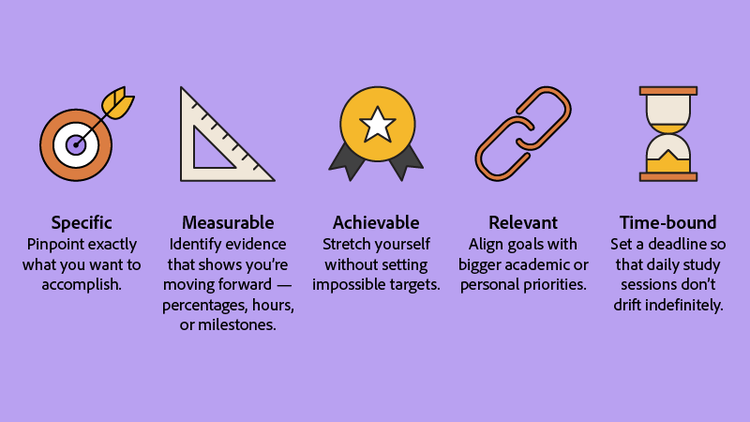
SMART is a time-tested framework that helps learners turn aspirations into clear action plans:
- Specific: Pinpoint exactly what you want to accomplish.
- Measurable: Identify evidence that shows you’re moving forward—percentages, hours, or milestones.
- Achievable: Stretch yourself without setting impossible targets.
- Relevant: Align goals with bigger academic or personal priorities.
- Time-bound: Set a deadline so that daily study sessions don’t drift indefinitely.
Each element transforms a wish—“I want better grades”—into a roadmap: “Raise my biology grade from 78% to 88% by the end of the semester.” Because every part is explicit, you can evaluate outcomes objectively and adjust strategy when needed.
In practice, SMART goals function like a personal project brief: they specify scope, resources, timeline, and deliverables in language you—and anyone helping you—can understand at a glance. Studies have found that students who framed study targets as SMART goals were more likely to complete assignments ahead of schedule. Researchers attributed the success to the built-in feedback loop created by the measurable and time-bound elements.
Early in your planning, consider digital workflows that support documentation. For instance, you can convert Word to PDF to lock in formatting before sharing a project outline for peer review. PDFs preserve fonts and layout across Windows, macOS, iOS, and Android, so collaborators always see the same version you do.
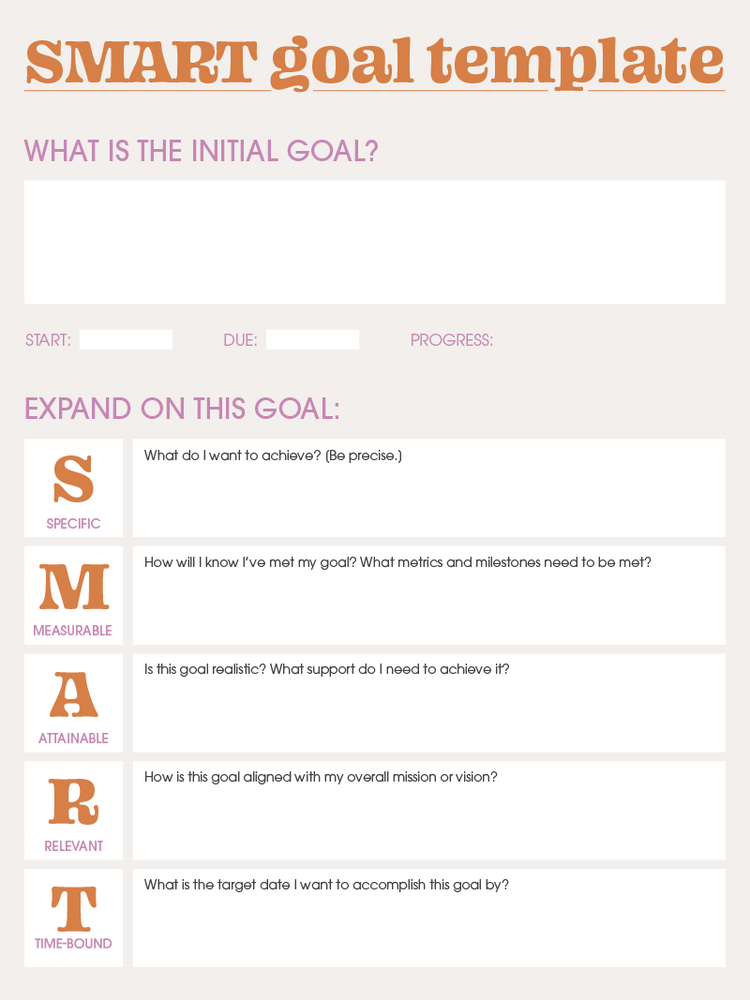
SMART goals template — download a ready-made worksheet you can fill out right in Acrobat or any PDF editor.
SMART goals examples for students
Below are six practical objectives that showcase how the SMART method adapts to common student priorities. Notice how each goal spells out the specific task, the measurement standard, and the deadline.
For studying
Schedule three 45-minute algebra study blocks every week for eight weeks.
- Why it works: It breaks a broad subject into recurring, digestible sessions.
- Progress check-in: Weekly review of completed sessions.
For grades
Boost cumulative GPA from 3.2 to 3.6 by the end of the academic year.
- Why it works: It sets a quantifiable benchmark and final date.
- Progress check-in: GPA snapshot after each term.
For career prep
Update résumé and cover letter using an AI resume builder within two weeks of semester start.
- Why it works: It aligns job-hunt prep with on-campus recruiting season.
- Progress check-in: Completed résumé upload to job portal.
For volunteering
Log 20 volunteer hours at the campus tutoring center before finals, documenting sessions in an online journal.
- Why it works: It blends community service with skill-building and reflection.
- Progress check-in: Hour log audit every Friday.
For daily habits
Dedicate 30 minutes nightly to reading course materials on tablet to reduce last-minute cramming.
- Why it works: It connects habit formation to stress relief.
- Progress check-in: Weekly self-assessment survey.
For applications
Submit scholarship application packet, including recommendation letters, one month before deadline.
- Why it works: It backward-plans complex deliverables.
- Progress check-in: Checklist completion three weeks out.
Throughout the semester, remember that objectives can be platform-inclusive. Whether you're working on Windows, macOS, or mobile, syncing files in PDF format ensures fonts and layouts remain consistent.
Real-world application: imagine you're balancing coursework with a part-time job. A SMART framework lets you map study sessions around shift schedules without sacrificing sleep. If circumstances change—say, a new project is added mid-term—you can revisit the achievable component to re-scope targets instead of abandoning them.
Another advantage is mentorship clarity. When you share a SMART goal with a tutor—"Improve research-paper citations score from 82 % to 92 % by Week 10"—the tutor immediately knows how to allocate coaching time and resources.
How to write SMART goals
Crafting effective objectives starts with a clear blueprint. Follow these steps to build goals that stand up to real-world classroom pressures.
- Identify the outcome. Write a one-sentence statement of what success looks like—for example, “Finish the first draft of my thesis.”
- Apply the SMART filter. Assess whether the outcome meets every letter of the acronym and refine wording until it does.
- List required resources. Factor in time, technology, and support (professors, advisors, peers).
- Set micro-milestones. Break larger objectives into weekly or bi-weekly checkpoints.
- Document the plan. Create a dedicated tracker—spreadsheets, calendar alerts, or an online PDF editor for editable progress charts.
- Schedule reviews. Block recurring 10-minute sessions to check metrics and adapt tactics.
- Celebrate milestones. Positive reinforcement builds momentum for long-term projects.
Tips on setting effective SMART goals
Knowing what SMART goals are is one thing—writing them effectively is another. For students, crafting goals that are clear, achievable, and motivating can make a big difference in how they manage their time and measure their progress. Below you can find practical tips to help you write SMART goals that actually work, turning good intentions into meaningful accomplishments.
- Use positive language focused on growth rather than avoidance.
- Combine large goals with mini-targets to maintain motivation.
- Pair each objective with a digital accountability tool such as an AI exam-prep assistant or AI flashcard maker.
- Keep goals visible—post them on your study dashboard or mobile home screen.
Ways to measure progress towards SMART goals
Monitoring keeps ambition grounded in reality. Try these tracking strategies:
- Check-in calendars. Log daily study minutes or pages read so trends emerge over time.
- Numeric KPIs (key performance indicators). Use percentages—like increasing quiz scores from 70 % to 85 %.
- Reflection journals. Write weekly summaries highlighting wins and obstacles.
- Digital trackers. Edit progress charts in a document editor to keep everything in one place.
- Self-testing tools. An AI quiz generator can create practice questions that reveal knowledge gaps.
Consistent measurement converts ambition into actionable data. If you notice quiz scores plateau, you can pivot—perhaps by adding peer-review sessions or adjusting study techniques—before final exams loom. Likewise, visual trend lines in a PDF chart make it easy to present progress reports to advisors or scholarship committees.
Frequently asked questions
If you're not seeing progress, revisit the 'Achievable' and 'Time-bound' elements of your goal. It may be too ambitious for the current timeframe, or external factors may require you to adjust your plan. Break the goal into even smaller steps and celebrate minor victories to rebuild momentum.
Aim for a window you can realistically manage—often one semester. Shorter objectives (two to four weeks) work well for skill drills, while year-long goals suit GPA or scholarship targets.
Absolutely. Setting a target such as “Attend five networking events by May” follows the same framework and supports well-rounded development.
Calendars, PDF planners, and study apps with reminder functionality all work. Converting templates to PDF ensures consistent formatting across devices.
Weekly reviews strike a balance between proactive correction and over-analysis. Major objectives may require mid-semester deep dives to adjust strategy. Establishing a recurring calendar event—ideally at the same time each week—guards against reactive, stress-driven check-ins that can skew perception of progress. By treating reviews as mini retrospectives, you’ll reinforce accountability and capture small wins that boost motivation.
Yes—clarity and structure replace guesswork, making workloads predictable and progress visible, which tends to lower anxiety. In a 2022 campus wellness study, students who maintained written SMART goals reported a 22 % decrease in self-described stress levels compared to peers using informal to-do lists. The act of codifying intentions appears to offload mental overhead, freeing cognitive resources for problem-solving rather than worry.
They are. Define collective deliverables—“Submit prototype by Week 6”—and assign individual responsibilities to keep everyone accountable. Shared PDF trackers allow teammates to tick off tasks in real time, ensuring transparency across different devices and operating systems. Incorporating weekly stand-ups tied to the SMART milestones helps surface bottlenecks early, keeping collaboration on schedule.
You may also like
title
SMART goals examples for students
cardImageAltText
Student writing SMART goals
cardImage
Tags
caas:content-type/article,caas:products/acrobat,caas:topic/chat-pdf,caas:topic/edit-pdf

