#f8f8f8
From summarizing complex concepts to generating study aids like flashcards, AI is making education more efficient and accessible. Yet, many students struggle to convert their detailed notes into a usable study format.
This guide will show you how to turn notes into flashcards using AI tools, helping you save time and optimize your study workflow. You’ll also be able to learn the benefits of such AI-powered tools when it comes to studying, as well as answers to the most common questions around AI study tools.

Why use AI-generated flashcards

AI tools are revolutionizing the study process and one of the ways in which they do so is by simplifying how notes are transformed into flashcards. Instead of manually sifting through pages of notes, AI tools help create structured, concise flashcards in minutes. Here’s why AI-generated flashcards are so effective:

  • Time-saving efficiency: AI quickly identifies key points in your notes, eliminating the need for manual summarization.
  • Structured organization: AI tools ensure your notes are formatted systematically, making it easier to study essential concepts.
  • Customizable content: Many AI tools allow you to tailor flashcards to focus on specific topics or details.

By automating the process, AI helps students focus on learning rather than spending hours converting notes into manageable formats. Such tools can help with other aspects of the learning process, from detailing effective study methods to personalizing a study session.

One of AI's standout features is its ability to summarize notes and identify essential points for flashcard creation. AI tools rely on algorithms to analyze your content, extract the most important information, and condense it into study-ready flashcards. This process frees students from the tedious task of combing through documents manually.

Active recall, a proven memory-enhancing technique, works seamlessly with flashcards. AI tools make this process even smoother by delivering concise flashcards that aid in retention.
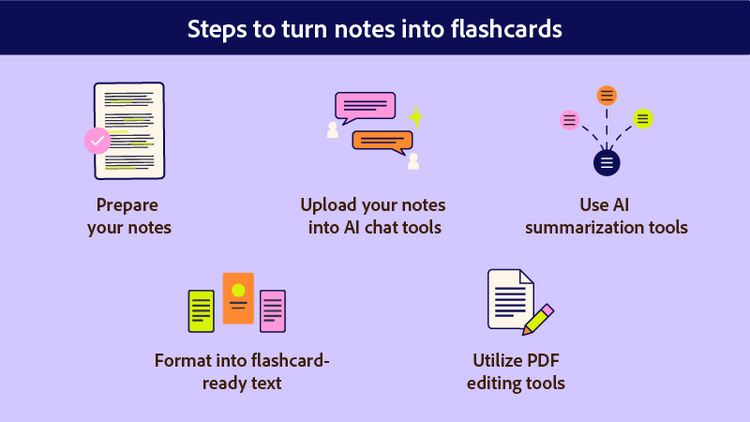
Steps to turn notes into flashcards

Animated graphic shows the five steps to turn notes into flashcards.

Creating flashcards from notes using AI tools is quite straightforward. No matter what tool you use, you can generally follow these steps to streamline the process:

1. Prepare your notes

Before using AI, ensure your notes are well-organized. Focus on the most relevant information, such as definitions, key concepts, and examples. There are many resources and tips on how to organize study notes. This preparation improves the accuracy and quality of the flashcards AI generates.


2. Upload your notes into AI chat tools

Most course materials come as PDFs and you can use AI tools to chat with your PDF, such as Acrobat AI Assistant. This will help analyze your content and pinpoint key ideas, while providing answers to any question you may have about your courses.


3. Use AI summarization tools to extract key concepts

You can use an AI summary generator to condense lengthy notes into simplified, flashcard-ready summaries. This will help focus on key information and deliver effective flashcards that cover the extent of your course material.


4. Format the extracted content into flashcard-ready text

Organize the summarized content into concise questions and answers. Ensure each flashcard focuses on one concept at a time.


5. Utilize PDF editing tools for final adjustments

Use online tools to edit PDF files before turning them into flashcards. This will enable you to add visuals or format text for clarity and better usability.


By following these steps, you’ll have a set of AI-generated flashcards that are ready to enhance your study sessions.

What is a flashcard generator and how to use it?

An AI flashcard maker is a specialized tool designed to create flashcards from notes automatically. These tools use machine learning algorithms to identify key data, summarize it, and format it into flashcards. Core functionalities include:

  • Automatic summarization of lengthy notes
  • Customization options for tailoring flashcard content
  • Integration with active recall and spaced repetition techniques

To make the most of flashcard generators, here are a few steps to follow:

  1. Input concise data: Avoid uploading unorganized or overly lengthy notes.
  2. Guide the AI: Use prompts to direct the AI in identifying essential points.
  3. Customize flashcards: Personalize flashcards for specific topics, adding visuals or formatting for clarity.
  4. Test usability: Ensure the flashcards cover the concepts thoroughly by reviewing their content before studying.

By leveraging these features, you can make flashcards from notes efficiently and effectively. The AI flashcard generator can help automate or skip some of the steps from the manual process of turning notes into flashcards. Just like many other AI tools for students, this can help you save time, get organized, and create customized study aids.


Three animated flashcards are shown.

Frequently asked questions.

What app makes flashcards out of notes?

Several apps, including Acrobat AI Assistant, are designed to turn notes into flashcards. They use AI to identify critical information in your notes, summarize content effectively, and format it into flashcards.

Are AI flashcards as effective as manually created ones?

Yes, AI flashcards can be just as effective as manually created ones, provided the input notes are well-organized and relevant. AI tools simplify the process of identifying key points, which can reduce human error and save time. However, it’s recommended to review the AI-generated flashcards for accuracy and add any missing details for completeness.

Can AI tools create visual flashcards?

Many AI tools offer customization options that include adding visuals such as diagrams, charts, or images to your flashcards. These features can enhance understanding and retention, especially for complex concepts that benefit from visual aids.

Which subjects work best with AI flashcards?

AI flashcards are versatile and can be used for a wide range of subjects, including sciences, languages, history, and math. However, they are particularly effective for subjects with clear definitions, formulas, or structured concepts, as AI excels at identifying and summarizing these types of data.

How do AI tools handle large amounts of notes?

AI tools are designed to process large volumes of notes efficiently by summarizing the content and identifying key points. Some tools allow users to upload entire textbooks or multiple pages of notes at once, making them ideal for extensive study materials. However, dividing notes into smaller, focused sections can improve accuracy.

Are there privacy concerns when using AI tools for flashcards?

When using AI tools, it’s important to ensure the platform you choose prioritizes data security and privacy. Look for tools that offer encrypted uploads and do not store your notes permanently on their servers. Always review the privacy policy of the AI tool before using it.

Keep exploring

https://main--dc--adobecom.aem.live/dc-shared/fragments/seo-articles/seo-caas-collection

https://main--dc--adobecom.aem.live/dc-shared/fragments/seo-articles/acrobat-color-blade