How HR and policy teams are using visual document design to reduce onboarding and compliance friction across hybrid workforces.
HR and policy teams are rethinking their approach to documentation, placing greater emphasis on visual clarity and ease of use. This article explores how structured, user-focused document design can streamline onboarding, support compliance, and keep hybrid teams aligned.
Hybrid work has fundamentally changed how employees interact with HR and policy documents such as onboarding documents. What were once static reference files, downloaded once, acknowledged, and rarely revisited, are now expected to play an active role in onboarding, decision-making, and everyday compliance. These documents often replace in-person explanations, making clarity, structure, and usability far more critical than they were in office-centric environments, and highlighting the need for a clear document management structure.
As a result, many HR and policy teams are re-evaluating how their documents function in practice. Rather than treating policies as something employees simply "read and sign", they are beginning to design documents that are easier to understand and more useful in real situations. The goal is not just compliance, but ensuring people genuinely know what to do and where to find the information they need.
style
two up
layout
1 | 2
Share this page
Why visual document design is getting more attention in HR spaces.
Based on Adobe Acrobat data combined with a survey of more than 400 professionals, 57% of respondents require enhanced document design weekly or more. The move towards visual document design isn't about aesthetics. It's about transforming them into formats that work better in real life situations. With growing regulatory requirements, more distributed teams, and less time for in person explanation, text-heavy policies often fall short.
In regulated industries across Australia (such as healthcare, finance, education, and government), unclear documentation can quickly lead to inconsistent processes or missed steps. Hybrid work adds another layer of complexity, as employees may not have immediate access to HR or compliance teams when questions arise.
Visual document design helps bridge that gap. By improving structure and layout, it supports faster understanding and more confident decision-making. Simple design choices can make a big difference, such as:
Clear headings and sections that show how information is organised
Visual summaries that highlight key obligations and actions
Icons or diagrams that explain processes at a glance
Clear signposting to detailed sections when more context is needed
The most common ways HR and policy teams are using visual documents.
The shift to visual documents is driving a range of practical use cases. According to Adobe data, 33% of respondents focus on HR and policy communications, such as onboarding guides and benefits overviews. This helps improve understanding, reduce friction, and support consistent communication across distributed teams.
Turning policies into infographics and visual summaries
Converting policies into infographics or visual summaries is the top use case for 42% of respondents. This reflects a clear need to distil complex information into formats that are easier to absorb and remember.
Visual summaries are particularly effective for organisation-wide policies, such as codes of conduct, data protection guidelines, and workplace health and safety procedures. By surfacing key obligations upfront, they reduce the risk of critical information being missed in long-form documents.
Common formats include:
One page policy overviews
Flowcharts for decision paths or escalation steps
Visual checklists for compliance requirements
These summaries support, rather than replace, full policy documents. They act as clear entry points that help employees grasp the essentials before referring to detailed sections when needed.
Designing onboarding documentation that guides action
Onboarding is another major driver of visual document redesign. Traditional onboarding documentation often assumes linear reading, but the reality is that new hires are typically juggling multiple systems, tasks, and deadlines simultaneously. In hybrid environments, this challenge is even greater.
Visual onboarding guides provide clear direction by showing what to do, when to do it, and where to get support. Many organisations are moving away from lengthy welcome packs in favour of structured, action oriented playbooks.
Effective formats typically include:
Step-by-step timelines for the first weeks
Visual role and responsibility overviews
Clear links between policies and required actions
By focusing on guidance rather than information overload, visual onboarding documents help employees ramp up faster and reduce repeated follow-ups with HR and managers.
Adobe Acrobat Studio capabilities that support document management workflows.
HR and policy teams need more than visually appealing documents. They need a document management workflow that supports collaboration, accuracy, and ongoing change. Adobe Acrobat Studio combines visual document creation with policy management capabilities to support modern HR workflows.
Generative AI for clear, structured summaries.
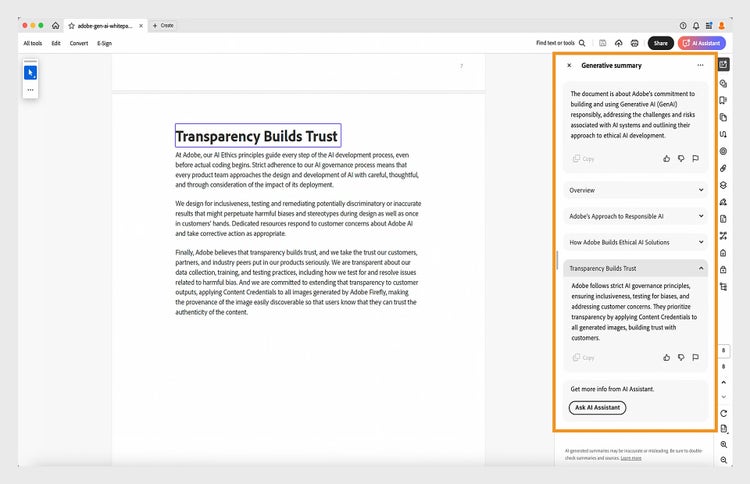
With Acrobat Studio's generative summary feature, users can read through long HR or compliance documents through concise, structured summaries. Outputs also include a brief overview to explain what the entire document is about.
For example, a 30-page onboarding manual can be condensed into a clear one-page overview highlighting key policies, critical steps, and required acknowledgements.
This is particularly useful for hybrid teams in Australia, where employees may be accessing documents from different offices or home setups and don't have the luxury of in person guidance.
Summaries make it faster for new hires to understand what matters most, while also giving managers and HR teams an easy reference for quick questions or refresher sessions.
Chat with PDF for instant answers.
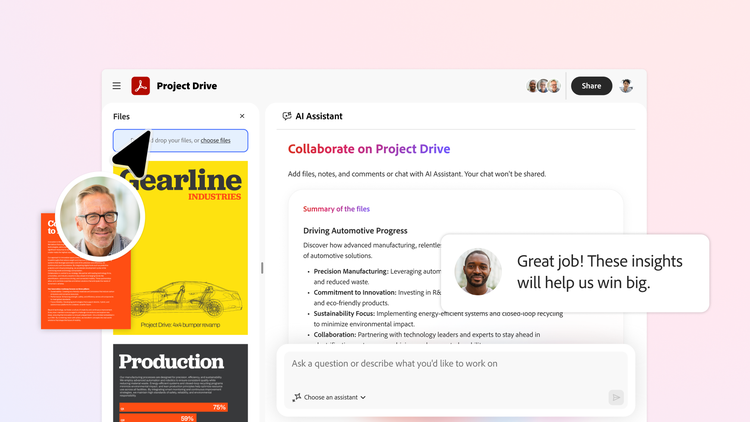
Acrobat Studio's chat with PDF feature enables employees, managers, and teams to interact with documents directly. Users can ask questions and receive clear, AI-powered answers in seconds. Instead of scrolling through lengthy policies or onboarding guides, users can understand key points or drill down into specifics.
Moreover, answers include numbered references that link back to the original content, making it easy to verify information. For example, a new starter can ask about leave entitlements and see the exact section in the policy highlighted instantly. This tool speeds up workflows while keeping document insights accurate and accessible.
Convert PDF for turning policies into training and onboarding materials.
Acrobat makes it simple to repurpose static PDFs into editable formats. Policies, procedures, or onboarding guides can be converted into PowerPoint decks for interactive training sessions or into Word documents for collaborative editing. This reduces repetitive manual reformatting and ensures that your content can be adapted across multiple uses.
For instance, a safety procedure PDF can become a visually engaging workshop deck for a site induction, helping employees retain important information more effectively than a text-only document.
Try our online tools for on-the-spot PDF power.
style
grid width 10
background
#f5f5f5
PDF to Word
Turn PDFs into editable Word docs instantly.
PDF to PPT
Transform PDFs into ready-to-edit PowerPoint slides.
Edit PDF
Easily update text, images, and links in your PDF.
PDF converter
Convert files to and from PDF effortlessly.
style
Four up, l-spacing, grid width 10
background
#f5f5f5
Ready-to-use templates with Adobe Express.
Adobe Express, included in Acrobat Studio, provides templates for documents, presentations, and social media content. With professional layouts, branding, and structure already built in, teams can quickly produce onboarding guides, policy updates, or benefits overviews without starting from scratch.
For example, a template can be customised for a new site induction guide while maintaining consistent branding and format across the organisation. This approach saves time, reduces errors, and helps teams create documents that are both visually appealing and digestible.
Create a variety of on-brand HR content — from onboarding videos, company announcements, talent posts and more.
style
xl-spacing, grid-width-6
Review, approval, and secure sharing in one workflow.
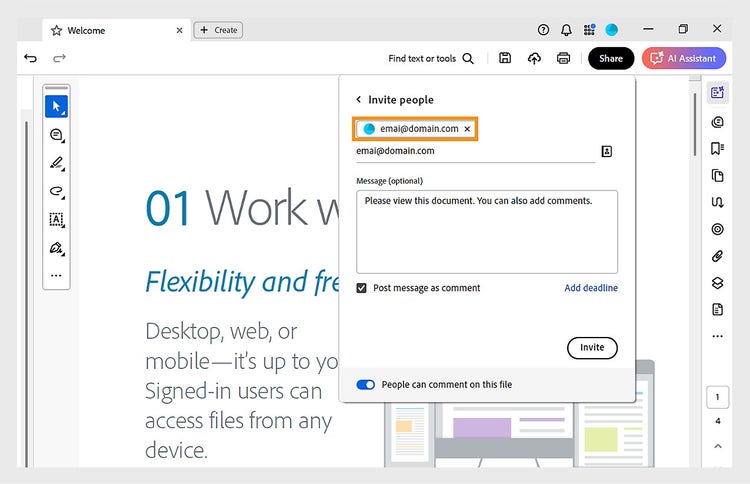
Adobe Acrobat brings review and approval into one centralised workflow, allowing stakeholders to comment, suggest edits, and sign off directly on documents. This supports collaboration without compromising security or compliance.
For example, a new leave policy can be shared with HR, legal, and operations teams, with every comment tracked in one place so nothing gets missed.
At the same time, Acrobat's secure cloud sharing ensures sensitive content remains protected through role based access controls.
This means confidential HR documents are only visible to authorised users, while general onboarding materials stay accessible to employees across hybrid and distributed teams.
Best practices for building a scalable document management workflow for hybrid teams.
Creating clear, well designed HR and policy documents is a great start, but it's only part of the picture. To keep them effective over time, organisations need a document management structure that supports change, growth, and compliance.
Here are a few practical best practices:
Assign clear ownership: Every document should have a named owner responsible for updates, accuracy, and approvals. This avoids confusion and ensures nothing falls through the cracks.
Set regular review cycles: Policies shouldn't only be reviewed when something goes wrong. Align review timelines with regulatory updates or business milestones so documents stay current and relevant.
Use templates consistently: Templates help to easily create, update, and recognise documents. They also help employees know what to expect, regardless of which policy or guide they're reading.
Standardise naming and organisation: Clear naming conventions and folder structures reduce search time and prevent outdated versions from being reused across teams.
Frequently asked questions.
Visual document design uses layout, structure, and visual elements such as summaries, flowcharts, and icons to make HR and policy information easier to understand and act on. It is commonly used in onboarding guides, compliance procedures, and workplace policy summaries.
Visual documents reduce repeated questions, speed up onboarding, and ensure employees can follow policies without needing in person clarification. This is particularly valuable when teams work across different locations and time zones.
By highlighting key obligations, deadlines, and actions clearly, visual documents reduce misinterpretation and missed steps. This helps organisations maintain consistent processes and lowers the risk of compliance breaches during audits or policy reviews.
AI can summarise long documents, answer employee questions, and surface relevant information instantly. This reduces time spent searching through policies and helps teams access accurate guidance when they need it.
Start by mapping the key milestones new hires must complete in their first 30, 60, and 90 days, then design structured, visually clear guides that support those steps. Tools like Adobe Acrobat Studio and Adobe Express can help create branded templates and generate concise summaries. Finally, implement role-based access controls to help keep confidential HR documents restricted while ensuring onboarding materials remain accessible across hybrid and distributed teams.
Acrobat Studio enables secure cloud access, collaborative editing, approvals, and document tracking from any location. This helps HR and policy teams maintain consistent documentation and version control across distributed teams.
Acrobat Studio scales across small businesses, large enterprises, and government teams. It can support everything from simple onboarding documents to complex compliance and policy workflows.
It provides version history, audit trails, controlled access, and secure document storage. These features help organisations maintain consistent, compliant, and audit ready records.
Yes. Acrobat includes encryption, redaction tools, permission controls, and secure sharing features to protect sensitive HR and compliance information.