.

Colour that actually feels like yours.

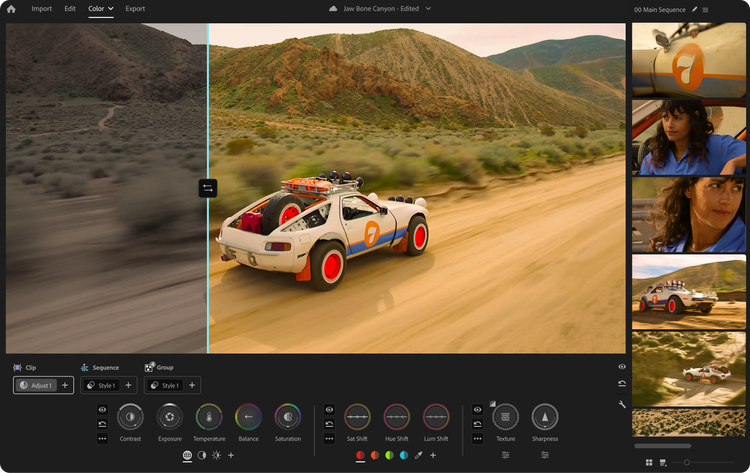
Colour your videos like an editor right in Premiere (beta) — no app switching required.

Walk through the basics of Colour Mode

Watch Colour Mode in Action

Completely original.
Completely designed for editors.

Brand-new systems for grading make Colour Mode unique. From intuitive controls to new inventions for moving work, you've never graded like this before.

Meet your new colour controls.

Most Colour Mode controls are bi-directional. Move your mouse up and down for one control, left and right for the other. Or press shift for precise single-axis adjustments. Each control activates a unique heads-up display with scopes, numeric info and real-time animated feedback that guides your creativity with confidence and clarity.

Contrast

Adjust contrast and pivot for customised, fluid balance between shadows and highlights.

Exposure

Adjust exposure and black level to control brightness and fine shadow detail.

Temperature

Move up and down for temperature, left and right for tint.

Balance

Shift colour balance in any direction to correct or add creative tone.

Saturation

Add or subtract the strength of colour in your clips.

Texture (Detail)

Adjust global, single or multi-band texture detail.

Sharpness (Detail)

Add fine sharpness or blur to your clips with radii and threshold controls.

Editors already love Colour Mode.

We built Colour Mode with feedback from hundreds of editors across the globe. Here's what they have to say.

Matte Johnson
YouTube Creator, @WhoIsMatt

"Adobe Premiere's new Colour Mode feels like the largest update to the app has ever received! Colour grading has only grown in importance over the years. Having an editor-first colour grading system that reimagines how to easily achieve professional colour is truly a game changer."

Kelsey Brannan
YouTube Creator, @PremiereGal

“Premiere’s new Colour Mode is a complete redesign that makes colour correction and grading feel dramatically more intuitive while raising the level of professional control advanced editors expect. The refreshed layout and tools streamline the entire workflow, making it faster and more fluid to move from quick fixes to precise grading without breaking creative momentum.”

Drex Lee
Global Creator Sensation

“In my world of epic one-shots, you only get one chance to capture the soul of a moment. Colour Mode in Premiere is how I make that moment immortal, giving me the emotional depth to tell stories that resonate with millions. It is the bridge between a raw vision and a cinematic masterpiece."

Josh Olufemii
Filmmaker, Educator @Olufemmi

“Literally been waiting for this day for yeeears. Premiere’s new Colour Mode feels like a long-awaited refresh to the way colour works in the app. The interface is cleaner, the tools are easier to access and it’s much quicker to move from basic corrections to more precise grading. It’s a thoughtful redesign that makes the whole process feel smoother. LOVE IT.”

Lila Traka
Filmmaker, @LilafromYouTube

"Premiere's new Colour Mode works the way my brain works. The icon-based controls, grading with zones and the Styles system make the whole process so intuitive. It just makes sense."

Chris Grubisa
Video Creator, Video Strategist, Entrepreneur

“Most software evolves by stacking features on top of old architecture. Adobe did the harder thing. They completely tore out the ‘old way’ and rebuilt it from the ground up. For editors, having a grading experience that’s faster, cleaner and far more precise is everything. Colour Mode is a reset for what colour grading software should be.”

Colour Mode is here. Try it today.

Colour Mode is available now in the Premiere beta — included with every Creative Cloud plan that has Premiere. New to Premiere? Start with a 7-day free trial.

Try the Premiere (beta) desktop app.

1. Start a free trial of Premiere.
2. Open the Creative Cloud app.
3. Install the Premiere (beta) app.