
As fotos não precisam ficar paradas. Com algumas etapas rápidas, você pode facilmente adicionar movimento a suas imagens. Neste breve tutorial, veja como Aaron Bernstein anima suas fotos usando máscaras e a linha de tempo no Adobe Photoshop.
View tutorial in Photoshop
Follow along in the app
Aaron Bernstein é um criador e ex-residente criativo da Adobe que mora na cidade de Nova York. Sob o pseudônimo digital de “Hungry Boy”, Aaron usa alimentos para refletir facetas da cultura contemporânea em projetos baseados em fotografia.
O arquivo de prática tem duas camadas: a camada de milhos e a camada de pipocas acima dela. Crie uma máscara de camada na camada de pipocas e inverta-a usando Control+I (Windows) ou Command+I (macOS).

2
Dar uma olhada
Bernstein selecionou a máscara de camada, escolheu a ferramenta Pincel e definiu a cor como branco. Depois, ele pintou sobre a máscara para revelar a primeira pipoca.

3
Revelar em estágios
Foi nesta etapa que Bernstein gastou boa parte de seu tempo. Ele duplicou a camada onde o primeiro milho de pipoca foi revelado – Control+J (Windows), Command+J (macOS). Em seguida, pintou com um pincel branco para revelar mais pipocas. Ele repetiu esta etapa até ter várias camadas e todas as pipocas da camada abaixo ficarem visíveis.

4
Criar a Linha do tempo
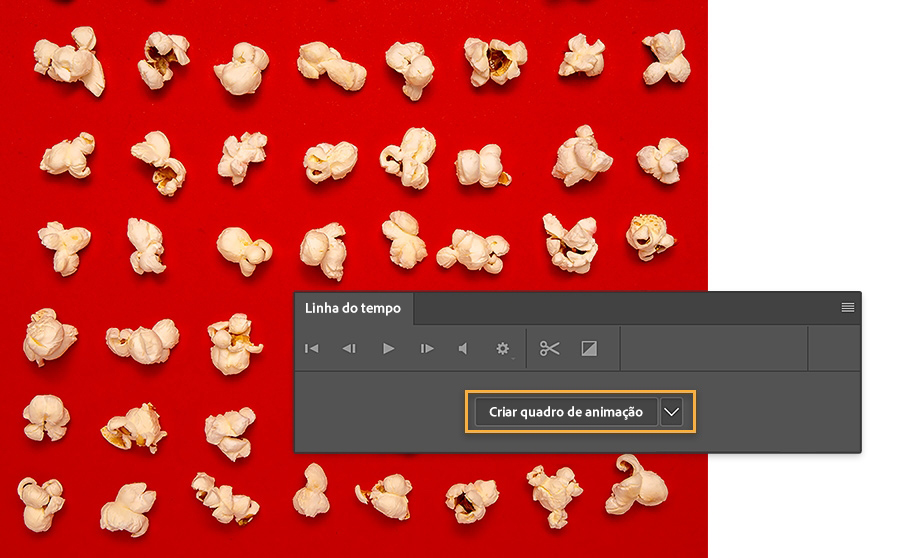
Bernstein clicou em Criar animação de quadros na Linha do tempo (Janela > Linha do tempo).
5
Criar quadros de animação
Para criar cada estado de animação, Bernstein escolheu Criar quadros a partir de camadas na Linha do tempo. Em seguida, ele desativou e ativou a visibilidade da camada de milhos para torná-la visível em todos os quadros da animação.
6
Adicionar loop
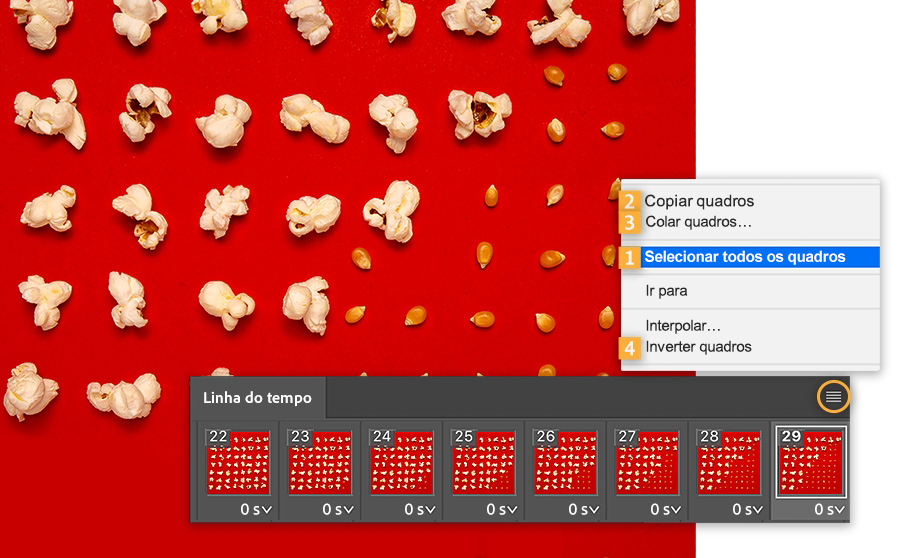
Bernstein trabalhou na Linha do tempo para criar a animação em loop. Primeiro, ele escolheu Selecionar todos os quadros, depois Copiar quadros e Colar quadros. Por fim, ele escolheu Inverter quadros para que as pipocas aparecessem estouradas e não estouradas. Ele clicou em Reproduzir na Linha do tempo para visualizar a animação. Bernstein usou o recurso Salvar para Web para salvar o GIF animado em loop.
Criar movimento
Dê vida às suas imagens com animações curtas.
Observação: os arquivos de projeto incluídos neste tutorial são apenas para fins práticos.

You can control how Adobe websites use cookies and similar technologies by making choices below. But note that if you disable cookies and similar technologies entirely, Adobe websites may not function properly.
Cookies are small text files stored by your web browser when you use websites. There are also other technologies that can be used for similar purposes like HTML5 Local Storage and local shared objects, web beacons, and embedded scripts. These technologies help us do things like remembering you and your preferences when you return to our sites, measure how you use the website, conduct market research, and gather information about the ads you see and interact with.
You can make choices in the menu below about what cookies and other technologies you want us to use on Adobe sites when you visit them from this browser. You can always change those choices later by clicking on the Cookie Preferences link at the bottom of the page.
If enabled:
We can improve your experience by tailoring the site and the content to things we think might be of interest
We can better keep track of your preferences — like what language you prefer to use
We will better understand your likely interests so we can provide you more relevant Adobe ads and content on non-Adobe websites and in non-Adobe apps
It will help us improve the performance of our website and those of our partners who use the Adobe Experience Cloud
If disabled:
We won’t be able to remember you from session to session so the experience may not be tailored to your interests
You’ll still have access to the content of the site but certain features that depend on cookies may not function
You’ll still see ads, they just may not be as relevant to you
General information
You can control how Adobe websites use cookies and similar technologies by making choices below. But note that if you disable cookies and similar technologies entirely, Adobe websites may not function properly.
Cookies are small text files stored by your web browser when you use websites. There are also other technologies that can be used for similar purposes like HTML5 Local Storage, web beacons, and embedded scripts. These technologies help us do things like remembering you and your preferences when you return to our sites, measure how you use the website, conduct market research, and gather information about the ads you see and interact with.
You can make choices in the menu below about what cookies and other technologies you want us to use on Adobe sites when you visit them from this browser. You can always change those choices later by clicking on the Cookie Preferences link at the bottom of the page.
If enabled:
We can improve your experience by tailoring the site and the content to things we think might be of interest
We can better keep track of your preferences — like what language you prefer to use
We will better understand your likely interests so we can provide you more relevant Adobe ads and content on non-Adobe websites and in non-Adobe apps
It will help us improve the performance of our website and those of our partners who use the Adobe Experience Cloud
If disabled:
We won’t be able to remember you from session to session so the experience may not be tailored to your interests
We’ll still count your use of our site and services
You’ll still have access to the content of the site but certain features that depend on cookies may not function
You’ll still see ads, they just may not be as relevant to you
Operate the site and core servicesOperate site and measure engagement
Always active
These cookies are required, and they are used to enable the site and related services core functionality. Without them the site could not operate, so they cannot be disabled.
These cookies enable the site and related services’ core functionality and collect statistics about user engagement, such as counting active use to help us understand trends. These cookies cannot be disabled.
Measure performance
These cookies are used to analyze site usage to measure and improve performance. Without them Adobe cannot know what content is most valued and how often unique visitors return to the site, making it hard to improve information we offer to you.
These cookies are used to analyze site usage to measure and improve performance. Without them Adobe cannot know what content is most valued, making it hard to improve information we offer to you.
Extend functionality
These cookies are used to enhance the functionality of Adobe sites such as remembering your settings and preferences to deliver a personalized experience; for example, your username, your repeated visits, preferred language, your country, or any other saved preference.
Personalize advertising
These cookies are used to enable Adobe and our partners to serve ads more relevant to your interests. Without them you will still see ads, but they might not be as relevant to you.
Personalize advertising
These cookies are used to enable Adobe and our partners to serve ads more relevant to your interests. Without them you will still see ads, but they might not be as relevant to you.