Tento ukázkový soubor obsahuje soubory Adobe Stock, na kterých si můžete vyzkoušet postupy, které jste se naučili v této výukové lekci. Pokud chcete tento ukázkový soubor použít mimo tuto výukovou lekci, můžete si koupit licenci na stránkáchAdobe Stock . Podmínky použití vzorového souboru naleznete v souboru ReadMe ve stejném adresáři.
Vyberte nástroj Zakřivení na panelu nástrojů. Než začnete s použitím, nastavte barvu výplně na hodnotu Žádná a vyberte barvu tahu na panelu Vlastnosti.
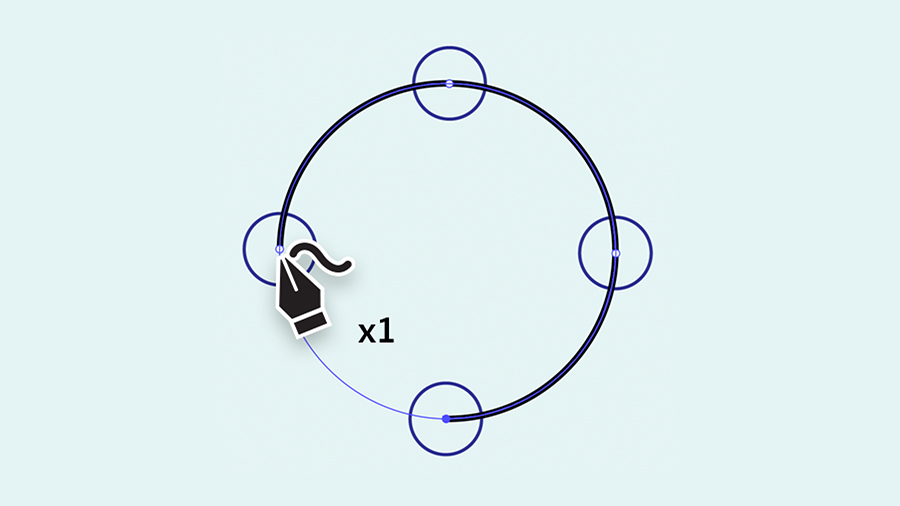
Cvičení 1
Klikněte jednou doprostřed každého kruhového vodítka. Na vytvoření dokonalého kruhu stačí čtyři kliknutí.
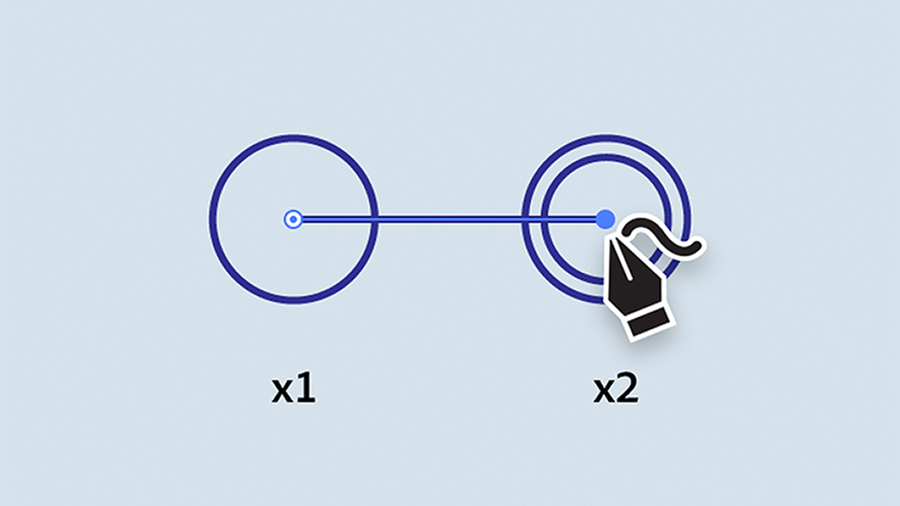
Cvičení 2
Jedním kliknutím vytvořte první bod. Poté dvojitě klikněte doprostřed každého dalšího kruhového vodítka. Každé dvojité kliknutí vytvoří rohový bod s rovnými čárami mezi body. Tvar dokončíte dvojitým kliknutím na první bod, který jste vytvořili.
Cvičení 3
Dokončete tvar těla kytary pomocí jednoduchých kliknutí, kterými nakreslíte celou cestu.
Cvičení 4
Ve Cvičení 4 byly cesty již vytvořeny. Nejprve použijte nástroj pro výběr a vyberte cestu. Poté přepněte na nástroj Zakřivení a dvojitě klikněte na středový bod na spodní straně a vytvořte z rohu hladkou křivku. Procvičte si postup tím, že kliknete na úsečku hned nad tím a přetáhnutím vytvoříte hladkou křivku. Bod odstraníte tak, že jej kliknutím vyberete a stisknete klávesu Delete.
Cvičení 5
Ve Cvičení 5 byly cesty již vytvořeny. Použitím nástroje pro výběr vyberte cestu a poté přepněte na nástroj Zakřivení. Přetáhnutím středových bodů upravte křivku, jak je znázorněno.
Začíná vám to jít, zkoušejte to dál. Narýsujte kresbu na kreslicím plátně níže a zkuste v kresbě měnit barvy výplně a tahu. Poté použijte tyto techniky a nakreslete elegantní křivky a přímky ve svých vlastních kresbách.

You can control how Adobe websites use cookies and similar technologies by making choices below. But note that if you disable cookies and similar technologies entirely, Adobe websites may not function properly.
Cookies are small text files stored by your web browser when you use websites. There are also other technologies that can be used for similar purposes like HTML5 Local Storage and local shared objects, web beacons, and embedded scripts. These technologies help us do things like remembering you and your preferences when you return to our sites, measure how you use the website, conduct market research, and gather information about the ads you see and interact with.
You can make choices in the menu below about what cookies and other technologies you want us to use on Adobe sites when you visit them from this browser. You can always change those choices later by clicking on the Cookie Preferences link at the bottom of the page.
If enabled:
We can improve your experience by tailoring the site and the content to things we think might be of interest
We can better keep track of your preferences — like what language you prefer to use
We will better understand your likely interests so we can provide you more relevant Adobe ads and content on non-Adobe websites and in non-Adobe apps
It will help us improve the performance of our website and those of our partners who use the Adobe Experience Cloud
If disabled:
We won’t be able to remember you from session to session so the experience may not be tailored to your interests
You’ll still have access to the content of the site but certain features that depend on cookies may not function
You’ll still see ads, they just may not be as relevant to you
General information
You can control how Adobe websites use cookies and similar technologies by making choices below. But note that if you disable cookies and similar technologies entirely, Adobe websites may not function properly.
Cookies are small text files stored by your web browser when you use websites. There are also other technologies that can be used for similar purposes like HTML5 Local Storage, web beacons, and embedded scripts. These technologies help us do things like remembering you and your preferences when you return to our sites, measure how you use the website, conduct market research, and gather information about the ads you see and interact with.
You can make choices in the menu below about what cookies and other technologies you want us to use on Adobe sites when you visit them from this browser. You can always change those choices later by clicking on the Cookie Preferences link at the bottom of the page.
If enabled:
We can improve your experience by tailoring the site and the content to things we think might be of interest
We can better keep track of your preferences — like what language you prefer to use
We will better understand your likely interests so we can provide you more relevant Adobe ads and content on non-Adobe websites and in non-Adobe apps
It will help us improve the performance of our website and those of our partners who use the Adobe Experience Cloud
If disabled:
We won’t be able to remember you from session to session so the experience may not be tailored to your interests
We’ll still count your use of our site and services
You’ll still have access to the content of the site but certain features that depend on cookies may not function
You’ll still see ads, they just may not be as relevant to you
Operate the site and core servicesOperate site and measure engagement
Always active
These cookies are required, and they are used to enable the site and related services core functionality. Without them the site could not operate, so they cannot be disabled.
These cookies enable the site and related services’ core functionality and collect statistics about user engagement, such as counting active use to help us understand trends. These cookies cannot be disabled.
Measure performance
These cookies are used to analyze site usage to measure and improve performance. Without them Adobe cannot know what content is most valued and how often unique visitors return to the site, making it hard to improve information we offer to you.
These cookies are used to analyze site usage to measure and improve performance. Without them Adobe cannot know what content is most valued, making it hard to improve information we offer to you.
Extend functionality
These cookies are used to enhance the functionality of Adobe sites such as remembering your settings and preferences to deliver a personalized experience; for example, your username, your repeated visits, preferred language, your country, or any other saved preference.
Personalize advertising
These cookies are used to enable Adobe and our partners to serve ads more relevant to your interests. Without them you will still see ads, but they might not be as relevant to you.
Personalize advertising
These cookies are used to enable Adobe and our partners to serve ads more relevant to your interests. Without them you will still see ads, but they might not be as relevant to you.