Crea vídeos para redes sociales de tan buena calidad que parecerán de pago con Adobe Premiere para dispositivos móviles. Mejora el audio fácilmente, edita en una línea de tiempo superfluida y comparte contenido tan impresionante que pensarán que contabas con todo un equipo.
Escanea el código QR para obtener la aplicación gratuita.
Es como llevar un estudio en el bolsillo
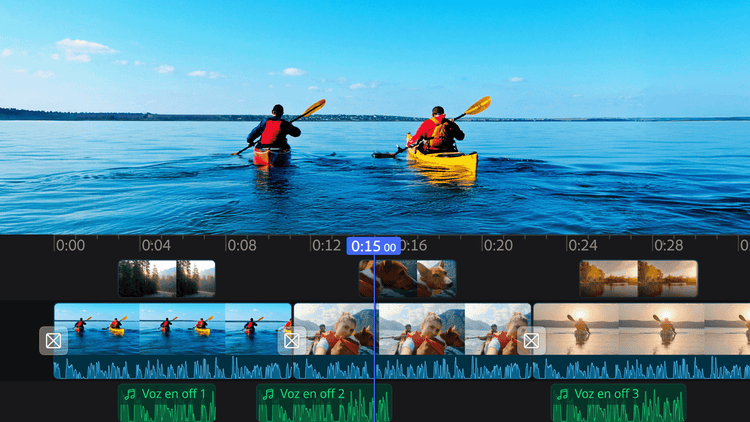
Edita líneas de tiempo a la velocidad del rayo
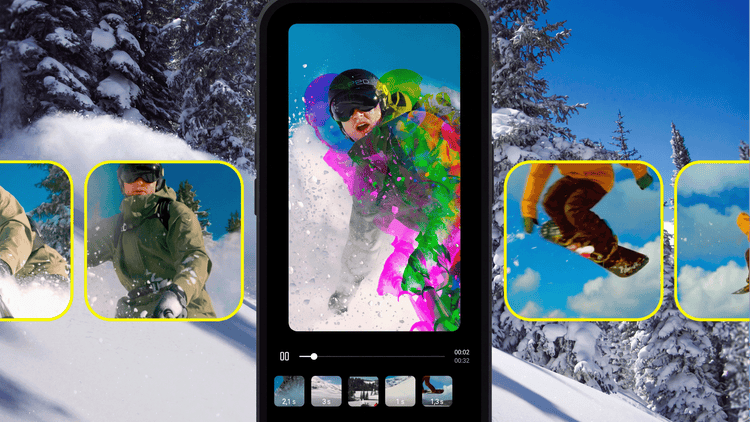
Destaca con tu propio estilo
Ediciones épicas con efectos y transiciones
Pistas ilimitadas para una creatividad sin fin
style
four up, l-spacing, two up mobile
Crea contenido pensado para compartir
Premiere para dispositivos móviles está diseñado para redes sociales con eliminación de fondo con un toque, subtítulos gratuitos e ilimitados y mucho más. Edita para reels de Instagram, TikTok, YouTube Shorts y para todos los sitios donde te gusta publicar.
Edición fluida, de principio a fin
Mantén tu flujo creativo sin marcas de agua ni anuncios emergentes. Recorta, reordena y añade capas de clips en una línea de tiempo que lo muestra todo de un vistazo. Las exportaciones y las funciones son gratuitas. Solo pagas cuando quieras usar herramientas de IA generativa.
Infinitas formas de crear a tu manera
Comparte vídeos impactantes. Elige entre cientos de miles de imágenes, vídeos, pegatinas, fuentes y mucho más para que tus vídeos destaquen, o explora nuevas ideas con la IA generativa al alcance de tu mano.
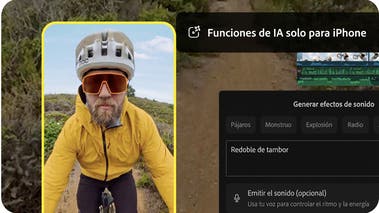
Un sonido increíble en segundos
¿Sin estudio de sonido? No hay problema. Suaviza los diálogos y elimina el ruido de fondo fácilmente con la función Mejorar audio. Encuentra las pistas más populares en la aplicación y usa tu propia voz para crear efectos de sonido perfectamente sincronizados.
style
xl-spacing-bottom
Descubre las principales funciones de Adobe Premiere para dispositivos móviles
Prepárate para las redes sociales
Adobe Premiere para dispositivos móviles está diseñado para la edición orientada a redes sociales, con efectos y transiciones exclusivos, subtítulos automáticos ilimitados y fuentes para cada estilo.
carousel
Pr-editorial-cards-02
Edita con pistas ilimitadas
Superpón clips y organiza tu contenido en una línea de tiempo multipista diseñada para trabajar con velocidad y precisión.
carousel
Pr-editorial-cards-02
Edición gratuita y sin distracciones
Edita sin marcas de agua, anuncios emergentes ni desorden. Solo pagas cuando quieres usar créditos de IA generativa. Disfruta de una experiencia de edición fluida que te permite centrarte plenamente en tu contenido.
carousel
Pr-editorial-cards-02
Convierte tu voz en efectos de sonido
Crea efectos de sonido personalizados para tus vídeos con la función Generar efectos de sonido. Usa el micrófono de tu iPhone para capturar el ritmo y la entonación que deseas, y deja que la IA se encargue del resto.
carousel
Pr-editorial-cards-02
Crea con confianza
Adobe no reclama ningún derecho sobre tu contenido y solo entrena los modelos de IA generativa de Adobe Firefly con contenido para el que tiene autorización.
carousel
Pr-editorial-cards-02
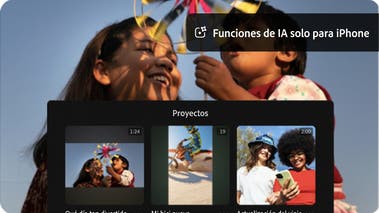
Genera imágenes impactantes al instante
Usa las funciones impulsadas por la IA de Adobe Firefly para generar pegatinas e imágenes, ampliar fondos o convertir imágenes en clips. Además, accede gratis a recursos creativos de una enorme biblioteca integrada en la aplicación.
carousel
Pr-editorial-cards-02
background
style
m-spacing-top
ADOBE PREMIERE, PARTNER OFICIAL DE YOUTUBE SHORTS
Una forma sencilla de crear YouTube Shorts
Adobe Premiere para dispositivos móviles ofrece un espacio exclusivo para editar YouTube Shorts con plantillas, efectos, transiciones y títulos preestablecidos únicos. Versiona plantillas de otros creadores y publica tu contenido directamente en YouTube.
Alterna fácilmente entre las aplicaciones de Adobe Premiere
Empieza un proyecto en el móvil y luego continúa donde lo dejaste en la aplicación de escritorio de Premiere para finalizarlo con herramientas avanzadas y control creativo.
background
bottom, center, contain
Inspírate con plantillas populares
Añade tu contenido a plantillas personalizables y publica en YouTube Shorts desde una misma aplicación.
Template displays a close up video of someone icing a Christmas tree cookie. The text "Happy" appears one letter at a time and then the word "Holidays".
Gratis
Template 4
Gratis
Template displays short videos of pleasant things like a beach, lingering on the first and showing the rest quickly. Text reads "Sorry, I have plans" and then "These are the plans."
Gratis
Template displays a series of waterfront landscape videos with a dreamy pink hued filter applied. Overlaid text in mixed fonts reads “Mentally, I’m here.”
Gratis
Template displays a series of still images of a fluffy brown and white dog in quick succession. Overlaid text reads "POV: My camera roll".
Gratis
Template displays short videos of a person making cinnamon buns, lingering on each section long enough to see each step.
Gratis
Template 3
Gratis
Template 2
Gratis
Template displays short videos of coffee beverages swiping in to frame from left to right. Text indicates different days of the week over each video.
Gratis
Template1
Gratis
Template 5
Gratis
Template displays a series of beautiful landscape photos with quick zoom ins on each and the text "happy place".
Gratis
Template displays a series of videos of an urban stroll with several seconds devoted to each clip. Overlaid text on the first frame reads “Let’s take a walk”.
Gratis
Template1
Gratis
Template 6
background
black
header
off
footer
off
Preguntas frecuentes
style
Center, xl spacing, static links
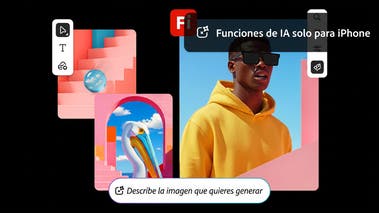
Sí, Adobe Premiere para dispositivos móviles es una aplicación móvil de edición de vídeo, gratuita e independiente. En la versión gratuita puedes usar todas las funciones de edición principales y exportar un número ilimitado de vídeos en resolución 4K sin marcas de agua. Las funciones de IA generativa con tecnología de Firefly utilizan créditos generativos, que pueden adquirirse con una suscripción o están incluidos en la mayoría de los planes de Creative Cloud. Las funciones de IA generativa solo están disponibles actualmente en iOS.
Para descargar e instalar Adobe Premiere en dispositivos móviles, escanea el código QR anterior o visita la App Store de Apple o la Play Store de Google en tu dispositivo.
Adobe Premiere para dispositivos móviles incluye imágenes, efectos, pistas de música, fuentes y recursos de vídeo. También puedes generar efectos de sonido personalizados, pegatinas, imágenes y mucho más con Adobe Firefly. Las funciones de IA generativa con tecnología de Firefly utilizan créditos generativos, que pueden adquirirse con una suscripción o están incluidos en los planes de Creative Cloud existentes. Las funciones de IA generativa solo están disponibles actualmente en iOS.
Adobe Premiere para dispositivos móviles te ayuda a crear contenido único con funciones de IA, como generación de vídeos, imágenes, pegatinas, efectos de sonido y mucho más. También incluye herramientas de IA asistida, como mejora de voz, eliminación de fondo y creación automática de subtítulos, para que trabajes más rápido. Las funciones de IA generativa solo están disponibles actualmente en iOS.
Sí, si tienes una suscripción de pago a Adobe Premiere para escritorio, puedes importar proyectos y contenido multimedia desde Adobe Premiere para dispositivos móviles.
Adobe Premiere para dispositivos móviles está pensado para quienes buscan una edición de nivel profesional en el móvil, con control preciso de la línea de tiempo, exportaciones sin marcas de agua y contenido generado por IA apto para uso comercial, todo en una aplicación gratuita. Es ideal para quienes también utilizan las herramientas de escritorio de Adobe y quieren un flujo de trabajo fluido entre el móvil y el escritorio.
En comparación con otros editores para móviles, Adobe Premiere para dispositivos móviles ofrece una experiencia de edición más profesional con una línea de tiempo multipista y redimensionable, subtítulos automáticos gratuitos e ilimitados, y exportaciones sin marcas de agua sin coste adicional. Las funciones de IA de Adobe Firefly son aptas para uso comercial porque Adobe solo entrena Firefly con contenido bajo licencia. Las funciones de IA generativa solo están disponibles actualmente en iOS.
Adobe Premiere en el móvil está disponible para iOS y Android. Algunas funciones pueden variar según la plataforma. Visita el Centro de ayuda de Adobe para obtener más información.
Descubre de lo que eres capaz
Crea vídeos que siempre destacan, desde cualquier lugar. Descubre todo el potencial de Premiere para escritorio y dispositivos móviles con una sola suscripción.
Acelera tus flujos de trabajo de vídeo con la IA generativa de Adobe Firefly
Visualiza tomas y efectos antes del rodaje, genera recursos perdidos en producción para complementar su edición y elimina tareas tediosas para mantenerte concentrado en tus ideas creativas.
You can control how Adobe websites use cookies and similar technologies by making choices below. But note that if you disable cookies and similar technologies entirely, Adobe websites may not function properly.
Cookies are small text files stored by your web browser when you use websites. There are also other technologies that can be used for similar purposes like HTML5 Local Storage and local shared objects, web beacons, and embedded scripts. These technologies help us do things like remembering you and your preferences when you return to our sites, measure how you use the website, conduct market research, and gather information about the ads you see and interact with.
You can make choices in the menu below about what cookies and other technologies you want us to use on Adobe sites when you visit them from this browser. You can always change those choices later by clicking on the Cookie Preferences link at the bottom of the page.
If enabled:
We can improve your experience by tailoring the site and the content to things we think might be of interest
We can better keep track of your preferences — like what language you prefer to use
We will better understand your likely interests so we can provide you more relevant Adobe ads and content on non-Adobe websites and in non-Adobe apps
It will help us improve the performance of our website and those of our partners who use the Adobe Experience Cloud
If disabled:
We won’t be able to remember you from session to session so the experience may not be tailored to your interests
You’ll still have access to the content of the site but certain features that depend on cookies may not function
You’ll still see ads, they just may not be as relevant to you
General information
You can control how Adobe websites use cookies and similar technologies by making choices below. But note that if you disable cookies and similar technologies entirely, Adobe websites may not function properly.
Cookies are small text files stored by your web browser when you use websites. There are also other technologies that can be used for similar purposes like HTML5 Local Storage, web beacons, and embedded scripts. These technologies help us do things like remembering you and your preferences when you return to our sites, measure how you use the website, conduct market research, and gather information about the ads you see and interact with.
You can make choices in the menu below about what cookies and other technologies you want us to use on Adobe sites when you visit them from this browser. You can always change those choices later by clicking on the Cookie Preferences link at the bottom of the page.
If enabled:
We can improve your experience by tailoring the site and the content to things we think might be of interest
We can better keep track of your preferences — like what language you prefer to use
We will better understand your likely interests so we can provide you more relevant Adobe ads and content on non-Adobe websites and in non-Adobe apps
It will help us improve the performance of our website and those of our partners who use the Adobe Experience Cloud
If disabled:
We won’t be able to remember you from session to session so the experience may not be tailored to your interests
We’ll still count your use of our site and services
You’ll still have access to the content of the site but certain features that depend on cookies may not function
You’ll still see ads, they just may not be as relevant to you
Operate the site and core servicesOperate site and measure engagement
Always active
These cookies are required, and they are used to enable the site and related services core functionality. Without them the site could not operate, so they cannot be disabled.
These cookies enable the site and related services’ core functionality and collect statistics about user engagement, such as counting active use to help us understand trends. These cookies cannot be disabled.
Measure performance
These cookies are used to analyze site usage to measure and improve performance. Without them Adobe cannot know what content is most valued and how often unique visitors return to the site, making it hard to improve information we offer to you.
These cookies are used to analyze site usage to measure and improve performance. Without them Adobe cannot know what content is most valued, making it hard to improve information we offer to you.
Extend functionality
These cookies are used to enhance the functionality of Adobe sites such as remembering your settings and preferences to deliver a personalized experience; for example, your username, your repeated visits, preferred language, your country, or any other saved preference.
Personalize advertising
These cookies are used to enable Adobe and our partners to serve ads more relevant to your interests. Without them you will still see ads, but they might not be as relevant to you.