Acrobat
What is contract renewal and how to compare PDF contracts.
Compare contracts quickly and confidently. Use Adobe Acrobat Pro to spot every change between PDF versions, so your renewals stay accurate and compliant.

Published by Adobe Acrobat India on 14 January 2026
Every business relationship eventually reaches a point where the contract must be revisited and renewed. When that happens, legal teams across India must ensure that renewed contracts accurately reflect the latest terms and conditions. A small, overlooked clause or outdated pricing can lead to compliance issues, financial loss, and a whole lot of legal headaches. This applies to employment contracts, vendor agreements, services deals, and all kinds of other business-related transactions.
With Adobe Acrobat Pro’s Compare Files tool, businesses can streamline the contract renewal process. They can leverage this tool to instantly detect differences between two PDF contracts, verify every clause, and create precise renewal letters that reflect the most up-to-date terms.
What is a contract review?
Contract renewal is the process of extending an existing contract for an additional period of time. This usually means either of two things: creating an all-new agreement with possibly updated terms or continuing to use the current agreement with minimal changes. In India, this process is governed by the Indian Contract Act, 1872, which requires valid consent and consideration.
Why comparing PDF contracts is crucial during renewals.
Each time a contract is renewed, a new version is typically drafted to reflect updated timelines, revised rates, or changed obligations. Comparing this new draft with the old contract helps you quickly identify modifications.
For example, when HR prepares a job contract renewal letter for an employee, the updated draft might include changes to salary, benefits, or job scope. Comparing old and new documents provides an opportunity for HR and legal teams to check these changes side by side to ensure that the renewal letter accurately reflects the employee’s new terms before final approval.
How to compare two PDF contracts and highlight differences.
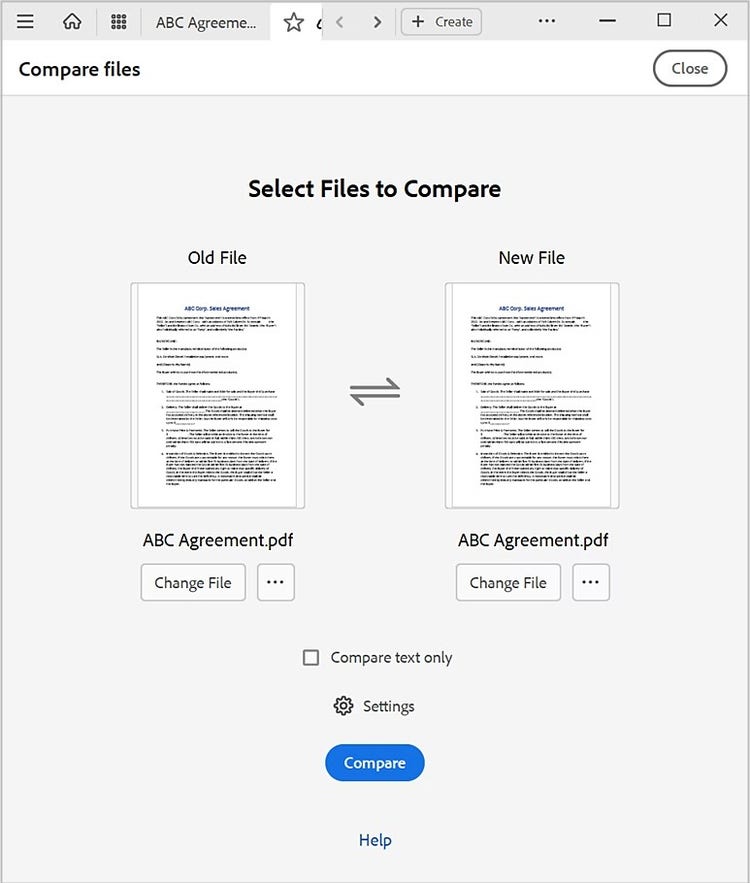
- Open Adobe Acrobat.
- Click Tools > Compare Files.
- Open your original contract (the old version) and the revised draft (the new version).
- Click Select File on the left to choose the older file version you want to compare.
- Click Select File on the right to choose the newer file version you want to compare.
- To swap the position of the old and new files, select the swap arrows icon between the thumbnails.
- Click the Compare button.
- Review the Compare Results summary.
- Click Go to First Change to review each file difference between the older document and the newer document.
You can further modify the compare settings to limit comparison to a certain pages, ignore graphic elements, and include formatting and backgrounds in the review.
What is a contract renewal letter?
A contract renewal letter is a formal document used to show the intent of at least one of two parties to continue their working relationship under the same (or updated) terms. Sending a renewal letter ensures there’s a written record of mutual consent and avoids lapses that could interrupt services, partnerships, or employment.
How to write a contract renewal letter.
When writing a contract renewal letter, the goal is to clearly restate your intent to continue the partnership and confirm any changes in terms, duration, or pricing. Here’s a simple structure you can follow:
- Start with a professional greeting.
- State your purpose. Mention that the letter is to renew the current contract.
- Reference the existing contract. Include the original contract’s title, reference number, and signing date.
- Outline changes (if any). Specify updates to payment, duration, or conditions.
- Add closing remarks. Express appreciation for the partnership and reaffirm your commitment.
- Sign off. Include your name, designation, and contact information.
To save time, you can use a business letter template from Adobe Express. These predesigned templates help maintain a polished, consistent look and include editable sections for company names, dates, and contract details.
Sample job contract renewal letter:
Subject: Renewal of Employment Contract
Dear [Employee’s Name],
We are pleased to inform you that your current employment contract, which is due to expire on [contract end date], has been approved for renewal. The renewed contract will take effect on [new start date] and remain valid until [new end date], under the same terms and conditions unless otherwise specified.
We would like to take this opportunity to thank you for your continued dedication and valuable contributions to [Company Name]. Your performance and commitment have been greatly appreciated, and we look forward to your ongoing success with the team.
Please review the attached contract renewal document for your reference and acknowledgment. Should you have any questions or wish to discuss any part of the agreement, feel free to reach out to [HR Contact Name] at [email address].
Sincerely,
[Authorized Signatory Name]
[Position]
[Company Name]
Benefits of using Adobe Acrobat for legal document comparison.
The process of contract renewal often involves comparing multiple versions of the same PDF, and Acrobat simplifies this from start to finish.
Speed and productivity.
Legal teams can compare two PDF files in seconds and automatically detect every change between drafts. Instead of spending hours cross-checking line by line, Acrobat generates a detailed summary of edits to help HR and legal teams focus on decision-making rather than manual review.
Accuracy and visibility.
The Compare Files tool highlights insertions, deletions, and formatting changes with annotations. This level of precision enables teams to spot even minute changes, such as adjusted delivery schedules, revised payment terms, modified clauses, and other revisions that could otherwise be missed.
Security and compliance.
Contracts often contain sensitive corporate or employee data. Acrobat ensures confidentiality with built-in encryption, restricted access, and audit trails. Legal teams can also track document versions securely to reduce risks of working with outdated drafts.
Integration with e-signature workflows.
Once all edits are verified, teams can finalise renewals quickly via e-signatures. This eliminates the need to print, courier, or scan signed copies, making the entire renewal process digital, traceable, and environmentally friendly.
Collaboration and consistency.
Acrobat allows multiple reviewers to comment or highlight directly within the document, creating a clear record of discussions and approvals. Whether you’re handling a job contract renewal letter or a multi-party supplier agreement, everyone stays aligned on the latest version.
Frequently asked questions.
More resources