Adobe Acrobat
How to create an authorisation letter with templates for business use.
Make authorisation and delegation hassle-free. Use Adobe Acrobat to create fillable PDF authorisation letters that are clear, professional, and ready to reuse.

Published by Adobe Acrobat India on 5 Janury 2026
For many businesses in India, authorisation letters are part of everyday operations, from managing banking transactions and government paperwork to compliance approvals or even simple parcel collections. Instead of drafting a new letter each time, create a PDF template that is easy to update, sign, and reuse whenever needed.
Let’s dive into authorisation letters: what they are, how businesses use them, and how Adobe Acrobat can be a source of modern solutions that can save you time without sacrificing trust.
What is a letter of authorisation?
An authorisation letter is an official written statement that temporarily grants another individual or organisation the right to act on your behalf. It is typically used in professional, financial, or legal settings where you cannot personally attend to a task.
These letters are particularly useful because they ensure that third parties have recognised authority and serve as written evidence that the authorisation was granted willingly.
When do businesses need an authorisation letter?
GST-related authorisation.
GST stands for Good and Services Tax. It is an indirect tax that replaced pre-existing taxes (VAT, service tax, entertainment tax, octroi, and central excise duty) in 2017. Under GST regulations, activities like registration, return submission, amendments, or cancellation can only be carried out by the proprietor or someone who has been formally permitted to act for the business.
An authorisation letter for GST enables businesses to delegate these tasks to staff members or external contacts, especially in situations where the proprietor or business head is not personally handling day-to-day GST compliance.
Document collection.
One of the most common reasons businesses issue an authorisation letter is for collecting documents. Often, the owner or director may not be available to personally visit government offices or corporate partners. In such cases, an employee, assistant, or even an external agent can be authorised to collect documents on behalf of the business. These documents can include business licenses and permits, signed contracts and invoices, business reports, legal notices, and NDAs (non-disclosure agreements).
Banking transactions.
Banks typically require only the account holder to manage any account-related transactions. When that’s not possible, an authorisation letter can enable a representative to be present on behalf of the account holder. This is especially useful when depositing or collecting cheques, updating KYC verification and compliance documents, or dealing with paperwork related to corporate credit cards, bank guarantees, or trade finance documents.
Access rights.
In most companies, there are restrictions to the records, systems, databases, and even facilities that employees can access. Issuing a letter of authorisation means granting temporary rights to any staff member to enter restricted areas, log into certain digital systems, or handle confidential company files. This protects the business from unauthorised use while ensuring critical tasks are not delayed when the higher ups are unavailable.
How to write an authorisation letter.
-
Identify and detail the parties involved.
Start by clearly mentioning who is giving authority and who is receiving it. Include your full name, address, and contact details as the person granting permission, followed by the complete name and contact information of the individual or organisation being authorised. This ensures there is no ambiguity about the parties involved.
-
Define the scope of authority.
Outline exactly what the authorised person is allowed to do on your behalf. Be specific about the tasks, responsibilities, or decisions they can handle. At the same time, note any restrictions, such as preventing them from making financial commitments or signing legal contracts beyond the stated purpose.
-
Set the timeframe.
Mention when the authorisation starts and when it ends. If the letter is meant for a single action (such as submitting a document), state this clearly. For ongoing authorisations, indicate the conditions under which the letter will expire or may be revoked.
-
Include relevant supporting details.
Where relevant, include references such as account numbers, transaction details, or case-specific information (e.g., for medical, tax, or banking purposes). Also specify any identification documents the authorised person must present when carrying out the task, such as an Aadhaar card, PAN card, or employee ID.
-
Draft the formal letter.
Use a professional format with your contact details, the date, the recipient’s details, and a polite salutation. Write in formal, precise language, and clearly state the purpose of the authorisation. Summarise the tasks, duration, and limitations in straightforward sentences that leave no room for misinterpretation.
-
Sign and validate the document.
Sign the letter yourself and, if appropriate, have the authorised person countersign it. For sensitive financial or legal authorisations, consider additional validation such as notarisation or a company seal. This adds weight and credibility to the document.
-
Review and distribute.
Before finalising, proofread the letter to confirm that all details are accurate. If sending electronically, consider digital signatures and password protection, then share it securely with the recipient or institution. Keeping both digital and physical copies ensures easy reference later.
Creating a fillable authorisation letter template with Adobe Acrobat.
Because authorisation letters are frequently used by businesses, it only makes sense to create an authorisation letter template that can easily be filled and edited depending on the situation. Templates help lessen reworks, avoid formatting issues, and allow you to fully customise layout, style, and content.
Here's how you can create a library template with Adobe Acrobat:
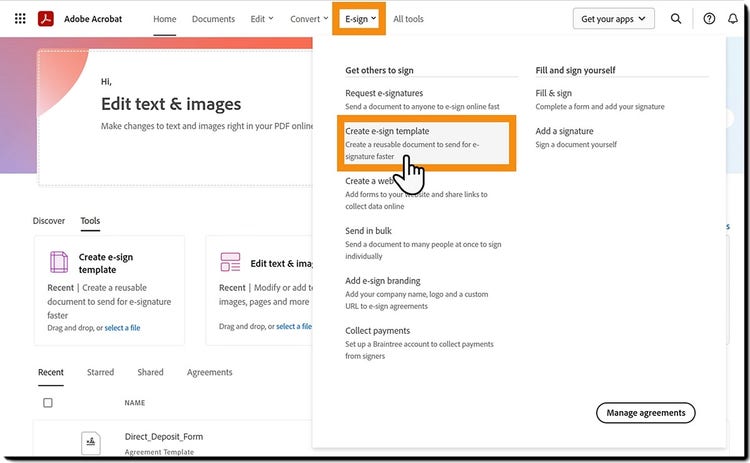
- Go to the E-sign tab, then select Create e-sign template.
- Click the Choose files button to open the file picker panel and select your files.
- Select the Template Properties menu and edit the name of your template in the Template Name field.
- Select Continue when your file is attached.
- With automatic field detection, you will be prompted to review each field to verify if it’s the correct field type. To manually add fields, select a field type from the right panel and drag it onto the document where needed.
- Select Create when all fields are placed and assigned.
Using AI to generate letter of authorisation.
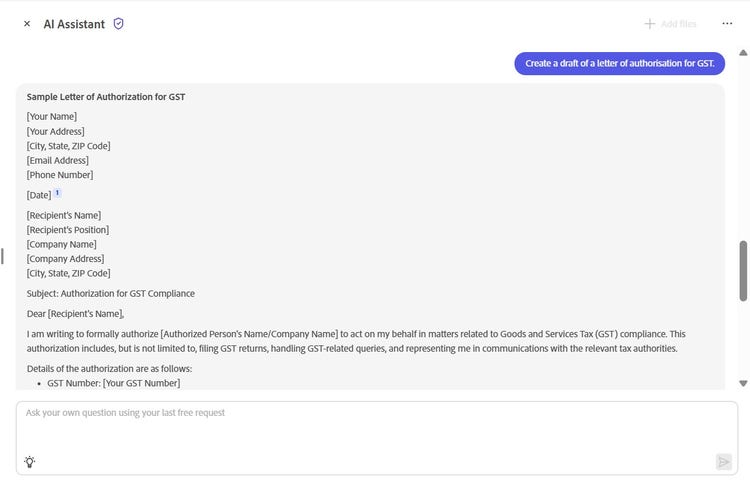
With Adobe Acrobat Studio, you can ask AI Assistant to create a sample authorisation letter format based on your needs. For example, you can type a prompt, such as “Create an authorisation letter allowing my employee to collect GST-related documents.” or “Draft a formal authorisation letter format for bank account statement collection.”
AI Assistant will instantly generate a clear, professional draft that follows a business-appropriate structure. You can then customise the details (such as names, dates, purpose, and validity period, etc.) without having to rework the entire letter. Once the draft is ready, you can save this as a fillable template and reuse as needed.
Frequently asked questions.
More resources