Adobe Acrobat
Mobile-first workflows: A productivity guide for small businesses.
Take your workflows mobile with Adobe Acrobat Studio. Access, edit, and approve documents anytime, anywhere and keep your business moving.

Published by Adobe Acrobat India on 17 Feburary 2026
Document Management, Digital Transformation, Work From Anywhere
Business doesn’t stop at the desk in India’s fast-moving SMBs. Approvals, conversations, and documents often happen on mobile, whether during travel, on-site visits, or while managing field operations across multiple locations. From resumes and invoices to contracts and marketing materials, critical files are shared via WhatsApp and other messaging apps, and teams are expected to act on them immediately.
For small and medium businesses (SMBs), this creates a challenge: how do you keep work moving when documents arrive on your phone, but traditional workflows still depend on desktops? Adobe Acrobat Studio’s mobile-first workflows bridge this gap by enabling teams to review, edit, convert, and sign documents directly from their smartphones. Let’s delve into it.
What are mobile-first workflows?
Mobile-first workflows put mobile devices at the centre of how work gets done. Rather than relying on desktops, teams can review, edit, and approve documents immediately, right when they receive them on their phones. This approach ensures that work moves forward in real time, helping employees stay productive wherever they are.
Adobe mobile solutions that keep work moving.
Teams work best when they can stay organised, focused, and productive even when they’re away from their desks. Adobe’s mobile solutions within Acrobat Studio are designed to support how small businesses actually work on the go, helping reduce friction in document-heavy tasks.
Keep things in order on mobile with PDF Spaces.
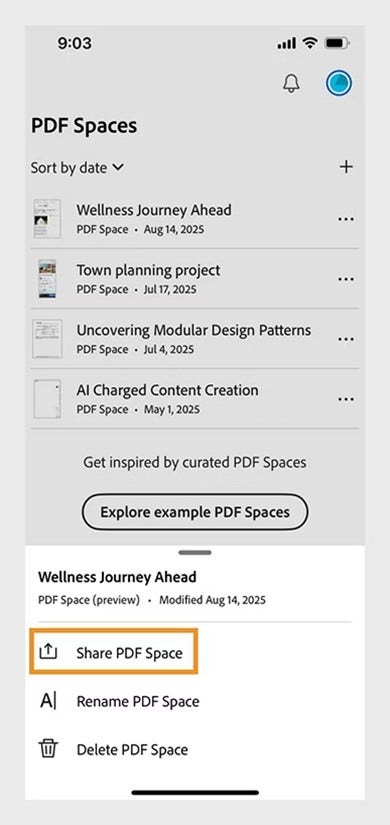
When documents are shared across WhatsApp, email, and cloud drives, keeping track of the latest version can quickly become a challenge. With PDF Spaces, that is not an issue.
Within a PDF Space, all recipients are given access to all its contents, including files, notes, and insights. They can also interact with either a prebuilt AI Assistant or a custom AI Assistant if the creator has selected one. Here’s how to do it:
- Select PDF Spaces from the Acrobat on mobile homepage.
- Find the PDF Space you want to share, select More options, and then Share.
- In the dialog box, tap the link under PDF Space access and select one of the following:
- Anyone on the internet with the link – Accessible to anyone who has the link.
- Anyone in <your-organization> with the link – Accessible only to employees in your company. (For enterprise users, this is selected by default.)
- Invited people only – Only users you invite can access the PDF Space.
- Tap Apply to confirm.
- Choose one of the following sharing options:
- Invite people: Enter a recipient’s name or email, add an optional message and deadline, then tap Invite.
- Share via third-party apps: Select an app like Outlook, Gmail, Teams, or WhatsApp and follow the prompts.
- Create a link to share: Tap Get link, then copy and share the link with recipients.
What can you do with PDF Spaces?
PDF Spaces is an AI-powered knowledge hub that can transform the way you interact with your documents. You can:
- View and organise up to 100 files in a single workspace.
- Verify AI-generated responses with clear, easy-to-view citations.
- Add notes to capture insights or save useful AI outputs for later.
- Share the entire workspace (including files, notes, and your selected AI Assistant) to collaborate more effectively with others.
For mobile, hybrid, and remote teams, this means fewer follow-ups, clearer collaboration, and faster decision-making, all without switching between apps or devices.
See how teams collaborate, edit, and share documents in real time—right from your mobile device. Experience a PDF Space in action.
Work hands-free with AI-powered voice commands.
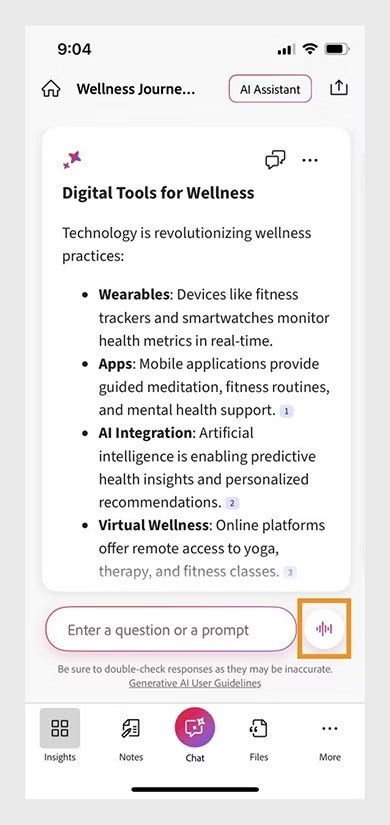
When multitasking or working on the move, typing isn’t always convenient. That’s where Acrobat Studio’s AI Assistant comes in. With the hands-free option, you can use voice commands to interact with documents using natural speech. Here’s how:
What can you do with AI-powered voice commands?
- Ask questions about a document without scrolling.
- Navigate long PDFs and generate summaries while travelling or between meetings.
- Quickly surface key information when time is limited.
- Pause, resume, and quit conversations to control flow of information you receive.
This hands-free capability helps teams stay productive in real-world and turn brief moments into meaningful progress.
Create on-brand content with Adobe Express mobile.
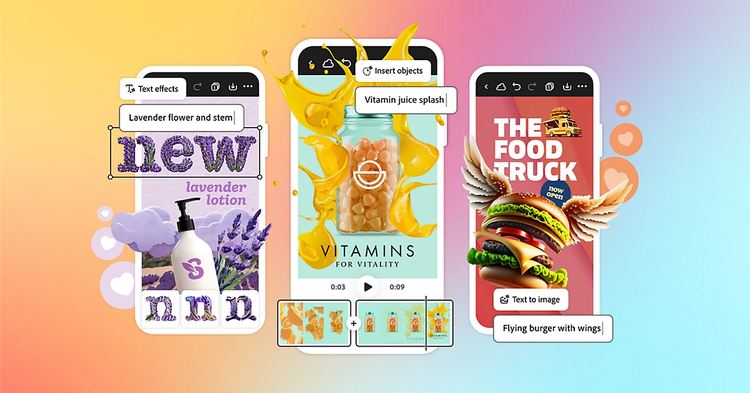
For creatives, waiting for a desktop can slow momentum, especially when ideas suddenly strike. The solution is simple: Adobe Express mobile. Available on Android and iOS, it lets small business teams create high-impact visual content directly from their phone. Here’s how:
- Download and open Adobe Express on your mobile device.
- Choose from a wide range of ready-made templates designed for different platforms and formats.
- Customise designs using text, images, video, animations, and brand elements.
- Use built-in AI capabilities to speed up creation and generate variations.
- Download or post your creations across social channels.
What can you create with Adobe Express mobile?
- Graphics and images for social media and marketing campaigns.
- Short videos and animations for digital platforms.
- Visual assets for presentations, promotions, and business communications.
- Invoices, proposals, and related business documents.
- On-brand content tailored for different channels.
This mobile-first approach helps small businesses create professional-quality visuals faster, respond to opportunities in real time, and keep creative work moving wherever they are.
Different applications of mobile-first and AI-powered workflows across core small business functions.
Small businesses juggle multiple responsibilities with limited time and resources. With mobile-first and AI-powered workflows, teams can move faster by simplifying document tasks across essential functions. Here’s how mobile access helps SMBs reduce delays and keep work moving forward.
Human resources.
Hiring and onboarding often involve several segmented steps, which typically cause delays and bottlenecks.
With Acrobat Studio on mobile, HR managers can convert image-based resumes into searchable PDFs, highlight key skills, and add comments while on the move. Shortlists are shared instantly with hiring managers, even when they have no access to a desktop. In fact, HR is considered a true AI power user, with studies showing above average use of AI for summarising, finding information, and editing documents.
Mobile-first workflows also streamline onboarding. HR teams can edit offer letters, send documents for Aadhaar eSign, and complete approvals directly from their phone. The result is faster hiring, smoother onboarding, and a better experience for new hires.
Marketing.
Marketing teams depend on speed, but approvals can easily slow momentum.
With Acrobat Studio on mobile, marketers can open proposals or campaign assets on their phone, make quick edits, and resend updated versions on the spot. Additionally, a recent Adobe Acrobat study shows a 17.6% increase in AI usage by marketing teams to analyse reports, data, and campaign insights.
The result is greater agility, faster approvals, and campaigns that stay on track.
Financial management.
Financial documents require accuracy and timely action, especially during tax season.
With Acrobat Studio on mobile, businesses can upload multiple receipts, invoices, and other financial documents. These can be reviewed on the go and shared directly with accountants. Mobile access also makes GST and compliance approvals faster, allowing documents to be reviewed, corrected, and signed without waiting for office hours.
By simplifying document handling on mobile, small businesses can manage tax responsibilities more efficiently and with less stress.

Why is it important to embrace mobile-first workflows?
In a mobile-driven business environment, no work waits for office hours or access to a full desktop setup. Small businesses need to stay agile, responsive, and productive wherever their teams are located. Embracing mobile-first workflows isn’t just a convenience; it’s a productivity essential that keeps operations moving and teams empowered.
By incorporating mobile-first workflows, organisations can enjoy:
- Faster decision-making: Teams can act immediately on proposals, contracts, and approvals.
- Greater flexibility: Employees can work from anywhere, be it during commutes, at home, in a shared working space, or even when on holiday.
- Improved collaboration: Shared mobile workspaces keep everyone aligned, reducing miscommunication and version errors.
- Time savings: Quick edits, AI-powered insights, and mobile approvals reduce bottlenecks and streamline daily operations.
Try our online tools to level up your PDF experience.
https://main--da-dc--adobecom.aem.page/in/dc-shared/fragments/roc/blog/online-tools/edit-pdf
https://main--da-dc--adobecom.aem.page/in/dc-shared/fragments/roc/blog/online-tools/protect-pdf
https://main--da-dc--adobecom.aem.page/in/dc-shared/fragments/roc/blog/online-tools/chat-with-pdf
Frequently asked questions.