
Acrobat
Quick and easy steps to reduce JPEG file size.
Learn the most effective ways to reduce JPEG file size while maintaining image quality, using compression techniques, format conversions, and optimisation tools.
Acrobat
Learn the most effective ways to reduce JPEG file size while maintaining image quality, using compression techniques, format conversions, and optimisation tools.

Published by Adobe Acrobat India on 22 April 2025
There are several effective ways to reduce the file size of a JPEG without significantly affecting its quality. Here are the best methods:
The JPEG format supports 24-bit colour, making it an excellent choice for preserving colour depth and brightness variations in photographs. However, it uses lossy compression, which means that some image data is permanently discarded during compression to achieve smaller file sizes. While higher quality settings retain more details, repeated compression can introduce artifacts, such as blurring, banding, and blockiness.
When working with JPEG compression, keep these key factors in mind:
For a quick and straightforward way to reduce file size, follow these steps:
If direct compression does not yield the desired results, converting JPEGs to PDF can provide additional size reduction. Here's how:
When dealing with multiple images, batch compression can save time. Consider these options:
JPEG compression can sometimes lead to unexpected issues. Here’s how to resolve them:
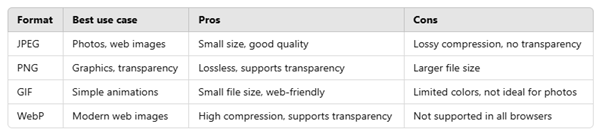
Choosing the right format is essential depending on your needs. Here's a comparison:
Adobe Acrobat is known for its PDF capabilities, but it also offers powerful image optimisation tools. Here’s how it works:
Understanding these finer details will help you get the best out of your images - whether you’re building a website, preparing a product catalogue, or sharing high-quality visuals with clients.