Nota: i file di progetto inclusi in questa esercitazione possono essere utilizzati solo per fare pratica.

Se desideri sperimentare i pennelli offerti da Alejandro, aggiungi la libreria al tuo lavoro. Questa serie si concentra sui pennelli Epic, disponibili dal pannello Librerie (Finestra > Librerie) in Adobe Photoshop e nella sezione Librerie dei pennelli Pixel in Adobe Fresco.
Per esercitarti con il suo collage di texture, copia la grafica nella sezione Il tuo lavoro di Photoshop o Fresco.
Crea pennelli da texture.
Negli ultimi 25 anni ho creato collage quasi tutti i giorni. Nel corso degli anni, la mia pratica artistica si è evoluta, ma ha sempre avuto una componente digitale sin da quando ho iniziato a usare Adobe Photoshop negli anni '90. Quando è uscito Adobe Fresco, ero un po' in ansia perché mi ero abituato al flusso di Adobe Sketch + Photoshop. Mi ci sono volute solo un paio di settimane per trasformarlo nel mio strumento di riferimento. Fresco ha riunito le parti migliori dei miei flussi e strumenti preferiti in un modo molto coerente. Sono riuscito ad aggiungere uno strato di espressione artistica molto più fluido ai miei collage, disegni e schizzi.
Più il mio lavoro diventava gestuale e illustrativo, più mi sono reso conto di utilizzare gli stessi stili di pennello per lavorare su un nuovo look o una serie di lavori. A quel punto ho capito che dovevo iniziare a creare dei pennelli personalizzati per rendere il lavoro davvero mio. Creare arte è incredibilmente gratificante, ma creare i propri strumenti per fare arte aggiunge un po' di divertimento al processo. Tutto il lavoro per creare i miei pennelli è stato fatto in Photoshop. Ho usato molto la fotocamera del telefono per raccogliere texture e macchie d'inchiostro durante le mie passeggiate in giro per la città o nel mio studio.
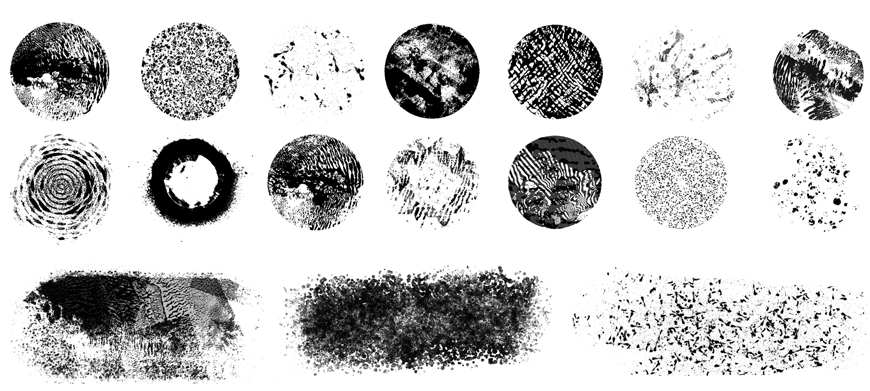
Prova diversi stili di pennello.
L'obiettivo dei miei pennelli era sempre quello di riflettere non solo le mie preferenze stilistiche, ma il mio modo di lavorare. Alcuni di questi pennelli si muovono lentamente, altri sono irregolari, altri cambiano radicalmente quando vengono ingranditi o usati come evidenziatore, alcuni ricordano la superficie bucherellata della vernice per gli attraversamenti pedonali e altri ancora sono ispirati a un rullo che uso da 30 anni. Ciò che mi interessa che capiate è che la sperimentazione è la chiave per trarre il massimo vantaggio dai vostri sforzi creativi, e creare i vostri strumenti può essere parte di quel processo.
Prova questi pennelli e fai vedere di cosa sei capace. Quindi assicurati di scoprire cosa puoi fare con il mio secondo set di pennelli Epic.

Prova questi tutorial con Photoshop
Modifica foto per creare nuove immagini e grafici.
You can control how Adobe websites use cookies and similar technologies by making choices below. But note that if you disable cookies and similar technologies entirely, Adobe websites may not function properly.
Cookies are small text files stored by your web browser when you use websites. There are also other technologies that can be used for similar purposes like HTML5 Local Storage and local shared objects, web beacons, and embedded scripts. These technologies help us do things like remembering you and your preferences when you return to our sites, measure how you use the website, conduct market research, and gather information about the ads you see and interact with.
You can make choices in the menu below about what cookies and other technologies you want us to use on Adobe sites when you visit them from this browser. You can always change those choices later by clicking on the Cookie Preferences link at the bottom of the page.
If enabled:
We can improve your experience by tailoring the site and the content to things we think might be of interest
We can better keep track of your preferences — like what language you prefer to use
We will better understand your likely interests so we can provide you more relevant Adobe ads and content on non-Adobe websites and in non-Adobe apps
It will help us improve the performance of our website and those of our partners who use the Adobe Experience Cloud
If disabled:
We won’t be able to remember you from session to session so the experience may not be tailored to your interests
You’ll still have access to the content of the site but certain features that depend on cookies may not function
You’ll still see ads, they just may not be as relevant to you
General information
You can control how Adobe websites use cookies and similar technologies by making choices below. But note that if you disable cookies and similar technologies entirely, Adobe websites may not function properly.
Cookies are small text files stored by your web browser when you use websites. There are also other technologies that can be used for similar purposes like HTML5 Local Storage, web beacons, and embedded scripts. These technologies help us do things like remembering you and your preferences when you return to our sites, measure how you use the website, conduct market research, and gather information about the ads you see and interact with.
You can make choices in the menu below about what cookies and other technologies you want us to use on Adobe sites when you visit them from this browser. You can always change those choices later by clicking on the Cookie Preferences link at the bottom of the page.
If enabled:
We can improve your experience by tailoring the site and the content to things we think might be of interest
We can better keep track of your preferences — like what language you prefer to use
We will better understand your likely interests so we can provide you more relevant Adobe ads and content on non-Adobe websites and in non-Adobe apps
It will help us improve the performance of our website and those of our partners who use the Adobe Experience Cloud
If disabled:
We won’t be able to remember you from session to session so the experience may not be tailored to your interests
We’ll still count your use of our site and services
You’ll still have access to the content of the site but certain features that depend on cookies may not function
You’ll still see ads, they just may not be as relevant to you
Operate the site and core servicesOperate site and measure engagement
Always active
These cookies are required, and they are used to enable the site and related services core functionality. Without them the site could not operate, so they cannot be disabled.
These cookies enable the site and related services’ core functionality and collect statistics about user engagement, such as counting active use to help us understand trends. These cookies cannot be disabled.
Measure performance
These cookies are used to analyze site usage to measure and improve performance. Without them Adobe cannot know what content is most valued and how often unique visitors return to the site, making it hard to improve information we offer to you.
These cookies are used to analyze site usage to measure and improve performance. Without them Adobe cannot know what content is most valued, making it hard to improve information we offer to you.
Extend functionality
These cookies are used to enhance the functionality of Adobe sites such as remembering your settings and preferences to deliver a personalized experience; for example, your username, your repeated visits, preferred language, your country, or any other saved preference.
Personalize advertising
These cookies are used to enable Adobe and our partners to serve ads more relevant to your interests. Without them you will still see ads, but they might not be as relevant to you.
Personalize advertising
These cookies are used to enable Adobe and our partners to serve ads more relevant to your interests. Without them you will still see ads, but they might not be as relevant to you.