
2. Seleziona il livello denominato "Model copy" nel pannello Livelli e fai doppio clic su di esso per aprire la finestra di dialogo Stile livello. Il sistema RGB utilizza i canali rosso, verde e blu per rappresentare i colori di un’immagine. Poiché vogliamo produrre uno stile di livello in cui sia visibile solo il canale rosso, occorre disattivare i canali Verde e Blu
: deselezionali e fai clic su OK.
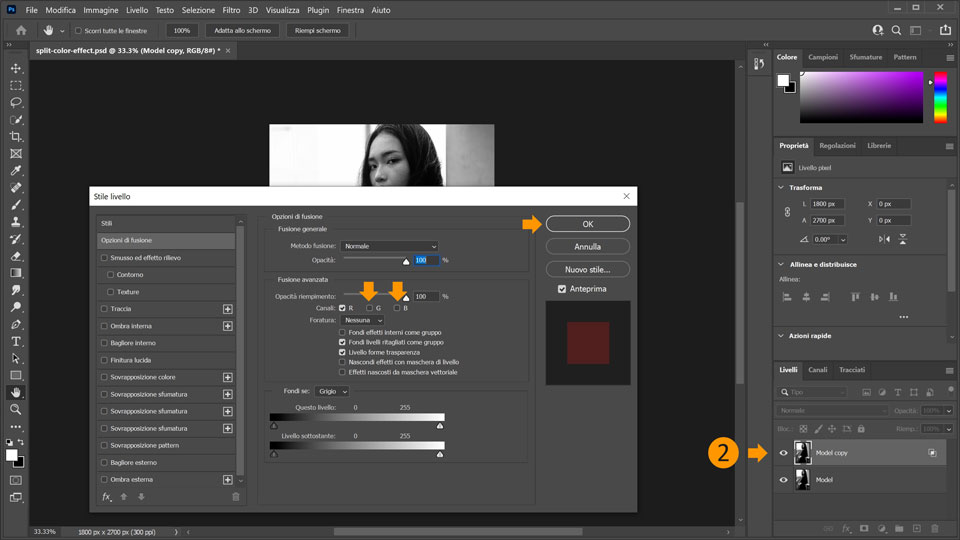
Suggerimento: fai clic sull’icona a forma di occhio del livello "Model" per renderlo invisibile. Ora puoi vedere l’effetto sul livello "Model copy”, dove è rimasto attivo solo il canale rosso. Per continuare, rendi nuovamente visibile il livello.
Come fluidificare il soggetto
3. Il prossimo passaggio consiste nell’applicare un effetto di distorsione alla modella. A tale scopo, useremo un filtro. Con il livello "Model copy" selezionato, vai su Filtro > Fluidifica. Una volta selezionato il filtro, si aprirà il pannello Proprietà.
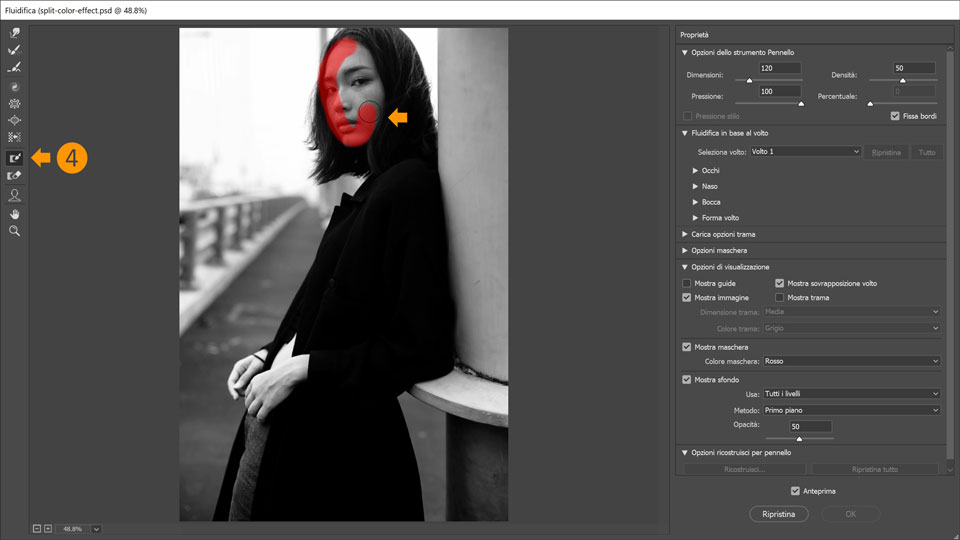
4. Per evitare che il volto della modella si deformi mentre fluidifichi il resto della foto, è necessario applicare una maschera. Vai nella barra degli strumenti a sinistra, seleziona lo Strumento maschera area fissa e passa il pennello sul volto della modella.
5. Nella barra degli strumenti, ora scegli lo Strumento altera avanti. Nel pannello Proprietà a destra, imposta la dimensione del pennello a 1000 px e spunta la casella Fissa bordi. Questo ti impedirà di trascinare troppo il bordo dell’immagine quando andrai a usare lo strumento di alterazione.
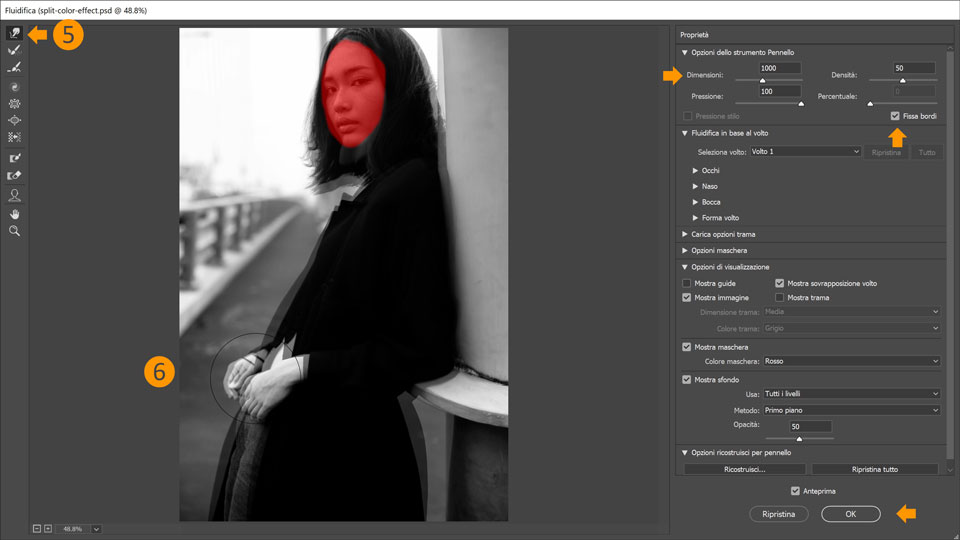
6. Applica lo Strumento altera avanti sulle parti della modella per sfalsare le aree della foto. Premi OK per confermare le modifiche.
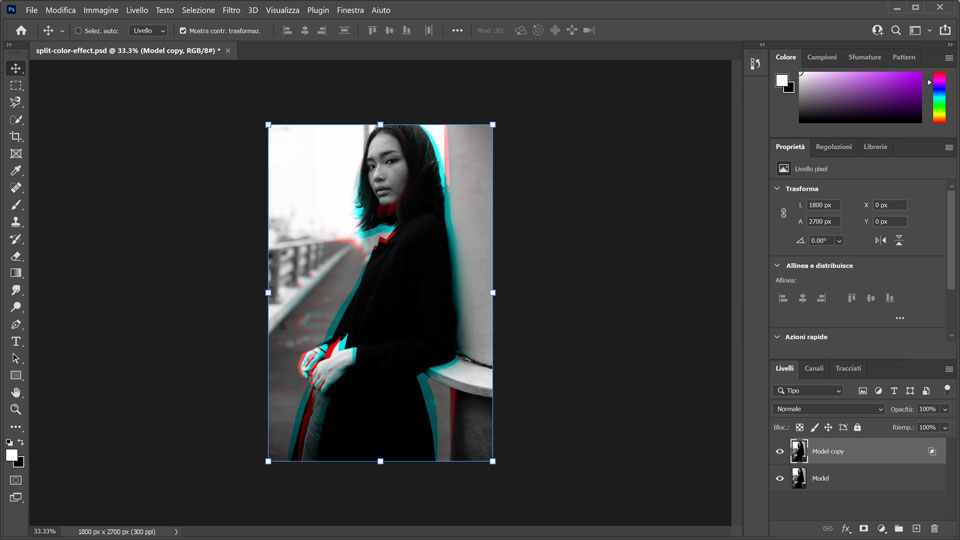
Ecco fatto! Ora tocca a te creare una suddivisione colore con Photoshop. Scarica le risorse disponibili oppure usa le tue e condividi il risultato finale su Facebook, Twitter e Instagram con l’hashtag #MadewithPhotoshop per ricevere commenti e restare in contatto con le altre menti creative della nostra community.
Behance:https://www.behance.net/live
Segui i nostri streaming dal vivo tenuti da professionisti del settore, su progetti reali in tempo reale e trova l’ispirazione giusta.

23 luglio 2022
Prova questi tutorial con Photoshop
Modifica foto per creare nuove immagini e grafici.
You can control how Adobe websites use cookies and similar technologies by making choices below. But note that if you disable cookies and similar technologies entirely, Adobe websites may not function properly.
Cookies are small text files stored by your web browser when you use websites. There are also other technologies that can be used for similar purposes like HTML5 Local Storage and local shared objects, web beacons, and embedded scripts. These technologies help us do things like remembering you and your preferences when you return to our sites, measure how you use the website, conduct market research, and gather information about the ads you see and interact with.
You can make choices in the menu below about what cookies and other technologies you want us to use on Adobe sites when you visit them from this browser. You can always change those choices later by clicking on the Cookie Preferences link at the bottom of the page.
If enabled:
We can improve your experience by tailoring the site and the content to things we think might be of interest
We can better keep track of your preferences — like what language you prefer to use
We will better understand your likely interests so we can provide you more relevant Adobe ads and content on non-Adobe websites and in non-Adobe apps
It will help us improve the performance of our website and those of our partners who use the Adobe Experience Cloud
If disabled:
We won’t be able to remember you from session to session so the experience may not be tailored to your interests
You’ll still have access to the content of the site but certain features that depend on cookies may not function
You’ll still see ads, they just may not be as relevant to you
General information
You can control how Adobe websites use cookies and similar technologies by making choices below. But note that if you disable cookies and similar technologies entirely, Adobe websites may not function properly.
Cookies are small text files stored by your web browser when you use websites. There are also other technologies that can be used for similar purposes like HTML5 Local Storage, web beacons, and embedded scripts. These technologies help us do things like remembering you and your preferences when you return to our sites, measure how you use the website, conduct market research, and gather information about the ads you see and interact with.
You can make choices in the menu below about what cookies and other technologies you want us to use on Adobe sites when you visit them from this browser. You can always change those choices later by clicking on the Cookie Preferences link at the bottom of the page.
If enabled:
We can improve your experience by tailoring the site and the content to things we think might be of interest
We can better keep track of your preferences — like what language you prefer to use
We will better understand your likely interests so we can provide you more relevant Adobe ads and content on non-Adobe websites and in non-Adobe apps
It will help us improve the performance of our website and those of our partners who use the Adobe Experience Cloud
If disabled:
We won’t be able to remember you from session to session so the experience may not be tailored to your interests
We’ll still count your use of our site and services
You’ll still have access to the content of the site but certain features that depend on cookies may not function
You’ll still see ads, they just may not be as relevant to you
Operate the site and core servicesOperate site and measure engagement
Always active
These cookies are required, and they are used to enable the site and related services core functionality. Without them the site could not operate, so they cannot be disabled.
These cookies enable the site and related services’ core functionality and collect statistics about user engagement, such as counting active use to help us understand trends. These cookies cannot be disabled.
Measure performance
These cookies are used to analyze site usage to measure and improve performance. Without them Adobe cannot know what content is most valued and how often unique visitors return to the site, making it hard to improve information we offer to you.
These cookies are used to analyze site usage to measure and improve performance. Without them Adobe cannot know what content is most valued, making it hard to improve information we offer to you.
Extend functionality
These cookies are used to enhance the functionality of Adobe sites such as remembering your settings and preferences to deliver a personalized experience; for example, your username, your repeated visits, preferred language, your country, or any other saved preference.
Personalize advertising
These cookies are used to enable Adobe and our partners to serve ads more relevant to your interests. Without them you will still see ads, but they might not be as relevant to you.
Personalize advertising
These cookies are used to enable Adobe and our partners to serve ads more relevant to your interests. Without them you will still see ads, but they might not be as relevant to you.