
Der in der Türkei lebende Künstler Şakir Yildirim lässt in seiner Bilderserie „Crawler“ mit surrealen Impressionen aus dem Alltag die Grenzen zwischen Fotografie und Design verschwimmen. Hier erleben wir, wie er einen Moment festhält, ohne die Zeit anzuhalten – mit dem Verflüssigen-Filter und seiner Fantasie.
Benötigte Materialien
In der Anwendung üben
1
Motiv duplizieren
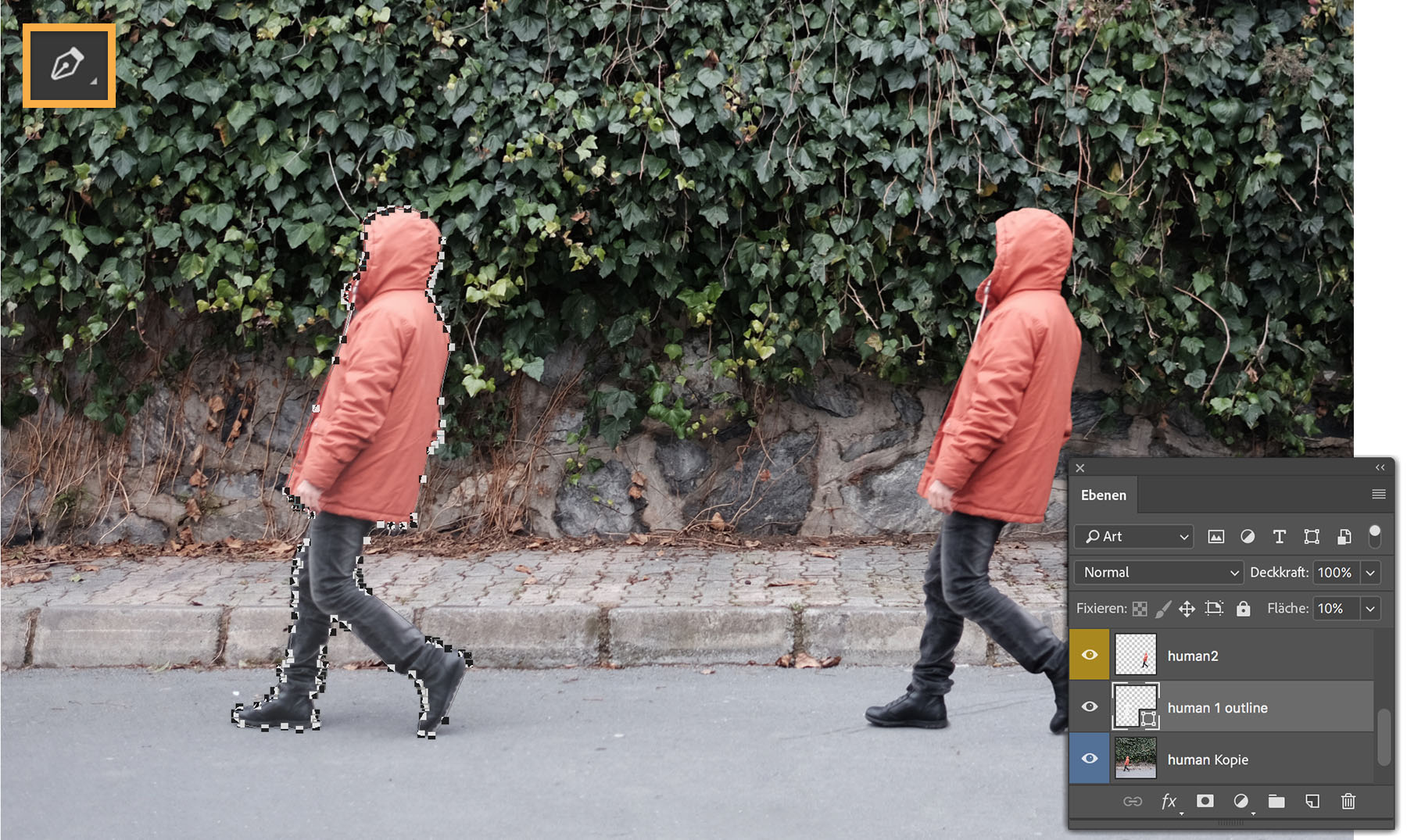
Bevor Şakir in einem statischen Bild Bewegung simulieren kann, dupliziert er die Person im Originalbild. Dazu zeichnet er die Person mit dem Zeichenstift-Werkzeug nach, kopiert die Auswahl (Bearbeiten > Duplizieren) und zieht das Double hinter die Originalperson.
2
Transformieren, verzerren und verformen
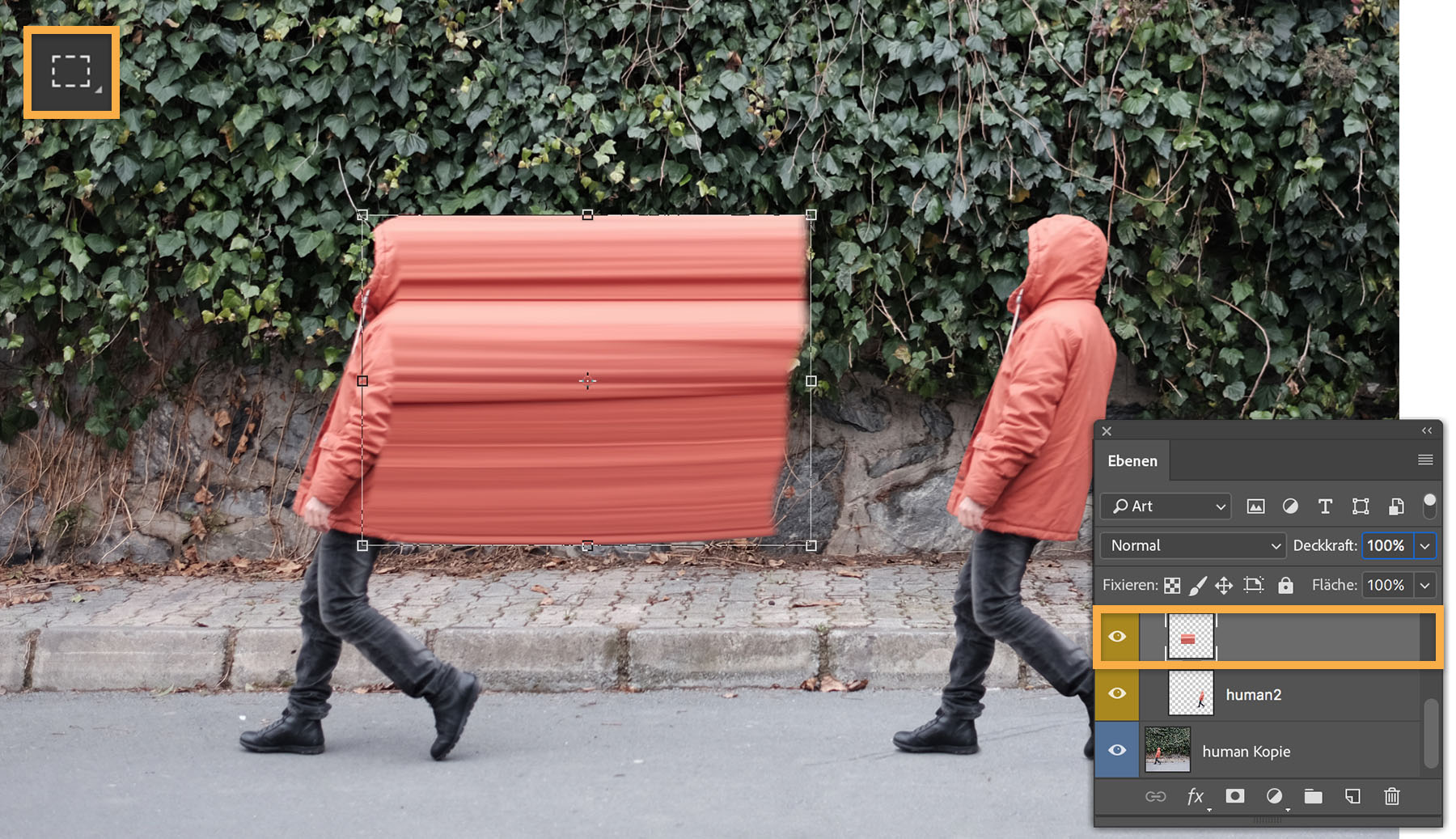
Dann bereitet Şakir alles für den Bewegungseffekt vor. Er zeichnet mit dem Auswahlrechteck-Werkzeug ein schmales Rechteck, um die Rückseite der Jacke zu isolieren. Diese rechteckige Auswahl kopiert er auf eine neue Ebene und skaliert sie dann (Bearbeiten > Transformieren > Skalieren) bis zur hinteren Kopie der Person.
Auf der Verzerrungsebene verwendet Şakir das Verformungswerkzeug (Bearbeiten > Transformieren > Verformen), um die Kanten der Verzerrung an der Person anzupassen.
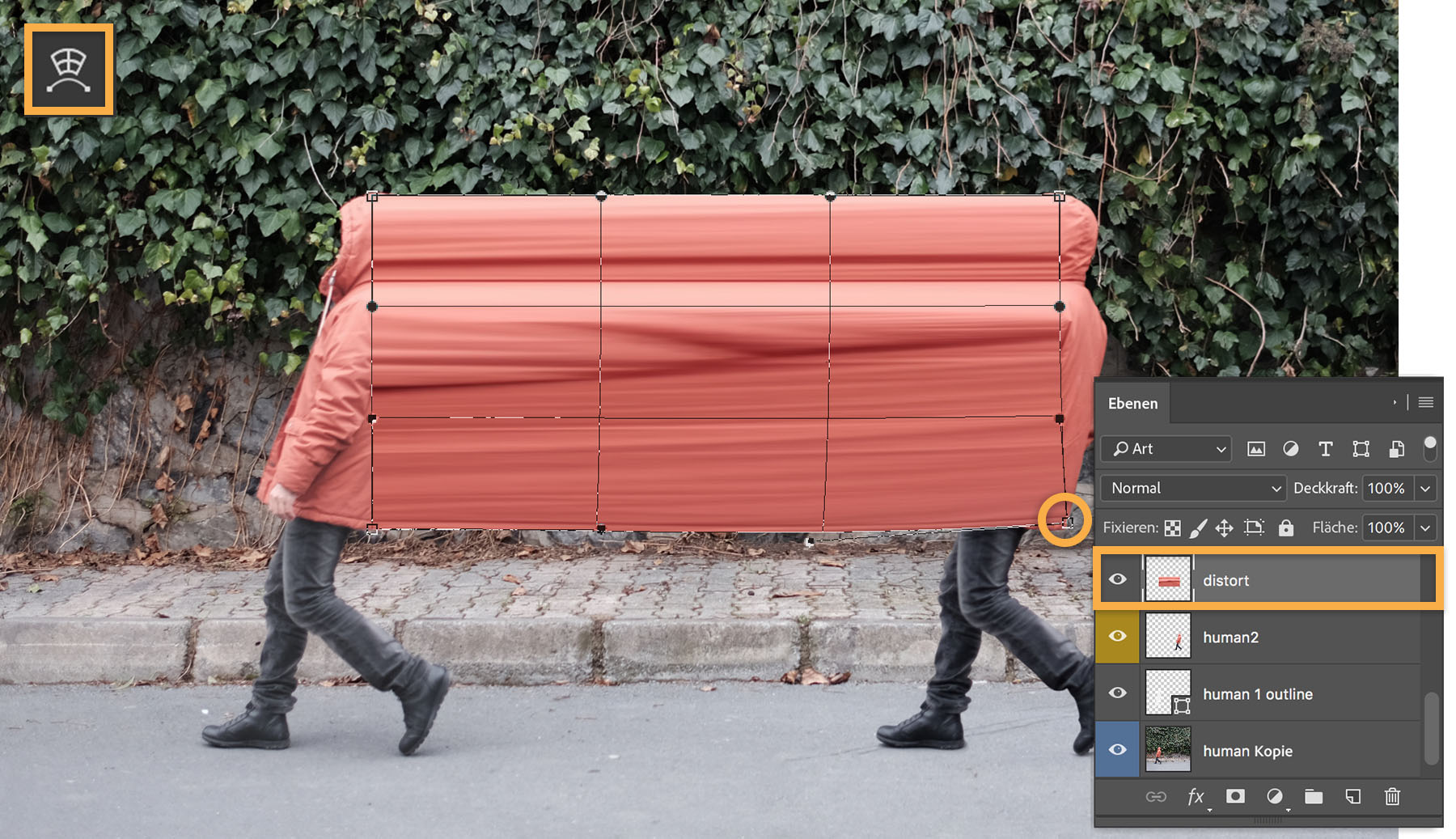
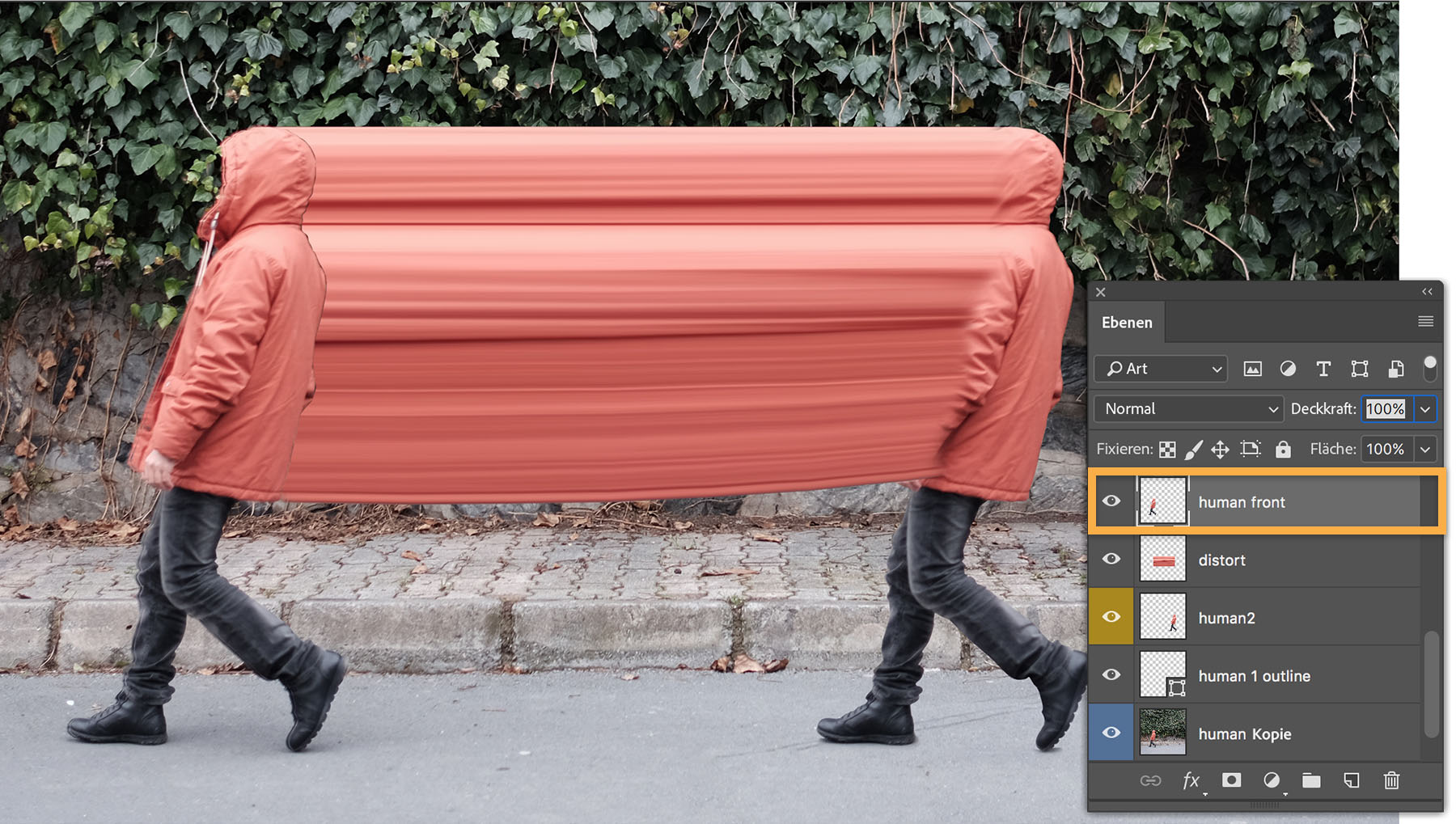
Dabei achtet er darauf, alle Elemente auf eigene Ebenen zu platzieren, damit er Effekte auf die einzelnen Bildbereiche anwenden kann. Jetzt kann Şakir die Jacke der vorderen Person „verflüssigen“. Dazu dupliziert er die vordere Person auf eine neue Ebene und verschiebt sie bis oberhalb der Ebene mit der skalierten Jacke.
3
Bewegungseffekt hinzufügen
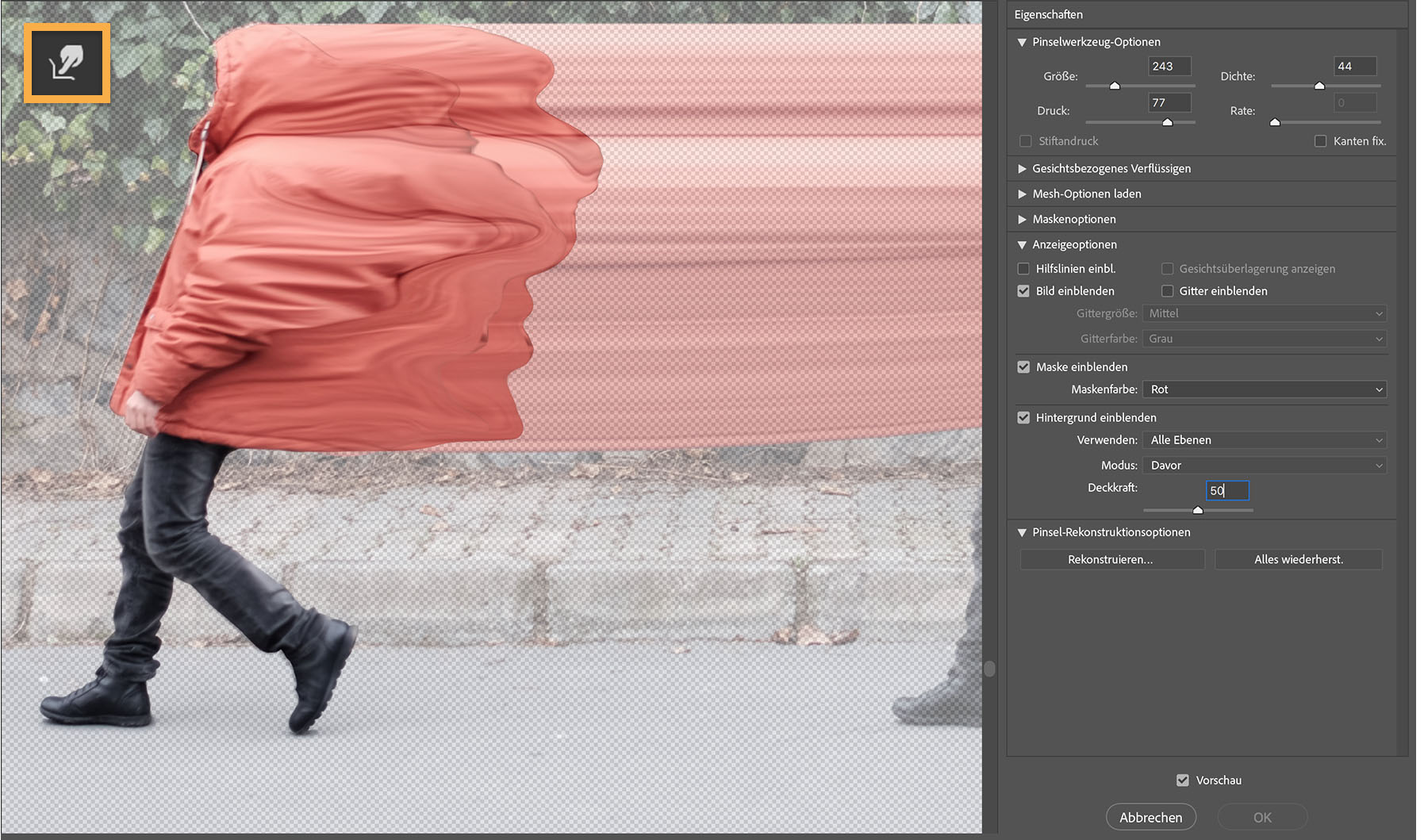
Der zeitaufwendigste Part des Projekts ist die Erzeugung des Bewegungseffekts. Şakir erstellt dazu mehrere Ebenen, wendet darauf den Verflüssigen-Filter an und verfeinert ihn für jede einzelne Ebene. Er wählt den Bildbereich aus, den er verflüssigen möchte. Dann zieht er das Motiv mit den Werkzeugen des Verflüssigen-Filters (Filter > Verflüssigen) so in Form, dass der gewünschte Effekt entsteht.
Tipp: Şakir verwendet meist das Mitziehen-Werkzeug, um den Verflüssigen-Effekt zu erzielen. Um bestimmte Bildbereiche von der Verflüssigung auszuschließen, sperrt er sie mit dem Fixierungsmaske-Werkzeug. Während des gesamten Prozesses passt Şakir immer wieder ausgewählte Bereiche mit den Transformieren-Optionen an.
4
Bewegungseffekt optimieren
Mit dem Radiergummi-Werkzeug verblendet er alle harten Kanten der verflüssigten Bildbereiche. Dazu wählt er die jeweilige Ebene aus, aktiviert das Radiergummi-Werkzeug, legt die Größe fest und passt die Kantenschärfe des Radiergummis an, um einen sanfteren Übergang zu erhalten.
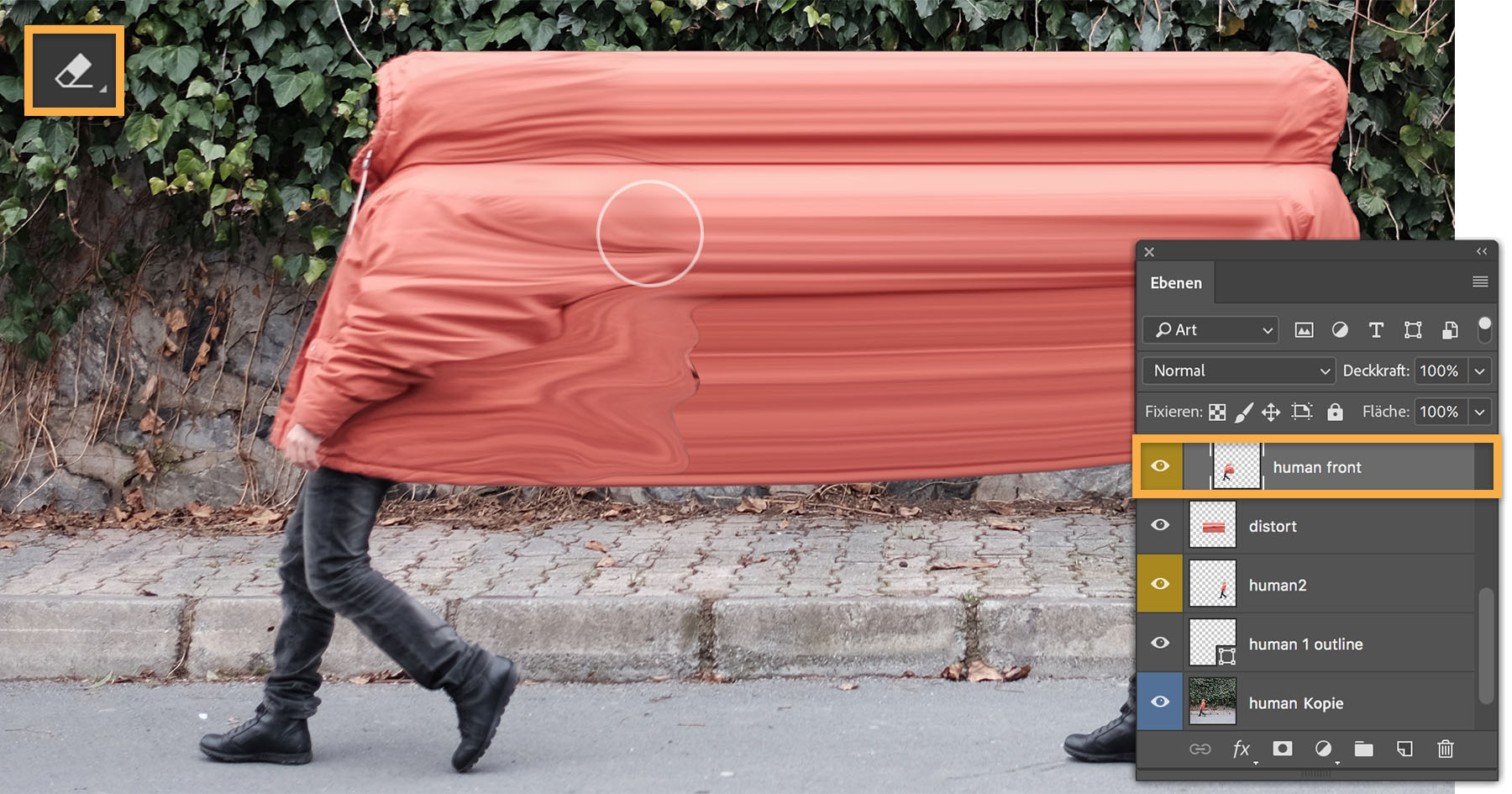
Diese Schritte – Ebene erstellen, Skalieren, Verflüssigen – wiederholt Şakir so oft, bis er mit dem Resultat zufrieden ist.
5
Feinkorrekturen vornehmen
Şakir setzt verschiedene Werkzeuge ein, um seiner Komposition einen ganz besonderen Look zu verleihen. Er passt Belichtung, Klarheit, Farbton und Schärfe mit Camera Raw-Filtern an und fügt mithilfe des Gaußschen Weichzeichners einen realistischen Schatten hinzu. Den letzten Schliff gibt Şakir seinem Werk dann mit Color Lookup-Einstellungen, selektiver Farbkorrektur, Auto-Farbe, Kontrast, Farbton und Kurvenanpassungen.
Weitere Arbeiten von Şakir inklusive anderer Bilder aus der Serie „Crawler“ findest du auf seinerBehance-Seite .
Über den Künstler.
Şakir Yildirim transformiert mit Photoshop Impressionen aus seinem Alltag zu ganz eigenen Kreationen. Er kann stundenlang Bilder mit Photoshop bearbeiten und dann einfach wieder verwerfen, denn ihm ist das Experimentieren mit seiner Kunst wichtiger als das Ergebnis. Manchmal ist ein Werk aber auch nach nur wenigen Änderungen fertig.
Şakir hat seine Freude an Kreativität bei seiner früheren Arbeit mit Keramik entdeckt. Jetzt findet er Inspiration auf seinen Reisen, deren Spontaneität und Ungewissheiten seine Bildsprache formen.
Photoshop bietet Şakir schier unerschöpfliche Möglichkeiten für seine Kunst, die man als eine Mischung aus Fotografie und Design bezeichnen könnte. Seine Flexibilität spiegelt sich in seinem Portfolio wider: Logo- und Webdesign, Bildbearbeitung, Collagen, Figuren, GIF-Animationen und Muster-Design.

You can control how Adobe websites use cookies and similar technologies by making choices below. But note that if you disable cookies and similar technologies entirely, Adobe websites may not function properly.
Cookies are small text files stored by your web browser when you use websites. There are also other technologies that can be used for similar purposes like HTML5 Local Storage and local shared objects, web beacons, and embedded scripts. These technologies help us do things like remembering you and your preferences when you return to our sites, measure how you use the website, conduct market research, and gather information about the ads you see and interact with.
You can make choices in the menu below about what cookies and other technologies you want us to use on Adobe sites when you visit them from this browser. You can always change those choices later by clicking on the Cookie Preferences link at the bottom of the page.
If enabled:
We can improve your experience by tailoring the site and the content to things we think might be of interest
We can better keep track of your preferences — like what language you prefer to use
We will better understand your likely interests so we can provide you more relevant Adobe ads and content on non-Adobe websites and in non-Adobe apps
It will help us improve the performance of our website and those of our partners who use the Adobe Experience Cloud
If disabled:
We won’t be able to remember you from session to session so the experience may not be tailored to your interests
You’ll still have access to the content of the site but certain features that depend on cookies may not function
You’ll still see ads, they just may not be as relevant to you
General information
You can control how Adobe websites use cookies and similar technologies by making choices below. But note that if you disable cookies and similar technologies entirely, Adobe websites may not function properly.
Cookies are small text files stored by your web browser when you use websites. There are also other technologies that can be used for similar purposes like HTML5 Local Storage, web beacons, and embedded scripts. These technologies help us do things like remembering you and your preferences when you return to our sites, measure how you use the website, conduct market research, and gather information about the ads you see and interact with.
You can make choices in the menu below about what cookies and other technologies you want us to use on Adobe sites when you visit them from this browser. You can always change those choices later by clicking on the Cookie Preferences link at the bottom of the page.
If enabled:
We can improve your experience by tailoring the site and the content to things we think might be of interest
We can better keep track of your preferences — like what language you prefer to use
We will better understand your likely interests so we can provide you more relevant Adobe ads and content on non-Adobe websites and in non-Adobe apps
It will help us improve the performance of our website and those of our partners who use the Adobe Experience Cloud
If disabled:
We won’t be able to remember you from session to session so the experience may not be tailored to your interests
We’ll still count your use of our site and services
You’ll still have access to the content of the site but certain features that depend on cookies may not function
You’ll still see ads, they just may not be as relevant to you
Operate the site and core servicesOperate site and measure engagement
Always active
These cookies are required, and they are used to enable the site and related services core functionality. Without them the site could not operate, so they cannot be disabled.
These cookies enable the site and related services’ core functionality and collect statistics about user engagement, such as counting active use to help us understand trends. These cookies cannot be disabled.
Measure performance
These cookies are used to analyze site usage to measure and improve performance. Without them Adobe cannot know what content is most valued and how often unique visitors return to the site, making it hard to improve information we offer to you.
These cookies are used to analyze site usage to measure and improve performance. Without them Adobe cannot know what content is most valued, making it hard to improve information we offer to you.
Extend functionality
These cookies are used to enhance the functionality of Adobe sites such as remembering your settings and preferences to deliver a personalized experience; for example, your username, your repeated visits, preferred language, your country, or any other saved preference.
Personalize advertising
These cookies are used to enable Adobe and our partners to serve ads more relevant to your interests. Without them you will still see ads, but they might not be as relevant to you.
Personalize advertising
These cookies are used to enable Adobe and our partners to serve ads more relevant to your interests. Without them you will still see ads, but they might not be as relevant to you.