It’s easy to set up a new document in Adobe Illustrator and configure options like width, height, color mode, and more.
Make a brand-new document
1. Upon launching Illustrator, you’ll see the Start workspace. Click Create new to open the New Document dialog box. Or simply press Control+N (Windows) or Command+N (macOS).
2. Select a category at the top such as Print, Mobile, or Web. These general categories start you off on the right foot by setting up some parameters for your project, like the best color mode and resolution.
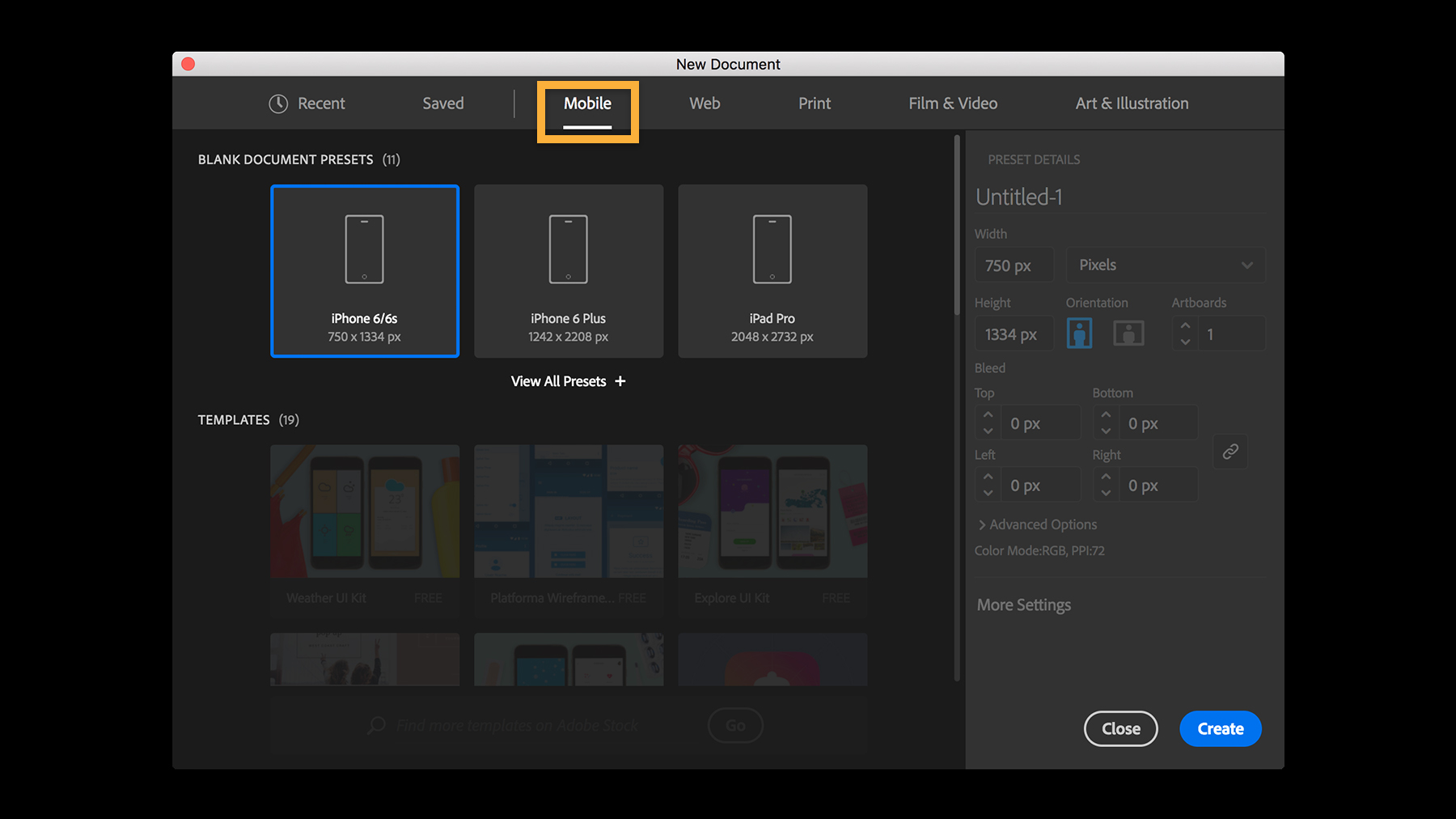
Tip: Consider your project before choosing a category. For example, choose Print if you’re designing a flyer, business card, or logo; choose Web if you plan to work on a web banner, social graphic, or art for your blog. If you’re unsure of the final destination, select Art & Illustration and customize the settings for your project.
3. Once you select a category, you’ll find many presets for commonly used document types. A preset is a handy starting point that creates a blank document using predefined dimensions and settings. For example, after picking Mobile, you can click a preset to quickly start designing for the iPad Pro.
4. You can customize your document in many ways, whether or not you picked a preset. In Preset Details on the right, you can specify exact dimensions, change measurement units and page orientation, or add a print bleed. (SeePrinter’s marks and bleeds to learn more about bleeds.)
Alternatively, you can jump-start your designs with a high-quality template. If you scroll in the main part of the New Document dialog box, you’ll find free templates with rich designs for a variety of projects, and you can download hundreds more from Adobe Stock. ViewCustomize an Illustrator template today to learn how to speed up your project with a template instead.
5. When you’re ready, click Create. This opens a new document with a blank artboard that is ready for your designs.
Now that your first document is open, you can change its settings anytime. Try making some of these easy edits:
Edit an artboard
An artboard in Illustrator works like a piece of paper on your desk. Artboards can be of any size and your document can contain multiple artboards in different sizes — so you can conveniently design for different projects and output sizes at once.
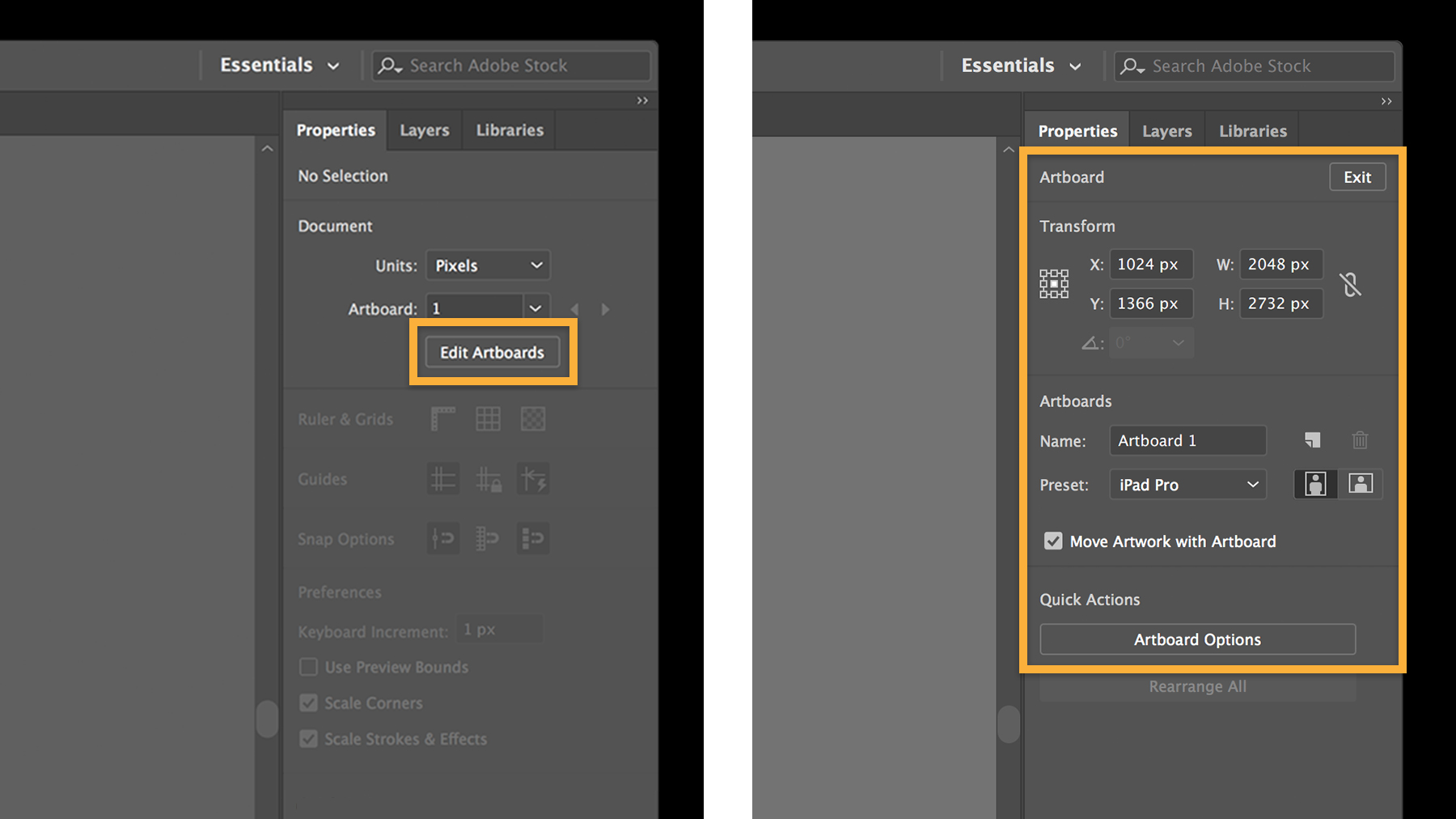
Go to Window > Properties. With nothing selected in your document, click Edit Artboards.
You can edit the width and height of the artboard by typing new values under Transform in the Properties panel. Click the New Artboard icon to create additional artboards. Click an artboard to select it — now you can manually adjust its size by dragging the widgets, or press the Delete key to remove it.
When you’re done, press Esc or click the Exit button at the top of the Properties panel.
Edit the document
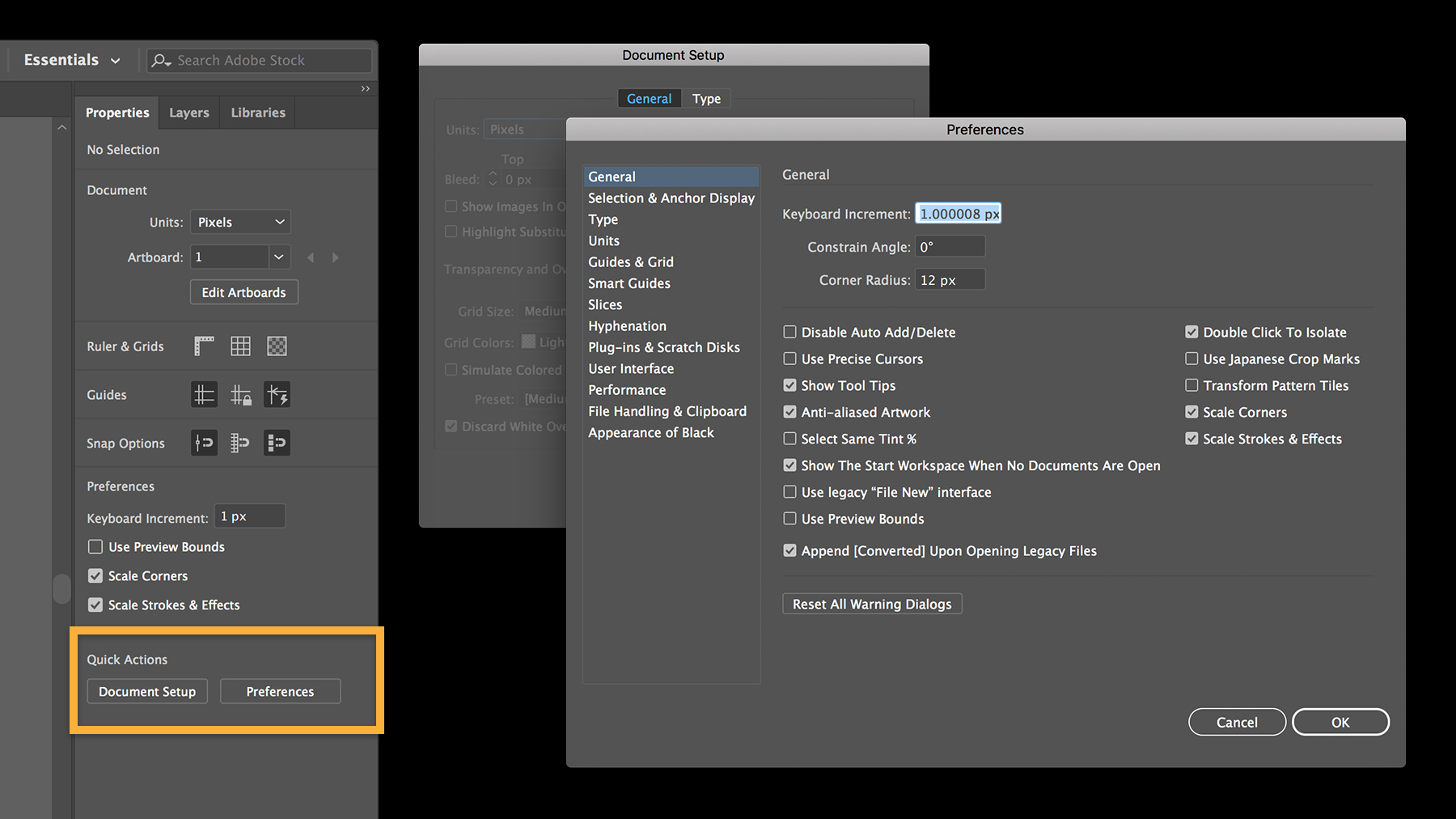
It’s just as easy to make a global change to your entire document consisting of multiple artboards. In the Properties panel, click Document Setup under Quick Actions. Change the units or bleed settings, and then click OK.
Or click Preferences in the Properties panel to quickly access and change any of the Illustrator application settings to your liking. (Your edited Preferences are saved when you quit Illustrator.)
Nice job setting up your first document. Don’t stop now — try these simple projects to practice your skills and create attractive illustrations in very little time.

You can control how Adobe websites use cookies and similar technologies by making choices below. But note that if you disable cookies and similar technologies entirely, Adobe websites may not function properly.
Cookies are small text files stored by your web browser when you use websites. There are also other technologies that can be used for similar purposes like HTML5 Local Storage and local shared objects, web beacons, and embedded scripts. These technologies help us do things like remembering you and your preferences when you return to our sites, measure how you use the website, conduct market research, and gather information about the ads you see and interact with.
You can make choices in the menu below about what cookies and other technologies you want us to use on Adobe sites when you visit them from this browser. You can always change those choices later by clicking on the Cookie Preferences link at the bottom of the page.
If enabled:
We can improve your experience by tailoring the site and the content to things we think might be of interest
We can better keep track of your preferences — like what language you prefer to use
We will better understand your likely interests so we can provide you more relevant Adobe ads and content on non-Adobe websites and in non-Adobe apps
It will help us improve the performance of our website and those of our partners who use the Adobe Experience Cloud
If disabled:
We won’t be able to remember you from session to session so the experience may not be tailored to your interests
You’ll still have access to the content of the site but certain features that depend on cookies may not function
You’ll still see ads, they just may not be as relevant to you
General information
You can control how Adobe websites use cookies and similar technologies by making choices below. But note that if you disable cookies and similar technologies entirely, Adobe websites may not function properly.
Cookies are small text files stored by your web browser when you use websites. There are also other technologies that can be used for similar purposes like HTML5 Local Storage, web beacons, and embedded scripts. These technologies help us do things like remembering you and your preferences when you return to our sites, measure how you use the website, conduct market research, and gather information about the ads you see and interact with.
You can make choices in the menu below about what cookies and other technologies you want us to use on Adobe sites when you visit them from this browser. You can always change those choices later by clicking on the Cookie Preferences link at the bottom of the page.
If enabled:
We can improve your experience by tailoring the site and the content to things we think might be of interest
We can better keep track of your preferences — like what language you prefer to use
We will better understand your likely interests so we can provide you more relevant Adobe ads and content on non-Adobe websites and in non-Adobe apps
It will help us improve the performance of our website and those of our partners who use the Adobe Experience Cloud
If disabled:
We won’t be able to remember you from session to session so the experience may not be tailored to your interests
We’ll still count your use of our site and services
You’ll still have access to the content of the site but certain features that depend on cookies may not function
You’ll still see ads, they just may not be as relevant to you
Operate the site and core servicesOperate site and measure engagement
Always active
These cookies are required, and they are used to enable the site and related services core functionality. Without them the site could not operate, so they cannot be disabled.
These cookies enable the site and related services’ core functionality and collect statistics about user engagement, such as counting active use to help us understand trends. These cookies cannot be disabled.
Measure performance
These cookies are used to analyze site usage to measure and improve performance. Without them Adobe cannot know what content is most valued and how often unique visitors return to the site, making it hard to improve information we offer to you.
These cookies are used to analyze site usage to measure and improve performance. Without them Adobe cannot know what content is most valued, making it hard to improve information we offer to you.
Extend functionality
These cookies are used to enhance the functionality of Adobe sites such as remembering your settings and preferences to deliver a personalized experience; for example, your username, your repeated visits, preferred language, your country, or any other saved preference.
Personalize advertising
These cookies are used to enable Adobe and our partners to serve ads more relevant to your interests. Without them you will still see ads, but they might not be as relevant to you.
Personalize advertising
These cookies are used to enable Adobe and our partners to serve ads more relevant to your interests. Without them you will still see ads, but they might not be as relevant to you.