Zajemite trenutek. Nato ga izpopolnite, retuširajte ali popolnoma preoblikujte. Paket Adobe Creative Cloud Photography vključuje Lightroom in Photoshop – vse, kar potrebujete za ustvarjanje izjemnih fotografij.
»Generativno odstranjevanje« v programu Lightroom omogoča neopazno in doslej najpreprostejše odstranjevanje motečih elementov s fotografij.
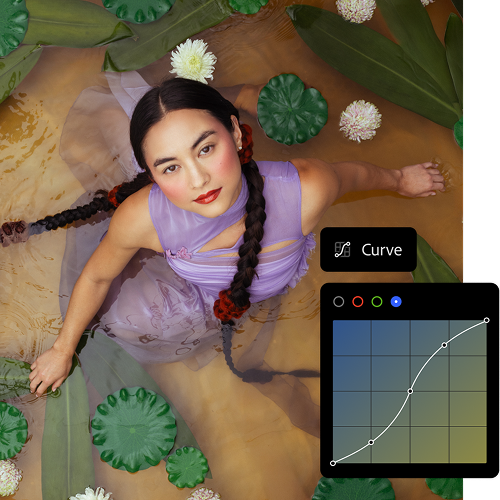
Obdelajte od koder koli.
Nadaljujte tam, kjer ste ostali, s programom Lightroom v mobilni napravi, namiznem računalniku ali spletu, vaši projekti pa se bodo samodejno sinhronizirali.
Dvignite veščine na višjo raven.
Oglejte si vadnice po korakih neposredno v programu Lightroom in poiščite še več navdiha v skupnosti Lightroom Discover.
Izpopolnite vsak ton in teksturo. Dodajte svojo prepoznavno noto. Z naprednejšo organizacijo fotografij v hipu poiščite najboljše posnetke. Z zmogljivimi in enostavnimi orodji za urejanje bo vsak posnetek nezmotljivo vaš.
Retuširajte fotografije ali jih povsem na novo zamislite. Natančno urejanje in inovacije UI vam dajejo moč, da presežete meje kadra – brez kompromisov pri kakovosti ali ustvarjalnem nadzoru.

three up, l-gap, no-spacing-top, xxxl spacing bottom
Še ne poznate Adobejevega programa za fotografije? Imamo odgovore.
Razlika med paketi Adobe za fotografijo je v tem, da paket Adobe Lightroom vključuje Adobe Lightroom, Adobe Lightroom Classic in 1 TB shranjevanja v oblaku za dostop do fotografij in njihovo urejanje kjerkoli, paket Adobe Creative Cloud Photography pa vključuje Adobe Lightroom, Adobe Lightroom Classic, Adobe Photoshop in 1 TB shranjevanja v oblaku. Primerjajte cene in funkcije paketov za fotografijo.
Da, pakete Adobe za fotografijo lahko preizkusite tako, da prenesete brezplačno sedemdnevno preskusno različico zbirke Adobe Creative Cloud in se odločite, ali je prava za vas. Začnite brezplačni preizkus
Čeprav sta si programa za urejanje digitalnih fotografij podobna, je glavna razlika med programoma Adobe Photoshop in Adobe Lightroom ta, da je Adobe Photoshop specializiran za spreminjanje, ustvarjanje in izboljšavo slik, medtem ko je Adobe Lightroom namenjen predvsem urejanju, organiziranju in obdelavi fotografij.Preberite več o razlikah med programoma Adobe Photoshop in Adobe Lightroom.
Paket Creative Cloud Photography je na voljo za 24,39€/mesecz DDV-jem pri letnem paketu s plačilom na mesec ali za 291,19€/letoz DDV-jem pri vnaprej plačanem letnem paketu. Paket vključuje Lightroom, Lightroom Classic, Photoshop in 1 TB shranjevanja v oblaku. Primerjajte pakete za fotografijo in cene.
style
xxl spacing
Poiščite paket Adobe Creative Cloud, ki je ustvarjen prav za vas.
style
three merch cards, dark, center, grid width 12, static links, no-spacing
background
#000
Lightroom (1 TB)
14,86€/mesecz DDV-jem. Letno, zaračunano mesečno
Lightroom za namizne računalnike, mobilne naprave in splet ter Lightroom Classic.
Redno po 79,96€/mesecDruga možnost je: 44,76€/mesecz DDV-jem. Letno, zaračunano mesečno
Pridružite se več kot 7 milijonom naročnikov Creative Cloud Pro po vsem svetu.Prihranite 44% v prvih leto pri nakupu celotne različice programa Lightroom, Photoshop in Lightroom Classic in več kot 20 programih ter ustvarjalni umetni inteligenci Adobe Firefly. Plačajte 44,76€/mesecz DDV-jem za prve leto in 79,96€/mesecz DDV-jem po tem. Samo za nove naročnike. Oglejte si pogoje | Oglejte si, kaj je vključeno

Redno po 79,96€/mesecDruga možnost je: 44,76€/mesecz DDV-jem. Letno, zaračunano mesečno
Pridružite se več kot 7 milijonom naročnikov Creative Cloud Pro po vsem svetu.Prihranite 44% v prvih leto pri nakupu celotne različice programa Lightroom, Photoshop in Lightroom Classic in več kot 20 programih ter ustvarjalni umetni inteligenci Adobe Firefly. Plačajte 44,76€/mesecz DDV-jem za prve leto in 79,96€/mesecz DDV-jem po tem. Samo za nove naročnike. Oglejte si pogoje | Oglejte si, kaj je vključeno
You can control how Adobe websites use cookies and similar technologies by making choices below. But note that if you disable cookies and similar technologies entirely, Adobe websites may not function properly.
Cookies are small text files stored by your web browser when you use websites. There are also other technologies that can be used for similar purposes like HTML5 Local Storage and local shared objects, web beacons, and embedded scripts. These technologies help us do things like remembering you and your preferences when you return to our sites, measure how you use the website, conduct market research, and gather information about the ads you see and interact with.
You can make choices in the menu below about what cookies and other technologies you want us to use on Adobe sites when you visit them from this browser. You can always change those choices later by clicking on the Cookie Preferences link at the bottom of the page.
If enabled:
We can improve your experience by tailoring the site and the content to things we think might be of interest
We can better keep track of your preferences — like what language you prefer to use
We will better understand your likely interests so we can provide you more relevant Adobe ads and content on non-Adobe websites and in non-Adobe apps
It will help us improve the performance of our website and those of our partners who use the Adobe Experience Cloud
If disabled:
We won’t be able to remember you from session to session so the experience may not be tailored to your interests
You’ll still have access to the content of the site but certain features that depend on cookies may not function
You’ll still see ads, they just may not be as relevant to you
General information
You can control how Adobe websites use cookies and similar technologies by making choices below. But note that if you disable cookies and similar technologies entirely, Adobe websites may not function properly.
Cookies are small text files stored by your web browser when you use websites. There are also other technologies that can be used for similar purposes like HTML5 Local Storage, web beacons, and embedded scripts. These technologies help us do things like remembering you and your preferences when you return to our sites, measure how you use the website, conduct market research, and gather information about the ads you see and interact with.
You can make choices in the menu below about what cookies and other technologies you want us to use on Adobe sites when you visit them from this browser. You can always change those choices later by clicking on the Cookie Preferences link at the bottom of the page.
If enabled:
We can improve your experience by tailoring the site and the content to things we think might be of interest
We can better keep track of your preferences — like what language you prefer to use
We will better understand your likely interests so we can provide you more relevant Adobe ads and content on non-Adobe websites and in non-Adobe apps
It will help us improve the performance of our website and those of our partners who use the Adobe Experience Cloud
If disabled:
We won’t be able to remember you from session to session so the experience may not be tailored to your interests
We’ll still count your use of our site and services
You’ll still have access to the content of the site but certain features that depend on cookies may not function
You’ll still see ads, they just may not be as relevant to you
Operate the site and core servicesOperate site and measure engagement
Always active
These cookies are required, and they are used to enable the site and related services core functionality. Without them the site could not operate, so they cannot be disabled.
These cookies enable the site and related services’ core functionality and collect statistics about user engagement, such as counting active use to help us understand trends. These cookies cannot be disabled.
Measure performance
These cookies are used to analyze site usage to measure and improve performance. Without them Adobe cannot know what content is most valued and how often unique visitors return to the site, making it hard to improve information we offer to you.
These cookies are used to analyze site usage to measure and improve performance. Without them Adobe cannot know what content is most valued, making it hard to improve information we offer to you.
Extend functionality
These cookies are used to enhance the functionality of Adobe sites such as remembering your settings and preferences to deliver a personalized experience; for example, your username, your repeated visits, preferred language, your country, or any other saved preference.
Personalize advertising
These cookies are used to enable Adobe and our partners to serve ads more relevant to your interests. Without them you will still see ads, but they might not be as relevant to you.