|
Aligning points
In addition to aligning objects, the Align commands can align the points that define objects.
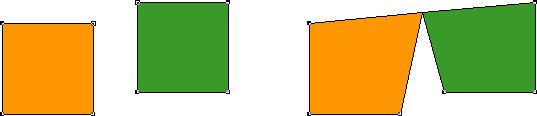 . .
Selected points on two objects before aligning (left) and after aligning horizontally and vertically (right)
To align points on objects:
| 1 |
Use the Subselect tool to select the points you want to align on one or more objects. |
| 2 |
Choose one or more of the following: |
 |
Modify > Align > Top |
|
Modify > Align > Bottom |
|
Modify > Align > Center Horizontal |
|
Modify > Align > Center Vertical |
|
Modify > Align > Left |
|
Modify > Align > Right |
|
Modify > Align Again |
 |
|
For more information on the Align commands, see the corresponding section in FreeHand Help or the Using FreeHand manual.
| 


