Створіть ідеальний стиль шрифту для свого проекту — з точною товщиною, шириною, нахилом — в Adobe Photoshop.
Повною мірою керуйте зовнішнім виглядом свого тексту за допомогою функціїваріативних шрифтів . Розпочніть з одного файлу шрифту та перейдіть до варіацій стилів, які можна використовувати повторно у своїх проектах.
Примітка. Для використання цієї функції вам знадобиться остання версія програми Photoshop.
Введення тексту
Натисніть T або виберіть інструмент «Горизонтальний текст» на панелі «Інструменти». Клацніть на полотні та введіть текст. Тричі клацніть текст, щоб виділити все речення, і збільште розмір шрифту на панелі параметрів.
Виберіть параметр вирівнювання. У разі потреби перемістіть виділений текст, перетягнувши його за верхню частину.
Пошук варіативного шрифту та його використання як відправної точки
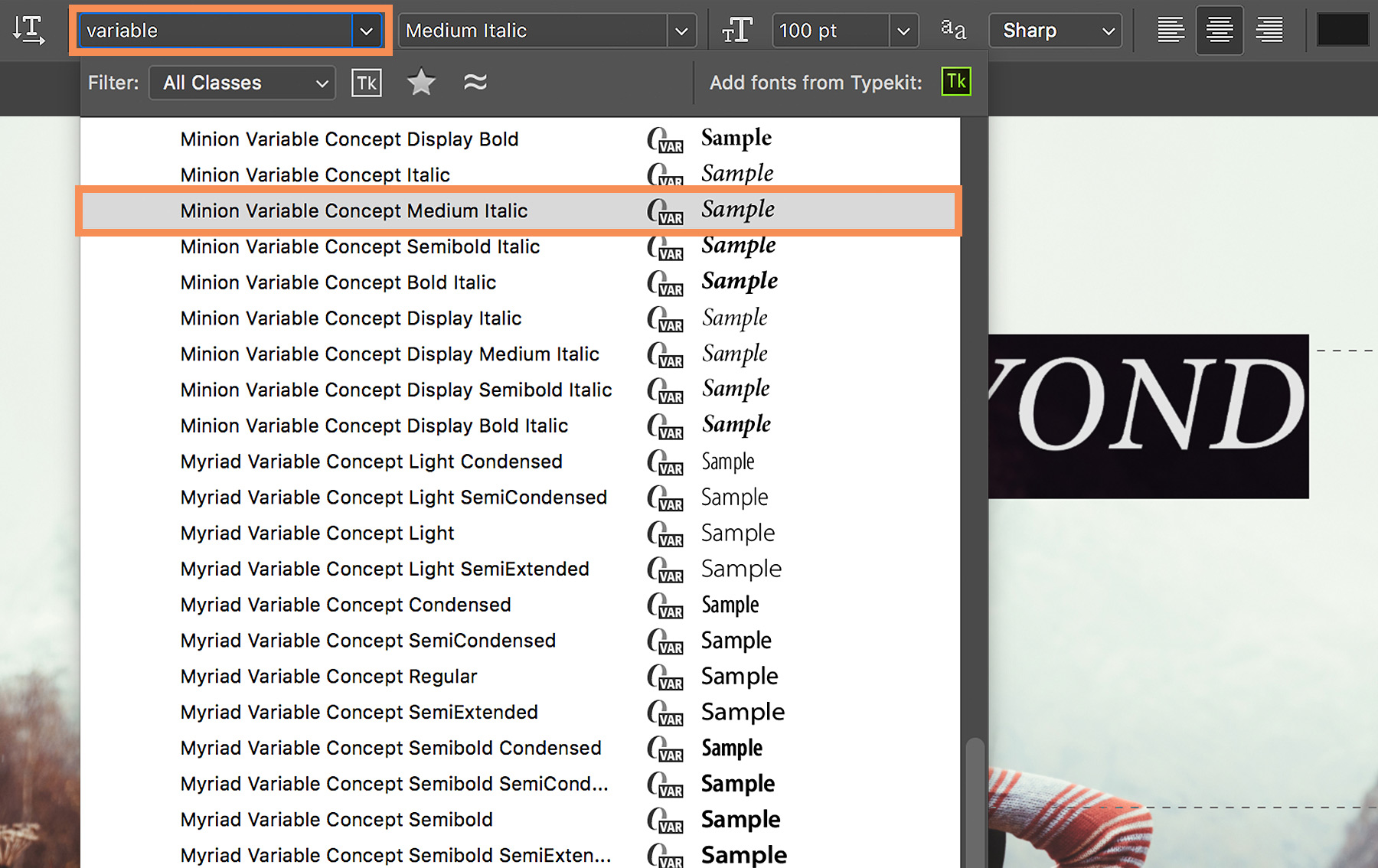
Ви можете швидко знаходити варіативні шрифти, установлені на комп’ютері. Виділіть текст, введіть слово «variable» у меню «Шрифт» на панелі параметрів. Ви помітите унікальний значок-ідентифікатор (VAR) поруч із назвою кожного варіативного шрифту.
Наведіть вказівник миші на список, щоб попередньо переглянути в реальному часі кожний стиль варіативного шрифту, а потім виберіть варіант стилю шрифту.
Редагування попередньо налаштованого стилю шрифту
На панелі «Властивості», яка відкривається автоматично, можна коригувати атрибути, як-от товщину, оптичний розмір, ширину та нахил, за допомогою зручних повзунків керування. Залежно від вибраного варіативного шрифту відображаються різні спеціальні атрибути.
Можна також змінювати колір тексту.
Порада. Під час коригування за допомогою повзунків програма Photoshop автоматично вибирає стиль шрифту, який найближчим чином відповідає вашим поточним налаштуванням. Наприклад, якщо збільшити значення нахилу для стилю шрифту «Правильний» (наприклад, Acumin Variable Concept Regular), варіант стилю буде автоматично змінено на курсив.
Точне налаштування типу
Натисніть «Додаткові параметри», щоб точно коригувати розмір шрифту, кернінг (інтервал між парою літер), трекінг (інтервал у групі літер) та інші параметри вашого тексту.
Порада. Щоб знову відкрити панель «Властивості», натисніть значок «Властивості» в стовпці закріпленої панелі або виберіть меню Вікно > Властивості.
Збереження спеціального стилю шрифту
Після того як текст виглядатиме так, як вам потрібно, збережіть свій унікальний стиль шрифту для його повторного використання.
Виділіть текст і натисніть «Стилі абзацу» в стовпці закріпленої панелі. Натисніть «Створити стиль абзацу» внизу панелі. Двічі клацніть новий стиль (Стиль абзацу 1) і введіть нову назву.
Щоб повторно використовувати власний стиль шрифту, просто виділіть текст у документі та виберіть створений вам стиль абзацу.
Сподіваємося, функція варіативних шрифтів для вас буде цікавою та корисною.

23 липня 2022 р.
Спробуйте ці учбові посібники разом із Photoshop
Редагуйте фотографії для створення нових зображень і графіки.
You can control how Adobe websites use cookies and similar technologies by making choices below. But note that if you disable cookies and similar technologies entirely, Adobe websites may not function properly.
Cookies are small text files stored by your web browser when you use websites. There are also other technologies that can be used for similar purposes like HTML5 Local Storage and local shared objects, web beacons, and embedded scripts. These technologies help us do things like remembering you and your preferences when you return to our sites, measure how you use the website, conduct market research, and gather information about the ads you see and interact with.
You can make choices in the menu below about what cookies and other technologies you want us to use on Adobe sites when you visit them from this browser. You can always change those choices later by clicking on the Cookie Preferences link at the bottom of the page.
If enabled:
We can improve your experience by tailoring the site and the content to things we think might be of interest
We can better keep track of your preferences — like what language you prefer to use
We will better understand your likely interests so we can provide you more relevant Adobe ads and content on non-Adobe websites and in non-Adobe apps
It will help us improve the performance of our website and those of our partners who use the Adobe Experience Cloud
If disabled:
We won’t be able to remember you from session to session so the experience may not be tailored to your interests
You’ll still have access to the content of the site but certain features that depend on cookies may not function
You’ll still see ads, they just may not be as relevant to you
General information
You can control how Adobe websites use cookies and similar technologies by making choices below. But note that if you disable cookies and similar technologies entirely, Adobe websites may not function properly.
Cookies are small text files stored by your web browser when you use websites. There are also other technologies that can be used for similar purposes like HTML5 Local Storage, web beacons, and embedded scripts. These technologies help us do things like remembering you and your preferences when you return to our sites, measure how you use the website, conduct market research, and gather information about the ads you see and interact with.
You can make choices in the menu below about what cookies and other technologies you want us to use on Adobe sites when you visit them from this browser. You can always change those choices later by clicking on the Cookie Preferences link at the bottom of the page.
If enabled:
We can improve your experience by tailoring the site and the content to things we think might be of interest
We can better keep track of your preferences — like what language you prefer to use
We will better understand your likely interests so we can provide you more relevant Adobe ads and content on non-Adobe websites and in non-Adobe apps
It will help us improve the performance of our website and those of our partners who use the Adobe Experience Cloud
If disabled:
We won’t be able to remember you from session to session so the experience may not be tailored to your interests
We’ll still count your use of our site and services
You’ll still have access to the content of the site but certain features that depend on cookies may not function
You’ll still see ads, they just may not be as relevant to you
Operate the site and core servicesOperate site and measure engagement
Always active
These cookies are required, and they are used to enable the site and related services core functionality. Without them the site could not operate, so they cannot be disabled.
These cookies enable the site and related services’ core functionality and collect statistics about user engagement, such as counting active use to help us understand trends. These cookies cannot be disabled.
Measure performance
These cookies are used to analyze site usage to measure and improve performance. Without them Adobe cannot know what content is most valued and how often unique visitors return to the site, making it hard to improve information we offer to you.
These cookies are used to analyze site usage to measure and improve performance. Without them Adobe cannot know what content is most valued, making it hard to improve information we offer to you.
Extend functionality
These cookies are used to enhance the functionality of Adobe sites such as remembering your settings and preferences to deliver a personalized experience; for example, your username, your repeated visits, preferred language, your country, or any other saved preference.
Personalize advertising
These cookies are used to enable Adobe and our partners to serve ads more relevant to your interests. Without them you will still see ads, but they might not be as relevant to you.
Personalize advertising
These cookies are used to enable Adobe and our partners to serve ads more relevant to your interests. Without them you will still see ads, but they might not be as relevant to you.