How to Use AI for Legal Document Review: Adobe Acrobat in ChatGPT.
Adobe Acrobat’s ChatGPT integration is a powerful tool for academic assignments and future legal careers. Acting as a legal document AI assistant, it can help students to review, analyse, and annotate case files, contracts, and other legal documents more efficiently.
Study smarter, not harder, and learn more about our ChatGPT integration.

What you’ll learn.
Key takeaways.
- Learn how to automate legal document review with AI to significantly cut down study time and enhance efficiency.
- Level up your law study flow with top AI tools for legal analysis.
- Try Adobe Acrobat’s ChatGPT integration – featuring some of the best AI features for legal PDF review for students.
Understanding AI in legal document review.
Legal document review is the process of examining a document to identify relevant material to use in a case or court. It’s usually carried out by trained paralegals or solicitors, so it’s an important skill for law students to learn. Legal document review also involves checking for any privileged or confidential information that may need to be withheld before the documents are shared with other parties.
AI can help to speed up document processing and assist with analysis. AI summarisation tools can come in handy to help summarise legal texts, case files and contracts to help identify the most useful information to bring forward.
For law students, legal document AI assistants can help to break down complex language and help point out critical information to assist with learning.
How can Adobe Acrobat in ChatGPT streamline legal document review with AI?
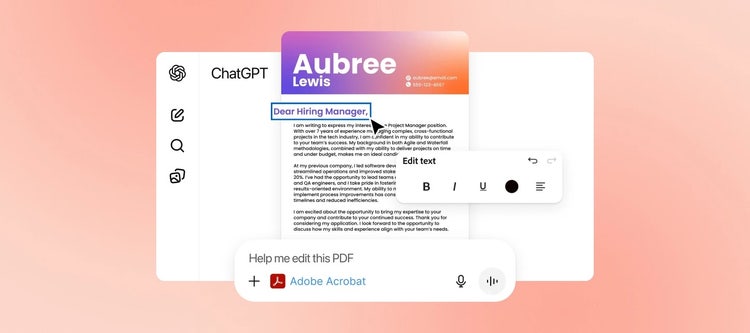
Law students can upload or open a legal PDF from their studies into ChatGPT and use the Adobe Acrobat integration to directly edit and interact with the document – all within the chat interface. You can enter your prompt, for example, ‘@Acrobat extract critical information from this PDF’ and sit back as it generates an answer to your query. You could also ask the tool to summarise the main arguments to help with your comprehension of the topic.
Uploading, interacting and editing your text in the same interface helps to streamline your workflow and save you valuable time flicking between applications – critical to those final years of your law degree.
Before you begin, you just need to make sure that Adobe Acrobat is connected to ChatGPT. Adobe prioritises privacy and data security, so as long as you use the Adobe Acrobat tool within ChatGPT, your PDF will be secure for editing.
Benefits of using AI for legal document review.
Artificial intelligence has the power to transform the way you study. From saving you time and enhancing efficiency to improving comprehension of technical documents. Take a look at some of the top advantages of using AI for legal documents:
Improved comprehension.
Struggling to wade through some complex data and tough legal jargon? The Adobe Acrobat ChatGPT integration can help break down technical language and provide clear summaries for easier understanding.
Time efficiency.
Automation is one of the most useful tools artificial intelligence offers. Traditionally, contract reviews were a laborious and time-consuming process. With AI, students and professionals can save precious time by automating document reviews. Just always remember to apply human oversight and a final accuracy check.
Rapid due diligence.
AI can process huge amounts of data very quickly, so lawyers (and students in training) can utilise these tools to analyse a larger data set more comprehensively. AI tools can help to reduce the risk of human error when completing repetitive and mundane tasks.
Identify risks and inconsistencies.
The Acrobat ChatGPT AI assistant can review legal documents to identify inconsistencies and errors that may have been missed by the human eye. This can help to improve the accuracy and efficiency of your workflow.
Develop future-ready legal skills for your career.
AI tools can help make the legal world more accessible for students, from simplifying complex language to identifying critical information to be aware of in cases. Start your future career on the right foot with the Adobe Acrobat ChatGPT integration.
How else can you use AI tools for legal document analysis?
Legal document and contract review is an essential – but traditionally time-consuming – process. AI tools for legal document review can help speed up this process for law students and professionals alike.
Explore how you can use AI to review legal documents with Adobe Acrobat in ChatGPT, from contract summarisation to creating timelines of events:
- Summarisation. Students can capitalise on AI tools to quickly and effectively summarise entire legal documents, specific case files or particular clauses and sections. An accessible summary can help with your understanding and comprehension.
- Document analysis. Students can ask AI to analyse or compare legal PDF documents. You can ask the AI assistant to note differences between contract drafts or legal briefs so you can start to notice patterns and discrepancies yourself, or flag simple formatting issues.
- Quality assurance. Manually reviewing multiple documents can leave room for human error. Introducing secure AI tools to your workflow can help analyse vast amounts of data very quickly – leaving you time and energy for a final manual review.
- Data extraction for case management. Ask secure AI tools to redact any sensitive or confidential information that’s not needed for case files to ensure anonymity and security where appropriate.
- Research and revision assistance. Students can use our chat with PDF AI assistant feature to ask questions about legal PDFs to help with revision – and even inform further research.
- Annotate documents. The Adobe Acrobat and ChatGPT integration allows you to directly edit and annotate your PDF documents – right in the ChatGPT interface. This may come in handy for redacting necessary information, as well as adding notes to case files.
- Plan timelines of chronological events. Utilising AI for legal documents could help to create a timeline of events based on the documents supplied, to help students better navigate a case.
How to automate legal document review with Acrobat in ChatGPT: Step-by-Step.
Lucky for law students, it’s simple and easy to automate legal document review with our Adobe Acrobat Chat GPT integration. Here’s how to use our tools for legal PDF automation and document review:
-
First of all, you need to ensure Adobe Acrobat is connected to ChatGPT. You can do so by heading to Adobe Acrobat for PDF. Select Connect, enter your information and then click Continue. You can also connect through ChatGPT – click Apps and search for Adobe Acrobat.
-
In the ChatGPT chat box, select + and More … to navigate to Adobe Acrobat. Or you can type in ‘@Acrobat’ and choose it from the dropdown.
-
Check that Acrobat is selected or begin your chat request with Adobe Acrobat. For example, ‘Adobe Acrobat edit this PDF’.
-
Upload or open the PDFs directly (whether it’s a case file, contract or statute) into the Asset Upload Interface and click Continue.
-
To get the most out of the tool, it’s important to write specific and effective prompts. For example:
“Summarise the key findings of this case and identify the ratio decidendi"
"Extract all clauses related to liability and damages"
"Identify any precedents cited in this document and their relevance"
"Analyse the potential risk factors for Party A in this agreement"
-
You can then use Acrobat's native tools directly in this chat interface. You can summarise or annotate directly onto the legal PDF to help with your revision.
-
Preview the results, confirm the action or Save. Once you’re finished, Download the annotated legal PDF. For advanced editing you can Open in Acrobat.
Tips and considerations for using AI tools for legal document review.
While AI for legal documents can help to maximise productivity, there are some important considerations. It’s key to remember that AI is a powerful tool to assist and enhance, but not to replace legal expertise, critical judgment or the need for thorough human review.
- Don’t neglect human insight. It’s important to remember that AI tools are extremely useful, but they cannot replace human oversight. It’s important to be aware of the context, nuance, or implicit meanings that AI may miss in complex legal texts.
- Always verify the AI output. Again, triple-check the output against the original legal document to ensure that the AI-generated summaries, analyses or extracted information line up.
- Prioritise privacy. Ensure that the tools you use have privacy measures in place to protect sensitive legal data. Adobe Acrobat complies with industry regulations and prioritises user privacy and data security. It’s designed to protect sensitive information, even when redacting information.
- Refine your prompts. It’s important to provide clear text prompts to guide the AI effectively and get the most out of its capabilities.
Professionals in the legal field frequently deal with sensitive subject matter. In a work environment, proprietary AI tools and systems may be advised for complete client confidentiality. But students can improve their skills and aid their comprehension with Acrobat’s secure tools.
For a broader understanding of review processes, read our guide on streamlining contract management.
Choosing the right AI tools for legal PDF review.
When looking for the best AI for legal PDF review as a student, you need to consider how easy it is to integrate with the workflows you’re already using for your studies. You also need to ensure that it’s accurate and can provide high-quality outputs to benefit your learning.
Adobe Acrobat’s ChatGPT integration takes the high-quality tools that you know and love and combines them with the ChatGPT interface. It features some of the top tools for legal analysis for students, thanks to its seamless integration with PDF documents and comprehensive capabilities for analysis, summarisation and annotation.
FAQs.
What’s the best AI tool for legal PDF review for students?
When selecting the best tool, you need to consider ease of integration and use, security, and quality of output. With any AI tool you choose, it’s still important to refine your prompts, test different approaches and review and edit the output until you’re happy with it.
How can I automate legal document review for my assignments effectively?
Using a tool like Adobe Acrobat within ChatGPT allows you to upload PDF documents for legal review. You can ask the tool to sort the PDFs, summarise findings, extract key information and more. You can also annotate, edit and write on PDFs directly within the interface – making collaboration on group assignments even easier.
Can a legal document AI assistant help me identify risk factors in case files?
Yes, a secure and compliant AI assistant can be used to help you identify risk factors in case files for your law studies. Using the Adobe Acrobat ChatGPT integration, you can upload PDF case files and ask the AI tool to extract risk factors.
Quickly develop legal alerts.
Quickly generate client alerts around dense, complicated legal information.

Useful PDF tools.
Take your law studies to the next level with Adobe Acrobat. Sign up today to make the most of our ChatGPT integration.