Acrobat for business | 10-Minute read
Free meeting minutes templates and examples.
Keep track of every meeting, with these free meeting minutes templates from Adobe Acrobat.
Meeting minutes are a key record for any organisation. If you’re leading an upcoming meeting, the right template can make documenting it quick and straightforward.
Meeting minutes can keep your business ticking, especially when people’s minds wander in those post-lunch discussions. Not only that, but they help to add clarity – no more forgotten deadlines, or mixed messages. With clearly defined meeting minutes, everything is there in writing.
However, inconsistent minutes can add to the confusion. Get it right first time, with handy meeting minutes templates with Adobe Acrobat.
What are meeting minutes?
Meeting minutes catalogue each event of a meeting, including discussions, and presentations (and maybe even the odd aside). They identify important decisions, vital steps, and actionable tasks. They can also be used to catalogue your team’s achievements.
Meeting minutes are generally handled by one person, designated as the notetaker. For small or informal meetings, any attendee may be asked to be the notetaker. It’s good practice for the meeting organiser to assign this task ahead of the meeting.
This doesn’t mean only the notetaker can take minutes, but they are accountable for summarising talking points, clarifying decisions, listing actionable tasks, and distributing the minutes of meeting notes to all attendees.
4 types of meeting minutes templates.
1. Standard meeting minutes.
Use cases: Team updates, quarterly company all-hands and staff meetings
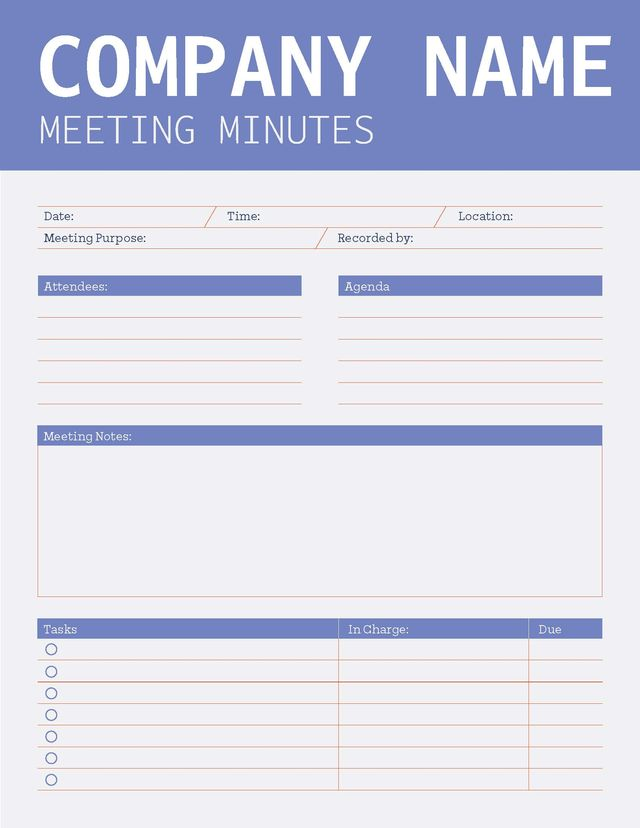
A standard meeting minute template is a great starting point. In this template, you’ll find key elements, alongside opportunities to note announcements, promotions or discussions, which can be customised as needed.
- Date
- Time
- Attendees
- Announcements
- Follow-up items
- Agenda items
- Agenda item 1: Discussion summary, decisions
- Agenda item 2: Discussion summary, decisions
- Other discussion items
- Action items
2. Detailed meeting minutes.
Use cases: Project meetings, annual employee reviews and client meetings
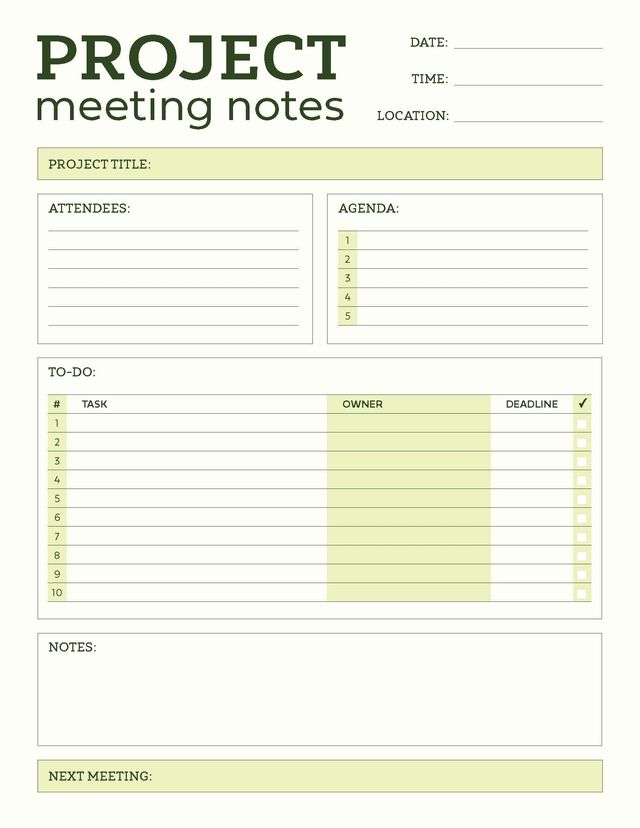
A detailed meeting minutes template builds on the standard template but promotes a deeper review of tasks or projects. It’s ideal for tracking project milestones, especially where outstanding action items are involved. Based on the meetings intent, the detailed meeting minutes template can be edited to define agenda items by department, project component, or potential roadblocks.
- Date
- Time
- Location
- Attendees
- Absentees
- Progress updates
- Outstanding action items
- Agenda items
- Agenda item 1: Discussion summary, decisions
- Agenda item 2: Discussion summary, decisions
- Agenda item 3: Discussion summary, decisions
- Action items
- Next meeting details
3. Formal meeting minutes.
Use cases: Executive meetings, HR proceedings and board meetings
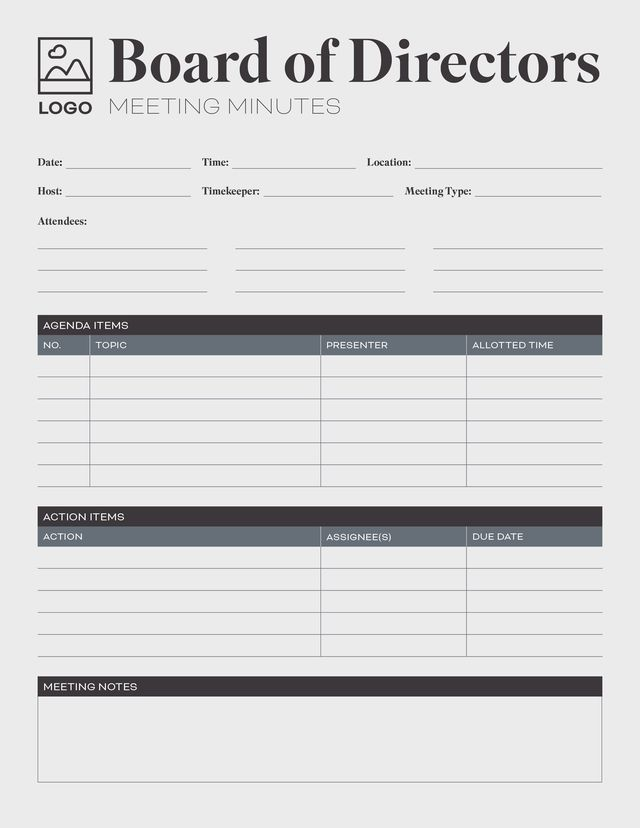
These formal meeting minutes templates include more structure than the others and are similar in structure to board meeting templates. While the order of the agenda isn’t too different, there are some formal expectations, such as old and new business, open voting discussions, and a formal adjournment.
While they’re a bit more in-depth, this template retains some consistency with others, so that notetakers can build familiarity.
- Date
- Time
- Location
- Call to order
- Attendees
- Absentees
- Old business
- Minutes from the last meeting
- Approval of previous minutes
- Open issues for approval
- Outstanding follow-up items
- New business
- Agenda item 1: discussion summary, decisions
- Agenda item 2: discussion summary, decisions
- Agenda item 3: discussion summary, decisions
- Action items
- Additional Notes
- Adjournment
- Next meeting details
- Time the meeting was adjourned
- Minutes approval
- Secretary approval
- President/Chairperson approval
Generally, formal meeting minutes need signature approval from the notetaker. Adobe Acrobat allows you to sign meeting notes in PDF form via electronic signature. If a company executive also needs to sign the meeting minutes, simply send the document to the relevant person(s) to request a signature. Finally, you can easily upload the meeting minutes for attendee review.
4. Informal meeting minutes.
Use cases: Team huddles, manager and employee check-ins and stand-up meetings
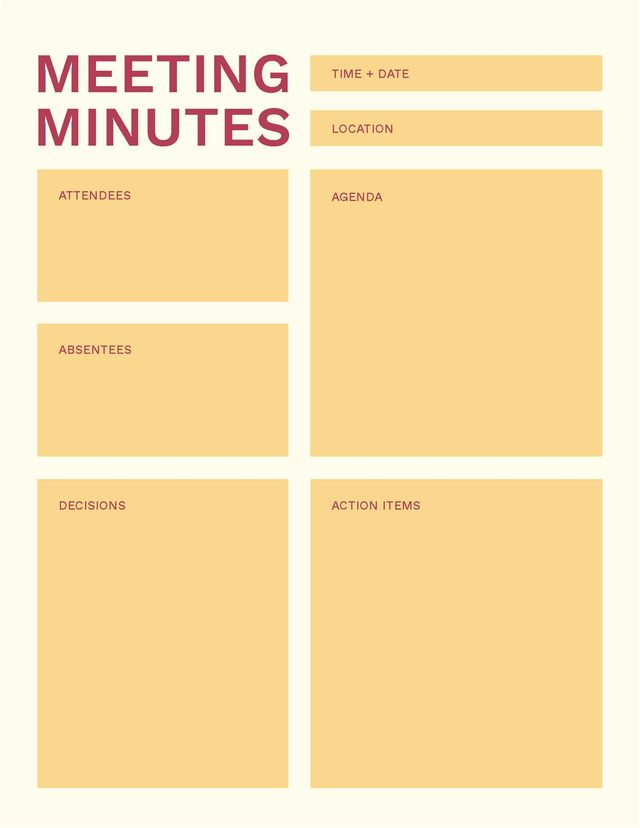
Sometimes, you just need the broad strokes of a meeting – that’s where the minimal meeting minutes template comes in. They’re ideal for recurring one-on-one meetings, those quick team huddles, or less formal discussions. There’s plenty of room for customisation and flexibility, without the rigidity and frills of a more in-depth meeting minute template.
- Date
- Time
- Attendees
- Agenda items (if needed) with discussion summaries and decisions
- Other discussion items
- Action items
While they’re a small part of it, keeping accurate minutes help your business move forward. Learn more about how Acrobat for businesscan smooth out your work processes.
Best practices for writing meeting minutes.
If you’re requested to create the meeting minutes, here are some best practices and tips for writing great meeting minutes:
- Be prepared. Proper preparation requires more than just showing up on time. Ensure you’re alert and attentive (that means getting to sleep on time). You may want to get a coffee if it’s your first time, or treat yourself to a snack. Most importantly – ensure your computer and the software you’re using is working.
- Stay focused. Don’t let yourself become distracted – whether that’s emails popping up on your laptop, or your phone. If you lose focus at the wrong time as the notetaker, you may end up with incomplete or incorrect information. Ensure you listen to each person attentively during the meeting and snooze any unnecessary notifications.
- Group relevant items. The best meetings have an agenda. However, you may not want to follow it exactly with your meeting minutes template. Instead of working in chronological order, you could group the minutes based on topic-relevant items. For example, you could list things in an Actionable Items section, or a Company News section, adding notes as and when they crop up in conversation.
- Take all meeting minutes as they happen. Take notes in real-time, not on reflection. If you can’t keep up with the meeting, you might consider use an audio recorder to revisit any missed points and fill in any gaps in your notes.
- Ask for clarification when necessary. Contrary to popular belief, it’s okay to ask for clarification. If you don’t understand an action item, or you missed something, speak up and be specific. A bit of clarification can help improve the accuracy of your minute notes. Most meetings will leave time at the end for questions, use this time to clarify points for your minutes.
- Use one tense. Clarity is everything, so sticking to one tense can aid with readability. Additionally, even though notes are taken in real-time, past tense is ideal for taking meeting minutes.
Why are meeting minutes important?
Meeting minutes are an essential part of recording company goals, tasks and talking points. They don’t just act as a way for businesses to record decisions or discussions. Meeting minutes also:
- Act as a “source of truth” for business discussions
- Provide a summary for employees or shareholders unable to attend
- Increase productivity and accountability for team members and leadership
- Demonstrate business progress on tasks or projects
- Record details for company audits.
How minutes are different from meeting notes .
Minutes and notes cover similar ground, and the terms can be used interchangeably, but there is a main difference in usage.
Generally, meeting minutes are considered to be more formal compared to meeting notes. Unlike minutes, notes tend to highlight key takeaways. Minutes, in comparison, ensure you have thoroughly recorded all information. They document more details about the meeting, which is usually more useful.
However, you may find people expect “minutes” when they say “notes”, and vice versa.
How to choose the right meeting minutes template.
Choosing the right template gives you a solid foundation to start recording your meetings. To ensure you get one that is fit for purpose, consider going through the following steps:
- Define the purpose. Depending on your goals, you might not need a big, in-depth template. Try to consider the purpose – do you need to brainstorm ideas? In that case, your meeting minutes template of choice might look different to a status update or announcement-centric meeting.
- Determine the schedule. How often will this meeting take place, and what is its scope? A meeting minutes template can vary depending on the timeframe. For example, a daily project catch-up might require more detailed notes to capture nuances, while a broader meeting may only need to record key points rather than in-depth project updates.
- Consider your audience. Depending on the audience, you might require a different template. If you’re supporting multiple discussions, involving department heads, or planning a meeting with the company board, you’ll need a document that accommodates multiple big-ticket agenda items.
- Classify the style. Try to consider what style of meeting you’re involved in and choose a relevant template. You don’t need a super formal document for a casual, weekly update.
If you’re working into a PDF meeting minutes template, you can use Adobe Acrobat to edit it online. Forget creating your meeting minutes from scratch. With an Adobe meeting minutes template, you can customise and edit PDF content by working directly into your document.
Frequently asked questions.
How do I write minutes of a meeting?
Electric notes make taking meeting minutes easy – and you can even check spelling and grammar, change formatting, and make amends as you go. Remember, always pay attention to the meeting, using the agenda as a guideline. Other things to consider are:
- Clarify any misunderstood action items or discussion topics immediately
- Include the date and time of the meeting
- Track attendees and absentees
- Provide context for previous meeting minutes, agenda topics and any resulting decisions
- Summarise everything with updates and new action items.
It’s a good idea to imagine you’re someone who hasn’t attended – if you can summarise the meeting in a way that someone absent could understand fully, you’ve done a good job. Condense the detail, but don’t miss crucial points.
Is there a format for meeting minutes?
Yes – there is a general format for meeting minutes, but it is not the only format – it depends on the type and style of the meeting. Using a meeting minutes template could provide guidelines for important information based on your intent.
Whatever happens, ensure your format accommodates all the touchpoints of your meeting and shoot for a clean design, not a decorative one (as fun as it is).
What are the 4 types of minutes?
The four most common types of meeting minutes and meeting types include:
- Standard meeting minutes, for general or staff meetings.
- Detailed meeting minutes, for ongoing projects or important developmental talks.
- Formal meeting minutes, for executive meetings or discussions with the board.
- Informal meeting minutes, for one-on-one meetings, group huddles or informal meets.
What should not be included in meeting minutes?
You don’t need to detail every scrap of information in a discussion – that’s a transcript. Meeting minutes focus on top-level topics, rather than the nitty-gritty details – unless you think they’re relevant.
As a rule, avoid adding personal opinions or judgements – meeting minutes are objective and impartial. They function as a historic document, so should not be skewed to affect the credibility of the notes (or the notetaker). Focus on facts, decisions and action items.