Customer journey map examples to help you understand your audience.
Start creating your customer journey map with helpful examples and templates from Adobe Express.
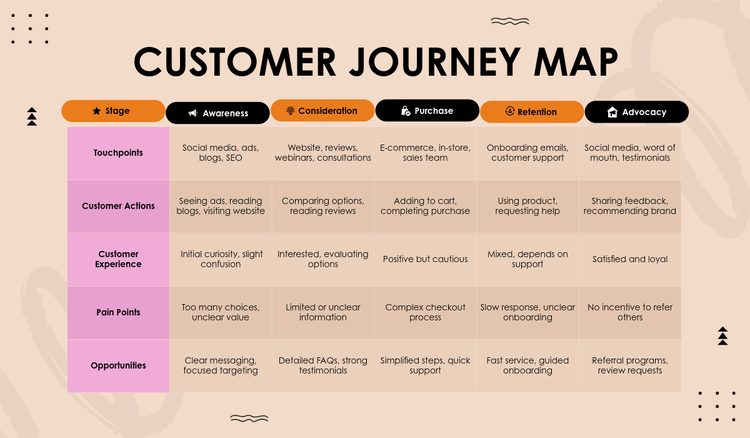




When creating any new product or service, it’s important to consider your customer journey. Customer journey maps are handy tools that enable you to visualise a customer’s experience with your brand. This includes all touchpoints involved – from awareness to purchase and more.
This article will explain what a customer journey map is and provide examples. It can be challenging to know where to begin with customer journey maps, but with the help of Adobe Express, you’ll have everything you need to get started.
What is a customer journey map?
Customer journey maps are created to help businesses gain a deeper understanding of how a customer will perceive a product or service. They also help to identify potential pain points, as well as opportunities and areas where improvements can be made. You may decide to plot your customer journey map in a chart, infographic or timeline format.
Simple customer journey map examples.
There are many different customer journey map examples that you may use in your business. We’ll start with some simple ones that can help you visualise the user experience in its current form.
The templates below may come in handy for launching a new product, promoting a seasonal sale or encouraging sign-ups for a limited-time offer.
recipe
Complex customer journey map examples.
More complex journey maps can be used to not only further understand your customers, but also map out multiple touchpoints or different journeys.
The templates below may be useful for mapping out long-term product procurement, managing multiple sales funnels, or onboarding a subscription-based service.
recipe
Business-to-business (B2B) customer journey map examples.
B2B customer journeys are just as important as B2C. They require the same level of thought and attention, especially as B2B sales products and services are often more expensive and can have a longer sales cycle.
B2B customer journey maps may come in handy for onboarding new clients, looking after sales leads during the lengthy sales cycle, or for handling decision-makers and end-users.
recipe
“Day in the life” customer journey map examples.
A “day in the life” map will have your customer’s day mapped out, from when they wake up to when they go to sleep. These are in a timeline format, so they can be followed chronologically.
Use customer journey maps to find out when your product or service will be of most value to your customer. For example, understanding your customer’s day can provide valuable context and insights into the thoughts and needs they experience – from their commute to work to their afternoon coffee.
recipe
Circular customer journey map examples.
A customer journey may not be linear. If you have a subscription-based product, then using a circular customer journey map may be useful to know how and why a customer does or does not renew a service.
A circular customer journey map may also be used for loyalty programmes or re-engaging customers after a purchase.
recipe
Other examples of customer journey maps.
Let’s look at some other examples of customer journey maps – all of which offer a unique perspective on customer needs, behaviours and interactions.
With these examples of customer journey maps, you can go even further with your insights for more strategic future planning:
Empathy maps: These may be used to help inform a customer journey map. They aim to create a shared understanding of how a customer thinks and feels, as well as what they say and do. This helps uncover pain points and allows you to learn exactly what drives your customer.
Customer experience maps: These are used to better understand behaviour, as it relates to a certain experience. They provide contextual insights to help you better understand your customers as people.
Service roadmaps or blueprints: A service blueprint maps out your internal service processes and systems to support customer touchpoints. It may come in handy when making organisational or procedural changes.
recipe
What makes a good customer journey map?
Customer journey maps aren’t just there to look impressive and then gather dust somewhere. They should be easy to use and understand, and help teams actively work out customer needs and wants. Here are some tips to keep your journey maps focused and useful:
Simplify complex customer journeys.
Your journey map should flow – it shouldn’t be more complicated than necessary. Highlight key moments, emotions and pain points so it’s easy to see the full picture.
Focus on a single scenario.
Don’t try to do everything all at once. By focusing on one scenario at a time, you’ll keep the map on track and relevant, allowing you to focus on anything that needs to change or improve.
Offer clear and actionable insights.
A customer journey map should give you the insights you need to move forward. By using visual aids, callouts, spotlight notes and highlights, you can see exactly where customers have issues and then work on resolving them.
Build from real customer data.
Use real data and feedback from customers, as well as any analytics from your CRM, to build a map that will lead to better strategic decisions.
Collaboration is key.
Journey mapping isn’t a solo task. Include people in your team and those in customer-facing departments to ensure everyone is on the same page and the customer journey map makes sense across the board.
How can Adobe Express help you create a customer journey map?
Adobe Express has all the tools you need and more to create a customer journey map, from engaging infographics to free templates for inspiration.


Create your own customer journey map for free.
Turn your customer journey into an infographic.
Take action with loyalty cards, landing pages and more.
Pitch your customer journey map with Adobe Express’ AI presentation tool.
Once you’ve created your customer journey map, it’s time to pitch it to stakeholders. Use Adobe Express’ AI presentation tool and create a polished, on-brand presentation of your customer journey map that’ll get people interested.
With the AI presentation tool, you can enter prompts to create a presentation that fits your brand and generates slides with all the information you need to deliver. You can then edit, customise content, and seamlessly share your journey map.
A presentation is a great way to provide feedback on certain insights and make a case for improving customer experiences.
You might also like...