Project management presentation tips & examples.
Get top tips for creating a stand-out project management presentation for your business.
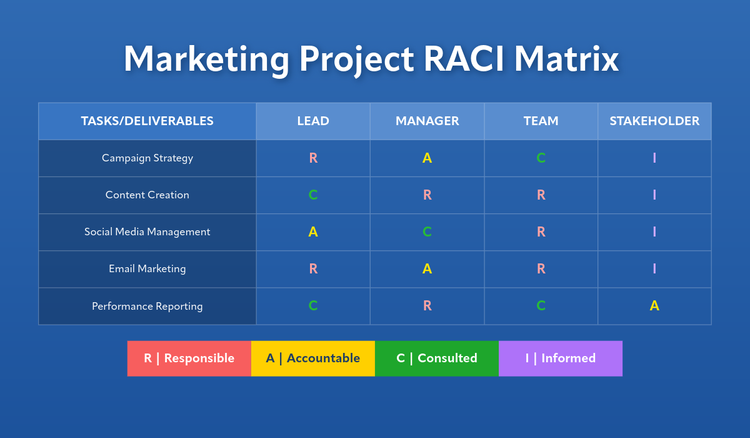




If you’re involved in project management, there’s a good chance you’ll have to put together a project management presentation from time to time. These can be useful for all stages of your project – at the beginning, to give an outline of the main objectives, during to give an update, and after to share a final report and results.
Knowing how to create a presentation on project management can help to keep your colleagues well informed on the status of your work and keep business operations running smoothly.
In this handy guide by Adobe Express, we’ll talk you through how to put together an impressive project management presentation, as well as provide some top tips to make it a success.
What is a project management presentation?
A project management presentation is a common business activity where team members and stakeholders come together to discuss a project that’s being undertaken by the business. Not all members are always directly involved with the project, and in most cases one or a few colleagues will participate in the presentation – presenting slides, delivering information and answering questions. The presentation can be informal or formal.
There’s usually an assigned project manager who will cover the essential information as part of the presentation, such as:
- An overview of the project
- The project scope
- Requirements collection
- Deliverables list
- Schedules and deadlines
- Milestones and goals.
recipe
What makes a stand-out project management presentation?
Regardless of the topic or audience, there are certain features that a good project management presentation will have. It’s important that you include key information in your presentation to ensure that your attendees aren’t left with any unanswered questions.
Here are some of the key elements to include in your project management presentation:
- Strong visuals. Adding images, videos and infographics can help to keep your audience engaged and interested. Avoid using slides with just text, as this can make your presentation, and thus your topic, seem stale and uninteresting.
- Set clear objectives – Identify and outline the main objectives for the project and how success will be measured. This can be through KPIs (key performance indicators).
- Simple breakdown of strategies. Once you’ve stated your objectives, let your teammates know how you plan to achieve them. You can make use of tables, graphs and bar charts to ensure your strategy is communicated clearly.
- Clear timelines. A strong project management presentation will have clearly set timelines for all elements of the project. Deadlines should be strict, but project managers should have contingency plans just in case.
- Good communication. Ensure that all slides are clear, concise and free from any spelling or grammatical mistakes. This will help to convey professionalism and give your audience more confidence in the project you’re working on.
How to craft your own project management presentation.
You don’t have to be a design pro to create an impressive project management presentation. Adobe Express offers a range of tools and templates to help you craft an effective presentation.
Here’s how to create a successful project management presentation:

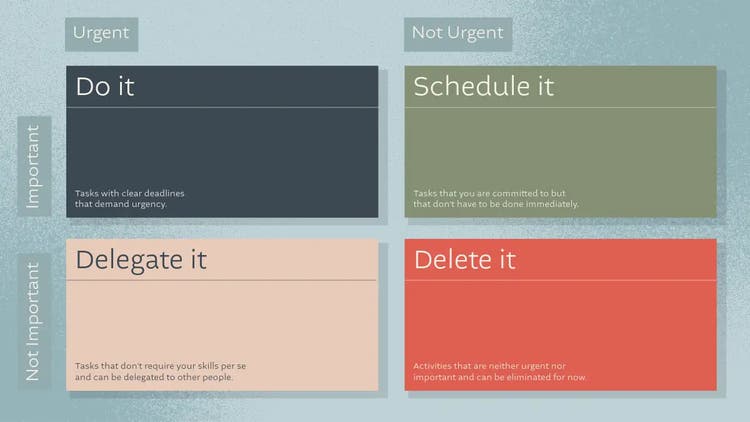
Define your objectives and key messages.
Structure your presentation for maximum impact.
Design slides and visuals that pop.
You should aim to make your presentation as visually appealing as possible. While the information you’re presenting is important, the way you present it is also key, as this helps you keep your audience’s attention.
Avoid using lots of text and jazz up your presentation with some brand assets, quality stock imagery, icons and graphics – these can support the data you’re presenting.
Want inspiration for your next project management presentation? Check out some of Adobe Express’ customisable presentation templates.
Keep it concise.
Avoid sending your audience into information overload with too much detail. Keep your slides concise and ensure you focus on getting across key messages.
Remember, you can always expand upon your points in the presentation, or with follow-up notes.
Leave time for Q&As.
Free project management presentation examples and resources.
recipe
6 tips for a successful project management presentation.
Give suitable notice.
Ensure you give all attendees suitable notice and select a date and time that fits with everyone’s schedule, if possible.
Make your presentation branded.
Adding branded assets like logos, and branded fonts and colours to your project management presentation can help to personalise it to your business and emphasise a shared interest with your audience.
Practice.
Practice makes perfect. Go over your presentations as many times as it takes for you to feel comfortable and confident in what you’re presenting.
Check your electronics.
Technical difficulties are the last thing you want when presenting to colleagues and key stakeholders. Ensure that projectors, laptops and connectors are all in working order before you start to present.
Tell a story.
Stats are great, but people tend to remember stories better. Try to incorporate storytelling into your presentation to make key points more memorable.
Ask for feedback.
The best way to improve your next project management presentation is to learn from your last one. Ask your attendees for feedback on both the presentation itself and the way you present.
You might also like...