How to write a meeting agenda – with examples.
Discover what a meeting agenda is, key elements to include, and how to create a meeting agenda to prepare for effective discussion.





Too often, meetings can lack clear objectives, go off topic, and feel unproductive. If you have an all-important meeting on the horizon, having a meeting agenda on hand can increase focus, enhance efficiency, and improve collaboration.
Read on to uncover what a meeting agenda is, what it includes, and how to write agendas for meetings. Set clear goals ahead of time with meeting agenda examples, templates, and tips from Adobe Express.
What is a meeting agenda?
A meeting agenda is a structured list of discussion points and activities that you plan to cover in a meeting. It serves as a roadmap to guide participants through the meeting’s purpose, topics, and objectives. This allows them to prepare the necessary information ahead of time and arrive ready to contribute effectively.
Essentially, using a meeting agenda can foster productive and structured conversations, turning a time-draining conversation into an outcome-driven event.
What to include in a meeting agenda.
A meeting agenda can be as detailed or as simple as you like. What’s most important is that you include the necessary information for participants to prepare.
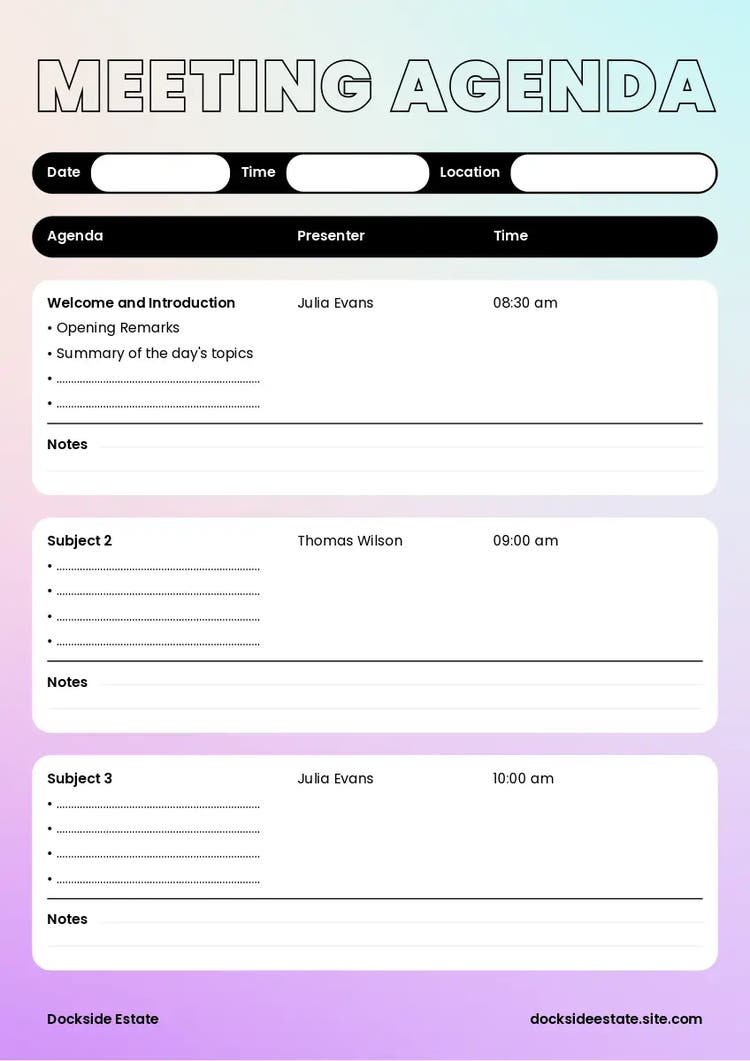
A standard meeting agenda includes:
- Meeting name. Establish the meeting agenda with a name or title, such as ‘Weekly Marketing Team Meeting’ or ‘2025 Sales Review’.
- Date and time. Include the meeting date and time so participants can manage their schedules effectively.
- Location. The meeting agenda should state where the meeting is taking place. If it’s online, provide a link to join the call.
- Objective(s). A section dedicated to goals or objectives, the purpose of the meeting, and what you’re looking to achieve.
- Agenda items. List each task or topic that you’re hoping to cover, as well as the time frame for each point.
- Space for review. The meeting agenda may also factor in extra time for further discussions or review.
How to write an effective meeting agenda.
Meeting agendas help ensure meetings are focused and efficient, keeping everyone on the same page and covering key subjects. Here are some simple steps to writing a meeting agenda.
1. Highlight the meeting’s objective.
The purpose of the meeting is arguably the most crucial part of your meeting agenda. Before anything else, define the specific objectives and what you aim to achieve by the end. Try to make your objective realistic and attainable. For example, a larger project might require a series of meetings, rather than a single one.
2. Get input from participants.
Getting input from participants can help you create a focused meeting agenda. Discussions are collaborative, after all. You can ask for topic suggestions or any questions they might have. This can help shape a meeting that meets everyone’s needs, increasing engagement and productivity. Once you’ve gathered everyone’s ideas, you can then outline the meeting tasks accordingly.
3. Formulate the questions you want to address.
Using your objectives, input, and topics as a base, consider the questions you want to answer during the meeting. Depending on the questions, you may want to prepare data, external research, or documents beforehand. Doing so can ensure an engaging, productive, and valuable meeting for all participants.
4. Make plans for individual tasks.
Now that you have your objectives and topics, you can create a list of actions. Consider the purpose of each item – whether it’s to share information, problem-solve, or decide a course of action. A meeting agenda with detailed items can structure your meeting and keep participants engaged.
5. Calculate the amount of time to spend on each topic.
With your agenda items sorted, estimate the amount of time you’ll need to cover each topic. You may already have an idea of how long the meeting should be, so ensure you carve out enough time per item. It’s also worth allowing time for questions or further review at the end of the meeting.
6. Identify who will lead on each topic.
Some meetings require multiple presenters or speakers. Determine who will take charge of specific topics, such as managers or department heads, and list them in your meeting agenda. This allows everyone to prepare for their own responsibility and keep the meeting focused.
7. Consider ending the meeting with a review.
Optional reviews can be a useful way to wrap up or conclude a meeting. This is your chance to revisit key subjects and summarise the discussion. Participants can better understand the decisions made and the next steps to take. You can also clarify how the meeting went and whether another meeting is necessary.
Free meeting agenda examples from Adobe Express.
recipe
How to bring your meeting agenda to life.

How can Adobe Express help you create a meeting agenda?
Understanding how to write a meeting agenda is just the beginning. You’ll also want to format and present it in the best possible way. Adobe Express has tools that can help you achieve just that.
1. Brainstorm what to include in your agenda.
Defining goals for your meeting agenda doesn’t have to be a chore. Create a spider diagram and get a comprehensive overview of your finest ideas. Branch out with core themes, organise your objectives, and outline desired outcomes.
2. Create a customised meeting agenda.
Design a custom meeting agenda that matches your unique needs. Choose a template or start from scratch and incorporate all the essential elements that’ll make your agenda shine. Use editing tools, add colour, text, images, business logos, and more.
3. Explore free meeting agenda templates.
Browse dozens of professional meeting agenda templates and choose the perfect one that speaks to you. Whether you go formal or funky, you can upload branded imagery and other visual elements your team will love.
Prepare for your meeting with the AI Presentation Maker.
Your meeting agenda is as important as the meeting itself, and what better way to present ideas than with a professional presentation? Adobe Express’s AI Presentation Maker is a helpful tool to create visually stunning slides. Explore various templates and design assets to make your presentation pop, or import your slides with striking elements and edit to your heart’s content. Want more visual flair? Generate high-quality images or include AI text effects that complement your slides. Whatever your meeting’s purpose, the AI presentation maker can communicate your ideas in style. No design experience needed – just a vision and a few clicks.
You might also like...