How to cite Wikipedia (APA, MLA, Chicago styles)
Whether you're writing an academic paper or compiling research notes, knowing how to cite Wikipedia correctly ensures your work maintains credibility and follows proper citation standards.
Understanding Wikipedia citations
When you write a research paper, you'll likely encounter Wikipedia at some point during your process. Wikipedia functions as an online encyclopedia, making it a tertiary source that compiles information from primary and secondary sources. Many instructors discourage heavy reliance on Wikipedia not because the information is inherently unreliable, but because academic work typically requires engagement with original research and peer-reviewed publications. However, Wikipedia articles often provide excellent overviews of complex topics and can point you toward valuable primary sources through their reference sections. Understanding proper citation practices is essential when you structure your research paper for academic submission.
Every Wikipedia citation requires four essential elements:
- Article title
- "Wikipedia" as publisher
- Retrieval date
- URL (preferably permalink)
The retrieval date matters because Wikipedia content changes frequently. Wikipedia is a crowd-sourced publication that anyone can edit. An article you reference today might contain different information tomorrow. This is where permalinks become essential. To generate a permalink, navigate to any Wikipedia article and look for the "Cite this page" tool in the left sidebar under the "Tools" menu. This feature generates a permanent link to the exact version of the article you viewed, ensuring anyone who follows your citation sees the same content you referenced.
Common Wikipedia citation mistakes
- Using the live URL instead of a permalink
- Forgetting retrieval dates
- Omitting revision history
- Citing Wikipedia when the original source is available
Learning to cite articles properly across different formats strengthens your overall citation skills. Keep reading for tips and tricks to citing Wikipedia in specific APA, MLA, and Chicago citation styles.
How to cite Wikipedia in APA style
The American Psychological Association (APA) style, now in its 7th edition, treats Wikipedia articles as entries in an online encyclopedia. When you cite Wikipedia in APA format, you follow specific conventions that differ slightly from other online sources. Understanding these nuances helps you create accurate citations that meet academic standards.
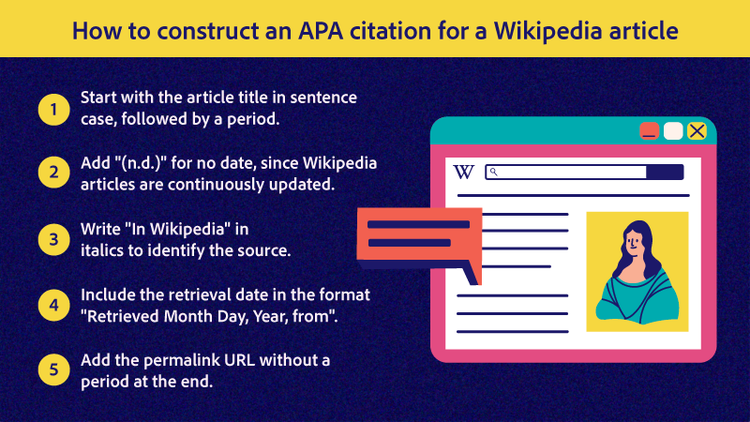
APA format emphasizes the retrieval date because Wikipedia content is ever-changing. Unlike static sources, online encyclopedias require documentation of when you accessed the information. Here's how to construct an APA citation for a Wikipedia article:
- Start with the article title in sentence case, followed by a period
- Add "(n.d.)" for no date, since Wikipedia articles are continuously updated
- Write "In Wikipedia" in italics to identify the source
- Include the retrieval date in the format "Retrieved Month Day, Year, from"
- Add the permalink URL without a period at the end
A properly formatted APA citation looks like this:
For in-text citations, APA uses the article title in place of an author name since Wikipedia articles have no individual author. Place the title in quotation marks within parentheses, followed by the date: ("Climate Change," n.d.). For narrative citations, write the title in quotation marks as part of your sentence: According to the "Climate Change" article (n.d.), global temperatures have risen significantly.
When formatting your final paper, you may need to convert your document to PDF to preserve citation formatting across different devices and platforms.
How to cite Wikipedia in MLA format
The Modern Language Association (MLA) style, currently in its 9th edition, approaches Wikipedia citations differently than APA. MLA emphasizes the container concept, treating Wikipedia as the larger work that contains individual articles.
MLA format requires specific punctuation and formatting that distinguishes it from other citation styles. The structure prioritizes the relationship between the article and its publication. Follow these steps to create an MLA citation:
- Begin with the article title in quotation marks, followed by a period inside the closing quotation mark
- Add Wikipedia in italics as the container name, followed by a comma
- Include the publisher (Wikimedia Foundation), followed by a comma
- Add the last modified date in day-month-year format, followed by a comma
- Include the URL without "https://"
A complete MLA citation appears as:
How to cite Wikipedia in Chicago style
The Chicago Manual of Style, now in its 17th edition, offers two citation systems: notes-bibliography and author-date. Most humanities disciplines use the notes-bibliography system, while sciences often prefer author-date. Understanding how to cite Wikipedia in Chicago style requires knowing which system your discipline expects.
The notes-bibliography system uses footnotes or endnotes for in-text citations, with a corresponding bibliography entry. The author-date system resembles APA format with parenthetical citations. Here's how to create Chicago citations using the notes-bibliography system:
- Place the article title in quotation marks
- Add Wikipedia in italics
- Include the phrase "last modified" followed by the date
- Add the URL
A Chicago footnote or endnote appears as:
How to cite Wikipedia in special cases
Standard Wikipedia citation formats don't always address every situation you'll encounter. Several common scenarios require modifications to the basic citation structure, and knowing how to handle these cases ensures your citations remain accurate and complete.
1. How to cite Wikipedia with no author
Wikipedia articles never list individual authors because they result from collaborative editing by many contributors. This isn't a limitation but rather a fundamental characteristic of the platform. When creating citations, simply begin with the article title rather than an author name. All major citation styles accommodate sources without authors by leading with the title, so Wikipedia citations follow established conventions for anonymous works.
2. How to cite an archived Wikipedia article
When you need to reference a specific historical version of an article, use Wikipedia's revision history feature. Click "View history" at the top of any article to see all previous versions. Select the date you need and use that page's URL as your permalink. For long-term preservation, you might also save the article as a PDF to maintain a personal record of the content at the time of your research.
3. How to cite a specific Wikipedia section
To cite a particular section within a longer article, include the section title after the article title. Use the format "Article Title: Section Title" in your citation. You can also use anchor links that direct readers to the specific section by adding the section heading to the URL with a hash symbol, such as #History or #Causes.
4. How to cite Wikipedia in-text
In-text citation formats vary by style. APA uses the article title in quotation marks with the date: ("Climate Change," n.d.). MLA uses a shortened title in quotation marks: ("Climate Change"). Chicago notes-bibliography uses superscript numbers that correspond to footnotes. For narrative citations in any style, incorporate the article title naturally into your sentence.
5. How to cite a foreign-language Wikipedia article
When citing articles from non-English Wikipedia editions, include the original title followed by an English translation in brackets. Note the language edition in your citation. For example, in APA: Cambio climático [Climate change]. (n.d.). In Wikipedia (Spanish). This approach helps readers understand the source while maintaining accuracy.
How to generate a Wikipedia citation with AI
Modern artificial intelligence tools for students have transformed how researchers handle citation tasks. Rather than manually constructing each citation, you can use artificial intelligence to streamline the process while maintaining accuracy. Using digital study assistants can help you format citations correctly across different styles, saving time for deeper engagement with your research.
Adobe Acrobat's AI Assistant offers powerful capabilities for managing citations and research documents. The AI Assistant understands citation style requirements and can generate formatted references that you then verify against your style guide.
Here's how to use AI assistance for Wikipedia citations:
- Access AI Assistant through Adobe Acrobat or Acrobat online
- Upload or open your research document containing Wikipedia source information
- Request citation generation by specifying the citation style you need
- Review the generated citation against your style guide requirements
- Copy the formatted citation to your bibliography or works cited page
Student resources like Adobe's student platform also include citation features designed specifically for academic work. The document summarization tool can help you process lengthy Wikipedia articles and identify key information worth citing.
When using AI for citations, follow these best practices:
- Verify AI-generated citations against current style guide rules
- Locate primary sources cited within Wikipedia articles when possible
- Double-check retrieval dates and URLs for accuracy
- Use consistent formatting throughout your entire document
- Cross-reference Wikipedia's built-in "Cite this page" tool for comparison
- Remember that you should also understand how to cite AI-generated content itself if you use AI tools substantially in your research process. Transparency about your methods strengthens academic integrity.
- You can also make annotations and edits to your documents to track which sources still need proper citations as you work through your research.
Note: AI-generated citations should be treated as drafts and verified against the latest style-guide requirements before submission.
Frequently asked questions
Why can't you cite Wikipedia?
Is there a cite button on Wikipedia?
How do I verify Wikipedia citation accuracy?
What if a Wikipedia article has been updated since I cited it?
Should I include Wikipedia in my bibliography or works cited page?
You may also like