How to use online content collaboration
Streamline teamwork with AI-powered content collaboration that keeps projects moving, documents secure, and everyone aligned in a single workspace from first draft to final approval.
What is online content collaboration?
Modern teams rarely work in the same room—or even the same time zone. Online content collaboration transforms how organizations create, review, and finalize documents by bringing everyone together in shared digital workspaces. With AI-powered tools now accelerating workflows, teams can produce higher-quality content faster while maintaining security and version control throughout the process.
Online content collaboration represents a fundamental shift in how teams approach document creation and review. Rather than sending files back and forth via email—creating confusion about which version is current—teams now work together in real time on shared platforms. This approach combines secure sharing, simultaneous editing, intelligent automation, and centralized feedback to help organizations move from initial draft to final approval with unprecedented efficiency. AI-powered collaboration tools take this further by summarizing lengthy documents, extracting key insights, and helping teams streamline communication.
Content collaboration refers to the process of multiple people working together on shared digital documents, presentations, images, or other creative assets using connected online tools. Unlike traditional workflows where one person completes their portion before handing off to the next, content collaboration enables simultaneous contribution, real-time feedback, and continuous refinement from all stakeholders.
In today's distributed work environment, content collaboration has become essential for organizations of every size. Collaboration software provides the infrastructure that makes this possible: secure cloud storage, permission controls, commenting systems, and editing tools that multiple users can access simultaneously.
The scope of content collaboration extends beyond simple document editing. It encompasses the entire lifecycle of content creation, such as ideation and planning, drafting and design, review and revision, approval and sign-off, and publication or distribution. Effective collaboration tools support each of these stages while maintaining a clear record of who contributed what and when. There are several use cases where online content collaboration gives organizations an advantage.
Real-time document reviews
Remote teams face unique challenges when reviewing documents together. Without the ability to gather around a conference table, workers rely on collaboration platforms that allow them to co-edit documents in real time. These tools display each participant's cursor and edits as they happen, creating a shared experience despite physical distance.
Real-time reviews eliminate the waiting game that plagues traditional document workflows. Instead of sending a draft and hoping for feedback within a few days, team members can schedule a live review session where everyone examines the document simultaneously. Questions get answered immediately, conflicting suggestions get resolved through discussion, and consensus emerges faster than through asynchronous communication alone.
Cross-department campaign development
Marketing campaigns require input from multiple departments: brand guidelines, pricing details, legal review, and creative assets. Content collaboration platforms provide a central workspace where all these stakeholders can contribute their expertise to shared campaign materials.
When sales teams can comment directly on marketing collateral, they provide frontline insights about customer sentiment and competitive positioning. Legal reviewers can flag compliance issues before materials reach production. Creative teams can iterate on designs while receiving immediate feedback from brand managers. This cross-functional collaboration produces campaigns that are more informative, more compelling, and more aligned with organizational goals.
Client feedback and approval workflows
External stakeholders—such as clients, partners, vendors, and consultants—often need to participate in document reviews without accessing internal systems. Secure sharing workflows enable organizations to invite outside collaborators while maintaining control over document access and permissions.
Client feedback workflows benefit enormously from centralized collaboration. Instead of collecting comments via email, phone calls, and meetings, teams can direct all client input to a single shared document. Clients can highlight specific passages, leave contextual comments, and even suggest edits—all within a controlled environment that protects sensitive information and maintains clear version history.
Organizational knowledge and documentation management
Organizations rely on internal documentation—policies, procedures, technical specifications, and institutional knowledge—that requires ongoing maintenance. Content collaboration tools help teams keep these resources current by enabling distributed authorship and review.
Subject matter experts across the organization can update their areas of expertise while editors ensure consistency and clarity. Version control features track every change, making it easy to see what was modified and revert if necessary. Collaborative documentation management ensures that knowledge bases remain accurate and valuable rather than becoming outdated repositories of obsolete information.
How content collaboration works
Understanding the workflow of content collaboration helps teams implement these tools effectively. While specific features vary between platforms, most collaboration tools follow a similar process that moves documents from initial upload through final distribution.
The collaboration workflow begins when someone creates or uploads content to a shared platform. From there, team members access the content according to their permissions, contribute their expertise, and move the document toward completion. Throughout this process, the platform maintains records of all activity, ensuring accountability and enabling recovery if something goes wrong.
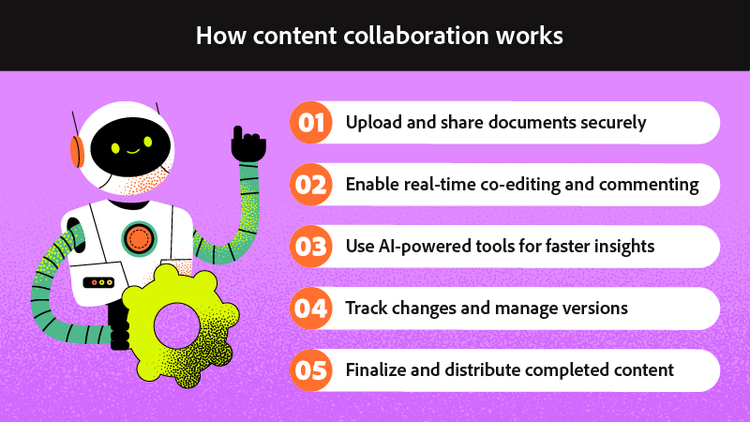
Step 1: Upload and share documents securely
The collaboration process starts with getting content into a document collaboration platform where team members can access it. This might mean uploading an existing file, creating a new document directly in the platform, or importing content from another application.
Once content exists in the shared environment, the document owner sets permissions that control who can view, comment, or edit. Granular permission controls allow organizations to share documents broadly for viewing while restricting editing rights to specific team members. These security measures protect sensitive information while enabling the broad participation that makes collaboration valuable.
Secure upload and sharing also means protecting documents during transfer and storage. Enterprise collaboration platforms use encryption to safeguard content both in transit and at rest, ensuring that sensitive business information remains protected from unauthorized access.
Step 2: Enable real-time co-editing and commenting
With documents uploaded and permissions set, team members can begin working together. Real-time co-editing allows multiple people to modify the same document simultaneously, with each person's changes appearing instantly for everyone else. Tracked changes may also be used to suggest edits that can either be accepted or rejected. This capability transforms document creation from a sequential handoff process into a truly collaborative experience.
Commenting features complement direct editing by providing space for discussion without modifying the document itself. Team members can highlight passages and attach questions, suggestions, or concerns. Threaded replies keep conversations organized, and resolution features allow teams to mark comments as addressed without losing the discussion history.
The combination of editing and commenting supports different collaboration styles. Some team members prefer to make direct changes; others prefer to suggest modifications through comments. Effective collaboration platforms accommodate both approaches, allowing teams to work in whatever way feels most natural.
Step 3: Set your timer for 25 minutes and commit fully
Choose your preferred timing method based on what works best for your study environment and personal preferences. Physical timers offer a tactile experience without digital distractions and create a satisfying visual representation of time passing. Phone apps provide convenience, automatic tracking features, and the ability to review your history of completed sessions. Browser extensions integrate directly into your computer workflow and can block distracting websites during active intervals.
Whichever option you select, the key is complete commitment. Once the timer starts, you have made a promise to yourself that you will honor. No checking messages, no quick social media scrolls, no switching to other tasks, no responding to non-emergency requests. The 25-minute interval is sacred and non-negotiable.
Some practitioners find it helpful to verbally or mentally commit to the interval before starting: "For the next 25 minutes, I will focus only on this calculus problem set." This simple ritual reinforces the psychological contract you are making with yourself and primes your brain for concentrated work.
Step 4: Use AI-powered tools for faster insights
Modern collaboration platforms increasingly incorporate artificial intelligence to accelerate common tasks. AI-powered research tools can analyze documents and extract key information, helping team members quickly understand lengthy or complex content.
AI assistants can summarize documents, identify main themes, and answer questions about content—capabilities that save significant time when working with extensive materials. Instead of reading through hundreds of pages to find relevant information, team members can ask the AI to locate specific details or provide an overview of key points.
These intelligent features prove especially valuable when onboarding new team members to existing projects or when executives need quick summaries of detailed reports. AI acceleration helps teams focus their human attention on strategic decisions and creative work rather than information gathering and synthesis.
Step 5: Track changes and manage versions
Accountability requires knowing who changed what and when. Version control features automatically track modifications to collaborative documents, creating a comprehensive history that teams can review at any time. If someone makes an unwanted change or deletes important content, version history makes recovery straightforward.
Change tracking also supports review workflows by highlighting modifications since the last review. Reviewers can focus their attention on new or changed content rather than re-reading entire documents. This targeted review process improves efficiency while ensuring that changes receive appropriate scrutiny.
Version management becomes especially important in regulated industries where organizations must demonstrate document integrity and maintain audit trails. Collaboration platforms with robust versioning provide the documentation needed to satisfy compliance requirements and support legal discovery if necessary.
Step 6: Finalize and distribute completed content
Once collaborative work reaches completion, teams often want to finalize and distribute the results. This might mean exporting documents in specific formats, publishing content to websites or intranets, or sharing final versions with external stakeholders.
Distribution features help teams analyze data and insights about how recipients engage with shared content. View tracking, download records, and engagement analytics provide visibility into whether distributed content reaches its intended audience and generates the expected response.
The final stage also includes archiving collaborative work for future reference. Completed documents, along with their full version history and associated comments, become organizational records that support knowledge management and institutional memory.
Benefits of online content collaboration
Organizations adopt content collaboration tools because these platforms deliver measurable improvements in productivity, accuracy, and decision-making. The benefits extend across departments and use cases, making collaboration software a foundational investment for modern organizations.
The advantages of content collaboration compound over time. As teams become more comfortable with collaborative workflows, they discover new ways to work together effectively. Initial productivity gains expand as organizations develop best practices and integrate collaboration into their standard operating procedures.
Increased creative output for marketing teams
Marketing teams operate under constant deadline pressure, producing campaigns, content, and collateral across multiple channels simultaneously. Content collaboration accelerates this work by eliminating the bottlenecks that slow traditional workflows.
When marketers can work together on shared documents, they spend less time waiting for handoffs and more time creating. Campaign briefs, creative concepts, and final assets move through review cycles faster because feedback happens in real time rather than through sequential email exchanges. The result is more campaigns completed in less time, with higher quality because more perspectives contribute to each piece.
Marketing teams also benefit from the ability to repurpose collaborative content. Assets created for one campaign can be easily adapted for others when they exist in accessible shared workspaces rather than buried in individual file systems.
Enhanced accuracy for legal and compliance teams
Documents with legal or regulatory implications require exceptional accuracy. A single error in a contract, policy, or compliance filing can create significant liability. Content collaboration improves accuracy by enabling multiple expert reviewers to examine documents simultaneously.
Legal teams can establish review workflows that ensure every document receives appropriate scrutiny before finalization. Compliance specialists can verify regulatory requirements while legal counsel reviews contractual terms. This parallel review process catches more errors than sequential review while completing review cycles faster.
The version control and audit trail features of collaboration platforms also support legal and compliance needs. Organizations can demonstrate exactly what was reviewed, by whom, and when—documentation that proves invaluable during audits, disputes, or regulatory examinations.
Streamlined workflows for multi-client agencies
Creative agencies juggle multiple clients, projects, and deadlines simultaneously. Shared collaboration spaces help agencies manage this complexity by providing organized environments where designers, writers, account managers, and clients can work together effectively.
Agencies benefit from collaboration tools that support their specific workflows: creative briefs that evolve through client input, design concepts that receive feedback directly on the artwork, and final deliverables that move through approval chains efficiently. When all project stakeholders can access the same workspace, communication improves and misunderstandings decrease.
Client collaboration features prove especially valuable for agencies. Rather than translating client feedback from emails and calls into actionable direction, agencies can invite clients into collaborative spaces where they provide input directly. This direct engagement improves client satisfaction while reducing time spent on communication.
Better decision-making with centralized feedback
Decisions improve when decision-makers have access to all relevant input. Content collaboration centralizes feedback from multiple stakeholders, ensuring that nothing gets lost in email threads or forgotten in meeting notes.
When all comments and suggestions exist in a single shared document, patterns emerge more clearly. Decision-makers can see where consensus exists and where disagreement requires resolution. They can trace the reasoning behind suggestions and understand the concerns that motivated feedback.
Centralized feedback also creates accountability for input. When stakeholders know their comments are visible to others and permanently recorded, they tend to provide more thoughtful, constructive feedback. This improved input quality leads directly to better decisions and better outcomes.
Frequently asked questions
What is content collaboration?
How does online collaboration work?
What are the 3 C's of collaboration?
What is the best online collaboration tool?
What security features should collaboration software have?
Can AI improve content collaboration workflows?
You may also like