


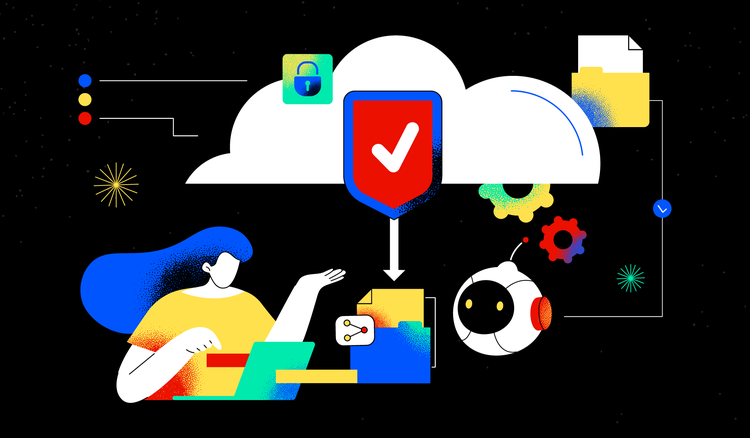
AI transforms how teams protect and exchange documents, combining powerful encryption with intuitive workflows.
What is secure document sharing?
Every day, professionals exchange countless files containing sensitive information—from financial reports and legal contracts to strategic plans and personal data. Modern document sharing goes beyond simple email attachments. It includes cloud-based storage, real-time collaboration, version control, and synchronized access across devices. Secure document sharing refers to the tools, protocols, and practices employed to protect these files throughout their journey from sender to recipient.
At its core, secure document sharing means more than simply sending a file. It involves encrypting content, controlling who can access it, tracking how it's used, and maintaining complete visibility over your documents at every stage. While teams embrace collaborative document editing, security remains a critical priority.
The rise of remote work and distributed teams has accelerated the need for robust sharing solutions. Organizations can no longer rely on physical handoffs and locked file cabinets alone. Instead, they must implement digital safeguards that travel with their documents wherever those files go.
Why security matters in document sharing
Unsecured document sharing creates significant risks. Sensitive data can fall into the wrong hands through intercepted emails, compromised links, or stolen devices. The consequences range from competitive disadvantage and regulatory penalties to reputational damage and legal liability.
Encryption serves as the first line of defense, scrambling file contents so only authorized recipients can read them. Access controls add another layer by specifying exactly who can view, edit, download, or share each document. Together, these measures ensure that even if files are intercepted, their content remains protected.
Methods for secure document sharing
Multiple approaches exist for sharing files securely, each offering distinct advantages depending on your needs. Understanding these methods helps you choose the right collaboration tools for every situation. The best strategy often combines several techniques to create layered protection, and can benefit tremendously from including intelligent automation.
1. Cloud-based sharing platforms
Cloud storage platforms provide centralized locations for storing and sharing files. Rather than sending documents as attachments, users share links that grant access to files stored securely online. This approach offers several advantages.
Real-time synchronization ensures everyone works with the latest version. Automatic backups protect against data loss. Centralized storage simplifies organization and search. Most importantly, cloud platforms include built-in security features like encryption and access logging that protect files without requiring technical expertise.
2. Password-protected file sharing
Adding passwords to shared files creates a simple but effective barrier against unauthorized access. When you share a document online with password protection, recipients must enter the correct credentials before viewing the contents.
This method works particularly well for one-time shares or when sending files to external parties. For maximum security, communicate passwords through a separate channel—such as a phone call—rather than including them in the same email as the file link.
3. Permission-based access controls
Granular permission settings let you specify exactly what each recipient can do with shared documents. View-only access prevents editing or commenting. Edit permissions allow changes while maintaining oversight. Some platforms offer even finer controls, such as preventing printing or restricting access to specific pages.
Expiration dates automatically revoke access after a set period, ensuring former collaborators or completed projects don't leave lingering security gaps. Activity tracking shows who accessed files and when, creating audit trails for compliance and accountability.
4. AI-powered document analysis and sharing
Artificial intelligence adds a new dimension to secure sharing. AI tools can automatically scan documents to identify sensitive information like social security numbers, financial data, or confidential terms. Based on this analysis, they recommend appropriate security settings or apply protections automatically.
Smart workflows route documents to the right reviewers, flag potential issues, and suggest access levels based on content and context. This automation reduces the burden on users while improving consistency and reducing the risk of human oversight.
Tips for effective document sharing
Following best practices ensures your sharing workflows remain both productive and secure:
- Define the security measures and access restrictions for different types of data to avoid mishandling of sensitive information
- Establish clear permission hierarchies that match your organizational structure and project needs
- Use consistent naming conventions that make files easy to identify and organize
- Implement version control to track changes and maintain document history
- Create audit trails by logging all access and modifications for compliance purposes
- Review and revoke access regularly, especially when projects conclude or team members change roles
- Train team members on security protocols to ensure consistent practices across your organization
- Adopt password best-practices such as requiring a strong password and changing passwords periodically
- Choose platforms that offer end-to-end encryption for maximum protection
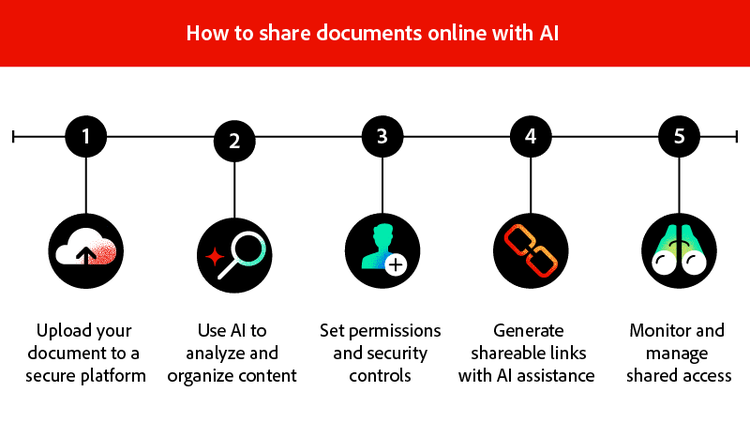
How to share documents online with AI
Leveraging AI transforms document sharing from a manual process into an intelligent workflow. These step-by-step instructions show you how to share documents securely while taking advantage of AI-powered features that enhance both protection and productivity.
Step 1: Upload your document to a secure platform
Begin by selecting a platform that offers robust security features and AI capabilities. Look for end-to-end encryption, compliance certifications relevant to your industry, and a track record of reliability.
Prepare your file before uploading by removing any unnecessary metadata or hidden content that shouldn't be shared. Ensure the document is in a format that preserves formatting across devices—PDF files work particularly well for this purpose because they maintain consistent appearance regardless of the recipient's software or operating system.
Step 2: Use AI to analyze and organize content
Once uploaded, AI document tools can scan your document to understand its content and structure. This analysis identifies key information, extracts important data points, and categorizes the document appropriately.
AI can detect sensitive information that may require additional protection, such as personal identifiers or confidential business terms. Some platforms offer automatic redaction suggestions, highlighting content you may want to obscure before sharing with certain audiences.
Step 3: Set permissions and security controls
With AI-informed insights into your document's content, configure appropriate access levels for each recipient. Determine whether collaborators need full editing capabilities or view-only access. Consider whether downloading or printing should be permitted.
Set password protection for sensitive files. Establish expiration dates for time-limited access. You can expedite this process by using AI assistants to chat with PDF documents, quickly locating specific sections that require different levels of access.
Step 4: Generate shareable links with AI assistance
AI-powered platforms create intelligent sharing links that can incorporate your security settings automatically. These links may include tracking capabilities that show when recipients access the document and which sections they view.
Smart link generation may suggest different sharing options based on your document type and intended audience. For internal team members, one set of permissions might apply. For external clients or partners, stricter controls may be recommended automatically.
Step 5: Monitor and manage shared access
After sharing, maintain visibility over your documents through activity dashboards and notifications. AI can alert you to unusual access patterns that might indicate security concerns, such as access attempts from unexpected locations or at unusual times.
Revoke access instantly when circumstances change. Update permissions as projects evolve. Use analytics to understand how shared documents are being used, informing future sharing decisions and helping optimize collaboration workflows.
Frequently asked questions
The ideal approach combines secure cloud storage with intelligent access controls. Upload files to a protected platform, set appropriate permissions for each recipient, and share links rather than attachments. For team collaboration, shared workspaces provide centralized environments where multiple users can access, review, and discuss documents while maintaining security. AI-powered platforms add value by generating security recommendations and automating workflows.
Document sharing refers to making digital files accessible to others for viewing, editing, or collaboration. Modern document sharing extends beyond simple file transfers to include real-time co-editing, version tracking, commenting, and integrated communication. Effective sharing balances accessibility with security, ensuring authorized users can work efficiently while protecting sensitive content from unauthorized access.
The best choice depends on your specific needs. Consider factors like storage limits, supported file types, security features, and platform compatibility. Free apps often trade advanced security for accessibility, so evaluate whether the available protections meet your requirements. For documents containing sensitive information, prioritize apps that offer encryption and access controls, even if this means accepting other limitations.
AI enhances collaboration in several ways. Intelligent search helps team members find relevant information quickly across large document libraries. Automated summary generation extracts key points from lengthy files. Smart suggestions recommend related documents or relevant team members to include. AI can translate content, transcribe audio, and extract data from images or scanned documents. These capabilities reduce manual effort and accelerate workflows while improving accuracy.
Essential security features include end-to-end encryption that protects files during transfer and storage. Look for granular permission controls that let you specify exactly what each user can do. Password protection adds another layer for sensitive files. Expiration dates automatically revoke access after set periods. Activity logging creates audit trails for compliance. Two-factor authentication prevents unauthorized account access. Finally, compliance certifications relevant to your industry indicate the platform meets established security standards.
You may also like
title
How to use AI for secure document sharing
cardImageAltText
Visual representation of secure document sharing workflow
cardImage
primaryTag
caas:content-type/article
Tags
caas:content-type/article,caas:products/acrobat,caas:topic/ai-chat-pdf,caas:topic/ai-assistant

