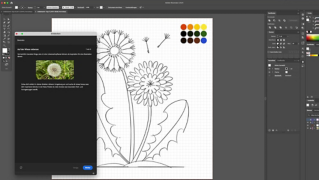


Im Bild Farbe ändern & Varianten testen mit Illustrator-KI
Designerin Rosa Kammermeier zeigt, wie du mit KI-Tools im Bild Farbe ändern und Farbkombinationen gestalten kannst.
Benötigte Materialien
In der Anwendung üben
Entdecke neue Wege der Farbgestaltung
Die KI-Funktion "Neu färben" in Illustrator einsetzen
Entdecke neue Möglichkeiten, Farben in deinen Illustrationen zum Leben zu erwecken! Mit den KI-Tools von Illustrator kannst du bestehendes Bildmaterial bearbeiten und neu einfärben, kreative Farbstimmungen per Prompt erzeugen oder harmonische Farbschemata aus Fotos ableiten.
Unterschiedliche Farbwirkungen ausprobieren Die KI unterstützt dich als Benutzer ganz unkompliziert dabei, unterschiedliche Farbvariationen auszuprobieren. Du siehst gleich am Bildschirm, wie deine Ideen wirken und kannst gezielt Farben anpassen und ersetzen, bis die Farbgestaltung genau deinem Wunsch entspricht. So entstehen Designs, die frisch, harmonisch und inspirierend zugleich wirken.
Farbnuancen anpassen
Mit diesem Ansatz lassen sich auch komplexe Farbstimmungen spielerisch umsetzen. Selbst kleine Änderungen an einzelnen Farbtönen oder kleinen Teilen eines Bildes erzeugen spannende Effekte und geben dir die Freiheit, deine kreative Vision zu entfalten.
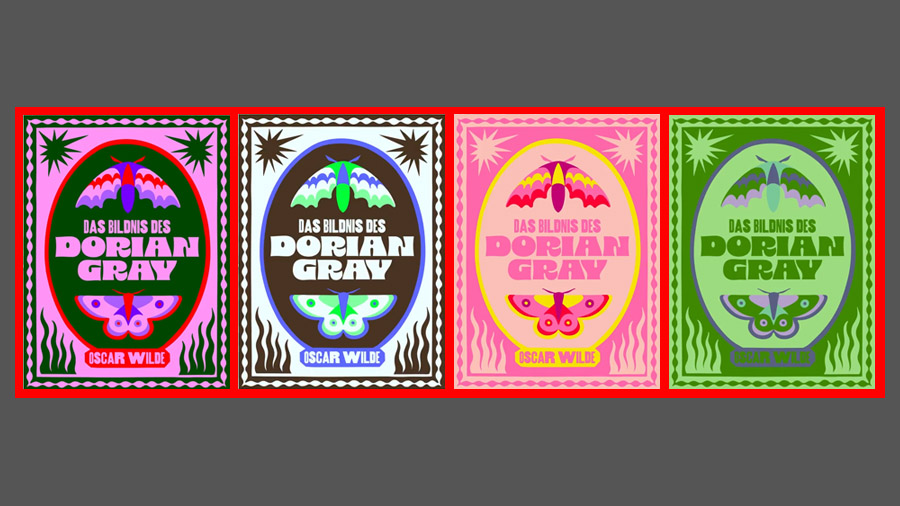
Bildmaterial neu färben
Schnelles Erstellen von Variationen Mit der Funktion „Neu färben“ kannst du im Handumdrehen neue Farbkombinationen für deine Designs, Illustrationen oder einzelne Ebenen und Objekte entdecken. Wähle eine Farbe im Farbkreis aus, ändere sie manuell – und die übrigen Farben passen sich automatisch an.
Harmonische Farbabstimmung So entstehen im Nu spannende Variationen der Bildfarbe, die harmonisch aufeinander abgestimmt sind und deinem Projekt einen besonderen Look verleihen. Experimentiere mit dem Farbregler, probiere unterschiedliche Kombinationen aus und finde Schritt für Schritt die perfekte Farbgestaltung für deinen Bedarf.
Spielerisch kreativ Die Funktion macht es einfach, Ideen schnell zu visualisieren. Du kannst sofort sehen, wie verschiedene Farbstimmungen wirken und deinen Designs dynamische Akzente verleihen.
Generative Neufärbung
Farben eines Bildes per Prompt steuern
Mit dem KI-Tool „Generative Neufärbung“ kannst du Illustrationen mithilfe eines Prompts neu einfärben und dein Farbschema ändern. Beschreibe eine gewünschte Farbstimmung oder eine thematische Richtung, die die KI umsetzen soll.
Gezielte Farbtöne einfügen Über das Plus-Symbol kannst du einzelne Farbtöne festlegen, die automatisch in das Ergebnis integriert werden. Je genauer dein Prompt, desto besser kann die KI deine Vorstellungen umsetzen.
Ergebnisse verfeinern Wenn das Resultat noch nicht deinen Vorstellungen entspricht, verfeinere den Prompt oder passe einzelne Bereiche manuell an. So erhältst du mit Leichtigkeit die perfekte Farbgestaltung.
Farbschema aus einem Bild extrahieren
Farben aus Fotos nutzen
Eine weitere Möglichkeit, neue Farbvariationen zu entdecken und Farbänderungen vorzunehmen, ist die Verwendung eines Farbschemas aus einem bestehenden Bild. Wähle ein Foto aus, dessen Farben dir gefallen.
KI-generiertes Schema Mit der Farbschema-Auswahl und dem Pipetten-Werkzeug erstellt die KI automatisch ein Schema aus ausgewählten Tönen des Bildes.
Farbton, Sättigung und Helligkeit: Farbvariationen erweitern Über die Regler für Sättigung und Helligkeit kannst du weitere Kombinationen erzeugen und die Palette nach deinen Vorstellungen anpassen. Zielgerichtet entwickelst du so harmonische und inspirierende Farbwelten, die deinem Projekt eine individuelle Note geben.
Kreative Freiheit
Diese Methode erlaubt alles – von subtilen Abstufungen bis zu kräftigen Kontrasten. Deine Illustrationen wirken dadurch immer außergewöhnlich, abwechslungsreich und professionell umgesetzt.

Über die Künstlerin
Rosa Kammermeier ist Illustratorin, Grafikdesignerin und Schriftkünstlerin und lebt in Berlin. Sie arbeitet für Print- und Webprojekte, analoge und digitale Projekte, große Wandbilder und kleine Kalligrafien. Neben ihrer Arbeit als Designerin begeistert sie sich sehr für Musik und liebt es, diese Leidenschaften zu verbinden.
You can control how Adobe websites use cookies and similar technologies by making choices below. But note that if you disable cookies and similar technologies entirely, Adobe websites may not function properly.
Cookies are small text files stored by your web browser when you use websites. There are also other technologies that can be used for similar purposes like HTML5 Local Storage and local shared objects, web beacons, and embedded scripts. These technologies help us do things like remembering you and your preferences when you return to our sites, measure how you use the website, conduct market research, and gather information about the ads you see and interact with.
You can make choices in the menu below about what cookies and other technologies you want us to use on Adobe sites when you visit them from this browser. You can always change those choices later by clicking on the Cookie Preferences link at the bottom of the page.
If enabled:
We can improve your experience by tailoring the site and the content to things we think might be of interest
We can better keep track of your preferences — like what language you prefer to use
We will better understand your likely interests so we can provide you more relevant Adobe ads and content on non-Adobe websites and in non-Adobe apps
It will help us improve the performance of our website and those of our partners who use the Adobe Experience Cloud
If disabled:
We won’t be able to remember you from session to session so the experience may not be tailored to your interests
You’ll still have access to the content of the site but certain features that depend on cookies may not function
You’ll still see ads, they just may not be as relevant to you
General information
You can control how Adobe websites use cookies and similar technologies by making choices below. But note that if you disable cookies and similar technologies entirely, Adobe websites may not function properly.
Cookies are small text files stored by your web browser when you use websites. There are also other technologies that can be used for similar purposes like HTML5 Local Storage, web beacons, and embedded scripts. These technologies help us do things like remembering you and your preferences when you return to our sites, measure how you use the website, conduct market research, and gather information about the ads you see and interact with.
You can make choices in the menu below about what cookies and other technologies you want us to use on Adobe sites when you visit them from this browser. You can always change those choices later by clicking on the Cookie Preferences link at the bottom of the page.
If enabled:
We can improve your experience by tailoring the site and the content to things we think might be of interest
We can better keep track of your preferences — like what language you prefer to use
We will better understand your likely interests so we can provide you more relevant Adobe ads and content on non-Adobe websites and in non-Adobe apps
It will help us improve the performance of our website and those of our partners who use the Adobe Experience Cloud
If disabled:
We won’t be able to remember you from session to session so the experience may not be tailored to your interests
We’ll still count your use of our site and services
You’ll still have access to the content of the site but certain features that depend on cookies may not function
You’ll still see ads, they just may not be as relevant to you
Operate the site and core servicesOperate site and measure engagement
Always active
These cookies are required, and they are used to enable the site and related services core functionality. Without them the site could not operate, so they cannot be disabled.
These cookies enable the site and related services’ core functionality and collect statistics about user engagement, such as counting active use to help us understand trends. These cookies cannot be disabled.
Measure performance
These cookies are used to analyze site usage to measure and improve performance. Without them Adobe cannot know what content is most valued and how often unique visitors return to the site, making it hard to improve information we offer to you.
These cookies are used to analyze site usage to measure and improve performance. Without them Adobe cannot know what content is most valued, making it hard to improve information we offer to you.
Extend functionality
These cookies are used to enhance the functionality of Adobe sites such as remembering your settings and preferences to deliver a personalized experience; for example, your username, your repeated visits, preferred language, your country, or any other saved preference.
Personalize advertising
These cookies are used to enable Adobe and our partners to serve ads more relevant to your interests. Without them you will still see ads, but they might not be as relevant to you.
Personalize advertising
These cookies are used to enable Adobe and our partners to serve ads more relevant to your interests. Without them you will still see ads, but they might not be as relevant to you.