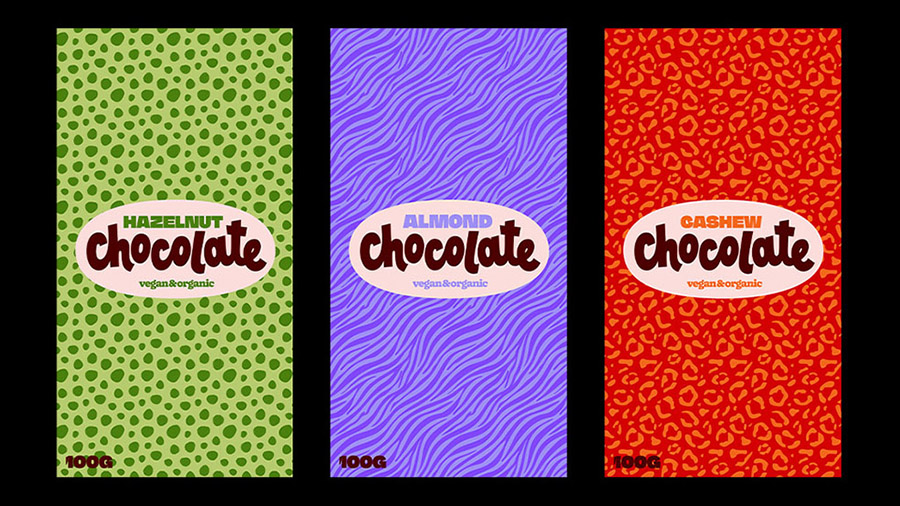
Die Grafikdesignerin Rosa Kammermeier zeigt dir Tipps und Tricks, wie du mit der neuen KI-Funktion „Muster generieren“ in Adobe Illustrator aufregende, organische Muster für jeden Anlass erstellen kannst. Sie zeigt dir anhand eines ansprechenden Packaging-Designs für Schokoladentafeln, wie du deine Muster-Sammlung anschließend kreativ einsetzen kannst.
Benötigte Materialien
In der Anwendung üben
Formuliere einen Text-Prompt
Die Idee in Text gießen
Am Anfang steht immer eine vage kreative Vorstellung, wie das spätere Muster aussehen soll. Rosa beginnt ihren Prompt mit der einfachen Information: „Organisches Muster mit Flecken“. Daraufhin erstellt die KI automatisch drei unterschiedliche Vorschläge zur Auswahl, die du direkt auf deiner Arbeitsfläche testen kannst. Klicke jedes Beispiel einzeln an, um zu sehen wie es auf der Fläche wirkt. Suche so den Entwurf, der deiner Vorstellung am Nächsten kommt und der dir als Inspiration für das weitere Vorgehen dient.
Den Prompt verfeinern
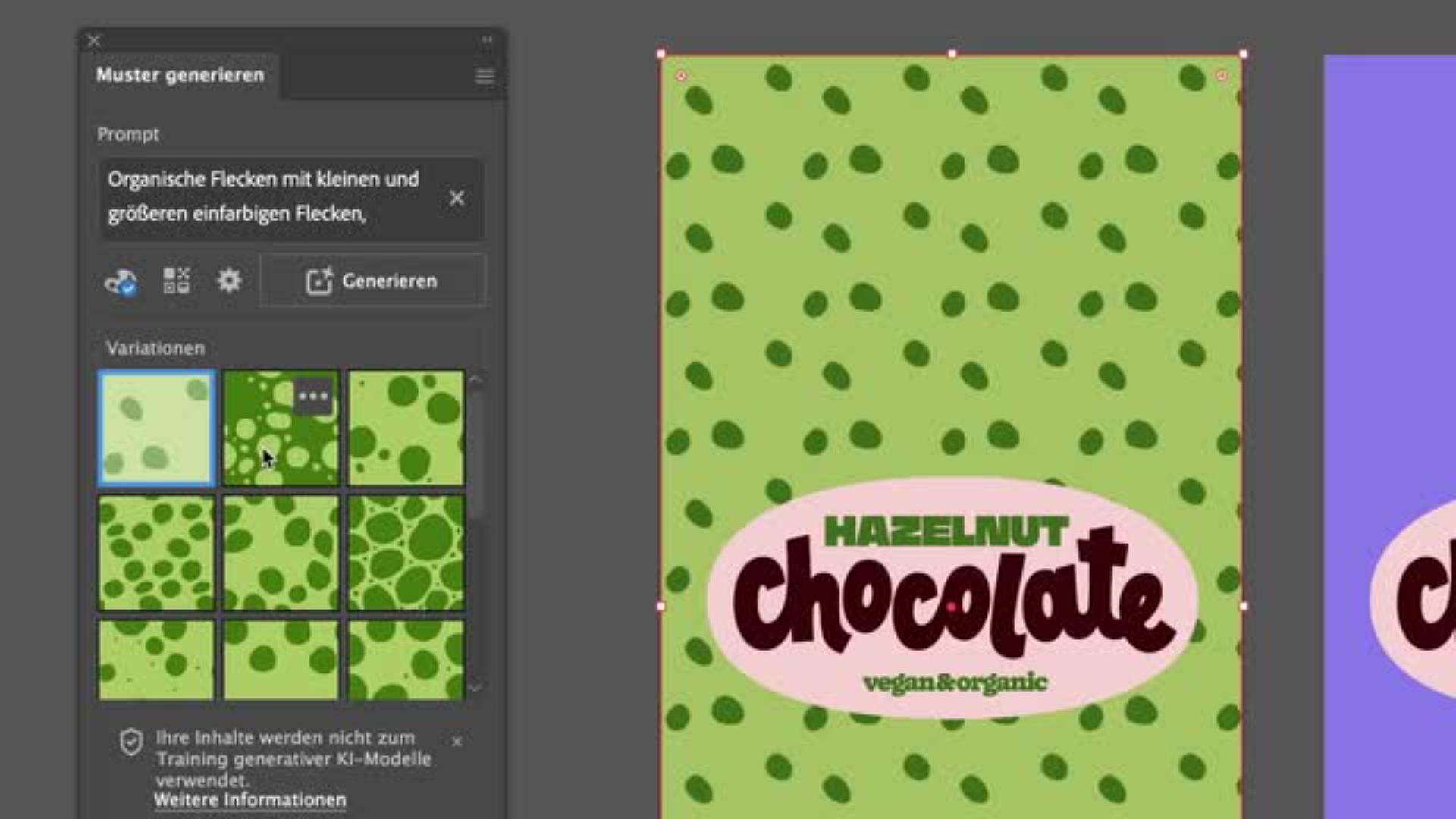
Wenn dich das Ergebnis noch nicht ganz überzeugt hat, kannst du die Inhalte des Prompts gezielt präzisieren und erweitern. Ergänze ihn etwa zu „Organisches Fleckenmuster, an Tierfell erinnernd“. Je klarer und detaillierter deine Beschreibung ist, desto besser kann die KI deine gestalterische Absicht und deinen Stil umsetzen. Füge beispielsweise noch „große und kleine Flecken“ hinzu. So lieferst du dir ein kreatives Ping-Pong-Spiel mit der KI, das nebenbei auch Spaß macht, bis das Muster genau deinen Vorstellungen entspricht.
Das Muster anpassen und individualisieren
Die Farbe des Musters anpassen
Du kannst die Farben des generierten Musters an die Farbpalette des Artworks anpassen, indem du die KI mit Farbwerten fütterst. Öffne dazu das kleine Farbpaletten-Symbol im Bedienfeld. Über das Plus-Symbol bei „Farben angeben“ kannst du neue Farbtöne hinzufügen. Rosa hat für dich die Farbpalette „chocolate“ vorbereitet, aus der du die passenden Farben wählen kannst. Verwende hier vor allem die Grün-Töne. Mit einem Klick auf „Generieren“ färbst du dein Muster in den gewählten Nuancen ein.
Die Dichte des Musters ändern
Über das Zahnrad-Symbol lässt sich zudem die Dichte des Musters regulieren. Eine höhere Dichte sorgt für ein kleinteiligeres, intensiveres Erscheinungsbild, während eine geringere Dichte mehr Ruhe und Leichtigkeit in das Design bringt.
Das Muster manuell verändern
Zuletzt hast du die Möglichkeit, das Ergebnis noch manuell zu verfeinern. Klicke dazu auf das Stift-Symbol unten rechts im Bedienfeld unter „Muster bearbeiten“. Du kannst die Anordnung der Elemente, Höhe, Breite oder Überlappung nach Belieben noch etwas verändern und dem Design damit eine persönliche Note geben.
Experimentiere mit der KI
Weitere schöne Muster-Ideen
Nachdem das Muster für die erste Schokoladentafel fertig ist, kannst du weitere Varianten ausprobieren. Rosas Idee für die zweite Tafel lautet: „Organisches Zebrastreifen-Muster, an Fell erinnernd“. Nutze hierfür zur Abwechslung die Lila- und Brauntöne aus der vorgegebenen Palette, um harmonische Kontraste zu erzeugen.
Letzte Anpassungen
Verfahre auf die gleiche Art und Weise mit dem Muster der dritten Tafel. Wähle hier die warm wirkenden Orange- und Rottöne der Farbpalette. Passe im letzten Schritt Farben, Dichte und Skalierung individuell an, bis alle drei Tafeln schöne Muster haben und perfekt miteinander harmonieren. Nun ist dein Produkt perfekt in Szene gesetzt!
Über die Künstlerin
Rosa Kammermeier ist Illustratorin, Grafikdesignerin und Schriftkünstlerin und lebt in Berlin. Sie arbeitet für Print- und Webprojekte, analoge und digitale Projekte, große Wandbilder und kleine Kalligrafien. Neben ihrer Arbeit als Designerin begeistert sie sich sehr für Musik und liebt es, diese Leidenschaften zu verbinden.
You can control how Adobe websites use cookies and similar technologies by making choices below. But note that if you disable cookies and similar technologies entirely, Adobe websites may not function properly.
Cookies are small text files stored by your web browser when you use websites. There are also other technologies that can be used for similar purposes like HTML5 Local Storage and local shared objects, web beacons, and embedded scripts. These technologies help us do things like remembering you and your preferences when you return to our sites, measure how you use the website, conduct market research, and gather information about the ads you see and interact with.
You can make choices in the menu below about what cookies and other technologies you want us to use on Adobe sites when you visit them from this browser. You can always change those choices later by clicking on the Cookie Preferences link at the bottom of the page.
If enabled:
We can improve your experience by tailoring the site and the content to things we think might be of interest
We can better keep track of your preferences — like what language you prefer to use
We will better understand your likely interests so we can provide you more relevant Adobe ads and content on non-Adobe websites and in non-Adobe apps
It will help us improve the performance of our website and those of our partners who use the Adobe Experience Cloud
If disabled:
We won’t be able to remember you from session to session so the experience may not be tailored to your interests
You’ll still have access to the content of the site but certain features that depend on cookies may not function
You’ll still see ads, they just may not be as relevant to you
General information
You can control how Adobe websites use cookies and similar technologies by making choices below. But note that if you disable cookies and similar technologies entirely, Adobe websites may not function properly.
Cookies are small text files stored by your web browser when you use websites. There are also other technologies that can be used for similar purposes like HTML5 Local Storage, web beacons, and embedded scripts. These technologies help us do things like remembering you and your preferences when you return to our sites, measure how you use the website, conduct market research, and gather information about the ads you see and interact with.
You can make choices in the menu below about what cookies and other technologies you want us to use on Adobe sites when you visit them from this browser. You can always change those choices later by clicking on the Cookie Preferences link at the bottom of the page.
If enabled:
We can improve your experience by tailoring the site and the content to things we think might be of interest
We can better keep track of your preferences — like what language you prefer to use
We will better understand your likely interests so we can provide you more relevant Adobe ads and content on non-Adobe websites and in non-Adobe apps
It will help us improve the performance of our website and those of our partners who use the Adobe Experience Cloud
If disabled:
We won’t be able to remember you from session to session so the experience may not be tailored to your interests
We’ll still count your use of our site and services
You’ll still have access to the content of the site but certain features that depend on cookies may not function
You’ll still see ads, they just may not be as relevant to you
Operate the site and core servicesOperate site and measure engagement
Always active
These cookies are required, and they are used to enable the site and related services core functionality. Without them the site could not operate, so they cannot be disabled.
These cookies enable the site and related services’ core functionality and collect statistics about user engagement, such as counting active use to help us understand trends. These cookies cannot be disabled.
Measure performance
These cookies are used to analyze site usage to measure and improve performance. Without them Adobe cannot know what content is most valued and how often unique visitors return to the site, making it hard to improve information we offer to you.
These cookies are used to analyze site usage to measure and improve performance. Without them Adobe cannot know what content is most valued, making it hard to improve information we offer to you.
Extend functionality
These cookies are used to enhance the functionality of Adobe sites such as remembering your settings and preferences to deliver a personalized experience; for example, your username, your repeated visits, preferred language, your country, or any other saved preference.
Personalize advertising
These cookies are used to enable Adobe and our partners to serve ads more relevant to your interests. Without them you will still see ads, but they might not be as relevant to you.
Personalize advertising
These cookies are used to enable Adobe and our partners to serve ads more relevant to your interests. Without them you will still see ads, but they might not be as relevant to you.