
Illustriere schillernd bunte Seifenblasen in Photoshop
Mithilfe von Ebenenstilen kannst du in Photoshop bunte Verläufe und Effekte erstellen. Illustrator Adrian Bauer zeigt dir in seinem Tutorial, wie du damit Seifenblasen im typisch irisierenden Look illustrierst.
Benötigte Materialien
In der Anwendung üben
Wer liebt sie nicht – schillernd bunte Seifenblasen! Sie verzaubern uns mit ihrer irisierenden Oberfläche, der wabernden Form und ihrer zarten Vergänglichkeit! Im Tutorial von Illustrator Adrian Bauer lernst du, ihren tollen Look mithilfe verschiedener Photoshop-Werkzeuge einzufangen: Nutze verschiedene Ebenenstile, um einen bunten Verlauf mit leuchtender Kante zu erstellen, und das Ellipse- sowie das Verformen-Werkzeug, um den Gute-Laune-Effekt in einer schönen Seifenblasen-Illustration festzuhalten.
Schillernder Farbverlauf
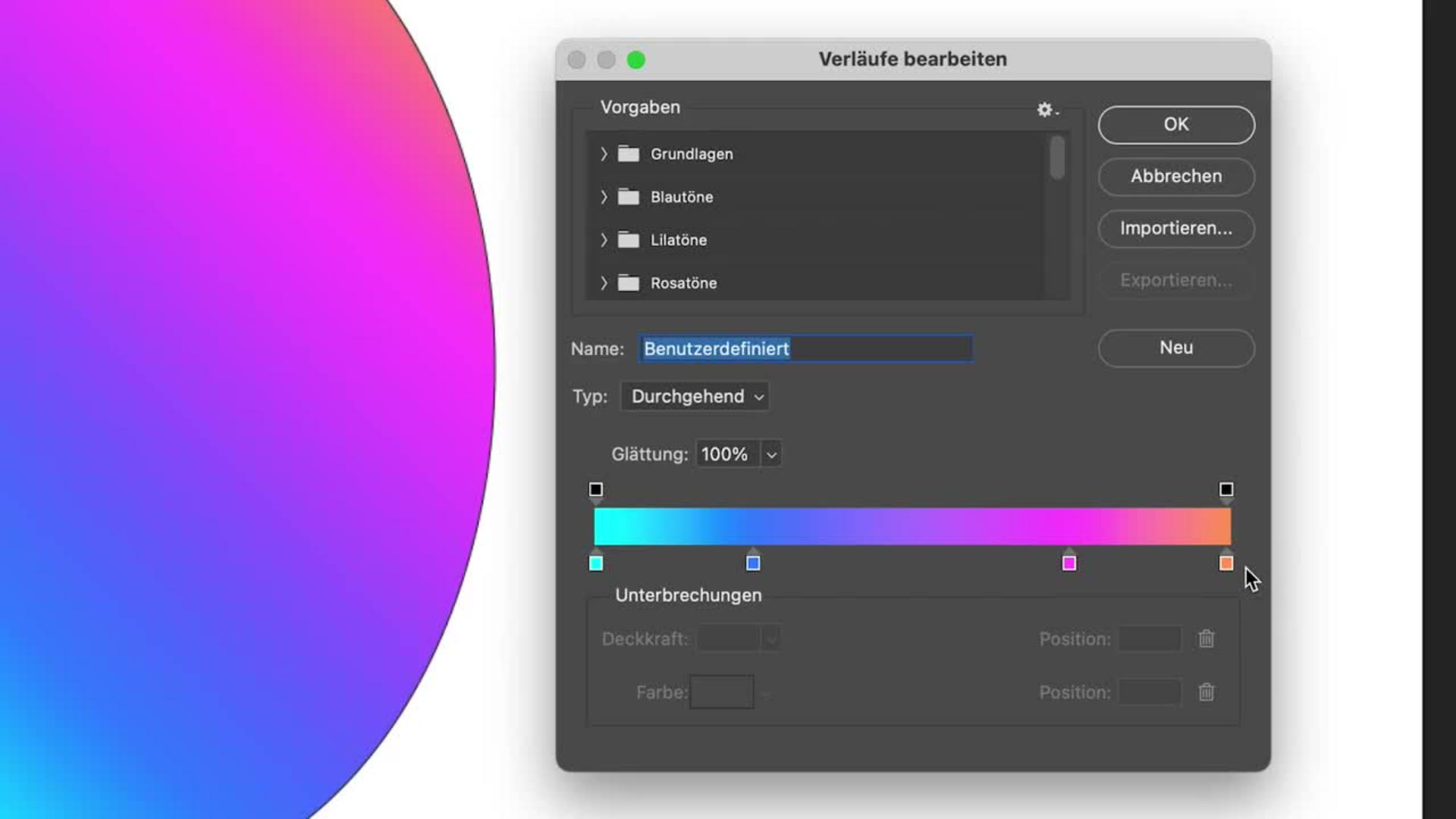
Mithilfe einer Verlaufsüberlagerung lässt sich jede Form bunt einfärben. Als Grundform für deine Seifenblase dient zunächst eine Ellipse, die mit einem vierfarbigen Verlauf gefüllt wird. Dafür stellt dir Adrian eine Farbpalette bereit, die an die schillernde Optik einer Seifenblase angelehnt ist. Schritt für Schritt zeigt dir der Profi, wie du die Verlaufsüberlagerung erstellst: Zunächst den bunten Farbverlauf, dann eine abgeflachte Kante mit Relief.
Benötigte Materialien
In der Anwendung üben
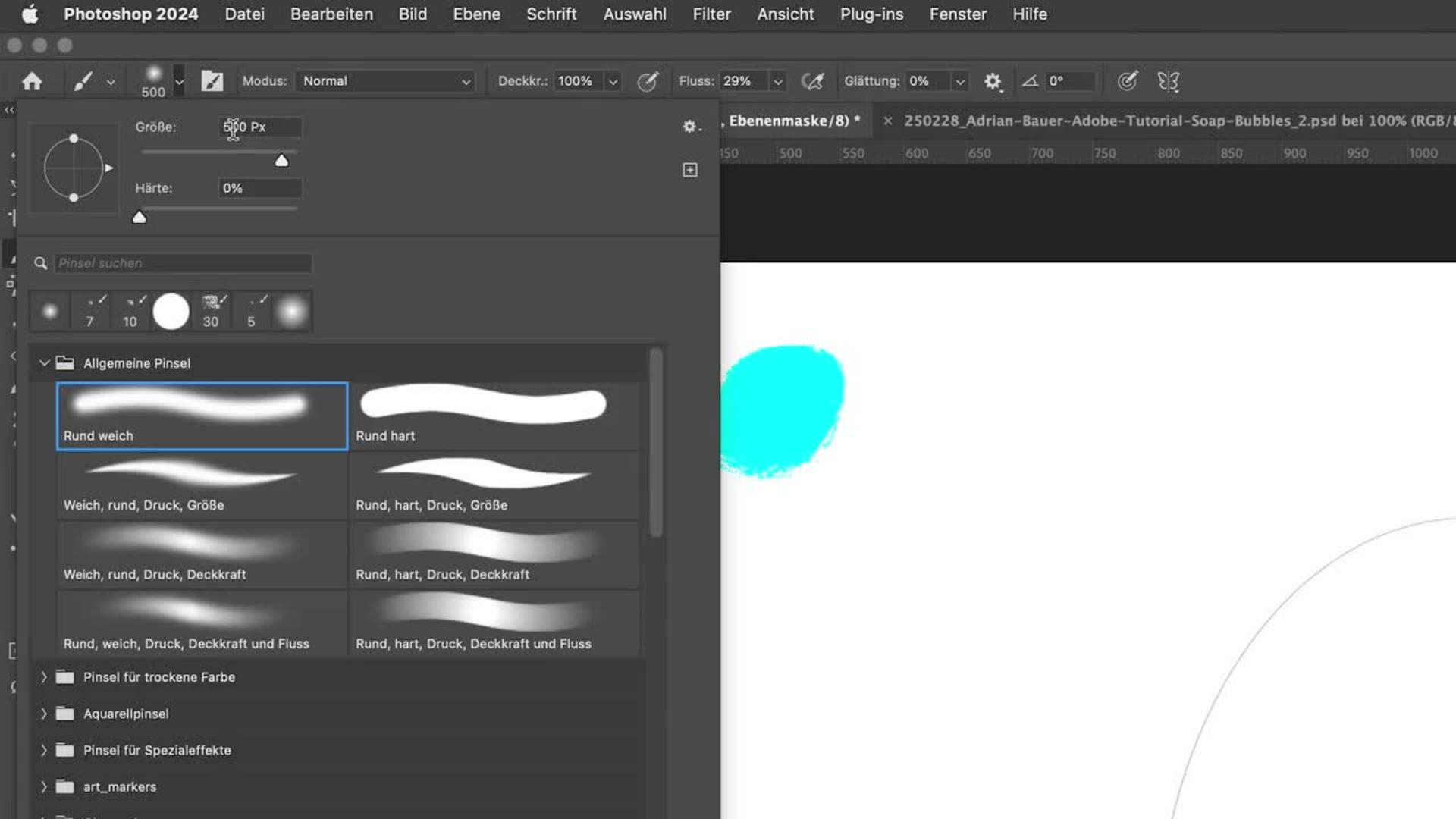
Transparenz imitieren Mithilfe einer Ebenemaske kannst du Bereiche deiner bunten Ellipse verdecken und wieder sichtbar machen, um den für Seifenblasen typisch durchsichtigen Anschein zu erwecken. Adrian Bauer zeigt dir, wie du mit dem Pinsel auf der Ebenenmaske arbeitest, um die Deckkraft des Verlaufs bis zum gewünschten Ergebnis zu verändern.
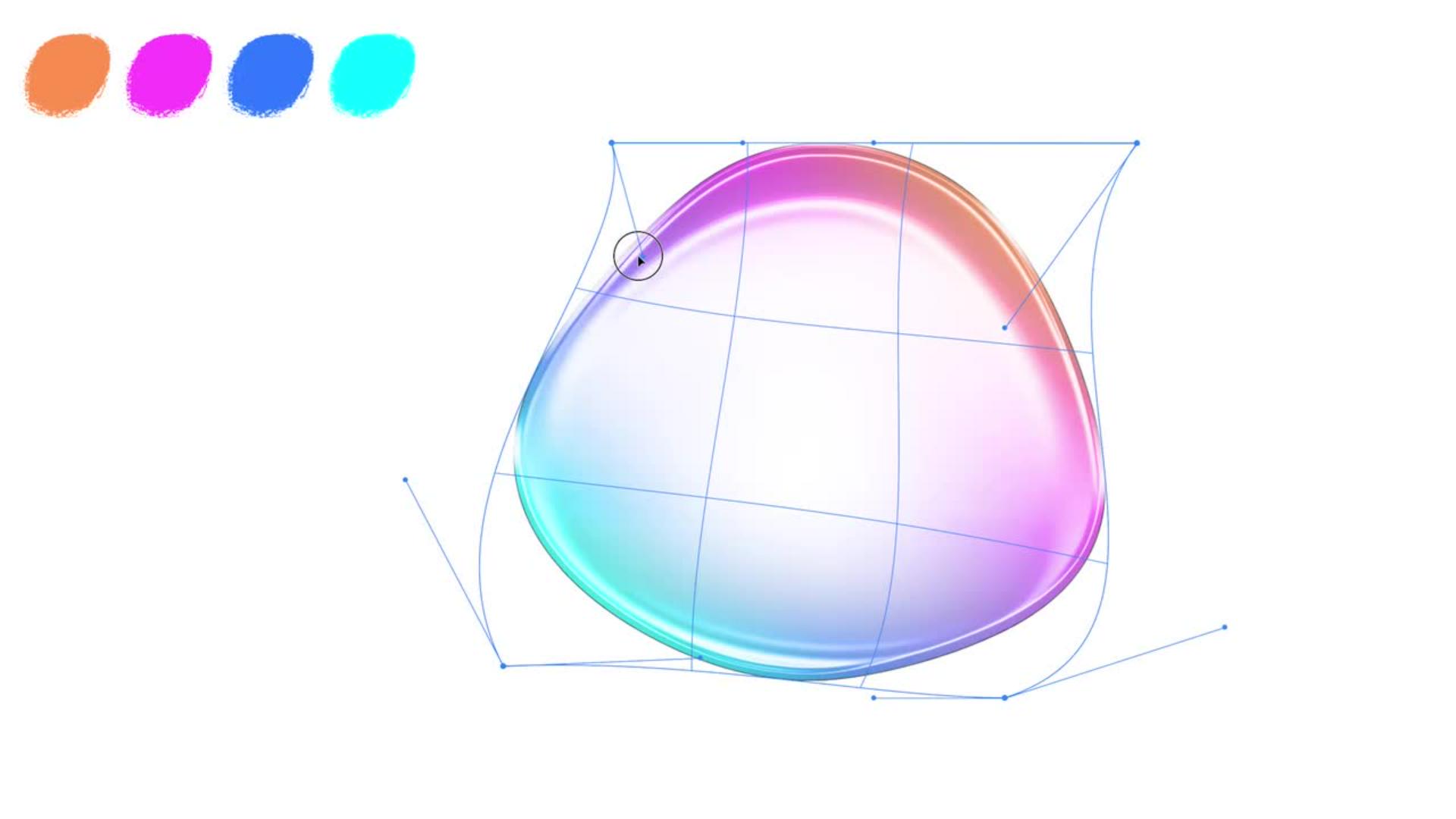
Seifenblasen formen Verändere abschließend mit dem Verformenwerkzeug deine Ellipse zum unverkennbaren Seifenblasen-Look. Ein Verformungsgitter hilft dir dabei, an vielen Punkten anzusetzen und an den Ecken und Enden der Ellipse zu ziehen, bis dir das Ergebnis gefällt.

Eine Seifenblase kommt selten allein
Sobald du deine erste Seifenblase in Photoshop illustriert hast, kannst du mit verschiedenen Farbverläufen und Formen experimentieren, um viele schillernde Seifenblasen zu erschaffen. Probiers jetzt aus und öffne Adrians interaktives Tutorial in Photoshop! Viel Spaß!
Benötigte Materialien
In der Anwendung üben
Über den Künstler
Adrian Bauer lebt in der Metropolregion Berlin. Mit seinen farbenfrohen, minimalistischen Illustrationen übersetzt er komplexe Sachverhalte in klar verständlichen Bilder. Das macht ihn zum gefragten Illustrator für internationale Agenturen, Verlagshäuser und Unternehmen in den Bereichen Editorial Illustration, Infografik und Corporate Branding.
Als Mentor in der Illustratoren Organisation Deutschland teilt er gerne Einblicke in seine Kreativarbeit und zeigt Creative Cloud Abonnent:innen mit seinen Adobe-Praxis-Tutorials Schritt für Schritt, wie seine Artworks in Photoshop und Illustrator entstehen.
You can control how Adobe websites use cookies and similar technologies by making choices below. But note that if you disable cookies and similar technologies entirely, Adobe websites may not function properly.
Cookies are small text files stored by your web browser when you use websites. There are also other technologies that can be used for similar purposes like HTML5 Local Storage and local shared objects, web beacons, and embedded scripts. These technologies help us do things like remembering you and your preferences when you return to our sites, measure how you use the website, conduct market research, and gather information about the ads you see and interact with.
You can make choices in the menu below about what cookies and other technologies you want us to use on Adobe sites when you visit them from this browser. You can always change those choices later by clicking on the Cookie Preferences link at the bottom of the page.
If enabled:
We can improve your experience by tailoring the site and the content to things we think might be of interest
We can better keep track of your preferences — like what language you prefer to use
We will better understand your likely interests so we can provide you more relevant Adobe ads and content on non-Adobe websites and in non-Adobe apps
It will help us improve the performance of our website and those of our partners who use the Adobe Experience Cloud
If disabled:
We won’t be able to remember you from session to session so the experience may not be tailored to your interests
You’ll still have access to the content of the site but certain features that depend on cookies may not function
You’ll still see ads, they just may not be as relevant to you
General information
You can control how Adobe websites use cookies and similar technologies by making choices below. But note that if you disable cookies and similar technologies entirely, Adobe websites may not function properly.
Cookies are small text files stored by your web browser when you use websites. There are also other technologies that can be used for similar purposes like HTML5 Local Storage, web beacons, and embedded scripts. These technologies help us do things like remembering you and your preferences when you return to our sites, measure how you use the website, conduct market research, and gather information about the ads you see and interact with.
You can make choices in the menu below about what cookies and other technologies you want us to use on Adobe sites when you visit them from this browser. You can always change those choices later by clicking on the Cookie Preferences link at the bottom of the page.
If enabled:
We can improve your experience by tailoring the site and the content to things we think might be of interest
We can better keep track of your preferences — like what language you prefer to use
We will better understand your likely interests so we can provide you more relevant Adobe ads and content on non-Adobe websites and in non-Adobe apps
It will help us improve the performance of our website and those of our partners who use the Adobe Experience Cloud
If disabled:
We won’t be able to remember you from session to session so the experience may not be tailored to your interests
We’ll still count your use of our site and services
You’ll still have access to the content of the site but certain features that depend on cookies may not function
You’ll still see ads, they just may not be as relevant to you
Operate the site and core servicesOperate site and measure engagement
Always active
These cookies are required, and they are used to enable the site and related services core functionality. Without them the site could not operate, so they cannot be disabled.
These cookies enable the site and related services’ core functionality and collect statistics about user engagement, such as counting active use to help us understand trends. These cookies cannot be disabled.
Measure performance
These cookies are used to analyze site usage to measure and improve performance. Without them Adobe cannot know what content is most valued and how often unique visitors return to the site, making it hard to improve information we offer to you.
These cookies are used to analyze site usage to measure and improve performance. Without them Adobe cannot know what content is most valued, making it hard to improve information we offer to you.
Extend functionality
These cookies are used to enhance the functionality of Adobe sites such as remembering your settings and preferences to deliver a personalized experience; for example, your username, your repeated visits, preferred language, your country, or any other saved preference.
Personalize advertising
These cookies are used to enable Adobe and our partners to serve ads more relevant to your interests. Without them you will still see ads, but they might not be as relevant to you.
Personalize advertising
These cookies are used to enable Adobe and our partners to serve ads more relevant to your interests. Without them you will still see ads, but they might not be as relevant to you.