V aplikaci Adobe Photoshop můžete vygenerovat dokonalý styl písma pro svůj projekt, včetně přesné tloušťky, šířky, sklonu a dalších atributů.
Získejte úplnou kontrolu nad vzhledem textupomocí variabilních písem. Začnete s jedním souborem písma a postupně si vytvořte varianty stylu, které můžete opakovaně použít ve svém projektu.
Poznámka: K použití této funkce je potřeba nejnovější verze aplikace Photoshop.
Zadejte text
Stiskněte klávesu T nebo na panelu nástrojů vyberte nástroj Vodorovný text. Klikněte na plátno a zadejte požadovaný text. Trojitým kliknutím na text vyberte celou větu a v pruhu voleb zvětšete velikost písma.
Vyberte volbu zarovnání. V případě potřeby změňte umístění přetažením horního okraje zvýrazněného textu.
Vyhledání variabilního písma a jeho použití jako výchozího bodu
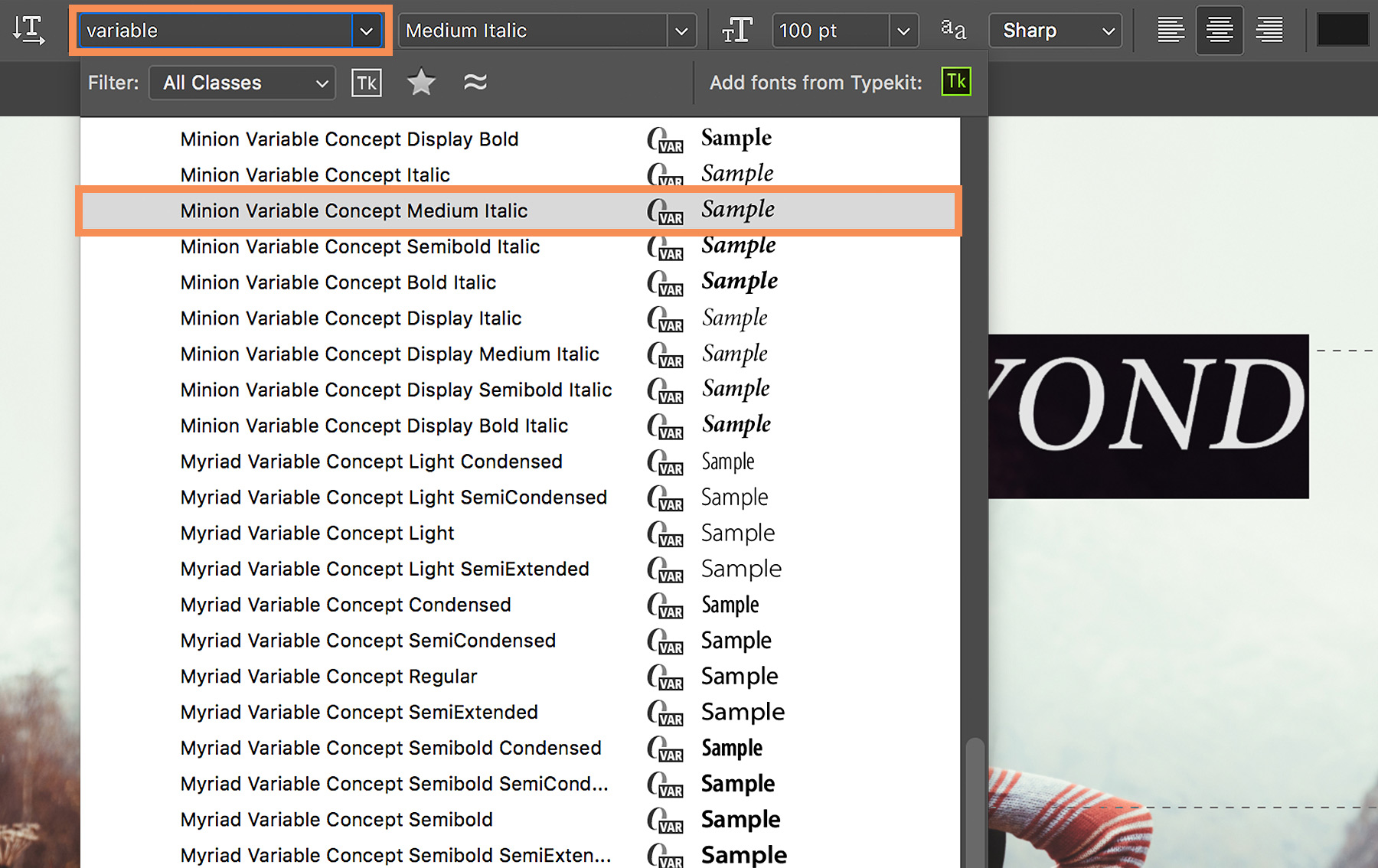
Nalezení variabilních písem nainstalovaných v počítači je snadné a rychlé. Vyberte text a v pruhu voleb v nabídce Písmo zadejte variable. Všimnete si jedinečného identifikátoru ikony (VAR) vedle názvu každého variabilního písma.
Přesunutím kurzoru na seznam zobrazte živý náhled jednotlivých stylů variabilního písma a pak vyberte variantu stylu písma.
Úprava přednastavení stylu písma
Automaticky se otevře panel Vlastnosti, ve kterém můžete pomocí praktických posuvníků upravit atributy Tloušťka, Optická velikost, Šířka a Sklon. V závislosti na vybraném variabilním písmu se můžou zobrazit různé vlastní atributy, které můžete upravit.
Můžete také změnit barvu textu.
Tip: Když provádíte úpravy pomocí posuvníků, aplikace Photoshop automaticky vybere styl písma nejbližší aktuálnímu nastavení. Například zvětšení sklonu stylu písma Regular (například Acumin Variable Concept Regular) automaticky změní písmo na kurzívu.
Doladění písma
Po kliknutí na tlačítko Další volby můžete upravit velikost písma, vyrovnání párů (mezery mezi dvojicí písmen), prostrkání (mezery ve skupině písmen) a další nastavení a vyladit tak vzhled textu.
Tip: Chcete-li znovu otevřít panel Vlastnosti, klikněte na ikonu Vlastnosti v ukotveném panelu nebo zvolte nabídku Okna > Vlastnosti.
Uložení vlastního stylu písma
Když váš text vypadá přesně podle vašich představ, můžete si svůj jedinečný styl písma uložit, abyste ho mohli opakovaně používat.
Vyberte text a v ukotveném panelu na klikněte Odstavcové styly. V dolní části panelu klikněte na možnost Vytvořit nový odstavcový styl. Dvakrát klikněte na nový styl (Odstavcový styl 1) a zadejte nový název.
Chcete-li znovu použít vlastní styl písma, jednoduše vyberte nějaký text v dokumentu a klikněte na odstavcový styl, který jste vytvořili.
Doufáme, že pro vás budou variabilní písma zajímavá a užitečná.

22. července 2022
Vyzkoušejte tyto výukové lekce pro aplikaci Photoshop
Upravujte fotografie a vytvářejte nové obrázky a grafiku.
You can control how Adobe websites use cookies and similar technologies by making choices below. But note that if you disable cookies and similar technologies entirely, Adobe websites may not function properly.
Cookies are small text files stored by your web browser when you use websites. There are also other technologies that can be used for similar purposes like HTML5 Local Storage and local shared objects, web beacons, and embedded scripts. These technologies help us do things like remembering you and your preferences when you return to our sites, measure how you use the website, conduct market research, and gather information about the ads you see and interact with.
You can make choices in the menu below about what cookies and other technologies you want us to use on Adobe sites when you visit them from this browser. You can always change those choices later by clicking on the Cookie Preferences link at the bottom of the page.
If enabled:
We can improve your experience by tailoring the site and the content to things we think might be of interest
We can better keep track of your preferences — like what language you prefer to use
We will better understand your likely interests so we can provide you more relevant Adobe ads and content on non-Adobe websites and in non-Adobe apps
It will help us improve the performance of our website and those of our partners who use the Adobe Experience Cloud
If disabled:
We won’t be able to remember you from session to session so the experience may not be tailored to your interests
You’ll still have access to the content of the site but certain features that depend on cookies may not function
You’ll still see ads, they just may not be as relevant to you
General information
You can control how Adobe websites use cookies and similar technologies by making choices below. But note that if you disable cookies and similar technologies entirely, Adobe websites may not function properly.
Cookies are small text files stored by your web browser when you use websites. There are also other technologies that can be used for similar purposes like HTML5 Local Storage, web beacons, and embedded scripts. These technologies help us do things like remembering you and your preferences when you return to our sites, measure how you use the website, conduct market research, and gather information about the ads you see and interact with.
You can make choices in the menu below about what cookies and other technologies you want us to use on Adobe sites when you visit them from this browser. You can always change those choices later by clicking on the Cookie Preferences link at the bottom of the page.
If enabled:
We can improve your experience by tailoring the site and the content to things we think might be of interest
We can better keep track of your preferences — like what language you prefer to use
We will better understand your likely interests so we can provide you more relevant Adobe ads and content on non-Adobe websites and in non-Adobe apps
It will help us improve the performance of our website and those of our partners who use the Adobe Experience Cloud
If disabled:
We won’t be able to remember you from session to session so the experience may not be tailored to your interests
We’ll still count your use of our site and services
You’ll still have access to the content of the site but certain features that depend on cookies may not function
You’ll still see ads, they just may not be as relevant to you
Operate the site and core servicesOperate site and measure engagement
Always active
These cookies are required, and they are used to enable the site and related services core functionality. Without them the site could not operate, so they cannot be disabled.
These cookies enable the site and related services’ core functionality and collect statistics about user engagement, such as counting active use to help us understand trends. These cookies cannot be disabled.
Measure performance
These cookies are used to analyze site usage to measure and improve performance. Without them Adobe cannot know what content is most valued and how often unique visitors return to the site, making it hard to improve information we offer to you.
These cookies are used to analyze site usage to measure and improve performance. Without them Adobe cannot know what content is most valued, making it hard to improve information we offer to you.
Extend functionality
These cookies are used to enhance the functionality of Adobe sites such as remembering your settings and preferences to deliver a personalized experience; for example, your username, your repeated visits, preferred language, your country, or any other saved preference.
Personalize advertising
These cookies are used to enable Adobe and our partners to serve ads more relevant to your interests. Without them you will still see ads, but they might not be as relevant to you.
Personalize advertising
These cookies are used to enable Adobe and our partners to serve ads more relevant to your interests. Without them you will still see ads, but they might not be as relevant to you.