48 Mother’s Day captions that feel personal, not generic.
Some people plan their Mother's Day post weeks in advance, while others remember when they’re already at brunch, looking for one good photo that says it all. In either case, a great caption helps bring out exactly how you feel.
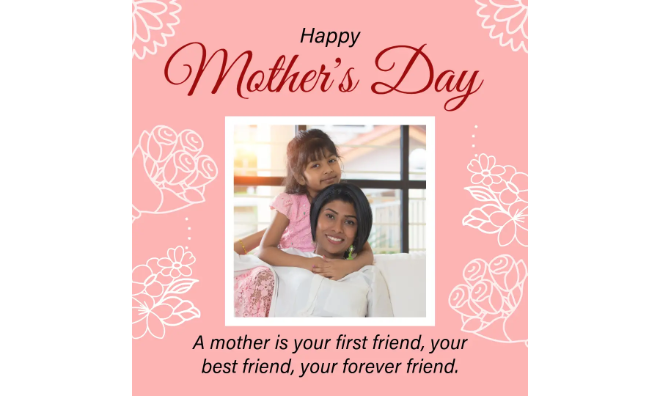




Mother’s Day captions that make it personal.
Everyone handles Mother’s Day a little differently. You might plan ahead, or you might remember while you’re mid-brunch and scrolling for something to post. Either way, one good caption can hold more than you think.
The right line can work on its own or inside a custom card. You could also turn a small story into a letter she actually keeps, not just reads once. What matters is that it feels like something you’d say, not just something you found.
Mother’s Day captions that come from the heart.
You don’t have to say it perfectly—just honestly. This set leans toward lines from the heart, not ones that sound borrowed. Some are quiet. Some are warm. All of them carry a kind of thank-you that doesn’t need much more.
You might post it with a photo from today, or save it for a custom photo collage you can print or send later. Either way, they’ll read like your voice, and not just a template.
This line doesn’t try to be deep; it just nods to the moments that stuck with you. It works for the kind of caption that doesn’t need context, just a feeling you already know. A quiet check-in, a look, the way she always asked if you’d eaten. It’s best for photos that aren’t necessarily polished, just real.
recipe
Happy Mother’s Day captions.
Saying “Happy Mother’s Day” isn’t the hard part—it’s figuring out how to post it without sounding like everyone else. That’s what this set is for. These aren’t trying to be deep or original; they just get the message across in a way that doesn’t feel like you pulled the first result off a search engine, especially if you add them to a letter with memorable photos.
If you’re putting something together for a group or a community shoutout, you can also plug one of these into a custom flyer. It’s a simple way to mark the day without needing a long explanation.
This line isn’t just for your mom; it works when the photo includes other people who’ve shown up in that role too. It fits group shots, school events, or anything that shows more than one version of what being a mom can look like. It’s a way to include everyone without making it feel generic.
recipe
How to create scroll-stopping Mother's Day captions.


Funny Mother’s Day captions.
Most Mother's Day photos aren’t staged—and that’s what makes them better. Maybe it’s out of focus. Maybe the celebrant’s blinking. You post it anyway. These captions don’t clean it up; they match the tone and keep it honest.
You can also use them in a custom poster if you're putting something together for a Mother's Day school project or setting up the brunch table. Humor reads better when it’s printed big.
This one’s better when you’re old enough to admit she put up with a lot. Think late replies, slammed doors, weekends you swore you’d never come home. It works when you’re finally at the point where all that drama is kind of funny.
Sweet Mother’s Day captions.
You might’ve already said it in person, but if you’re posting something too, these captions help it feel less blank. These sweet Mother's Day captions don’t try to make a big statement; they try to capture the same warmth and tenderness your mom makes you feel.
They also work well printed on a custom banner if you’re setting up a surprise brunch or decorating a space without going over the top.
This pairs best with photos that aren’t planned—maybe a hug before leaving, or something caught between errands. It fits when you’re trying to show what doesn’t usually make it into posts: the way she was always the place you went when nothing else made sense.
recipe
How to choose a Mother’s Day caption when the relationship is complicated.
Not everyone’s relationship with their mom is simple. If posting feels complicated, there are still ways to do it without pretending or oversharing.
- Keep it neutral without sounding cold. A caption doesn’t need to explain your whole history. Pick something simple that keeps it respectful without getting into what you’d rather keep private. One-sentence Mother's Day captions are best since they can be candid and upfront.
- Let the image lead. If writing feels like it’s too much, let the photo carry the post. A moment that means something—old or new—can do the work without needing text. You can also use a custom collage to soften the tone and shift the focus to shared memories.
- Avoid phrasing that doesn’t match your reality. You don’t have to use words like “best” or “always there” if they don’t feel right. Stick to lines that thank her or choose something that feels real to you. You don’t need to stretch the truth.
- Skip the caption altogether. You can still post something visual—a photo, a shared moment, or even just a backdrop that holds meaning. A simple Mother’s Day card can be enough to mark the day and make her feel special.
When to post (or not post) your Mother’s Day captions.
Not everyone posts on the day, and not everyone feels like saying something online just because it’s expected. If you’re still thinking it through, here are a few things that might help:
- You don’t need to post in real time. You can wait. A post later—after things quiet down—can feel more natural than one rushed just to get it out.
- Don’t tag people without thinking it through. Not everyone wants to be tagged or pulled into a public post. If you're hesitating, leave it off and keep the message between you and her.
- It’s okay to post even if someone’s missing. If you're grieving or someone is no longer part of your life, it’s still valid to post a line that marks the day. Sometimes, a photo says enough.
- Not posting is also an option. You can celebrate your Mom in a way that isn’t public. Send her a private message, print something for her, or just be present. None of that has to show up on your feed.
Create thoughtful Mother’s Day memories with Adobe Express.
You already have the words. What you do with them is what people see. Adobe Express gives you different ways to shape how your caption shows up. You can build from a blank page or use a template and tweak what’s already there.
Whether it’s a card, a banner, or something you’re posting online, it lets you decide how much or how little you want to say. Sometimes the words are simple. A visual representation just helps those words land the way you meant them to.