Introduction
Master Properties do a lot to help control multiple versions of a graphic.
But what happens when you want to push changes through all of the different versions of the graphics which are all in different compositions?
Well, that's where pushing and pulling with Master Properties comes into play.
If we look at our project here,
Understanding master compositions and master properties
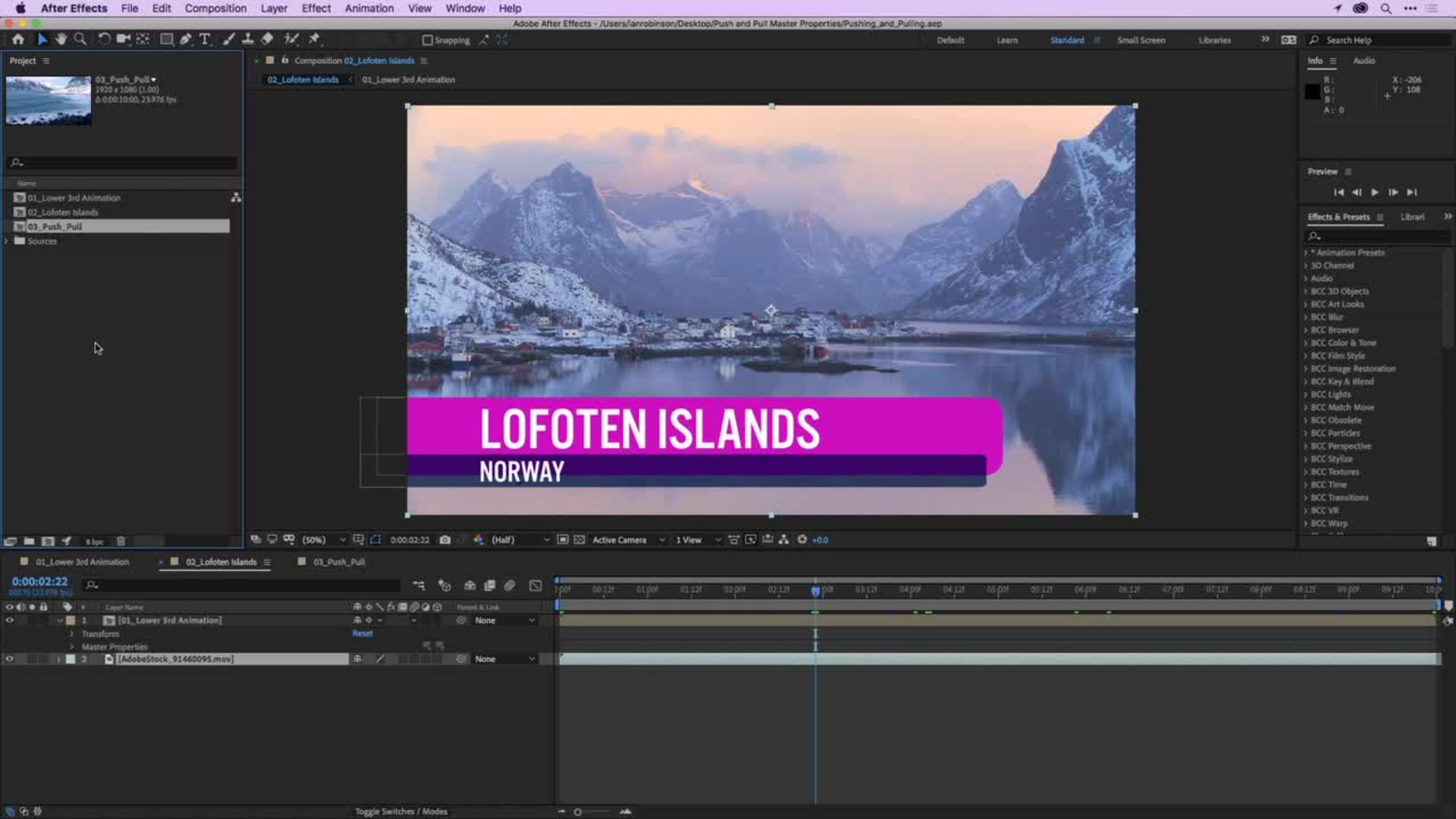
I am currently in the 02_Lofoten Islands composition and as I scrub through here, you'll notice I have an animated lower third with text and a smaller bar of text for the location.
If I look in the Timeline, you'll notice this is made up of a pre-composition over top of some background footage.
So, I'll double click on the pre-comp to open that up and this is our master comp, and this is what's going to actually drive all the other versions of this animation.
If I make changes in here, these changes will flow down through the rest of the composition.
But, you know, what happens when you're working in a normal workflow like you go to another comp and you make a change and you want that change to go to all the other compositions?
Well, let me show you.
If I click here on the 03_Push_Pull composition
Editing graphics using master properties in sub-compositions
I can see as I scrub through that I've got some rough seas here.
So, I'm going to go ahead and open up the options for Layer 1 and in the Master Properties you'll notice I can change my Title Text or my Location Text, I could change the bar color for the Large Bar or the Smaller Bar.
So, let's start by changing the bar color for the Larger Bar.
I want it to be this kind of blue color.
So, I'll click once on the Eyedropper here and I'll sample a dark color.
I can see the colors I'm going to sample up here in the Info panel.
So, I'll go in and hover over a dark color and I'll just click once, and you can see now I've got a nice darker blue green color which is exactly what I want.
And why don't I go ahead and change the text?
I'll right click on the Title Text and I'll say Edit Value and for this one I'll say Rough Seas and I'll click OK.
Notice even though I typed upper and lower it stayed all caps.
That was because I had created all caps in the master composition by using the All Caps button in the Character panel.
So, anytime I make any changes to the text they're going to be all caps.
Now, let's go to the 02 composition.
Notice it's still unchanged.
Pulling changes from the master composition
03, I just made changes here in their Master Properties but 02 I haven't made any changes yet.
So, let me go ahead and go to my Master Properties option here and I'll right click on the Title Text and for this one I'll Edit Value and I'll say Calm Seas and I'll click OK.
Now, let me show you how pushing and pulling works.
If I want to change the bar color here for the Large Bar, I'll go ahead and just click on the color and let's change this to green.
That looks horrific.
I want to reset this back to what was originally in the composition based on the master comp.
Well, if I go to this button here on the left, I can pull the color from the master comp.
So, I'll click once on that and you notice I've pulled that color from the master comp.
Okay.
That's great.
Let's go here to 03_Push_Pull.
Let's say I want this new Large Bar Color to go back to all the other compositions inside the project.
Well, in this one instead of pulling from the master comp,
Pushing changes back to the master composition
I'm going to push this change back to the master comp.
So, I'll click on that and it doesn't look like much has happened.
But if I go to my master comp here, now you'll see I have the new color and if I go to the 02 comp, the new color has flowed through here.
Now, let's go to 03 again and let's say I want to push the actual Title Text ROUGH SEAS back to the master composition.
I'm going to go right here, and I'll click once and that's going to push it back to the master comp.
So, when I go here now it's going to say ROUGH SEAS but if I go to the 02 comp, notice it still says CALM SEAS.
Once you've made a change to a sub comp even if you push the change from another sub comp back to the master comp it'll think that you want to keep the changes that you've already made to this comp.
So, if I want that text from the master comp to flow here to where I've already made that change, this is where I need to tell it to go ahead and pull that information from the master comp.
So, when you have multiple compositions containing different versions of a motion graphic, sending changes between those compositions are only one button away with Push and Pull in Master Properties.