Techniques to access bank statement PDF with password
#1E1E1E
ACROBAT
How to open or remove a bank statement PDF password securely.
Learn the proper techniques to access bank statement PDFs with a password. Find tips on opening your password-protected bank statement and how to remove it using Adobe Acrobat.
In the era of digital banking, the security of customer data and transactions is of utmost importance. Bank statements are the banking sector's key component containing information on user transactions. Since this data is sensitive, most banks send bank statement PDFs protected with a password to safeguard account information.
Accessing a bank statement PDF with a password in a secure environment helps to manage the finances properly and prevents unauthorised access. However, passwords can be a two-edged sword, as you might face difficulties when trying to open, access, or remove passwords from bank statement PDFs across devices like mobile phones, desktops, or iPhones. Hence, in this article, we will discuss such challenges and how to overcome them by removing passwords.
style
xl spacing, two up
layout
1 | 2
Challenges with PDF passwords in bank statements.
Lost and forgotten password. The most common challenge you would face is forgetting or losing the passwords to your bank statements. In today’s digital era, when we manage many online accounts, keeping track of passwords for each document is quite cumbersome. As a result, it becomes difficult to open bank statement PDFs with passwords, especially when you urgently need them for financial verification.
Inaccessibility and bad user experience. If you want to share bank statements for official purposes like loan applications, passwords can hinder the accessibility and overall user experience. It can be quite cumbersome for the bank executive to open the bank statement PDF and might require some additional software which might be difficult to download, complicating the user experience overall.
Weak security. If the password is not secured properly or shared with someone, it might lead to unauthorised access to your bank statement data. Moreover, if your password is easy to guess, then it might be possible for someone to crack and steal your identity and information.
Inconvenience while retrieving it. When a bank statement password is lost, banks usually follow strict KYC verification processes before reissuing credentials. You might need to get your KYC done and wait for a long time to get a new password. It is quite a time-consuming process and full of hassle, especially when you want to access a file immediately.
Difficulty while printing or converting PDFs. Many users struggle to remove passwords from bank statement PDFs when they need to print, merge, or convert them into other formats like Excel or Word. Without removing the password correctly, such actions are often blocked by security settings, resulting in delays and frustration.
How to safely recover a bank statement PDF password?
Bank Statement PDFs are usually password-protected to avoid any leakage of sensitive financial information. However, there are a lot of instances where you would need to access a bank statement PDF and have no password available. In such cases, you can follow some of the techniques mentioned below to retrieve the password or remove it completely from the PDF:
Check your registered email or SMS. In most Indian banks, the bank statement password is auto-generated and shared through email or SMS, often a combination of your name and birthdate. Reviewing these messages can help you open the bank statement PDF password-protected file without extra steps.
Use your internet banking password reset option. Many Indian banks provide a secure method to recover or reset the bank statement PDF password through their internet banking portal. By logging in to your account, you can navigate to the statement or document settings and request a password reset or retrieve the existing PDF password. This method is safe, authorised, and eliminates the need for third-party tools.
Get in touch with your bank’s customer support. This is the preferred way to get your password back for accessing the bank statement. A lot of banks do share the password in the email when sending bank statements, but if you are not able to access it, get in touch with your bank’s customer care. They will willingly help you once you provide them with authentic KYC documents.
Use Adobe Acrobat to unlock or manage passwords. Adobe Acrobat allows you to manage password protection legitimately. Once you enter the correct password, you can remove it or modify security settings using the Protect feature. This ensures you stay compliant and secure when managing sensitive financial PDFs.
While choosing any of these options to get the password of PDF bank statements, it is important to consider all the consequences it can lead to if found to be illegitimate.
Removing passwords from bank statement PDFs.
You should only remove passwords from bank statement PDFs after getting proper authorisation from the owner to access the file. If, for some reason, the PDF is password protected, and you try to remove it without proper permissions, then it can lead to some legal issues.
However, after getting legal access, you can easily remove the password from PDF by following the steps given below.
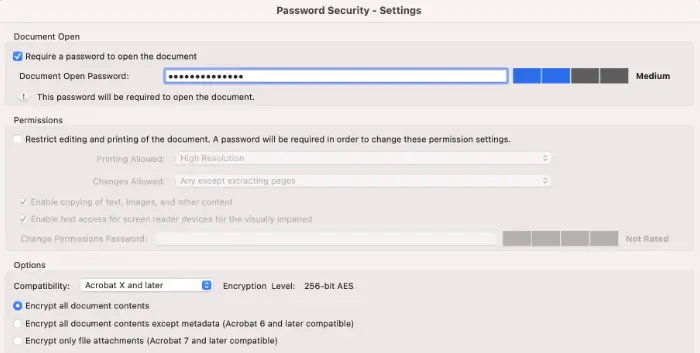
How to remove password from PDF bank statement using Adobe Acrobat?
Launch Adobe Acrobat and Open the bank statement pdf password protected by going to the file menu and choosing the “Open” option.
When asked, enter the required password to access the file and press “enter” or click “okay”.
Go to the “Tools” tab to remove the Password security. In the tools option, you need to follow this “Protect” -> “Encrypt” -> “Remove Security” from the dropdown menu.
After you remove security, you need to click “OK” when prompted to confirm that you want to remove password security.
Once you select the appropriate security settings, you can access the PDF file without the password. Save it at the desired location, like a cloud or on your computer.
Make sure that you securely handle your bank statement and only share the information that is needed.
Effective approaches:
Handle bank statements carefully and avoid sharing sensitive data unnecessarily.
Use Adobe Acrobat to maintain compliance and security while managing financial PDFs.
Converting PDF bank documents to Excel is quite a great move as it will allow you to analyse your financial data and keep it recorded in one place. Below is a step-by-step guide that will help you to convert PDF bank statements to Excel.
Step 1: Download Adobe Acrobat and open the targeted file.
If you don't have Adobe Acrobat already, then you can download it from the website based on the OS you use. There are multiple options available to choose from. Further, If needed, you can also create an account for free or opt for a paid plan.
Step 2: Open the PDF bank statement.
You then need to open the PDF bank statement file to convert it to Excel. Open it by going to the File Menu and selecting the “Open” option. If it asks you to enter a password, enter it by following the steps given in the prompt.
Step 3: Use the export PDF option.
With the help of this feature, you can easily export your PDF in the required format of your choice. Ideally, you can choose the spreadsheet option and then choose Microsoft Excel Workbook to convert PDF documents to an Excel sheet.
Step 4: Choose the export option.
Once you choose a required option, start the export process by clicking the “Export” Option. For a scanned document, a text recognition program will be run.
Step 5: Confirm and save.
Ensure all the data that you copied is quite accurate and complete. In case there are any errors or incomplete content, try to copy it back and save the Excel sheet with any file name on the cloud or desktop.
With this, you would have successfully converted your bank statement to Excel without any hassle. It is quite crucial to handle any sensitive financial information securely when dealing with someone else’s data or yours. This will keep you compliant with all privacy regulations.
Best practices to secure and access bank statement PDFs.
It is quite crucial to maintain the integrity of PDF documents without compromising their accessibility. Using a few of the best practices given below, you can keep the PDF document Secure and Safe.
Use strong encryption methodologies. If your PDF includes some sensitive content, then using strong encryption methodology, you can secure it. In this process, the encryption will convert your content into some random text using some cryptographic algorithms like AES (Advanced Encryption Standard) or RSA.
Use access control to set permissions. Tools like Adobe Acrobat allow you to set the permissions and grant access to only specific people to read content. Further, using access control permissions, you easily limit actions from different users to prevent any unauthorised access.
Leverage watermarks. Watermarks are the best way to prevent any sharing of sensitive information. With the help of Watermark, you can add some invisible or partially visible text to your PDF document, such as “Confidential” or some company logo.
Keep software updated. Regularly update Adobe Acrobat and PDF viewers to the latest versions. Updates often include security patches that protect PDFs against vulnerabilities and potential hacks.
Maintain secure storage and sharing practices. Store PDF bank statements in secure locations such as encrypted cloud drives or password-protected folders. Avoid sharing the file via unsecured email or public links.
Facilitate your banking processes with PDFs.
Bank statement PDF is password-protected to prevent any unauthorised access; however, it can be quite daunting when you forget or lose your password. Nevertheless, by applying certain strategies and password removal techniques, you can easily retrieve or remove passwords from your PDF or you can use PDF to Excel Adobe online tool to convert PDF bank statements to Excel. Additionally, following the best practices is important to maintain the overall integrity and security of sensitive information in PDF documents like bank statements.

Frequently asked questions.
Why are bank statement PDFs password-protected?
Bank statements usually contain crucial information about the user’s transactions and account numbers. Making it password-protected helps to keep it secure and prevents any illegitimate access.
How can I open a bank statement PDF if I forgot the password?
If you forget your bank statement PDF password, first check your registered email or SMS, as many banks share auto-generated passwords there. You can also use your internet banking password reset or contact your bank’s customer support to recover it. Once retrieved, use Adobe Acrobat to safely unlock or manage the PDF while maintaining compliance.
Is it legal to attempt to access passwords for bank statement PDFs?
Without any authorisation from the account owner, it is not legitimate to access or crack the password of a bank statement PDF. It might lead to a violation of regulatory laws related to privacy and data protection.
Can I convert a password-protected PDF bank statement to Excel?
It is possible to convert the password-protected PDF to Excel, but for this, you need to have authorisation to open the document. Without appropriate permissions, it might cause some legal consequences.
How do I maintain bank statement security while removing the password?
After you have removed the password, it is essential to make sure that you secure the file by storing it at the appropriate location. Moreover, you need to handle the financial information by complying with regulatory rules like privacy and data protection regulations.
How do I remove the password from a PDF bank statement on mobile or iPhone?
To remove a password from a bank statement PDF on mobile or iPhone, use Adobe Acrobat Reader mobile app. First, open the PDF and enter the existing password. Then, go to the Protect option, select Encrypt > Remove Security, and confirm the action. Save the PDF to a secure location on your device or cloud storage. Only remove passwords from PDFs you are authorised to access to maintain compliance and prevent unauthorised use.
style
grid width 8
CardTitle
Techniques to access bank statement PDF with password.
CardImage
CardImageAltText
Accessing bank statements
CardDescription
Learn the proper techniques to access bank statement PDFs with a password. Find tips on opening your password-protected bank statement and how to remove it using Adobe Acrobat.