Zrób zdjęcie, a następne dopracuj je, wykonaj retusz lub całkowicie przekształć. Wszystko to zrobisz, wybierając plan fotograficzny Adobe Creative Cloud, który zawiera programy Lightroom i Photoshop.
Dzięki narzędziu Usuwanie generatywne w programie Lightroom czyszczenie zdjęć stało się łatwiejsze niż kiedykolwiek. Obiekty znikają bez śladu.
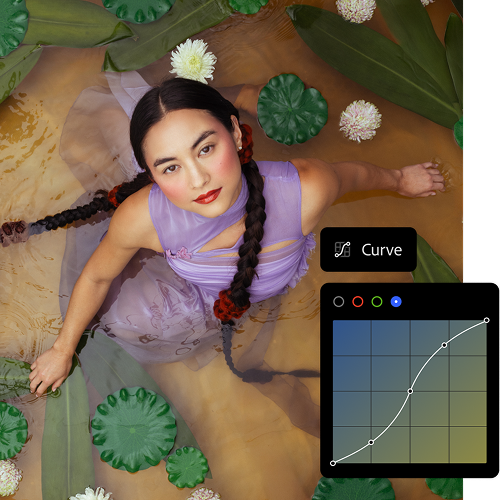
Edycja z dowolnego miejsca
Kontynuuj pracę w poprzednim miejscu dzięki aplikacji mobilnej, programowi lub usłudze internetowej Lightroom. Projekty są między nimi automatycznie synchronizowane.
Rozwijanie umiejętności
Skorzystaj z samouczków wbudowanych w programie Lightroom. Jeśli poszukujesz więcej inspiracji, zajrzyj do społeczności dzięki funkcji Odkrywanie w programie Lightroom.
Generatywna sztuczna inteligencja w programie Adobe Photoshop. To zmienia wszystko.
Za pomocą opartych na modelach Adobe Firefly funkcji Wypełnienie generatywne i Rozszerzenie generatywne możesz dodawać, usuwać lub uzupełniać zawartość dowolnych obrazów bezpośrednio w programie Photoshop. Wypróbuj, aby przekonać się, jakie to proste.
three up, l-gap, no-spacing-top, xxxl spacing bottom
Dopiero zaczynasz przygodę z fotografią i narzędziami firmy Adobe? Znamy odpowiedzi.
Różnica między planami fotograficznymi Adobe polega na tym, że plan Adobe Lightroom obejmuje produkty Adobe Lightroom, Adobe Lightroom Classic oraz 1 TB przestrzeni dyskowej w chmurze umożliwiającej dostęp do zdjęć i ich edycję w dowolnym miejscu, natomiast plan Adobe Creative Cloud Photography zawiera produkty Adobe Lightroom, Adobe Lightroom Classic, Adobe Photoshop oraz 1 TB przestrzeni dyskowej w chmurze. Porównaj ceny i funkcje planów fotograficznych.
Tak. Aby wypróbować plany fotograficzne, pobierz bezpłatną, 7-dniową wersję próbną usługi Adobe Creative Cloud. Przekonaj się, czy to odpowiedni produkt dla Ciebie. Zacznij bezpłatny okres próbny
Choć obie aplikacje do cyfrowej obróbki fotografii są do siebie podobne, główna różnica między Adobe Photoshop a Adobe Lightroom polega na tym, że Adobe Photoshop specjalizuje się w manipulacji obrazem, jego tworzeniu i udoskonalaniu, podczas gdy Adobe Lightroom koncentruje się na edycji, organizacji i przetwarzaniu zdjęć. Dowiedz się więcej o różnicach między Adobe Photoshop a Adobe Lightroom.
Plan fotograficzny Creative Cloud kosztuje 24,59€ / mies.w tym VAT w ramach planu Roczny, rozliczany miesięcznie lub 293,58€ / rokw tym VAT w przypadku planu rocznego opłacanego z góry. Plan obejmuje programy Lightroom, Lightroom Classic i Photoshop oraz 1 TB przestrzeni dyskowej w chmurze. Porównaj plany fotograficzne i ceny.
style
xxl spacing
Znajdź plan Adobe Creative Cloud, który odpowiada Twoim potrzebom.
style
three merch cards, dark, center, grid width 12, static links, no-spacing
background
#000
Lightroom (1 TB)
14,98€ / mies.w tym VAT. Plan roczny rozliczany co miesiąc
Lightroom na urządzeniach przenośnych, komputerze i w przeglądarkach oraz Lightroom Classic.
Regularly at 80,61€ / mies.Lub za 45,13€ / mies.w tym VAT. Plan roczny rozliczany co miesiąc
Ponad 20 aplikacji, w tym Lightroom, Photoshop i Lightroom Classic, oraz usługa Adobe Firefly — kreatywna sztuczna inteligencja do tworzenia obrazów, wideo i audio.
You can control how Adobe websites use cookies and similar technologies by making choices below. But note that if you disable cookies and similar technologies entirely, Adobe websites may not function properly.
Cookies are small text files stored by your web browser when you use websites. There are also other technologies that can be used for similar purposes like HTML5 Local Storage and local shared objects, web beacons, and embedded scripts. These technologies help us do things like remembering you and your preferences when you return to our sites, measure how you use the website, conduct market research, and gather information about the ads you see and interact with.
You can make choices in the menu below about what cookies and other technologies you want us to use on Adobe sites when you visit them from this browser. You can always change those choices later by clicking on the Cookie Preferences link at the bottom of the page.
If enabled:
We can improve your experience by tailoring the site and the content to things we think might be of interest
We can better keep track of your preferences — like what language you prefer to use
We will better understand your likely interests so we can provide you more relevant Adobe ads and content on non-Adobe websites and in non-Adobe apps
It will help us improve the performance of our website and those of our partners who use the Adobe Experience Cloud
If disabled:
We won’t be able to remember you from session to session so the experience may not be tailored to your interests
You’ll still have access to the content of the site but certain features that depend on cookies may not function
You’ll still see ads, they just may not be as relevant to you
General information
You can control how Adobe websites use cookies and similar technologies by making choices below. But note that if you disable cookies and similar technologies entirely, Adobe websites may not function properly.
Cookies are small text files stored by your web browser when you use websites. There are also other technologies that can be used for similar purposes like HTML5 Local Storage, web beacons, and embedded scripts. These technologies help us do things like remembering you and your preferences when you return to our sites, measure how you use the website, conduct market research, and gather information about the ads you see and interact with.
You can make choices in the menu below about what cookies and other technologies you want us to use on Adobe sites when you visit them from this browser. You can always change those choices later by clicking on the Cookie Preferences link at the bottom of the page.
If enabled:
We can improve your experience by tailoring the site and the content to things we think might be of interest
We can better keep track of your preferences — like what language you prefer to use
We will better understand your likely interests so we can provide you more relevant Adobe ads and content on non-Adobe websites and in non-Adobe apps
It will help us improve the performance of our website and those of our partners who use the Adobe Experience Cloud
If disabled:
We won’t be able to remember you from session to session so the experience may not be tailored to your interests
We’ll still count your use of our site and services
You’ll still have access to the content of the site but certain features that depend on cookies may not function
You’ll still see ads, they just may not be as relevant to you
Operate the site and core servicesOperate site and measure engagement
Always active
These cookies are required, and they are used to enable the site and related services core functionality. Without them the site could not operate, so they cannot be disabled.
These cookies enable the site and related services’ core functionality and collect statistics about user engagement, such as counting active use to help us understand trends. These cookies cannot be disabled.
Measure performance
These cookies are used to analyze site usage to measure and improve performance. Without them Adobe cannot know what content is most valued and how often unique visitors return to the site, making it hard to improve information we offer to you.
These cookies are used to analyze site usage to measure and improve performance. Without them Adobe cannot know what content is most valued, making it hard to improve information we offer to you.
Extend functionality
These cookies are used to enhance the functionality of Adobe sites such as remembering your settings and preferences to deliver a personalized experience; for example, your username, your repeated visits, preferred language, your country, or any other saved preference.
Personalize advertising
These cookies are used to enable Adobe and our partners to serve ads more relevant to your interests. Without them you will still see ads, but they might not be as relevant to you.