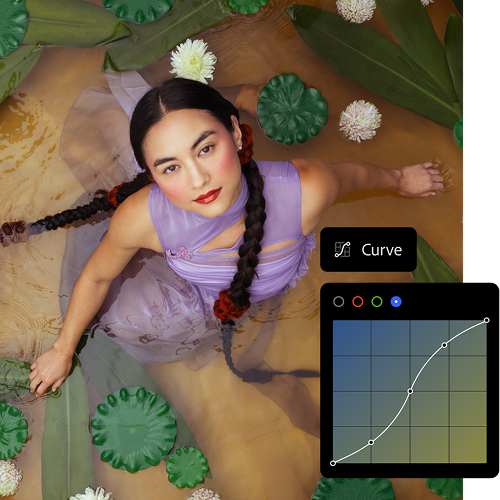
Fotografiați, apoi perfecționați. Retușați imaginile sau regândiți-le de la zero. Planul pentru fotografie Adobe Creative Cloud include Lightroom și Photoshop, astfel încât să le puteți face pe toate.
Fotografiați, apoi perfecționați. Retușați imaginile sau regândiți-le de la zero. Planul pentru fotografie Adobe Creative Cloud include Lightroom și Photoshop, astfel încât să le puteți face pe toate.
Perfecționați fiecare tonalitate și textură. Adăugați ultimele retușuri care vă definesc stilul personal. Și găsiți cele mai bune cadre în câteva clipe, cu o organizare mai inteligentă a fotografiilor. Cu instrumente de editare puternice și ușor de utilizat, fiecare fotografie devine inconfundabil a dvs.
Retușați fotografiile sau reimaginați-le complet. Editarea de precizie și inovația AI vă dau puterea de a depăși limitele cadrului, fără a sacrifica calitatea sau controlul creativ.
three up, l-gap, no-spacing-top, xxxl spacing bottom
Sunteți la început de drum cu aplicațiile Adobe pentru fotografie? Noi avem răspunsuri.
Diferența dintre planurile Adobe pentru fotografie constă în faptul că planul Adobe Lightroom include Adobe Lightroom, Adobe Lightroom Classic și spațiu de stocare în cloud de 1 TB pentru accesarea și editarea fotografiilor de oriunde, iar planul pentru fotografie Adobe Creative Cloud include Adobe Lightroom, Adobe Lightroom Classic, Adobe Photoshop și spațiu de stocare în cloud de 1 TB. Comparați prețurile și funcțiile planurilor pentru fotografie.
Da, puteți încerca planurile pentru fotografie Adobe descărcând o versiune de încercare gratuită de șapte zile a Adobe Creative Cloud pentru a vedea dacă vi se potrivește. Începeți perioada de încercare gratuită
Deși cele două aplicații de editare foto digitală sunt similare, principala diferență dintre Adobe Photoshop și Adobe Lightroom este că Adobe Photoshop este specializat în modificarea, crearea și îmbunătățirea imaginilor, iar Adobe Lightroom se concentrează pe editarea, organizarea și procesarea fotografiilor. Mai multe informații despre Adobe Photoshop în comparație cu Adobe Lightroom.
Planul pentru fotografie Creative Cloud costă 24,19€/lunăcu TVA pentru planul anual facturat lunar sau 288,80€/ancu TVA pentru planul anual plătit în avans. Acest plan include Lightroom, Lightroom Classic, Photoshop și spațiu de stocare în cloud de 1 TB. Comparați planurile și prețurile pentru fotografie.
style
xxl spacing
Găsiți planul Adobe Creative Cloud potrivit pentru dvs.
style
three merch cards, dark, center, grid width 12, static links, no-spacing
background
#000
Lightroom (1 TB)
14,74€/lunăcu TVA. Anual, facturat lunar
Lightroom pentru desktop, mobil și web, plus Lightroom Classic.
În mod obișnuit la 79,30€/lunăAlternativ, la 44,39€/lunăcu TVA. Anual, facturat lunar
Alăturați-vă celor peste 7 milioane de abonați Creative Cloud Pro din întreaga lume. Economisiți 44% în primele an la versiunea completă Lightroom, Photoshop și Lightroom Classic și la peste 20 de aplicații, plus inteligența artificială creativă Adobe Firefly. Plătiți 44,39€/lunăcu TVA în primele an, apoi 79,30€/lunăcu TVA. Numai pentru abonații noi. Consultați termenii | Vedeți ce este inclus
You can control how Adobe websites use cookies and similar technologies by making choices below. But note that if you disable cookies and similar technologies entirely, Adobe websites may not function properly.
Cookies are small text files stored by your web browser when you use websites. There are also other technologies that can be used for similar purposes like HTML5 Local Storage and local shared objects, web beacons, and embedded scripts. These technologies help us do things like remembering you and your preferences when you return to our sites, measure how you use the website, conduct market research, and gather information about the ads you see and interact with.
You can make choices in the menu below about what cookies and other technologies you want us to use on Adobe sites when you visit them from this browser. You can always change those choices later by clicking on the Cookie Preferences link at the bottom of the page.
If enabled:
We can improve your experience by tailoring the site and the content to things we think might be of interest
We can better keep track of your preferences — like what language you prefer to use
We will better understand your likely interests so we can provide you more relevant Adobe ads and content on non-Adobe websites and in non-Adobe apps
It will help us improve the performance of our website and those of our partners who use the Adobe Experience Cloud
If disabled:
We won’t be able to remember you from session to session so the experience may not be tailored to your interests
You’ll still have access to the content of the site but certain features that depend on cookies may not function
You’ll still see ads, they just may not be as relevant to you
General information
You can control how Adobe websites use cookies and similar technologies by making choices below. But note that if you disable cookies and similar technologies entirely, Adobe websites may not function properly.
Cookies are small text files stored by your web browser when you use websites. There are also other technologies that can be used for similar purposes like HTML5 Local Storage, web beacons, and embedded scripts. These technologies help us do things like remembering you and your preferences when you return to our sites, measure how you use the website, conduct market research, and gather information about the ads you see and interact with.
You can make choices in the menu below about what cookies and other technologies you want us to use on Adobe sites when you visit them from this browser. You can always change those choices later by clicking on the Cookie Preferences link at the bottom of the page.
If enabled:
We can improve your experience by tailoring the site and the content to things we think might be of interest
We can better keep track of your preferences — like what language you prefer to use
We will better understand your likely interests so we can provide you more relevant Adobe ads and content on non-Adobe websites and in non-Adobe apps
It will help us improve the performance of our website and those of our partners who use the Adobe Experience Cloud
If disabled:
We won’t be able to remember you from session to session so the experience may not be tailored to your interests
We’ll still count your use of our site and services
You’ll still have access to the content of the site but certain features that depend on cookies may not function
You’ll still see ads, they just may not be as relevant to you
Operate the site and core servicesOperate site and measure engagement
Always active
These cookies are required, and they are used to enable the site and related services core functionality. Without them the site could not operate, so they cannot be disabled.
These cookies enable the site and related services’ core functionality and collect statistics about user engagement, such as counting active use to help us understand trends. These cookies cannot be disabled.
Measure performance
These cookies are used to analyze site usage to measure and improve performance. Without them Adobe cannot know what content is most valued and how often unique visitors return to the site, making it hard to improve information we offer to you.
These cookies are used to analyze site usage to measure and improve performance. Without them Adobe cannot know what content is most valued, making it hard to improve information we offer to you.
Extend functionality
These cookies are used to enhance the functionality of Adobe sites such as remembering your settings and preferences to deliver a personalized experience; for example, your username, your repeated visits, preferred language, your country, or any other saved preference.
Personalize advertising
These cookies are used to enable Adobe and our partners to serve ads more relevant to your interests. Without them you will still see ads, but they might not be as relevant to you.