Adobe Photoshop'ta kalınlık, genişlik, eğiklik ve diğer özelliklerle birlikte projeniz için mükemmel font stilini oluşturun.
Değişken yazı tipleriyle metninizin görünümü üzerinde tam denetimelde
edin. Tek bir font dosyasıyla başlayın ve daha sonra projenizde tekrar kullanabileceğiniz stil varyasyonları elde edin.
Not: Bu özelliği kullanmak için Photoshop'un en son sürümüne sahip olmanız gerekir.
Metninizi yazın
T'ye basın veya Araçlar panelinden Yatay Yazım aracını seçin. Tuvali tıklayın ve metninizi girin. Cümlenin tamamını seçmek için metni üç kez tıklayın ve Seçenekler çubuğundan font boyutunu artırın.
Bir hizalama seçeneği belirleyin. Gerekirse, vurgulanan metnin üst kısmından sürükleyerek yeniden konumlandırın.
Değişken bir font bulun ve bulunan fontu başlangıç noktası olarak kullanın
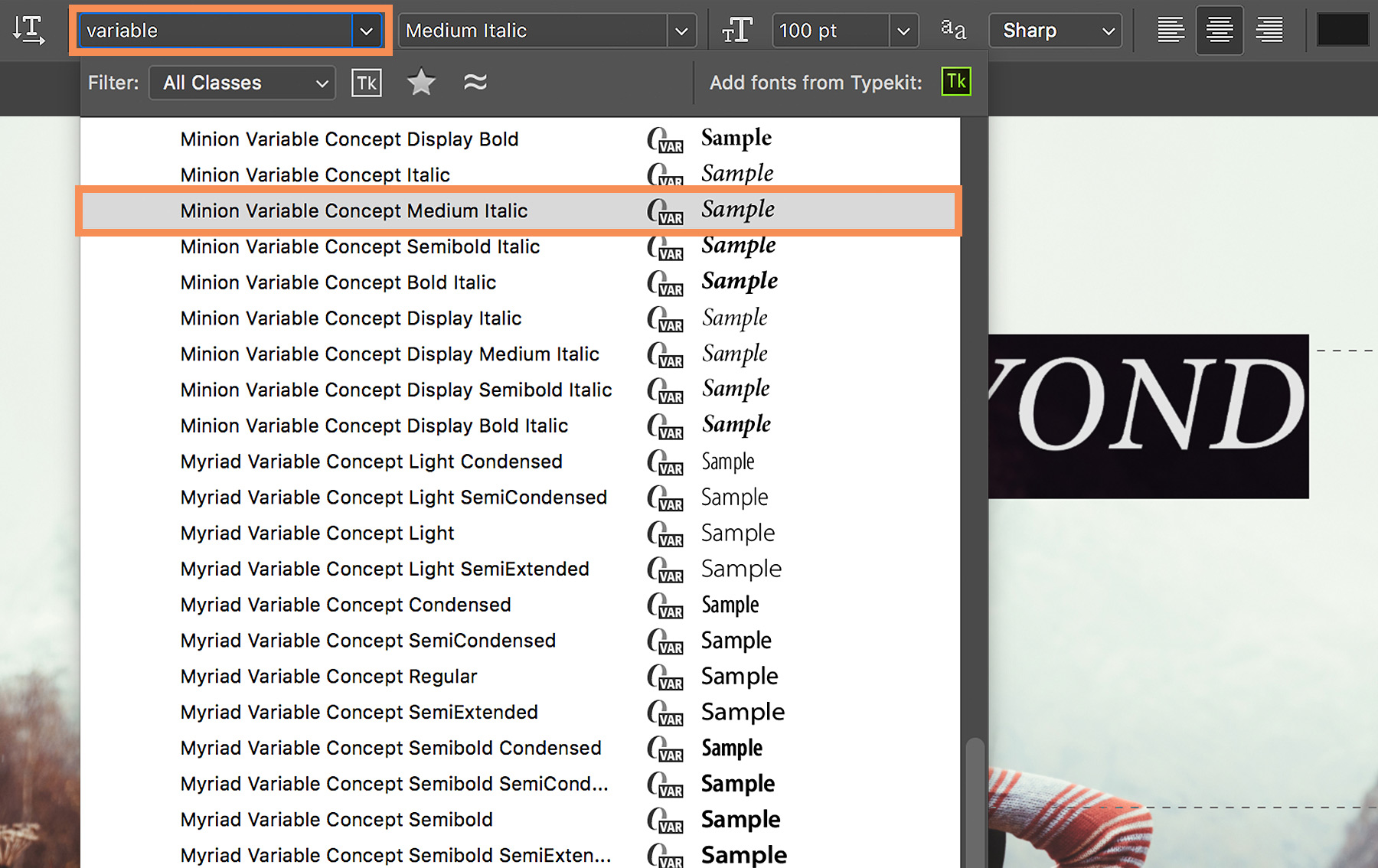
Bilgisayarınızda yüklü olan değişken fontları hızlı bir şekilde bulabilirsiniz. Metniniz seçiliyken Seçenekler çubuğunda yer alan Font menüsüne değişken yazın. Her bir değişken font adının yanında benzersiz simge tanımlayıcısının (VAR) yer aldığını göreceksiniz.
Her bir değişken font stilinin canlı önizlemesini görmek için imlecinizi listenin üzerine getirin ve bir font stili varyasyonu seçin.
Font stilinin hazır ayarını düzenleyin
Özellikler paneli otomatik olarak açılır ve ilgili kaydırıcı kontrollerini kullanarak Kalınlık, Optik boyut, Genişlik ve Eğim gibi nitelikleri ayarlayabilirsiniz. Seçtiğiniz değişken fonta bağlı olarak üzerinde ayarlama yapabileceğiniz çeşitli özel nitelikler görebilirsiniz.
Metninizin rengini de değiştirebilirsiniz.
İpucu: Photoshop, kaydırıcıları ayarladığınız sırada, geçerli ayarlarınıza en yakın font stilini otomatik olarak seçer. Örneğin, Normal bir font stilinin eğimini artırdığınızda (Acumin Variable Concept Regular gibi) fontun stili otomatik olarak italik stil varyasyonu şeklinde değiştirilir.
Yazınıza ince ayar yapın
Gelişmiş'i tıklayarak font boyutu, karakter aralığı (harf çifti arasındaki aralık), izleme (harf grubundaki aralık) ve diğer ayarları değiştirebilir ve böylelikle metninizi düzenleyebilirsiniz.
İpucu: Özellikler paneline yeniden erişmek için, sabitlenmiş panel sütununda yer alan Özellikler simgesini tıklayın veya Pencere > Özellikleri'i seçin.
Özel font stilinizi kaydedin
Artık metniniz tam istediğiniz gibi göründüğüne göre, neden oluşturduğunuz benzersiz font stilinizi daha sonra yeniden kullanabilmek için kaydetmiyorsunuz?
Metninizi seçin ve sabitlenmiş panel sütununda yer alan Paragraf Stilleri öğesini tıklayın. Panelin en altında yer alan Yeni Paragraf Stili Oluştur öğesini tıklayın. Yeni stili (Paragraf Stili 1) çift tıklayın ve yeni bir ad girin.
Özel font stilinizi yeniden kullanmak için belgedeki bazı metinleri seçmeniz ve oluşturduğunuz paragraf stilini tıklamanız yeterlidir.
Umarız değişken fontları heyecan verici ve kullanışlı bulursunuz.

23 Temmuz 2022
Bu Photoshop eğitimlerini deneyin
Yeni görüntüler ve grafikler oluşturmak için fotoğrafları düzenleyin.
You can control how Adobe websites use cookies and similar technologies by making choices below. But note that if you disable cookies and similar technologies entirely, Adobe websites may not function properly.
Cookies are small text files stored by your web browser when you use websites. There are also other technologies that can be used for similar purposes like HTML5 Local Storage and local shared objects, web beacons, and embedded scripts. These technologies help us do things like remembering you and your preferences when you return to our sites, measure how you use the website, conduct market research, and gather information about the ads you see and interact with.
You can make choices in the menu below about what cookies and other technologies you want us to use on Adobe sites when you visit them from this browser. You can always change those choices later by clicking on the Cookie Preferences link at the bottom of the page.
If enabled:
We can improve your experience by tailoring the site and the content to things we think might be of interest
We can better keep track of your preferences — like what language you prefer to use
We will better understand your likely interests so we can provide you more relevant Adobe ads and content on non-Adobe websites and in non-Adobe apps
It will help us improve the performance of our website and those of our partners who use the Adobe Experience Cloud
If disabled:
We won’t be able to remember you from session to session so the experience may not be tailored to your interests
You’ll still have access to the content of the site but certain features that depend on cookies may not function
You’ll still see ads, they just may not be as relevant to you
General information
You can control how Adobe websites use cookies and similar technologies by making choices below. But note that if you disable cookies and similar technologies entirely, Adobe websites may not function properly.
Cookies are small text files stored by your web browser when you use websites. There are also other technologies that can be used for similar purposes like HTML5 Local Storage, web beacons, and embedded scripts. These technologies help us do things like remembering you and your preferences when you return to our sites, measure how you use the website, conduct market research, and gather information about the ads you see and interact with.
You can make choices in the menu below about what cookies and other technologies you want us to use on Adobe sites when you visit them from this browser. You can always change those choices later by clicking on the Cookie Preferences link at the bottom of the page.
If enabled:
We can improve your experience by tailoring the site and the content to things we think might be of interest
We can better keep track of your preferences — like what language you prefer to use
We will better understand your likely interests so we can provide you more relevant Adobe ads and content on non-Adobe websites and in non-Adobe apps
It will help us improve the performance of our website and those of our partners who use the Adobe Experience Cloud
If disabled:
We won’t be able to remember you from session to session so the experience may not be tailored to your interests
We’ll still count your use of our site and services
You’ll still have access to the content of the site but certain features that depend on cookies may not function
You’ll still see ads, they just may not be as relevant to you
Operate the site and core servicesOperate site and measure engagement
Always active
These cookies are required, and they are used to enable the site and related services core functionality. Without them the site could not operate, so they cannot be disabled.
These cookies enable the site and related services’ core functionality and collect statistics about user engagement, such as counting active use to help us understand trends. These cookies cannot be disabled.
Measure performance
These cookies are used to analyze site usage to measure and improve performance. Without them Adobe cannot know what content is most valued and how often unique visitors return to the site, making it hard to improve information we offer to you.
These cookies are used to analyze site usage to measure and improve performance. Without them Adobe cannot know what content is most valued, making it hard to improve information we offer to you.
Extend functionality
These cookies are used to enhance the functionality of Adobe sites such as remembering your settings and preferences to deliver a personalized experience; for example, your username, your repeated visits, preferred language, your country, or any other saved preference.
Personalize advertising
These cookies are used to enable Adobe and our partners to serve ads more relevant to your interests. Without them you will still see ads, but they might not be as relevant to you.
Personalize advertising
These cookies are used to enable Adobe and our partners to serve ads more relevant to your interests. Without them you will still see ads, but they might not be as relevant to you.